Sleep mode only locks computer after reinstall?

Zukaro

New member
Local time
12:41 AM
Messages
28
Location
Oakville, Ontario, Canada
For some reason after reinstalling Windows 7 Home Premium on my computer I can't go into sleep mode anymore. When I tell my computer to go into sleep mode the screen goes dark and it looks like it's going to do it, but then it wakes up immediately and brings me to the lock screen (basically it just locks my computer rather than actually sleeps).

Reinstalling Windows isn't an option as I've just spent a week getting everything setup and installing all my games and such. :P
(I'd rather live without sleep mode than go through that again)
 

My Computer

Computer Manufacturer/Model Number
Custom Built by Myself
OS
Windows 7 Home Premium x64 / Ubuntu 12.04 LTS x64
CPU
Intel Core i5 760 @ 2.80GHz
Motherboard
Asus P7P55D PRO
Memory
4GB
Graphics Card(s)
NVIDIA GeForce GTX 460
Monitor(s) Displays
Samsung SMBX250, TOSHIBA TV
Screen Resolution
Samsung: 1080p, 1920 x 1080|Toshiba: 1360 x 768
Hard Drives
500GB SATA HDD
500GB SATA HDD
Case
Cooler Master HAF 922
Cooling
Fan-cooled
Internet Speed
Down:12Mbps|Up:1Mbps
open a elevated command prompt and try using the command
powercfg /requests

This should name all the things that may be/ or are interfering with the sleep function.
 

My Computer

Computer Manufacturer/Model Number
Insane hobo technologies. ;-)
OS
Windows 7 x64
CPU
Intel i7 2600k
Motherboard
Asrock z68 extreme 4 gen 3
Memory
G.skill Ripjaw 16gigs @ 1866
Graphics Card(s)
Nvidia gtx580 (evga)
Sound Card
Integrated HD audio + hdmi
Monitor(s) Displays
24" ASUS widescreen + 42" insignia
Screen Resolution
1080p (1920x1080)
Hard Drives
128 Samsung 830
256 Samsung 840
3 x 1tb storage drive (various)
1 western digital 1tb (eSATA)
1 Seagate 1tb (eSATA)
PSU
1 kilowatt SLI/Crossfire rated Silverstone modular
Case
NZXT Phantom + additional 220 fan
Cooling
Zalmann
Keyboard
Microsoft wireless 3000 (v2)
Mouse
MS - wireless 5000 (bluetrack)
Internet Speed
depends on if you ask me or my provider.
Other Info
The above information is provided as is, and the author assumes no responsibility for issues it may cause with your sanity or fanboyism.
When I type in that command it says:

Display:
None.

System:
None.

Awaymode:
None.
 

My Computer

Computer Manufacturer/Model Number
Custom Built by Myself
OS
Windows 7 Home Premium x64 / Ubuntu 12.04 LTS x64
CPU
Intel Core i5 760 @ 2.80GHz
Motherboard
Asus P7P55D PRO
Memory
4GB
Graphics Card(s)
NVIDIA GeForce GTX 460
Monitor(s) Displays
Samsung SMBX250, TOSHIBA TV
Screen Resolution
Samsung: 1080p, 1920 x 1080|Toshiba: 1360 x 768
Hard Drives
500GB SATA HDD
500GB SATA HDD
Case
Cooler Master HAF 922
Cooling
Fan-cooled
Internet Speed
Down:12Mbps|Up:1Mbps

My Computer

Computer Manufacturer/Model Number
Insane hobo technologies. ;-)
OS
Windows 7 x64
CPU
Intel i7 2600k
Motherboard
Asrock z68 extreme 4 gen 3
Memory
G.skill Ripjaw 16gigs @ 1866
Graphics Card(s)
Nvidia gtx580 (evga)
Sound Card
Integrated HD audio + hdmi
Monitor(s) Displays
24" ASUS widescreen + 42" insignia
Screen Resolution
1080p (1920x1080)
Hard Drives
128 Samsung 830
256 Samsung 840
3 x 1tb storage drive (various)
1 western digital 1tb (eSATA)
1 Seagate 1tb (eSATA)
PSU
1 kilowatt SLI/Crossfire rated Silverstone modular
Case
NZXT Phantom + additional 220 fan
Cooling
Zalmann
Keyboard
Microsoft wireless 3000 (v2)
Mouse
MS - wireless 5000 (bluetrack)
Internet Speed
depends on if you ask me or my provider.
Other Info
The above information is provided as is, and the author assumes no responsibility for issues it may cause with your sanity or fanboyism.
I've tried that, it does the same thing still. I'll check my BIOS settings later, however, I don't see how they'd be affecting sleep mode now when using the same settings on my previous installation didn't do that.

(I had changed one setting however, but it had nothing to do with power (it was just which hard drive the BIOS saw; I changed it to my second hard drive as I have Ubuntu 12.04 on here as well and I needed to boot from my other hard drive for the grub bootmanager to work so I could actually get into Ubuntu (I'm not sure if this could be it, but it's really the only thing that's much different from my previous installation)))
 

My Computer

Computer Manufacturer/Model Number
Custom Built by Myself
OS
Windows 7 Home Premium x64 / Ubuntu 12.04 LTS x64
CPU
Intel Core i5 760 @ 2.80GHz
Motherboard
Asus P7P55D PRO
Memory
4GB
Graphics Card(s)
NVIDIA GeForce GTX 460
Monitor(s) Displays
Samsung SMBX250, TOSHIBA TV
Screen Resolution
Samsung: 1080p, 1920 x 1080|Toshiba: 1360 x 768
Hard Drives
500GB SATA HDD
500GB SATA HDD
Case
Cooler Master HAF 922
Cooling
Fan-cooled
Internet Speed
Down:12Mbps|Up:1Mbps
I've heard of grub causing some odd problems with windows, but this is not one of them.
My only other thought is you are running a driver the system doesn't like.
The only way to work that out is a bit involved though.

If you are willing to press through turn on driver verifier:

http://www.sevenforums.com/tutorials/101379-driver-verifier-enable-disable.html
(Please read all instructions for driver verifier before using as it's possible it will make the machine behave badly and you need to know how to undo it.)

The actual intent is to cause the system to blue screen creating a memory dump I can read in the debugger.

If you get a blue screen you can then just follow these instructions
http://www.sevenforums.com/crashes-debugging/96879-blue-screen-death-bsod-posting-instructions.html

(once it's created a dump file for us you can turn driver verifier back off)
 

My Computer

Computer Manufacturer/Model Number
Insane hobo technologies. ;-)
OS
Windows 7 x64
CPU
Intel i7 2600k
Motherboard
Asrock z68 extreme 4 gen 3
Memory
G.skill Ripjaw 16gigs @ 1866
Graphics Card(s)
Nvidia gtx580 (evga)
Sound Card
Integrated HD audio + hdmi
Monitor(s) Displays
24" ASUS widescreen + 42" insignia
Screen Resolution
1080p (1920x1080)
Hard Drives
128 Samsung 830
256 Samsung 840
3 x 1tb storage drive (various)
1 western digital 1tb (eSATA)
1 Seagate 1tb (eSATA)
PSU
1 kilowatt SLI/Crossfire rated Silverstone modular
Case
NZXT Phantom + additional 220 fan
Cooling
Zalmann
Keyboard
Microsoft wireless 3000 (v2)
Mouse
MS - wireless 5000 (bluetrack)
Internet Speed
depends on if you ask me or my provider.
Other Info
The above information is provided as is, and the author assumes no responsibility for issues it may cause with your sanity or fanboyism.
Based on the OP it sounds like the PC is going to sleep, then waking up.

From an elevated command prompt enter these commends
powercfg -lastwake
powercfg -devicequery wake_armed
powercfg -energy
if -lastwake returns something, that may be your problem
wake_armed will list devices capable of waking the PC
-energy will create a report that may help
 

My Computer

Computer type
PC/Desktop
Computer Manufacturer/Model Number
home built
OS
Multi-Boot W7_Pro_x64 W8.1_Pro_x64 W10_Pro_x64 +Linux_VMs +Chromium_VM
CPU
AMD Athlon II x4 620
Motherboard
Gigabyte GA-MA785G-UD3H
Memory
6GB GSkill DDR2 800
Graphics Card(s)
AMD 4670 GPU + AMD 4200 IGP
Sound Card
on board Realtek ALC889A
Monitor(s) Displays
RCA 40" LCD TV, Insignia 32" LCD TV, HP 15" LCD monitor
Screen Resolution
1680 x 1050
Hard Drives
OCZ Vertex 3 120GB,
Samsung F3 1TB (3),
Several others - WD, Seagate, Hitachi, ...
PSU
Corsair 500 W
Case
Rosewill mid tower
Cooling
CM 90mm rifle
Keyboard
Gyration wireless, Logitech wireless, Dell USB wired
Mouse
Gyration wireless, Logitech wireless, V7 USB wired
Internet Speed
Spectrum - 100Mbps D / 10Mbps U
Antivirus
Avast, MBAM3, EMET, WinPatrol
Browser
Pale Moon, Firefox, IE
Other Info
2 multi-boot PC's
Mainly HTPC/Office/Gen purpose (no gaming).
Trendnet USB KVM.
LG DVD burner/Blue Ray Player.
Tray system for removable SATA backup drives.

Not currently OCd, under-volted.
I use Hybrid sleep, rarely re-boot or shutdown.

Hauppauge HD-PVR, Avermedia PCIe TV Tuner, Hauppauge PCI TV Tuner.
I've heard of grub causing some odd problems with windows, but this is not one of them.
My only other thought is you are running a driver the system doesn't like.
The only way to work that out is a bit involved though.

If you are willing to press through turn on driver verifier:

http://www.sevenforums.com/tutorials/101379-driver-verifier-enable-disable.html
(Please read all instructions for driver verifier before using as it's possible it will make the machine behave badly and you need to know how to undo it.)

The actual intent is to cause the system to blue screen creating a memory dump I can read in the debugger.

If you get a blue screen you can then just follow these instructions
http://www.sevenforums.com/crashes-debugging/96879-blue-screen-death-bsod-posting-instructions.html

(once it's created a dump file for us you can turn driver verifier back off)


I'd rather not deal with all that stuff right now. :P
I don't think it's a drive though, as I'm using the same drivers as were on my last installation.

(maybe later I'll attempt that)
 

My Computer

Computer Manufacturer/Model Number
Custom Built by Myself
OS
Windows 7 Home Premium x64 / Ubuntu 12.04 LTS x64
CPU
Intel Core i5 760 @ 2.80GHz
Motherboard
Asus P7P55D PRO
Memory
4GB
Graphics Card(s)
NVIDIA GeForce GTX 460
Monitor(s) Displays
Samsung SMBX250, TOSHIBA TV
Screen Resolution
Samsung: 1080p, 1920 x 1080|Toshiba: 1360 x 768
Hard Drives
500GB SATA HDD
500GB SATA HDD
Case
Cooler Master HAF 922
Cooling
Fan-cooled
Internet Speed
Down:12Mbps|Up:1Mbps
the the post just above your last one there.
if his idea gives blank results.. yeah I'm out of other ideas.
 

My Computer

Computer Manufacturer/Model Number
Insane hobo technologies. ;-)
OS
Windows 7 x64
CPU
Intel i7 2600k
Motherboard
Asrock z68 extreme 4 gen 3
Memory
G.skill Ripjaw 16gigs @ 1866
Graphics Card(s)
Nvidia gtx580 (evga)
Sound Card
Integrated HD audio + hdmi
Monitor(s) Displays
24" ASUS widescreen + 42" insignia
Screen Resolution
1080p (1920x1080)
Hard Drives
128 Samsung 830
256 Samsung 840
3 x 1tb storage drive (various)
1 western digital 1tb (eSATA)
1 Seagate 1tb (eSATA)
PSU
1 kilowatt SLI/Crossfire rated Silverstone modular
Case
NZXT Phantom + additional 220 fan
Cooling
Zalmann
Keyboard
Microsoft wireless 3000 (v2)
Mouse
MS - wireless 5000 (bluetrack)
Internet Speed
depends on if you ask me or my provider.
Other Info
The above information is provided as is, and the author assumes no responsibility for issues it may cause with your sanity or fanboyism.
Based on the OP it sounds like the PC is going to sleep, then waking up.

From an elevated command prompt enter these commends
powercfg -lastwake
powercfg -devicequery wake_armed
powercfg -energy
if -lastwake returns something, that may be your problem
wake_armed will list devices capable of waking the PC
-energy will create a report that may help

1.
Wake History Count - 0

2.
HID-compliant mouse
HID-compliant mouse <001>
HID Keyboard Device

3.
I've attached the report to this post.
 

Attachments

My Computer

Computer Manufacturer/Model Number
Custom Built by Myself
OS
Windows 7 Home Premium x64 / Ubuntu 12.04 LTS x64
CPU
Intel Core i5 760 @ 2.80GHz
Motherboard
Asus P7P55D PRO
Memory
4GB
Graphics Card(s)
NVIDIA GeForce GTX 460
Monitor(s) Displays
Samsung SMBX250, TOSHIBA TV
Screen Resolution
Samsung: 1080p, 1920 x 1080|Toshiba: 1360 x 768
Hard Drives
500GB SATA HDD
500GB SATA HDD
Case
Cooler Master HAF 922
Cooling
Fan-cooled
Internet Speed
Down:12Mbps|Up:1Mbps
In Control Panel / Power Options /Advanced settings
make sure USB Selective suspend is set to disabled
check that multimedia is set to allow the computer to sleep
a wireless mouse can cause problems...
These elevated CMD commands will disable the devices that can wake the PC
Powercfg -devicedisablewake "HID-compliant mouse <001>"
Powercfg -devicedisablewake "HID-compliant mouse"
Powercfg -devicedisablewake "HID Keyboard Device"
to make sure these commands worked re-run
powercfg -devicequery wake_armed

Also make sure you don't have an unsaved Theme.
 

My Computer

Computer type
PC/Desktop
Computer Manufacturer/Model Number
home built
OS
Multi-Boot W7_Pro_x64 W8.1_Pro_x64 W10_Pro_x64 +Linux_VMs +Chromium_VM
CPU
AMD Athlon II x4 620
Motherboard
Gigabyte GA-MA785G-UD3H
Memory
6GB GSkill DDR2 800
Graphics Card(s)
AMD 4670 GPU + AMD 4200 IGP
Sound Card
on board Realtek ALC889A
Monitor(s) Displays
RCA 40" LCD TV, Insignia 32" LCD TV, HP 15" LCD monitor
Screen Resolution
1680 x 1050
Hard Drives
OCZ Vertex 3 120GB,
Samsung F3 1TB (3),
Several others - WD, Seagate, Hitachi, ...
PSU
Corsair 500 W
Case
Rosewill mid tower
Cooling
CM 90mm rifle
Keyboard
Gyration wireless, Logitech wireless, Dell USB wired
Mouse
Gyration wireless, Logitech wireless, V7 USB wired
Internet Speed
Spectrum - 100Mbps D / 10Mbps U
Antivirus
Avast, MBAM3, EMET, WinPatrol
Browser
Pale Moon, Firefox, IE
Other Info
2 multi-boot PC's
Mainly HTPC/Office/Gen purpose (no gaming).
Trendnet USB KVM.
LG DVD burner/Blue Ray Player.
Tray system for removable SATA backup drives.

Not currently OCd, under-volted.
I use Hybrid sleep, rarely re-boot or shutdown.

Hauppauge HD-PVR, Avermedia PCIe TV Tuner, Hauppauge PCI TV Tuner.
I just tried all that stuff; none seem to work.
(also, my mouse is wired)
 

My Computer

Computer Manufacturer/Model Number
Custom Built by Myself
OS
Windows 7 Home Premium x64 / Ubuntu 12.04 LTS x64
CPU
Intel Core i5 760 @ 2.80GHz
Motherboard
Asus P7P55D PRO
Memory
4GB
Graphics Card(s)
NVIDIA GeForce GTX 460
Monitor(s) Displays
Samsung SMBX250, TOSHIBA TV
Screen Resolution
Samsung: 1080p, 1920 x 1080|Toshiba: 1360 x 768
Hard Drives
500GB SATA HDD
500GB SATA HDD
Case
Cooler Master HAF 922
Cooling
Fan-cooled
Internet Speed
Down:12Mbps|Up:1Mbps
One thing that seems odd to me is in your Energy report it shows S1 AND S3 Sleep are supported.
On my systems I have only ever seen S1 OR S3 supported.

I don't understand how Windows would know which sleep mode to use.

I set S1 or S3 in the BIOS, and that is what shows in my report.
I'm not sure what you have in your BIOS for this.
You may want to check your BIOS setting for this.
 

My Computer

Computer type
PC/Desktop
Computer Manufacturer/Model Number
home built
OS
Multi-Boot W7_Pro_x64 W8.1_Pro_x64 W10_Pro_x64 +Linux_VMs +Chromium_VM
CPU
AMD Athlon II x4 620
Motherboard
Gigabyte GA-MA785G-UD3H
Memory
6GB GSkill DDR2 800
Graphics Card(s)
AMD 4670 GPU + AMD 4200 IGP
Sound Card
on board Realtek ALC889A
Monitor(s) Displays
RCA 40" LCD TV, Insignia 32" LCD TV, HP 15" LCD monitor
Screen Resolution
1680 x 1050
Hard Drives
OCZ Vertex 3 120GB,
Samsung F3 1TB (3),
Several others - WD, Seagate, Hitachi, ...
PSU
Corsair 500 W
Case
Rosewill mid tower
Cooling
CM 90mm rifle
Keyboard
Gyration wireless, Logitech wireless, Dell USB wired
Mouse
Gyration wireless, Logitech wireless, V7 USB wired
Internet Speed
Spectrum - 100Mbps D / 10Mbps U
Antivirus
Avast, MBAM3, EMET, WinPatrol
Browser
Pale Moon, Firefox, IE
Other Info
2 multi-boot PC's
Mainly HTPC/Office/Gen purpose (no gaming).
Trendnet USB KVM.
LG DVD burner/Blue Ray Player.
Tray system for removable SATA backup drives.

Not currently OCd, under-volted.
I use Hybrid sleep, rarely re-boot or shutdown.

Hauppauge HD-PVR, Avermedia PCIe TV Tuner, Hauppauge PCI TV Tuner.
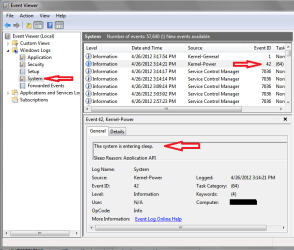
Another thing you can check is the Event Viewer to see if you are getting the Sleep event after you click on Sleep.
It's Event ID 42 in System Logs - see my screen print.

SleepEvent SP 01.PNG
 

My Computer

Computer type
PC/Desktop
Computer Manufacturer/Model Number
home built
OS
Multi-Boot W7_Pro_x64 W8.1_Pro_x64 W10_Pro_x64 +Linux_VMs +Chromium_VM
CPU
AMD Athlon II x4 620
Motherboard
Gigabyte GA-MA785G-UD3H
Memory
6GB GSkill DDR2 800
Graphics Card(s)
AMD 4670 GPU + AMD 4200 IGP
Sound Card
on board Realtek ALC889A
Monitor(s) Displays
RCA 40" LCD TV, Insignia 32" LCD TV, HP 15" LCD monitor
Screen Resolution
1680 x 1050
Hard Drives
OCZ Vertex 3 120GB,
Samsung F3 1TB (3),
Several others - WD, Seagate, Hitachi, ...
PSU
Corsair 500 W
Case
Rosewill mid tower
Cooling
CM 90mm rifle
Keyboard
Gyration wireless, Logitech wireless, Dell USB wired
Mouse
Gyration wireless, Logitech wireless, V7 USB wired
Internet Speed
Spectrum - 100Mbps D / 10Mbps U
Antivirus
Avast, MBAM3, EMET, WinPatrol
Browser
Pale Moon, Firefox, IE
Other Info
2 multi-boot PC's
Mainly HTPC/Office/Gen purpose (no gaming).
Trendnet USB KVM.
LG DVD burner/Blue Ray Player.
Tray system for removable SATA backup drives.

Not currently OCd, under-volted.
I use Hybrid sleep, rarely re-boot or shutdown.

Hauppauge HD-PVR, Avermedia PCIe TV Tuner, Hauppauge PCI TV Tuner.
In my BIOS S1 and S3 were set to auto (something like that).
Also, the event viewer shows the sleep event.
 

My Computer

Computer Manufacturer/Model Number
Custom Built by Myself
OS
Windows 7 Home Premium x64 / Ubuntu 12.04 LTS x64
CPU
Intel Core i5 760 @ 2.80GHz
Motherboard
Asus P7P55D PRO
Memory
4GB
Graphics Card(s)
NVIDIA GeForce GTX 460
Monitor(s) Displays
Samsung SMBX250, TOSHIBA TV
Screen Resolution
Samsung: 1080p, 1920 x 1080|Toshiba: 1360 x 768
Hard Drives
500GB SATA HDD
500GB SATA HDD
Case
Cooler Master HAF 922
Cooling
Fan-cooled
Internet Speed
Down:12Mbps|Up:1Mbps
OK
From what I learned Win7 will default to S1 Sleep.

For me after the Sleep Event #42, the next System Event is #1.
You can see this in my last Screen Print.
Event #1 sets the Windows time - and that is the first system event when I wake up the PC.

What is your next system event after Event ID #42?
Maybe we can find a problem looking at your Event Log?

Given that you do get a Sleep Event, using a Sleep Trace may have the answer.
I've never used it, but I would for a situation like this.
http://www.sevenforums.com/tutorial...up-shutdown-sleep-hibernate-reboot-trace.html
 

My Computer

Computer type
PC/Desktop
Computer Manufacturer/Model Number
home built
OS
Multi-Boot W7_Pro_x64 W8.1_Pro_x64 W10_Pro_x64 +Linux_VMs +Chromium_VM
CPU
AMD Athlon II x4 620
Motherboard
Gigabyte GA-MA785G-UD3H
Memory
6GB GSkill DDR2 800
Graphics Card(s)
AMD 4670 GPU + AMD 4200 IGP
Sound Card
on board Realtek ALC889A
Monitor(s) Displays
RCA 40" LCD TV, Insignia 32" LCD TV, HP 15" LCD monitor
Screen Resolution
1680 x 1050
Hard Drives
OCZ Vertex 3 120GB,
Samsung F3 1TB (3),
Several others - WD, Seagate, Hitachi, ...
PSU
Corsair 500 W
Case
Rosewill mid tower
Cooling
CM 90mm rifle
Keyboard
Gyration wireless, Logitech wireless, Dell USB wired
Mouse
Gyration wireless, Logitech wireless, V7 USB wired
Internet Speed
Spectrum - 100Mbps D / 10Mbps U
Antivirus
Avast, MBAM3, EMET, WinPatrol
Browser
Pale Moon, Firefox, IE
Other Info
2 multi-boot PC's
Mainly HTPC/Office/Gen purpose (no gaming).
Trendnet USB KVM.
LG DVD burner/Blue Ray Player.
Tray system for removable SATA backup drives.

Not currently OCd, under-volted.
I use Hybrid sleep, rarely re-boot or shutdown.

Hauppauge HD-PVR, Avermedia PCIe TV Tuner, Hauppauge PCI TV Tuner.
Back
Top