Sleep-on-LAN

allend66

Brit on the lam...
Guru
Local time
9:35 PM
Messages
385
Location
The Mighty Maspujols, Spain
Does anybody have any ideas about this, please - I want to doubleclick a shortcut on my local desktop and put a remote laptop on my LAN to sleep (note: we've already got shutdown to work, but not sleep.)

I've tried:

1) a shortcut to a shortcut on the remote pc doesn't work.

2) a shortcut pointing to "\\remotepc\WinXP\Windows\system32\rundll32.exe powrprof,SetSuspendState" only puts the local pc to sleep, not the remote.

3) 3rd party apps don't work: Wizmo (same as number 2, puts local to sleep, even though it is in remote's %system% directory) and Sysinternals' PsTools (PsExec) doesn't work - all sorts of access denied, even though I am adminstrator on both, with the same account name and password on both machines.

4) Powershell 2.0 remote doesn't work either -

Please! Somebody help me put my remote pc to sleep with 1 double-click from my local desktop, and not have to RDP in, wait for 20 seconds for the connection to establish, then double click the sleep shortcut on the remote's desktop, then exit. I'm going mad with this one...
 

Attachments
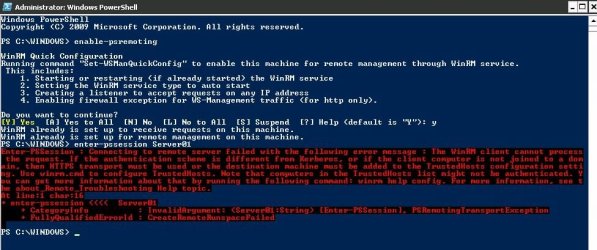
  • powershell.JPG
    powershell.JPG
    72.6 KB · Views: 117

My Computer

Computer Manufacturer/Model Number
Toshiba Satellite L500
OS
Windows 7 Home Premium x64 OEM --> RTM clean install
CPU
Intel T4400
Motherboard
? - laptop inbuilt ?
Memory
4Gb
Graphics Card(s)
? - Mobile Intel(R) 4 Series Express Chipset Family ?
Sound Card
Realtek
Monitor(s) Displays
? + extended to a 42" LG55PC plasma tele!
Screen Resolution
1366 * 768
Hard Drives
320Gb 5500rpm
PSU
?
Case
?
Cooling
?
Internet Speed
3Meg, when it works.
Other Info
A LOWLY LAPTOP!
Guys, just a polite thread-bumping..

Anybody got any ideas for this one?

Too difficult for you all? :D

Thanks!
 

My Computer

Computer Manufacturer/Model Number
Toshiba Satellite L500
OS
Windows 7 Home Premium x64 OEM --> RTM clean install
CPU
Intel T4400
Motherboard
? - laptop inbuilt ?
Memory
4Gb
Graphics Card(s)
? - Mobile Intel(R) 4 Series Express Chipset Family ?
Sound Card
Realtek
Monitor(s) Displays
? + extended to a 42" LG55PC plasma tele!
Screen Resolution
1366 * 768
Hard Drives
320Gb 5500rpm
PSU
?
Case
?
Cooling
?
Internet Speed
3Meg, when it works.
Other Info
A LOWLY LAPTOP!
psexec \\nameofpc -u <username> -p <password> "rundll32 powrprof.dll,SetSuspendState"

or

psexec \\nameofpc -u <username> -p <password> "%windir%\system32\rundll32.exe powrprof.dll,SetSuspendState Hibernate"


PsExec

Not too difficult for me....
 

My Computer

Computer Manufacturer/Model Number
HP Pavilion Elite HPE-410f
OS
Windows 7 Ultimate x64
CPU
AMD Phenom x6 1045t
Motherboard
N/A
Memory
8 GB
Graphics Card(s)
ATI Radeon HD 5570
Sound Card
Realtek Highdefinition Audio / 5.1 Dolby Setup
Monitor(s) Displays
HP w2207h Widescreen
Screen Resolution
1680*1050
Hard Drives
1 TB (fixed), 320 Portable maxtor, Server Hard drives
PSU
350 Watt
Case
HP CASE
Cooling
Bass
Keyboard
Logitech MX 5500
Mouse
Logitech MX 5500
Internet Speed
ROAD RUNNER 16MB D/512 U
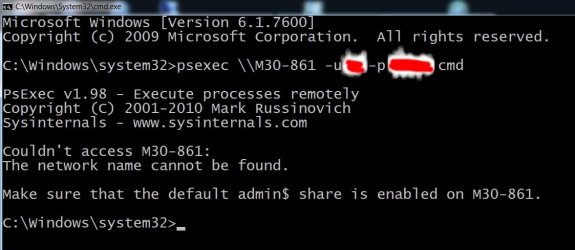
OK, thanks, but I'll have to post back later: it doesn't work for me. (The blasted window flashes up and is gone before I can read/screengrab it).

Looking into video screengrab software and will post back... :cry:

----

Ok, got it... the popup windows says:

"Couldn't access M30:
The network name couldn't be found.

Make sure that the default admin$ is enabled on M30."
 
Last edited:

My Computer

Computer Manufacturer/Model Number
Toshiba Satellite L500
OS
Windows 7 Home Premium x64 OEM --> RTM clean install
CPU
Intel T4400
Motherboard
? - laptop inbuilt ?
Memory
4Gb
Graphics Card(s)
? - Mobile Intel(R) 4 Series Express Chipset Family ?
Sound Card
Realtek
Monitor(s) Displays
? + extended to a 42" LG55PC plasma tele!
Screen Resolution
1366 * 768
Hard Drives
320Gb 5500rpm
PSU
?
Case
?
Cooling
?
Internet Speed
3Meg, when it works.
Other Info
A LOWLY LAPTOP!
acurasd - very nice program. Thanks for the pointer.
 

My Computer

Computer type
PC/Desktop
Computer Manufacturer/Model Number
Lenovo IdeaCenter 450
OS
Windows 10 Pro X64
CPU
Intel Quad Core i7-4770 @ 3.4Ghz
Memory
16.0GB PC3-12800 DDR3 SDRAM 1600 MHz
Graphics Card(s)
Intel Integrated HD Graphics
Sound Card
Realtek HD Audio
Monitor(s) Displays
HP 22" LCD
Screen Resolution
1680 x 1050
Hard Drives
250GB Samsung EVO SATA-3 SSD
2TB Seagate ST2000DM001 SATA-2
1.5TB Seagate ST3150041AS SATA
Keyboard
Dell USB
Mouse
Lenovo USB
Internet Speed
Cable via Road Runner 3MB Upload, 30MB Download
Antivirus
Windows Defender, MBAM Pro, MBAE
Browser
Seamonkey
Other Info
UEFI/GPT
PLDS DVD-RW DH16AERSH
Seems as though it tries to use the true admin account on the computer. You can always enable the true admin on both computers and put a very secured password on one another so that the program will be able to push through.
 

My Computer

Computer Manufacturer/Model Number
HP Pavilion Elite HPE-410f
OS
Windows 7 Ultimate x64
CPU
AMD Phenom x6 1045t
Motherboard
N/A
Memory
8 GB
Graphics Card(s)
ATI Radeon HD 5570
Sound Card
Realtek Highdefinition Audio / 5.1 Dolby Setup
Monitor(s) Displays
HP w2207h Widescreen
Screen Resolution
1680*1050
Hard Drives
1 TB (fixed), 320 Portable maxtor, Server Hard drives
PSU
350 Watt
Case
HP CASE
Cooling
Bass
Keyboard
Logitech MX 5500
Mouse
Logitech MX 5500
Internet Speed
ROAD RUNNER 16MB D/512 U
... can always enable the true admin on both computers and ... the program will be able to push through.

Hmm, ok thanks. Could you please walk me through it?

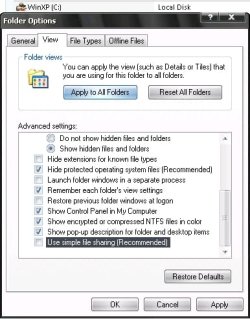
The last thing I tried before giving up and going onto the next thing (see original post) was turn off simple file sharing and enable admin$. I don't know where I found it now ( I suppose I could refind it if needed ) but I changed a HKLM DWORD from 1 to 0 forcing WinXP to recreate the admin$ on reboot.

When you say true admin - I'm confused: Both the local (Win7 HP x64) and the remote (WinXP Pro SP3 x86) are administrator accounts - both have the same user name and same password.

Thanks.
 

My Computer

Computer Manufacturer/Model Number
Toshiba Satellite L500
OS
Windows 7 Home Premium x64 OEM --> RTM clean install
CPU
Intel T4400
Motherboard
? - laptop inbuilt ?
Memory
4Gb
Graphics Card(s)
? - Mobile Intel(R) 4 Series Express Chipset Family ?
Sound Card
Realtek
Monitor(s) Displays
? + extended to a 42" LG55PC plasma tele!
Screen Resolution
1366 * 768
Hard Drives
320Gb 5500rpm
PSU
?
Case
?
Cooling
?
Internet Speed
3Meg, when it works.
Other Info
A LOWLY LAPTOP!

My Computer

Computer Manufacturer/Model Number
HP Pavilion Elite HPE-410f
OS
Windows 7 Ultimate x64
CPU
AMD Phenom x6 1045t
Motherboard
N/A
Memory
8 GB
Graphics Card(s)
ATI Radeon HD 5570
Sound Card
Realtek Highdefinition Audio / 5.1 Dolby Setup
Monitor(s) Displays
HP w2207h Widescreen
Screen Resolution
1680*1050
Hard Drives
1 TB (fixed), 320 Portable maxtor, Server Hard drives
PSU
350 Watt
Case
HP CASE
Cooling
Bass
Keyboard
Logitech MX 5500
Mouse
Logitech MX 5500
Internet Speed
ROAD RUNNER 16MB D/512 U
Acurasd - thanks. You've taken the time to answer me, for which I am grateful, though I won't take your advice - not just yet. I'll see if it can be solved some other way, as I'm not sure if this is relevant. I've been trawling the Sysinternals forums and there is any amount of can't-get-this-to-connect type posts, and nowhere is mentioned true admin account.

I get a "network name couldn't be found.." with the name of the PC or its IP address.
So:
"psexec \\M30 -u myadminaccount -p mypassword cmd" is just as unproductive as
"psexec \\192.168.1.99 -u myadminaccount -p mypassword cmd". This is with psexec.exe pasted into my Windows directory (psshutdown doesn't work either). The long version also didn't work: "C:\users\allend66\Documents\psexec.exe \\M30 -u myadminaccount -p mypassword cmd".

I think the problem is somewhere on the remote machine (WinXP SP3 x86), even though I have simple file sharing off, Network access:classic - users use their own credentials (not "guest" account), firewall has exceptions, and I'm Administrator account on local & remote with the same name & password on both (elevated command prompt, and right click shortcut "run as administrator").

would welcome any other suggestions..
 

Attachments

  • 1.jpg
    1.jpg
    40 KB · Views: 25

My Computer

Computer Manufacturer/Model Number
Toshiba Satellite L500
OS
Windows 7 Home Premium x64 OEM --> RTM clean install
CPU
Intel T4400
Motherboard
? - laptop inbuilt ?
Memory
4Gb
Graphics Card(s)
? - Mobile Intel(R) 4 Series Express Chipset Family ?
Sound Card
Realtek
Monitor(s) Displays
? + extended to a 42" LG55PC plasma tele!
Screen Resolution
1366 * 768
Hard Drives
320Gb 5500rpm
PSU
?
Case
?
Cooling
?
Internet Speed
3Meg, when it works.
Other Info
A LOWLY LAPTOP!
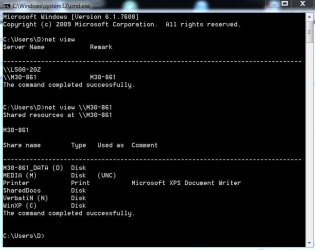
What does net view in a Command Prompt show you? Should return a list of computers on your network in the form:

\\COMPUTER1
\\COMPUTER2


The net view \\COMPUTER1 should return a list of shared resources on that computer. If that work than network name resolution is working. If not then that is where your problem is.
 

My Computer

Computer type
PC/Desktop
Computer Manufacturer/Model Number
Lenovo IdeaCenter 450
OS
Windows 10 Pro X64
CPU
Intel Quad Core i7-4770 @ 3.4Ghz
Memory
16.0GB PC3-12800 DDR3 SDRAM 1600 MHz
Graphics Card(s)
Intel Integrated HD Graphics
Sound Card
Realtek HD Audio
Monitor(s) Displays
HP 22" LCD
Screen Resolution
1680 x 1050
Hard Drives
250GB Samsung EVO SATA-3 SSD
2TB Seagate ST2000DM001 SATA-2
1.5TB Seagate ST3150041AS SATA
Keyboard
Dell USB
Mouse
Lenovo USB
Internet Speed
Cable via Road Runner 3MB Upload, 30MB Download
Antivirus
Windows Defender, MBAM Pro, MBAE
Browser
Seamonkey
Other Info
UEFI/GPT
PLDS DVD-RW DH16AERSH
Thanks Ztrucker, here's what I get (as expected - I have no problem remoting in or access network files/folders):

(to be clear: the L500 machine is my main rig - Win 7, and I remote into the M30 WinXP Pro)
Looks like that is not the problem, contradicting that damn PsExec.exe! Ideas?
 

Attachments

  • m30 (winxp).JPG
    m30 (winxp).JPG
    53.8 KB · Views: 38
  • L500 (win7).JPG
    L500 (win7).JPG
    29.3 KB · Views: 20

My Computer

Computer Manufacturer/Model Number
Toshiba Satellite L500
OS
Windows 7 Home Premium x64 OEM --> RTM clean install
CPU
Intel T4400
Motherboard
? - laptop inbuilt ?
Memory
4Gb
Graphics Card(s)
? - Mobile Intel(R) 4 Series Express Chipset Family ?
Sound Card
Realtek
Monitor(s) Displays
? + extended to a 42" LG55PC plasma tele!
Screen Resolution
1366 * 768
Hard Drives
320Gb 5500rpm
PSU
?
Case
?
Cooling
?
Internet Speed
3Meg, when it works.
Other Info
A LOWLY LAPTOP!
Grrrrrr!

Going to put this to death as unresolved. I'll just continue to remote in, sleep & disconnect, wasting 20 seconds of my life everytime I want to standby the remote machine.

A bit like smokers chiseling off 5 minutes off the end of their life with every bifta, I wonder how much lifetime will be "establishing connection"? <grumble>
 

My Computer

Computer Manufacturer/Model Number
Toshiba Satellite L500
OS
Windows 7 Home Premium x64 OEM --> RTM clean install
CPU
Intel T4400
Motherboard
? - laptop inbuilt ?
Memory
4Gb
Graphics Card(s)
? - Mobile Intel(R) 4 Series Express Chipset Family ?
Sound Card
Realtek
Monitor(s) Displays
? + extended to a 42" LG55PC plasma tele!
Screen Resolution
1366 * 768
Hard Drives
320Gb 5500rpm
PSU
?
Case
?
Cooling
?
Internet Speed
3Meg, when it works.
Other Info
A LOWLY LAPTOP!
Hi there mbouz and welcome to the forums.

Yes, I tried that one - it's ok but you have to run it on your remote machine so it listens (I put a shortcut for it in the start up folder). Then you have to setup a shortcut on your local machine that'll ping it, again, no problem. I ditched it after it would stop listening after a short amount of time - there's no settings on it it's so small (minus port number) but for me it would stop working - useless!
It would also leave an IE8 window open locally after sending the kill command.

Workarounds:
1) continue to remote in, double click sleep shortcut on desktop / auto disconnect.
2) adjust remote pc power settings to automatically sleep if nothing is running (after all waking it is no problem)
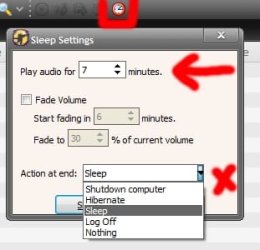
3) MediaMonkey Gold (paid - not the free version) has a timer option on it to sleep / power down / hibernate after # minutes.

For me, still unresolved. Good luck if you get it to work - post back with updates..
 

My Computer

Computer Manufacturer/Model Number
Toshiba Satellite L500
OS
Windows 7 Home Premium x64 OEM --> RTM clean install
CPU
Intel T4400
Motherboard
? - laptop inbuilt ?
Memory
4Gb
Graphics Card(s)
? - Mobile Intel(R) 4 Series Express Chipset Family ?
Sound Card
Realtek
Monitor(s) Displays
? + extended to a 42" LG55PC plasma tele!
Screen Resolution
1366 * 768
Hard Drives
320Gb 5500rpm
PSU
?
Case
?
Cooling
?
Internet Speed
3Meg, when it works.
Other Info
A LOWLY LAPTOP!
Something else you could try is using the windows task scheduler. It handles a lot of triggers, so if you found one that's appropriate that could trigger it. You could also set it to every 10 minutes restart the sleep on lan monitoring program..
 

My Computer

OS
Windows 7 Ultimate x64
True... but I'd still be left with an open blank IE page after sending the sleep command. I couldn't be bothered with messing with it anymore, auto sleep with power settings will suffice.

But good idea...:)
 

My Computer

Computer Manufacturer/Model Number
Toshiba Satellite L500
OS
Windows 7 Home Premium x64 OEM --> RTM clean install
CPU
Intel T4400
Motherboard
? - laptop inbuilt ?
Memory
4Gb
Graphics Card(s)
? - Mobile Intel(R) 4 Series Express Chipset Family ?
Sound Card
Realtek
Monitor(s) Displays
? + extended to a 42" LG55PC plasma tele!
Screen Resolution
1366 * 768
Hard Drives
320Gb 5500rpm
PSU
?
Case
?
Cooling
?
Internet Speed
3Meg, when it works.
Other Info
A LOWLY LAPTOP!
hey allen one other question - how did you adjust the timing for your media server's auto sleep? for example, you may want to watch a 30 min tv show one night, then a 2.5 hour movie the next. you don't want it going to sleep too early or your movie will cut off half way, but you don't want it on for an extra 2 hours after your 30 min tv show has finished. is there a way to disable the auto sleep while it's serving files? thanks!
 

My Computer

OS
Windows 7 Ultimate x64
Just reviewing this thread again and unless it's a typo, I think I see why psexec did not work for you.

"psexec \\M30 -u myadminaccount -p mypassword cmd"

Should be:

"psexec \\M30-861 -u myadminaccount -p mypassword cmd"
 

My Computer

Computer type
PC/Desktop
Computer Manufacturer/Model Number
Lenovo IdeaCenter 450
OS
Windows 10 Pro X64
CPU
Intel Quad Core i7-4770 @ 3.4Ghz
Memory
16.0GB PC3-12800 DDR3 SDRAM 1600 MHz
Graphics Card(s)
Intel Integrated HD Graphics
Sound Card
Realtek HD Audio
Monitor(s) Displays
HP 22" LCD
Screen Resolution
1680 x 1050
Hard Drives
250GB Samsung EVO SATA-3 SSD
2TB Seagate ST2000DM001 SATA-2
1.5TB Seagate ST3150041AS SATA
Keyboard
Dell USB
Mouse
Lenovo USB
Internet Speed
Cable via Road Runner 3MB Upload, 30MB Download
Antivirus
Windows Defender, MBAM Pro, MBAE
Browser
Seamonkey
Other Info
UEFI/GPT
PLDS DVD-RW DH16AERSH
@mbouz - this is where MediaMonkey Gold and its timer is useful. I bought it back in the day when I wasn't impressed with Winows Media Player 9 on my XP box. Tell it to sleep after # minutes... job done.
 

Attachments

  • Untitled.jpg
    Untitled.jpg
    14.9 KB · Views: 464

My Computer

Computer Manufacturer/Model Number
Toshiba Satellite L500
OS
Windows 7 Home Premium x64 OEM --> RTM clean install
CPU
Intel T4400
Motherboard
? - laptop inbuilt ?
Memory
4Gb
Graphics Card(s)
? - Mobile Intel(R) 4 Series Express Chipset Family ?
Sound Card
Realtek
Monitor(s) Displays
? + extended to a 42" LG55PC plasma tele!
Screen Resolution
1366 * 768
Hard Drives
320Gb 5500rpm
PSU
?
Case
?
Cooling
?
Internet Speed
3Meg, when it works.
Other Info
A LOWLY LAPTOP!
@Ztrucker - thanks but still no go. I even retried this because I have since (the last post) formatted+fresh installed XP pro, but it just won't have it.
 

Attachments

  • Untitled.jpg
    Untitled.jpg
    61.2 KB · Views: 10

My Computer

Computer Manufacturer/Model Number
Toshiba Satellite L500
OS
Windows 7 Home Premium x64 OEM --> RTM clean install
CPU
Intel T4400
Motherboard
? - laptop inbuilt ?
Memory
4Gb
Graphics Card(s)
? - Mobile Intel(R) 4 Series Express Chipset Family ?
Sound Card
Realtek
Monitor(s) Displays
? + extended to a 42" LG55PC plasma tele!
Screen Resolution
1366 * 768
Hard Drives
320Gb 5500rpm
PSU
?
Case
?
Cooling
?
Internet Speed
3Meg, when it works.
Other Info
A LOWLY LAPTOP!
Back
Top