Hi,
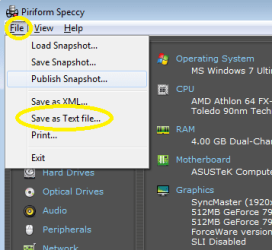
I need you share detailed 'Speccy' report text file & 'Drivers' text file.
You can use 'Google Drive' to share them. You should have at least one Google Account/ Sign up for that. Google uses one signup/account around all their apps/functionalities i.e. Chrome, Android device, Gmail, youtube, Google Drive, etc. Google gives 15GB upload free data limit per account.
One need not install anything to use Google Drive Web Interface/Page
How to Upload the files to Google Drive/ Drag & Drop the files into Google Drive.
1.On your computer, go to
Meet Google Drive – One place for all your files
2.Login into your account.
3.To upload files and folders, drag them into the Google Drive folder/window
(It will take some time depending on the internet speed & upload file size)
4.Once upload completed, Right click the file/folder you want to share & click ''Get shareable link''
(The link is copied temporarily to your pc memory )
5.Right click in your post's material window & paste. Save the post & its done!
( This post can give you some idea about Google Drive but it mentions some extra things!
How to Share Files on Google Drive in 2018 )
Anything else ? Let us know.
Thanks & Regards. ...