Slow boot up sometimes, other times fast

Altadena Mark

New member
Local time
4:25 PM
Messages
13
I'm new here and in need of help. I installed Windows 7 pro 64 bit by upgrading an XP Pro machine, ie. a clean install with a windows.old directory. After installing all of my programs, sometime when I bootup first thing, it can take 5 minutes to reach my desktop. Last night I ran msconfig and disabled all of the startup, and booted up in 45-55 seconds. I slowly enabled each of the items in startup, and now with all items in startup enable, it still boots in 45-55 seconds. I don't understand why sometimes it stays at the black screen with the windows logo for 4 or 5 minutes with the hard disk trashing, and other times it boots up quickly. Any help or advice would be appreciated. Thanks.
 

My Computer My Computer

OS
Windows 7

My Computer My Computer

Computer type
PC/Desktop
Computer Manufacturer/Model Number
Dell XPS 420
OS
Windows 10, Home Clean Install
CPU
Intel Core2 processsor Q8200(2.33Ghz 1333FSB) Quad Core Tech
Motherboard
Dell
Memory
6 gb
Graphics Card(s)
ATI Radeon 256MB HD3650
Sound Card
Intergrated 7.1 Channel Audio
Monitor(s) Displays
Dell SP2009W 20"
Hard Drives
640 GB Serial ATA Hard drive
Cooling
Fan
Keyboard
Dell USB Keyboard
Mouse
Dell Premium Optical USB
Internet Speed
DSL 2.85
Another part of the problem is that a new install takes time to adjust, setting, indexing etc. I think that if this is a new install, you should wait a while before taking any action.
 

My Computer My Computer

Computer type
PC/Desktop
Computer Manufacturer/Model Number
Dell XPS 420
OS
Windows 10, Home Clean Install
CPU
Intel Core2 processsor Q8200(2.33Ghz 1333FSB) Quad Core Tech
Motherboard
Dell
Memory
6 gb
Graphics Card(s)
ATI Radeon 256MB HD3650
Sound Card
Intergrated 7.1 Channel Audio
Monitor(s) Displays
Dell SP2009W 20"
Hard Drives
640 GB Serial ATA Hard drive
Cooling
Fan
Keyboard
Dell USB Keyboard
Mouse
Dell Premium Optical USB
Internet Speed
DSL 2.85
Thanks Richard, I appreciate your feedback. I have to admit my installation is just about two weeks old, but I didn't think that it would take this much time for the system to settle in. I did perform a clean boot per the MS instructions, I just disabled the startup items. The system came up quickly. I therefore thought that one of my items in startup was the cause. I was very supprised to find that after I enabled them all again, the system came up quickly. I shut down for five minutes and restarted, and all was fine. I'll see when I get home tonight after leaving the machine off for 24 hours how it boots up. Again thanks for your help and advice.
Mark
 

My Computer My Computer

OS
Windows 7
Mark, I am happy too, your computer is working and it was real easy for me, too. Probably a start up item was not working properly, turning it off reset it.
Good luck.
 

My Computer My Computer

Computer type
PC/Desktop
Computer Manufacturer/Model Number
Dell XPS 420
OS
Windows 10, Home Clean Install
CPU
Intel Core2 processsor Q8200(2.33Ghz 1333FSB) Quad Core Tech
Motherboard
Dell
Memory
6 gb
Graphics Card(s)
ATI Radeon 256MB HD3650
Sound Card
Intergrated 7.1 Channel Audio
Monitor(s) Displays
Dell SP2009W 20"
Hard Drives
640 GB Serial ATA Hard drive
Cooling
Fan
Keyboard
Dell USB Keyboard
Mouse
Dell Premium Optical USB
Internet Speed
DSL 2.85
Well, I don't know what to make of this. This morning it took 4 minutes 50 sec. (Yes, I'm timing it). Yesterday once it took 2 minutes 30 sec. and another time 50 seconds to boot up. I haven't installed anything, just reading email and web browsing. I can't understand this large variation in boot up time.
 

My Computer My Computer

OS
Windows 7
Apparantly the slowness is caused by one of the services that were disabled. Try the clean boot again. This time wait a few days between adding the additional services. I would wait a week, between additions.
 

My Computer My Computer

Computer type
PC/Desktop
Computer Manufacturer/Model Number
Dell XPS 420
OS
Windows 10, Home Clean Install
CPU
Intel Core2 processsor Q8200(2.33Ghz 1333FSB) Quad Core Tech
Motherboard
Dell
Memory
6 gb
Graphics Card(s)
ATI Radeon 256MB HD3650
Sound Card
Intergrated 7.1 Channel Audio
Monitor(s) Displays
Dell SP2009W 20"
Hard Drives
640 GB Serial ATA Hard drive
Cooling
Fan
Keyboard
Dell USB Keyboard
Mouse
Dell Premium Optical USB
Internet Speed
DSL 2.85
Post a shot of the msconfig startup tab, and if you have AVG, kill it with a removal tool and install MSE.
 

My Computer My Computer

Computer Manufacturer/Model Number
Sony Vaio Z46GDU
OS
Windows 7 Ultimate x86-64
CPU
[email protected] 1066MHz FSB
Motherboard
Sony branded
Memory
6GB DDR3 1066MHz
Graphics Card(s)
9300M GS 256MB Dedicated (Speed) + Intel4500MHD (Stamina)
Sound Card
Realtek HD Audio
Monitor(s) Displays
13.1' WXGA
Screen Resolution
1600x900
Hard Drives
320GB 7200RPM w/ 16MB cache
Internet Speed
1MB/s
I've experienced the same situation and believe I discovered the answer. If you have Windows Update set to automatically update your computer, the boot time will sometimes be extended because you're system is "configuring" or installing new updates that have been downloaded during your previous session. Next time you experience a long boot time check and see if a new update was downloaded and/or installed.
 

My Computer My Computer

OS
Windows 7
Yes boot time will slow if another process is working at the same time. I have not experienced a slow boot, as I boot only about once a week. I have expereinced slowness, surfing or while performing other functions if a download is being performed or my A/V is getting an update etc.
 

My Computer My Computer

Computer type
PC/Desktop
Computer Manufacturer/Model Number
Dell XPS 420
OS
Windows 10, Home Clean Install
CPU
Intel Core2 processsor Q8200(2.33Ghz 1333FSB) Quad Core Tech
Motherboard
Dell
Memory
6 gb
Graphics Card(s)
ATI Radeon 256MB HD3650
Sound Card
Intergrated 7.1 Channel Audio
Monitor(s) Displays
Dell SP2009W 20"
Hard Drives
640 GB Serial ATA Hard drive
Cooling
Fan
Keyboard
Dell USB Keyboard
Mouse
Dell Premium Optical USB
Internet Speed
DSL 2.85
I would say the testing the thread starter does is totally wrong. This is the logic, I disable all the items, start my pc. It boots well. I enable all the startup and it boots well. Once the computer is booted, the startup items loaded will connect to internet and does wat all is possible.

I restart again, the boot is slower. This is basically because of the above process aftermath.

I suggest, disable all the startup items and enable only the ones u really need. If you still need them, start them manually.

I follow this and my boot is very quicker everytime.

I also agree that windows updates will download the updates automatically and configure and install them during boot. So, this is normal procedure/process.

As sugg above, prov a snip of ur startup items and we will let u knw what is needed and what is not.
 

My Computer My Computer

Computer Manufacturer/Model Number
MacBook Pro
OS
Lion
CPU
i5
Memory
4GB
Graphics Card(s)
Intel
Screen Resolution
1200x800
Hard Drives
Seagate FreeAgent GO 250GB Ext. HDD
Hi all,
Thanks for the ideas. I don't have AVG or MSE installed. I'm using Vipre as an antivirus/antitrojan. I'm at work now, so I'll have to post a picture later tonight or tomorrow. I can't remember whether I have autoupdates on so I'll check tonight. I'll also check to see whether anything was installed this morning (5 minute boot up time). I'll get back to you all.
Mark
 

My Computer My Computer

OS
Windows 7
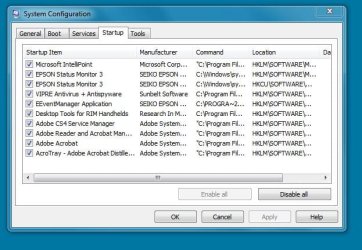
Okay. I checked my windows update and nothing was updated this morning or since 2/9/10. I'm attaching a copy of my startup file. I checked the usergroup for Vipre and am trying a potential adjustment to the program to make it 'faster'. I'll let you know how that goes. Again thanks for the help.
 

Attachments

  • startup.JPG
    startup.JPG
    57 KB · Views: 92

My Computer My Computer

OS
Windows 7
Leave the service manager and your antivirus and start unticking the rest.
 

My Computer My Computer

Computer Manufacturer/Model Number
Sony Vaio Z46GDU
OS
Windows 7 Ultimate x86-64
CPU
[email protected] 1066MHz FSB
Motherboard
Sony branded
Memory
6GB DDR3 1066MHz
Graphics Card(s)
9300M GS 256MB Dedicated (Speed) + Intel4500MHD (Stamina)
Sound Card
Realtek HD Audio
Monitor(s) Displays
13.1' WXGA
Screen Resolution
1600x900
Hard Drives
320GB 7200RPM w/ 16MB cache
Internet Speed
1MB/s
Except the rest stated above, I believe all those startup items are resource hungry. :D

Remove them and you will def notice a boost in ur boot up time.
 

My Computer My Computer

Computer Manufacturer/Model Number
MacBook Pro
OS
Lion
CPU
i5
Memory
4GB
Graphics Card(s)
Intel
Screen Resolution
1200x800
Hard Drives
Seagate FreeAgent GO 250GB Ext. HDD
I don't have an external HDD, at least not one that's on. It's a usb, but I keep it off until I need to access it. Seems that most of the time I have problems when I boot up first thing in the morning. After that, I can restart numerous time and it's up in 50 seconds.
 

My Computer My Computer

OS
Windows 7
OK folks, seems that I took care of the problem another way. Besides the inconsistent boot times, I was also missing my manual restore points, or the restore points put in by installing programs. After reading in this forum of others experiencing this restore point problem, and the only apparent solution was to re-install Windows 7 using the custom install with the format option, I took the plunge. Used easy transfer wizard first, then re-installed the OS and now I have all my restore points, PLUS the machine boots up in about 55 seconds on a regular basis with all my startup programs running. Yeah! Hope this helps others.
Mark
 

My Computer My Computer

OS
Windows 7
Glad that you are up and running. Many people are reluctant to do a clean install, but it saves a lot of time

Make a system image, now. Everything is working just the way that you want it, update it with a current back up about once a month. In the future you will not have to reinstall, in the case of problems, you can merely use the image.

Take care and enjoy.
 

My Computer My Computer

Computer type
PC/Desktop
Computer Manufacturer/Model Number
Dell XPS 420
OS
Windows 10, Home Clean Install
CPU
Intel Core2 processsor Q8200(2.33Ghz 1333FSB) Quad Core Tech
Motherboard
Dell
Memory
6 gb
Graphics Card(s)
ATI Radeon 256MB HD3650
Sound Card
Intergrated 7.1 Channel Audio
Monitor(s) Displays
Dell SP2009W 20"
Hard Drives
640 GB Serial ATA Hard drive
Cooling
Fan
Keyboard
Dell USB Keyboard
Mouse
Dell Premium Optical USB
Internet Speed
DSL 2.85
Back
Top