Solved Slow cold-boot and reboot

bawldiggle

GrayGhost2 ret.
Pro User
VIP
Local time
6:41 PM
Messages
895
Location
Australia
My Toshiba laptop boot/reboot is very slow (about 3 minutes)

I have ...
1. disabled all non essential startups and services
2. defragged system files
3. defragged data files
4. disabled Classic Shell start-menu "Pre-cache icons"

Just read "Brinks" How to Enable or Disable Defrag of Boot Files at Startup in Vista

Are the Vista settings applicable to Win7 x32 (and 64-bit) ?
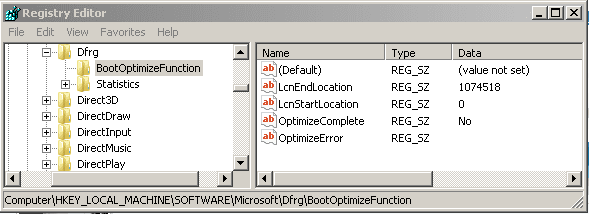
My x32 registry does not contain the "Enable" value/name

Toshiba Reg.PNG

I would appreciate any advice :)
 

My Computer

Computer type
PC/Desktop
Computer Manufacturer/Model Number
Toshiba, Lenovo (laptops) + 4 rigs
OS
XP Pro (x86) | 7 HP (x86) & (x64) | 7 Pro (x64)
Am I in the wrong forum :)
 

My Computer

Computer type
PC/Desktop
Computer Manufacturer/Model Number
Toshiba, Lenovo (laptops) + 4 rigs
OS
XP Pro (x86) | 7 HP (x86) & (x64) | 7 Pro (x64)
You are in the right forum. :)

How many programs do you have starting with your pc?

Is the computer slow at any other time? Or just at boot?
 

My Computer

Computer type
PC/Desktop
Computer Manufacturer/Model Number
Custom Built
OS
Windows 10 Pro
CPU
AMD Ryzen 5 2400G Processor with Radeon RX Vega 11 Graphics
Motherboard
ASRock X470 Master SLI/AC AM4 AMD Promontory X470 SATA 6Gb/s
Memory
G.SKILL Ripjaws V Series 16GB (2 x 8GB) 288-Pin DDR4 SDRAM D
Graphics Card(s)
2047MB NVIDIA GeForce GTX 1060 6GB (EVGA)
Sound Card
Motherboard Built in
Monitor(s) Displays
Acer R240HY bidx 23.8-Inch IPS HDMI DVI VGA (1920 x 1080) Wi
Screen Resolution
1920 x 1080
Hard Drives
1TB Sandisk SSD PLUS (Main drive)
500 GB Seagate 7200 RPM (Games)
500 GB Western Digital 7200 RPM (Virtual Machines)
PSU
CORSAIR TX Series TX650M 650W 80+ Gold Modular Power Supply
Case
CORSAIR CARBIDE SPEC-02 Mid-Tower Gaming Case, Red LED Fan
Cooling
220mm, two 120mm, and four 60mm fans
Keyboard
Wired Dell keyboard
Mouse
Wireless Logitech mouse
Internet Speed
250mb down, 30mb up
Antivirus
Panda Cloud Antivirus
Browser
Chrome-ish x64
Other Info
Your awesome for reading this.
Thank you andrew129260 for your response :)
How many programs do you have starting with your pc?
Seven!

  1. Classic Shell (IvoSoft)
  2. USB Safely Remove (Crystal Rich Ltd)
  3. Bitdefender Internet Security (Bitdefender)
  4. Keyboards LEDs (Karpolan) ... CAPSLOCK on screen indicator
  5. AlfaClock (AlfaSoft Research)
  6. ClipX (Clipboard extender)
  7. ShiftOff (1 Hour Software by Skrommel - DonationCoder.com)

  • I have experimented with Windows OS enabled/disabled but it makes no differrence to startup.
  • ClipX: I have a script file that updates two sticky items in the clipx.INI with the days date (2 formats).
    Startup runs a VBS file that rewrites the INI file then runs ClipX.exe for the current windows session.
    ClipX.ini must be updated before ClipX.exe for "new" dates to be available.
    Have just considered upgrading the VBS to only conditionally re-write the INI file, but during standalone testing the whole process is less than a second.
  • AlfaClock: provides a feature where I can paste the current date+time into any app/document

Is the computer slow at any other time? Or just at boot?
Boot and reboot are slow.
Yesterday:
- 90 seconds to reboot
Today:
- DiskCleanup (removed about 12 Registry backups etc) + reboot
- System Defrag (took 2 hours with "MyDefrag" :shock:) + reboot
- reboot is now down to 75 seconds
Laptop has never been this slow
- after "Starting Windows" screen there is a 35 second of black screen before "Welcome Screen"

I have recently (1 week) had a problem of lagging refresh when dragging some app windows.
(WinExplorer + Metapad-LE (portable)
The lag seemed occur when many (5-7) windows open.
Metapad developed the jitters, several weeks ago.
I have removed Metapad-LE --> ran CCleaner --> manually trawled through the registry deleting Metapad items.
Rebooting between each step for good measure.
Have adapted full version of Metapad 3.6 into the PC
The lag problems is 80% improved. But WinExplorer leaves a shadow trail when dragged quickly.

In this forum pc running slow out nowhere in post #5 I downloaded CPU-Z
At post post #7 Mellon Head mentions "bus speed" (I am in the dark at this point.)

My CPU feedback (with CPU-Z)
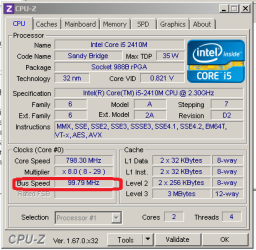
CPU-Z result.PNG

-----
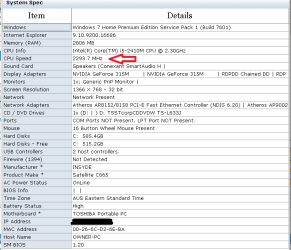
SPECS:
Toshiba Satellite C665

System Specs.PNG

Am I expecting too much ? :confused:

Thank you :)
 
Last edited:

My Computer

Computer type
PC/Desktop
Computer Manufacturer/Model Number
Toshiba, Lenovo (laptops) + 4 rigs
OS
XP Pro (x86) | 7 HP (x86) & (x64) | 7 Pro (x64)
UPDATE: :o :)

Just remembered two apps that I installed.
1. CoreTemp
- installs itself in C:\Program Files" -- I do not use that folder for my own installs
- is loaded with every boot, but is not listed on "Startup" list ... BUT was listed in "Services" as Running :confused:
- even after reboot
- disabled it in Services + disabled "Startup" on app "Settings"
2. Gizmo Central
- the major cause of 90+ seconds boot/reboot time
- had installed itself in startup + services
- uninstalled "Gizmo Central" and reboot is back to 55 seconds

I must watch "System Configuration" -- services and startup settings when installing anything.

Would appreciate feedback on the CPU "bus speed" :)
 

My Computer

Computer type
PC/Desktop
Computer Manufacturer/Model Number
Toshiba, Lenovo (laptops) + 4 rigs
OS
XP Pro (x86) | 7 HP (x86) & (x64) | 7 Pro (x64)
What power settings is windows set to? If desktop, I always choose high performance.
Laptop, choose balanced.

This could be the cause of the cpu speed
 

My Computer

Computer type
PC/Desktop
Computer Manufacturer/Model Number
Custom Built
OS
Windows 10 Pro
CPU
AMD Ryzen 5 2400G Processor with Radeon RX Vega 11 Graphics
Motherboard
ASRock X470 Master SLI/AC AM4 AMD Promontory X470 SATA 6Gb/s
Memory
G.SKILL Ripjaws V Series 16GB (2 x 8GB) 288-Pin DDR4 SDRAM D
Graphics Card(s)
2047MB NVIDIA GeForce GTX 1060 6GB (EVGA)
Sound Card
Motherboard Built in
Monitor(s) Displays
Acer R240HY bidx 23.8-Inch IPS HDMI DVI VGA (1920 x 1080) Wi
Screen Resolution
1920 x 1080
Hard Drives
1TB Sandisk SSD PLUS (Main drive)
500 GB Seagate 7200 RPM (Games)
500 GB Western Digital 7200 RPM (Virtual Machines)
PSU
CORSAIR TX Series TX650M 650W 80+ Gold Modular Power Supply
Case
CORSAIR CARBIDE SPEC-02 Mid-Tower Gaming Case, Red LED Fan
Cooling
220mm, two 120mm, and four 60mm fans
Keyboard
Wired Dell keyboard
Mouse
Wireless Logitech mouse
Internet Speed
250mb down, 30mb up
Antivirus
Panda Cloud Antivirus
Browser
Chrome-ish x64
Other Info
Your awesome for reading this.
Power settings is "Balanced"
With Advanced Power settings as Toshiba settings.

Laptop is mains powered 95% of its life.

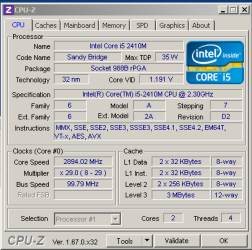
High Performance (setting)

  • Core VID: 0.821 v to 1.191 v ... an increase of 45%
  • Core speed: 798.30 MHz to 2894.02 MHz ... an increase of 262%
  • Multiplier: x8 (8-29) to x29.0 (8-29)
  • Bus Speed: unchanged ??
Max power setting.PNG

I have set power back to "Balanced" because "High Performance" will suck the battery rather quickly.
I don't trust laptops with their fan underneath to manage heat either.

"High Performance" setting does not improve boot/reboot times ... now at 55 seconds for a reboot.
Looks like I will have to live with these "times"

I would like to know about "Bus Speed" too. (Google !)

Thank you for your help :)
 
Last edited:

My Computer

Computer type
PC/Desktop
Computer Manufacturer/Model Number
Toshiba, Lenovo (laptops) + 4 rigs
OS
XP Pro (x86) | 7 HP (x86) & (x64) | 7 Pro (x64)

My Computer

Computer type
PC/Desktop
Computer Manufacturer/Model Number
Toshiba, Lenovo (laptops) + 4 rigs
OS
XP Pro (x86) | 7 HP (x86) & (x64) | 7 Pro (x64)
Back
Top