Solved Slow Computer

despuit

New member
Power User
Local time
3:36 PM
Messages
88
Location
Everywhere
My moms computer is ridiculously slow, and she is a very impatient women. Drives you mad. I've boosted the whole thing like explorer can actually open now without waiting 10 mins. There is more memory coming in the mail as she refuses to close things, disabled unneeded services, put the computer in performance mode. Boots at around 800mb not too bad compared to the 1.5 mark she was hitting before when she only has 3 to begin with. Only two errors pop up on login which actually makes the computer stall at the logonui prompt for like 5 minutes. One is a virus, pain in the ass keeps rewriting itself. The other is one seems to be the problem though network framework 2.0 or other is not installed it pops up with. I looked into it and it says it's unneeded non-existent. I'll reboot once I post this and update.

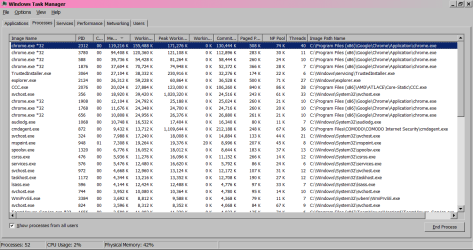
Chrome takes up between 600mb IDLE to 1.5GB in use which cripples the computer, she has 9 tabs open now and two exstentions. She is mainly on those memory hoarding sites like top ten this or 15 best, MSN, Facebook, Pogo, Youtube, and Outlook are always running which is mad. Facebook is either left on the newsfeed which I keep telling her to switch over to her profile when tabs off as it will help but no. So that's 300 MB right there not kidding sometimes more. If she is not on the newsfeed she is playing a game while playing a game on pogo which is 160mb on top of that. Youtube can take up between 150-300mb as well, outlook is 60-120mb. That's like 900MB right there on a machine already loading around 1GB in memory from the boot so that's 2GB and there is only 3GB on here.

I would have thought maybe the extra 1 would provide leeway but it does not, once that point is crossed every thing is on 5-20 min delay. She refuses to use any other browser. And the memory is sort of a last resort thing, like it will do the trick I just don't want to burn out the computer is all ready pretty old.

Any ideas how to lower memory consumption, or leverage the extra gig into favour? My computer is optimised for service handling not application so I have no idea.
 

My Computer

Computer type
Laptop
Computer Manufacturer/Model Number
Lenovo
OS
Windows 7 - Home Edition - Build 7601x8086
Memory
Samsung DDR3 4GB
Graphics Card(s)
Intergrated
Sound Card
Intergrated
Screen Resolution
1400 x 1050
Hard Drives
80GB HDD 2.5
PSU
20V adapter
Case
Piece of plastic
Cooling
Copper heatsink
Keyboard
Intergrated PS2
Mouse
TouchPad
Antivirus
Commodo
Browser
K-Melon
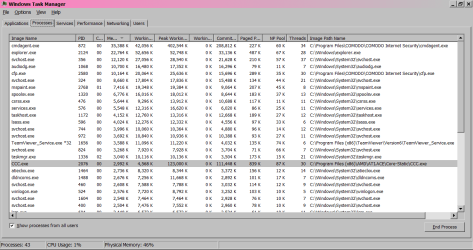
Update: I hate this computer. Booted in 3 mins, no problems. Memory usage is through the roof now though at double 1.6. However everything is working really fast still. So it is definitely the processes she is running in chrome that are killing the computer. I don't know why.. if it is crappy CPU, or HDD or what is going on with the pages but it's killing the computer. I've attached some information, if you need anything else ask. Thanks in advanced for any advice you can give.


Image 1: Error on boot
Image 2: Memory at boot
Image 3: System Info
Image 4: Memory with just this page open
 

Attachments

  • error.png
    error.png
    4.6 KB · Views: 22
  • MEMORY.png
    MEMORY.png
    36.2 KB · Views: 1
  • MSINFO.png
    MSINFO.png
    29 KB · Views: 0
  • TASKMGRwithChrome.png
    TASKMGRwithChrome.png
    37.6 KB · Views: 0

My Computer

Computer type
Laptop
Computer Manufacturer/Model Number
Lenovo
OS
Windows 7 - Home Edition - Build 7601x8086
Memory
Samsung DDR3 4GB
Graphics Card(s)
Intergrated
Sound Card
Intergrated
Screen Resolution
1400 x 1050
Hard Drives
80GB HDD 2.5
PSU
20V adapter
Case
Piece of plastic
Cooling
Copper heatsink
Keyboard
Intergrated PS2
Mouse
TouchPad
Antivirus
Commodo
Browser
K-Melon

My Computer

Computer type
PC/Desktop
Computer Manufacturer/Model Number
home built
OS
Multi-Boot W7_Pro_x64 W8.1_Pro_x64 W10_Pro_x64 +Linux_VMs +Chromium_VM
CPU
AMD Athlon II x4 620
Motherboard
Gigabyte GA-MA785G-UD3H
Memory
6GB GSkill DDR2 800
Graphics Card(s)
AMD 4670 GPU + AMD 4200 IGP
Sound Card
on board Realtek ALC889A
Monitor(s) Displays
RCA 40" LCD TV, Insignia 32" LCD TV, HP 15" LCD monitor
Screen Resolution
1680 x 1050
Hard Drives
OCZ Vertex 3 120GB,
Samsung F3 1TB (3),
Several others - WD, Seagate, Hitachi, ...
PSU
Corsair 500 W
Case
Rosewill mid tower
Cooling
CM 90mm rifle
Keyboard
Gyration wireless, Logitech wireless, Dell USB wired
Mouse
Gyration wireless, Logitech wireless, V7 USB wired
Internet Speed
Spectrum - 100Mbps D / 10Mbps U
Antivirus
Avast, MBAM3, EMET, WinPatrol
Browser
Pale Moon, Firefox, IE
Other Info
2 multi-boot PC's
Mainly HTPC/Office/Gen purpose (no gaming).
Trendnet USB KVM.
LG DVD burner/Blue Ray Player.
Tray system for removable SATA backup drives.

Not currently OCd, under-volted.
I use Hybrid sleep, rarely re-boot or shutdown.

Hauppauge HD-PVR, Avermedia PCIe TV Tuner, Hauppauge PCI TV Tuner.
Any ideas how to lower memory consumption, or leverage the extra gig into favour?

None at all, given her habits and preferences. I'll take your word for it that those aren't going to change.

What's the over-riding reason this is your problem rather than her problem, considering that she has a long history of ignoring your suggestions?
 

My Computer

Computer type
PC/Desktop
Computer Manufacturer/Model Number
Ignatz Special; 4 speed manual gearbox; factory air conditioning; one of one
OS
Windows 7 Home Premium SP1, 64-bit
CPU
Intel Skylake i5-6600K, not overclocked
Motherboard
AsRock Z170M Extreme 4, micro ATX
Memory
8 GB HyperX DDR4-2666 (2 x 4 GB)
Graphics Card(s)
none; graphics are integrated on CPU
Sound Card
onboard: Realtek ALC1150; external: USB Behringer UF0-202
Monitor(s) Displays
Dell S2340M 23 inch IPS
Screen Resolution
1600 x 900
Hard Drives
System: Crucial MX100 series SSD, 128 GB;
Data: Samsung Spinpoint 103SJ, 1 TB;
Backup: WD Caviar Green WD30EZRX-00D8PB0, 3 TB
PSU
Rosewill SilentNight 500 watt fanless, semi-modular
Case
Antec Solo II
Cooling
Noctua NH-U12S; Noctua F12 intake, Noctua S12A exhaust
Keyboard
Microsoft 200 6JH-00001 USB
Mouse
Dell or Microsoft optical wired; USB
Antivirus
Microsoft Security Essentials and Malwarebytes Premium
Browser
Pale Moon
Other Info
All fans PWM; speeds at idle: CPU circa 500 rpm; intake circa 600 rpm; exhaust circa 600 rpm; CPU temps 27 idle and 47 C load in a warm room (27 C/81 F) when running Intel Extreme Tuning Utility stress test.
Thanks David, yeah it is just an overwrite for browser settings nothing malicious more or less annoying. Have to go through the registry and appdata and clear it out. Just not really pressed on it.

@ignat lol i just don't want to hear about it anymore, I know if it is not this it will be something else but at least it is one less thing. For peace of mind. Like she reaches the point she will take the computer and just throw out the windows because "it doesn't work". There is no rationale, there is no way to make compromise so I figured hey maybe someone has dealt with memory issues and chrome in the past and know ways to bump up speeds. Like I now don't believe the memory is the major contributor to the problem. So even if I do update the memory it may help a little bit. But if the pages are taxing another component am not sure how to fix that. The CPU reads out pretty good, the temps are all in range (besides one being broken reading -128), the HDD reads 95% performance and 90% fitness. I even just loaded ten websites all high in resources, works fine.

The only thing left I can think of is the pages she is on update a lot and bloat the system , maybe the networking is going haywire. Maybe it's posible to do something on the firewall to limit inbound connections? Limit chrome refresh rate for pages or something

Update: installed the great suspender maybe this will help, set it up to 5 mins and whitelisted the pages I know she relies on to update
 

My Computer

Computer type
Laptop
Computer Manufacturer/Model Number
Lenovo
OS
Windows 7 - Home Edition - Build 7601x8086
Memory
Samsung DDR3 4GB
Graphics Card(s)
Intergrated
Sound Card
Intergrated
Screen Resolution
1400 x 1050
Hard Drives
80GB HDD 2.5
PSU
20V adapter
Case
Piece of plastic
Cooling
Copper heatsink
Keyboard
Intergrated PS2
Mouse
TouchPad
Antivirus
Commodo
Browser
K-Melon
@ignat lol i just don't want to hear about it anymore,

Very small chance of that I'd guess since you are apparently (for whatever reason) the in-house IT support guy. Hope you are getting paid in some way--room and board, a few laughs, whatever.
 

My Computer

Computer type
PC/Desktop
Computer Manufacturer/Model Number
Ignatz Special; 4 speed manual gearbox; factory air conditioning; one of one
OS
Windows 7 Home Premium SP1, 64-bit
CPU
Intel Skylake i5-6600K, not overclocked
Motherboard
AsRock Z170M Extreme 4, micro ATX
Memory
8 GB HyperX DDR4-2666 (2 x 4 GB)
Graphics Card(s)
none; graphics are integrated on CPU
Sound Card
onboard: Realtek ALC1150; external: USB Behringer UF0-202
Monitor(s) Displays
Dell S2340M 23 inch IPS
Screen Resolution
1600 x 900
Hard Drives
System: Crucial MX100 series SSD, 128 GB;
Data: Samsung Spinpoint 103SJ, 1 TB;
Backup: WD Caviar Green WD30EZRX-00D8PB0, 3 TB
PSU
Rosewill SilentNight 500 watt fanless, semi-modular
Case
Antec Solo II
Cooling
Noctua NH-U12S; Noctua F12 intake, Noctua S12A exhaust
Keyboard
Microsoft 200 6JH-00001 USB
Mouse
Dell or Microsoft optical wired; USB
Antivirus
Microsoft Security Essentials and Malwarebytes Premium
Browser
Pale Moon
Other Info
All fans PWM; speeds at idle: CPU circa 500 rpm; intake circa 600 rpm; exhaust circa 600 rpm; CPU temps 27 idle and 47 C load in a warm room (27 C/81 F) when running Intel Extreme Tuning Utility stress test.
If I am here, I am the cause and solution of all problems. Not enough, am just around for the winter first time in 8 years don't think it will happen again. I just stay out of sight, and keep my headphones on. Help around where I can, maybe allievate some of her frustrations. They're internal for sure, but a little goes a long way.

Will see how performance is today, and if the add-on fixed it. I'll close it off, is just odd. Have never had this problem with any of my machines. Disabled flash as well unless clicked into should help.
 

My Computer

Computer type
Laptop
Computer Manufacturer/Model Number
Lenovo
OS
Windows 7 - Home Edition - Build 7601x8086
Memory
Samsung DDR3 4GB
Graphics Card(s)
Intergrated
Sound Card
Intergrated
Screen Resolution
1400 x 1050
Hard Drives
80GB HDD 2.5
PSU
20V adapter
Case
Piece of plastic
Cooling
Copper heatsink
Keyboard
Intergrated PS2
Mouse
TouchPad
Antivirus
Commodo
Browser
K-Melon
Hi there

Usually the SIMPLEST solution will fix the problem. First you DO have to have enough RAM so if you haven't END OF STORY.

Now in all my experience with computers it's invariably HIDEOUSLY SLOW HDD's that kill a system. If you can't get an SSD then at least try SATA or any HDD's with at least 7200 RPM and LARGE CACHE.

Slow HDD's even with an I7 processor -- also END OF STORY !!!.

I've actually seen very few machines that have poor performance due to slower CPU's etc when used for normal office type apps.

Gaming etc - different considerations.

Also don't run too many apps at once.

Finally get rid of any STUPID security packages like McAfee or Norton and install MSE (Microsoft security essentisls - it's free) instead.

Cheers
jimbo
 

My Computer

Computer type
PC/Desktop
Computer Manufacturer/Model Number
Custom built, several laptops HP/ASUS
OS
Linux CENTOS 7 / various Windows OS'es and servers
CPU
Intel i7 Intel i5
Memory
8GB, 16GB
Graphics Card(s)
On Motherboard
Sound Card
Realtek HD audio
Monitor(s) Displays
Apple Cinema display, Samsung LCD
Screen Resolution
1920 X 1080
Hard Drives
4 X 1TB SATA
Mouse
Toshiba wireless laser
Internet Speed
> 20MB up
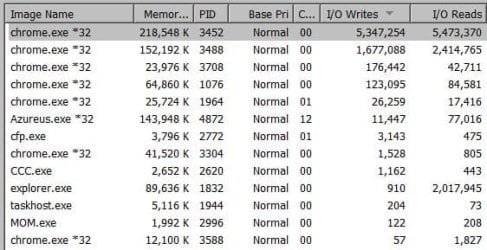
Thanks Jimbo funny you mention HDD problems. Frig was messing around and found a huge bug in Chrome. Apparently going on for years now, the reads/write to the IO go through the roof and more pages you run the more these writes/reads increase in the session memory. Up 300k on 4 pages in 40 mins. So either be rid of the program, or is going to be slow is all I can deduce. The drive is pretty healthy for 8 years of the torture went down 10% so shouldn't die till 72 more years if lucky mathematically speaking.

Yeah I've noticed that, only thing the CPU usually is killed from is video processing IME.

Thank god no one does gaming.

Yeah that is out of my control, I've said that and is why I am upgrading the ram whenever it comes in the mail. Is special order as they no longer make for computers this old.... fantastic.

Security using low resource program commodo leveraged to disable a lot of the windows security features to save on resources in conjunction AntiLogger which is the biggest thing running next to explorer and trustedinstaller at 30mb the IO writes on her are pretty huge too 350k and I just started this computer.
 

My Computer

Computer type
Laptop
Computer Manufacturer/Model Number
Lenovo
OS
Windows 7 - Home Edition - Build 7601x8086
Memory
Samsung DDR3 4GB
Graphics Card(s)
Intergrated
Sound Card
Intergrated
Screen Resolution
1400 x 1050
Hard Drives
80GB HDD 2.5
PSU
20V adapter
Case
Piece of plastic
Cooling
Copper heatsink
Keyboard
Intergrated PS2
Mouse
TouchPad
Antivirus
Commodo
Browser
K-Melon

My Computer

Computer type
PC/Desktop
Computer Manufacturer/Model Number
Own build (new) Desk1 / Asus ROG Win 7 / Desk2 1st build
OS
Desk1 7 Home Prem / Desk2 10 Pro / Main lap Asus ROG 10 Pro 2 laptop Toshiba 7 Pro Asus P2520 7 & 10
CPU
Desk1 i5 3750K / Laptop i7 GTX 860M / Desk2 i5 2500
Motherboard
Desk1 Asus P877-V / Desk2 Gigabyte H67 UD3H / Laptop ?
Memory
Desk1 8GB (1866) / Desk2 16GB (1333) / Laptop 8Gb DDR3
Graphics Card(s)
Desk 1& 2NVidia GTX 650 & Laptops on board Intel
Sound Card
Desk 1 & 2 -XONAR DG Realtek High Def audio Laptop
Monitor(s) Displays
Desk 1 Benq HD 2450 / Desk2 Philips 24" / Laptop 17.5"
Screen Resolution
1920x1080 D1 & D2 & Laptop 1
Hard Drives
Desk1 Samsung 120GB 830 SSD
Asus ROG 256GB 850 Pro SSD
Desk2 Samsung 840 256 SSD
Toshiba 120GB EVO
PSU
Desk 1 Corsair HX 1050/ Laptop ? / Desk 2 Corsair HX 650
Case
Desk 1 Cooler HAF XM ? Toshiba laptop / Desk2 Coolermaster
Cooling
Fans on all Desk1 -2 Desk2 - all Coolermasters 5 Laptop ?
Keyboard
Desk 1 MS Sidewinder X6 Desk 2 MS Sidewinder X 4
Mouse
Desk 1&2 - Gigabyte MS 900 gamer - laptop - Logitec wireless
Internet Speed
ADSL2+
Other Info
One other Desktop (tester) and spare Toshba laptop both with SSD's
Running Kaspersky 2016 ISS on all machines config'd identically
Logitec audio stereo systems on each machine (x3)
Canon MG5250MFC
Router/modem TP-Link running WPA2SK
Jeepers they added a lot to the list, thanks appreciate it.


Solution: Wasn't a memory usage issue, the extra memory was unneeded as the hard drive was being heavily taxed by chrome. The more tabs open the more read/writes to the session memory are performed. Either migrate to another browser, or as Jimbo mentioned you can upgrade to a better HDD or even an SSD something that can take the abuse. While knowing it will deplete lifespan.

Secondary work around as I am not touching the HDD not worth my time, installed "The great suspender and since I have been on here now for 3 hours unfortunately I can fortunately say it works incredibly well. Decreases memory usage, I/O activity. Tabs suspend automatically in 5 minutes, and if you click them reload pretty fast even with key entries if you made any so that's good. Has whitelist options to avoid closing important tabs.

https://code.google.com/p/chromium/issues/detail?id=176727
 

Attachments

  • crazy.JPG
    crazy.JPG
    43.5 KB · Views: 3
Last edited:

My Computer

Computer type
Laptop
Computer Manufacturer/Model Number
Lenovo
OS
Windows 7 - Home Edition - Build 7601x8086
Memory
Samsung DDR3 4GB
Graphics Card(s)
Intergrated
Sound Card
Intergrated
Screen Resolution
1400 x 1050
Hard Drives
80GB HDD 2.5
PSU
20V adapter
Case
Piece of plastic
Cooling
Copper heatsink
Keyboard
Intergrated PS2
Mouse
TouchPad
Antivirus
Commodo
Browser
K-Melon
yep agree with Jimbo an SSD would be the go and don't worry too much about what you hear about decreasing SSD life by over doing it I think you would need to thrash it with a bit stick to do that. My current laptop SSD has I think a very long warranty period - approx. ten years at an average 40GB rad write per day :party:
Samsung SSD 850 PRO Overview | Samsung SSD
 

My Computer

Computer type
PC/Desktop
Computer Manufacturer/Model Number
Own build (new) Desk1 / Asus ROG Win 7 / Desk2 1st build
OS
Desk1 7 Home Prem / Desk2 10 Pro / Main lap Asus ROG 10 Pro 2 laptop Toshiba 7 Pro Asus P2520 7 & 10
CPU
Desk1 i5 3750K / Laptop i7 GTX 860M / Desk2 i5 2500
Motherboard
Desk1 Asus P877-V / Desk2 Gigabyte H67 UD3H / Laptop ?
Memory
Desk1 8GB (1866) / Desk2 16GB (1333) / Laptop 8Gb DDR3
Graphics Card(s)
Desk 1& 2NVidia GTX 650 & Laptops on board Intel
Sound Card
Desk 1 & 2 -XONAR DG Realtek High Def audio Laptop
Monitor(s) Displays
Desk 1 Benq HD 2450 / Desk2 Philips 24" / Laptop 17.5"
Screen Resolution
1920x1080 D1 & D2 & Laptop 1
Hard Drives
Desk1 Samsung 120GB 830 SSD
Asus ROG 256GB 850 Pro SSD
Desk2 Samsung 840 256 SSD
Toshiba 120GB EVO
PSU
Desk 1 Corsair HX 1050/ Laptop ? / Desk 2 Corsair HX 650
Case
Desk 1 Cooler HAF XM ? Toshiba laptop / Desk2 Coolermaster
Cooling
Fans on all Desk1 -2 Desk2 - all Coolermasters 5 Laptop ?
Keyboard
Desk 1 MS Sidewinder X6 Desk 2 MS Sidewinder X 4
Mouse
Desk 1&2 - Gigabyte MS 900 gamer - laptop - Logitec wireless
Internet Speed
ADSL2+
Other Info
One other Desktop (tester) and spare Toshba laptop both with SSD's
Running Kaspersky 2016 ISS on all machines config'd identically
Logitec audio stereo systems on each machine (x3)
Canon MG5250MFC
Router/modem TP-Link running WPA2SK
Back
Top