Slow game performance

whiplash

New member
Member
VIP
Local time
3:32 PM
Messages
158
Hi everyone, I'm new here. I found this place after Googleing this problem I've been having.

I recently upgraded from XP 32-bit to Win 7 32-bit. After the installation i updated all of my drivers from the manufactures and went to windows update and installed anything that it found.

My problem is that when i am playing games (Call of Duty 4 & 5, Farcry 2; what I've noticed so far) the FPS are unplayable low, were talking 10 fps! COD 4 isn't as bad, it averages about 20, but that's still pretty bad! the weird thing is that back when i had XP everything ran great. Even weirder, when i turn the graphics settings down in the game to try to counter the low fps nothing changes. I turned all these games down to Lego pixel resolution and i was still getting 10 fps! I'm getting very frustrated with this. Does anyone else know what i can do to fix this.

My system specs:

OS - Windows 7 Home Premium 32-bit
Motherboard - MSI nForce 650i
CPU - Intel P4 3.4ghz
RAM - 3GB DDR2
Video - Sparkle GeForce 9600GT 1GB
Hard Drive - Western Digital 1TB
Disc Drive - DVD RW
 

My Computer

Computer Manufacturer/Model Number
Self-Build
OS
Windows 7 Home Premium x64, Ubuntu Linux
CPU
Intel [email protected]
Motherboard
ASUS P5N-D nForce 750i SLI
Memory
8GB Patroit Gamer Series PC6400 DDR2
Graphics Card(s)
PNY GTX 470
Sound Card
Realtek HD Audio
Monitor(s) Displays
Acer X233H
Screen Resolution
1920x1080
Hard Drives
Western Digital 1TB
Western Digital 2TB
Corsair Neutron 120GB SSD
PSU
900 watt, efficient to 750 watts
Case
NZXT M59
Cooling
Ultra Chilltec Silver CPU Cooler, 120mm fan x2, 140mm fan x2
Keyboard
Razer Marauder (Starcraft 2)
Mouse
Razer Spectre (Starcraft 2)
Internet Speed
Cable (2-5Mb/s)
No ideas?
 

My Computer

Computer Manufacturer/Model Number
Self-Build
OS
Windows 7 Home Premium x64, Ubuntu Linux
CPU
Intel [email protected]
Motherboard
ASUS P5N-D nForce 750i SLI
Memory
8GB Patroit Gamer Series PC6400 DDR2
Graphics Card(s)
PNY GTX 470
Sound Card
Realtek HD Audio
Monitor(s) Displays
Acer X233H
Screen Resolution
1920x1080
Hard Drives
Western Digital 1TB
Western Digital 2TB
Corsair Neutron 120GB SSD
PSU
900 watt, efficient to 750 watts
Case
NZXT M59
Cooling
Ultra Chilltec Silver CPU Cooler, 120mm fan x2, 140mm fan x2
Keyboard
Razer Marauder (Starcraft 2)
Mouse
Razer Spectre (Starcraft 2)
Internet Speed
Cable (2-5Mb/s)
Did you update your DirectX files?

From my Tips on Troubleshooting Game Issues ...

5 - Update your Direct X files - Contrary to popular belief, just because Windows 7 is DX11 capable doesn’t mean it has the latest DX9 files!!! Most game issues can be fixed by simply updating the DX files.

Click the bold link and get the Feb 2010 files.
 

My Computer

Computer type
PC/Desktop
Computer Manufacturer/Model Number
Custom built by me.
OS
Windows 10 Pro
CPU
Intel Core i7-4770K (3.5Ghz)
Motherboard
Gigabyte G1 Sniper 5 (F10 Bios)
Memory
32 gig Corsair Dominator Platinum (4x8Gig)
Graphics Card(s)
Sapphire Tri-X R9 Fury
Sound Card
Soundblaster ZXR
Monitor(s) Displays
NEC PA242W 24" LCD Monitor
Screen Resolution
1920 x 1200
Hard Drives
Primary - Samsung 850 Pro (512gig), Samsung 840 Pro (256gig), 2TB WD Caviar Black.
PSU
EVGA Supernova 1000 G2
Case
Cooler Master HAF X
Cooling
Corsair H100i with Corsair Air Series SP120 Quiet Fans
Keyboard
Logitech Wireless Wave
Mouse
Logitech Performance MX
Internet Speed
High Speed Cable
Antivirus
Norton Security
Browser
IE11
Other Info
Memory Timings - 1866MHz @ 9-9-9-27-1T @ 1.5 volts
Upgrading from one OS to a new one is never recommended as they aren't as compatible as they tell you they are and if you have issues with the old one, you will bring it to the new OS as well... it is always better to install a fresh OS, even if you have to install all your software again.

although, win 7 has a little utility that lets you sync all your old files so you can easily put on your new OS once you are done.

+1 on what sygnus21 said.
 

My Computer

Computer type
PC/Desktop
Computer Manufacturer/Model Number
Custom Built... Intel/Nvidia/ASRock
OS
Windows 7 x64 (Ultimate)
CPU
Intel i5-4670K
Motherboard
ASRock Z87 Extreme 6
Memory
8GBs Ripjaws 2133Mhz
Graphics Card(s)
Asus GTX660 (2GBs)
Sound Card
Onboard Realtek HD
Monitor(s) Displays
Acer AL2216W
Screen Resolution
1680 x 1050
Hard Drives
Samsung 840 SSD 120GBs
Samsung 750GB 32MB cache
1.5 TB
PSU
PC Cooling 750w Silencer
Case
Thermaltake Spedo Advance
Cooling
Std Cooler
Keyboard
Logitech G15
Mouse
Logitech G9
Internet Speed
Comcast 20Mbit
Antivirus
Avast
Browser
Firefox
Thanks for the replies.

When i said i "upgraded" from XP to Win 7, i didn't mean upgrade as with what you can do when you have Vista and you upgrade to Win 7. Sorry for that mix up, I should have been more clear. when i installed Win 7 i did a clean install, just like the instructions say to if your running XP. Afterword, i installed new drivers and ran Disc Cleanup.

As for DirectX, when i installed Call of Duty 5 it wanted me to install DirectX 9.0c that came with the disc so i let it install. I guess i should have mentioned that back on XP, i had Bioshock installed but i could only play it if i turn all the graphics down to low. even then i was getting about 20 fps. Now that i have Win 7, Bioshock runs great with all the graphics at max and about 35fps. this is the only game that really works.

Thanks, I'll try downloading DirectX 9 directly from Microsoft and see if that helps.
 

My Computer

Computer Manufacturer/Model Number
Self-Build
OS
Windows 7 Home Premium x64, Ubuntu Linux
CPU
Intel [email protected]
Motherboard
ASUS P5N-D nForce 750i SLI
Memory
8GB Patroit Gamer Series PC6400 DDR2
Graphics Card(s)
PNY GTX 470
Sound Card
Realtek HD Audio
Monitor(s) Displays
Acer X233H
Screen Resolution
1920x1080
Hard Drives
Western Digital 1TB
Western Digital 2TB
Corsair Neutron 120GB SSD
PSU
900 watt, efficient to 750 watts
Case
NZXT M59
Cooling
Ultra Chilltec Silver CPU Cooler, 120mm fan x2, 140mm fan x2
Keyboard
Razer Marauder (Starcraft 2)
Mouse
Razer Spectre (Starcraft 2)
Internet Speed
Cable (2-5Mb/s)
Ok, i tried downloading and installing DirectX from Microsoft but when i when to install it, the window said "setup has found that a newer version of DirectX is already installed. No installation required"
 

My Computer

Computer Manufacturer/Model Number
Self-Build
OS
Windows 7 Home Premium x64, Ubuntu Linux
CPU
Intel [email protected]
Motherboard
ASUS P5N-D nForce 750i SLI
Memory
8GB Patroit Gamer Series PC6400 DDR2
Graphics Card(s)
PNY GTX 470
Sound Card
Realtek HD Audio
Monitor(s) Displays
Acer X233H
Screen Resolution
1920x1080
Hard Drives
Western Digital 1TB
Western Digital 2TB
Corsair Neutron 120GB SSD
PSU
900 watt, efficient to 750 watts
Case
NZXT M59
Cooling
Ultra Chilltec Silver CPU Cooler, 120mm fan x2, 140mm fan x2
Keyboard
Razer Marauder (Starcraft 2)
Mouse
Razer Spectre (Starcraft 2)
Internet Speed
Cable (2-5Mb/s)
Ok, i tried downloading and installing DirectX from Microsoft but when i when to install it, the window said "setup has found that a newer version of DirectX is already installed. No installation required"

OK so the last thing you can try is upgrading your sound & video drivers to the latest version for your OS
 

My Computer

Computer type
PC/Desktop
Computer Manufacturer/Model Number
Custom Built... Intel/Nvidia/ASRock
OS
Windows 7 x64 (Ultimate)
CPU
Intel i5-4670K
Motherboard
ASRock Z87 Extreme 6
Memory
8GBs Ripjaws 2133Mhz
Graphics Card(s)
Asus GTX660 (2GBs)
Sound Card
Onboard Realtek HD
Monitor(s) Displays
Acer AL2216W
Screen Resolution
1680 x 1050
Hard Drives
Samsung 840 SSD 120GBs
Samsung 750GB 32MB cache
1.5 TB
PSU
PC Cooling 750w Silencer
Case
Thermaltake Spedo Advance
Cooling
Std Cooler
Keyboard
Logitech G15
Mouse
Logitech G9
Internet Speed
Comcast 20Mbit
Antivirus
Avast
Browser
Firefox
Ok, i tried downloading and installing DirectX from Microsoft but when i when to install it, the window said "setup has found that a newer version of DirectX is already installed. No installation required"

thats because you already have DX11 (which is backwards compatible with every other version) , you need to run the DX update tool.....

Download details: DirectX End-User Runtime

this will check for any incremental updates and install them as required although i doubt you'll need any

what resolution and settings are you running the games at , what fps were you getting before? what drivers are you currently running for your gpu and what version of motherboard chipset drivers
 

My Computer

Computer type
PC/Desktop
Computer Manufacturer/Model Number
Custom
OS
Win 10 Home Premium 64 Bit
CPU
I7 5930K @ 4.5
Motherboard
Asus X99 s
Memory
16GB Kingston Hyper X Fury DDR4
Graphics Card(s)
EVGA 980ti SC + ACX 2.0
Sound Card
Onboard
Monitor(s) Displays
ROG Swift PG278Q
Screen Resolution
2560x1440
Hard Drives
Kingston Hyper X 250gb SSD
Samsung 2TB mechanical
PSU
Corsair RM 850
Case
NZXT H440 Red
Cooling
Corsair H100i GTX
Keyboard
Razer Reclusa
Mouse
Logitech G5 Gamer
Internet Speed
34mb
Antivirus
Eset Smart Security
Browser
Firefox
Ok, i tried downloading and installing DirectX from Microsoft but when i when to install it, the window said "setup has found that a newer version of DirectX is already installed. No installation required"

OK so the last thing you can try is upgrading your sound & video drivers to the latest version for your OS


Already have.

Nvidia driver version - 257.15
Realtek HD Audio driver version - 6.0.1.6069
 

My Computer

Computer Manufacturer/Model Number
Self-Build
OS
Windows 7 Home Premium x64, Ubuntu Linux
CPU
Intel [email protected]
Motherboard
ASUS P5N-D nForce 750i SLI
Memory
8GB Patroit Gamer Series PC6400 DDR2
Graphics Card(s)
PNY GTX 470
Sound Card
Realtek HD Audio
Monitor(s) Displays
Acer X233H
Screen Resolution
1920x1080
Hard Drives
Western Digital 1TB
Western Digital 2TB
Corsair Neutron 120GB SSD
PSU
900 watt, efficient to 750 watts
Case
NZXT M59
Cooling
Ultra Chilltec Silver CPU Cooler, 120mm fan x2, 140mm fan x2
Keyboard
Razer Marauder (Starcraft 2)
Mouse
Razer Spectre (Starcraft 2)
Internet Speed
Cable (2-5Mb/s)
You might need to update the BIOS for your motherboard. I googled your board: MSI nForce 650i, but came up with nothing. I think the board is based on the nVidia 650i chipset, but has a different name.

Can you download CPU-Z and find out what your motherboard is and what version of the BIOS you have?
http://www.cpuid.com/cpuz.php


Edit: After we get that info, we can find out if a newer BIOS was made available to use Win7/newer graphics/etc.
 

My Computer

Computer type
Laptop
Computer Manufacturer/Model Number
ASUS G60-RBBX05
OS
Win7 Home Premium 64x
CPU
Intel Core 2 Duo P7450 / 2.13 GHz (2.29 with Extreme Turbo)
Memory
4 GB PC-6400 Hyundai (2X2) at 800Mhz
Graphics Card(s)
NVIDIA GeForce GTX 260M 1GB DDR3 VRAM
Monitor(s) Displays
16" LED Backlit
Screen Resolution
1366 x 768 on laptop 1600x1050 max res on 22" external mon
Hard Drives
OCZ Agility 3 60GB SSD / 320 GB - Serial ATA-150 - 7200 rpm
PSU
6-cell Lithium ion { lasts 1.5 hours }
Case
ASUS G60 Laptop
Keyboard
Chicklet type back-lit (white light) keyboard
Mouse
Logitech G9 Laser Mouse 3200dpi and 1000 reports per minute
Internet Speed
Comcast 8.60mb/s up - 3.11mb/s down
Antivirus
MSE
Browser
Firefox
Other Info
General mid-budget gaming Comp. Low batterylife - High FrameRates - currently overheating problems :(

2nd Rig: Case: Rosewill BLACKHAWK Gaming ATX Mid Tower Computer Case

Mobo: GIGABYTE GA-990FXA-UD3
CPU: AMD FX-6200 Zambezi 3.8GHz (4.1GHz Turbo)
Heatsink: COOLER MASTER V8 CPU Cooler
RAM: Patriot Viper 3 8GB (2 x 4GB) 240-Pin DDR3 SDRAM 1866 (PC3 15000)
GPU: SAPPHIRE Radeon HD 6850 1GB 2
the 257.15 drivers have been optimised for the 400 series GPU's and are known to cause poor performance under certain circumstances in other gpu's (as discovered by Unwinder the developer of Riva Tuner) , the control panel doesnt work properly and the game profiles are all screwed up , roll back to the latest WHQL on offer at the moment (NOT the 197.77 leaked whql drivers thya are just as bad , get the ones from the NV site) you cant judge performance issues on those drivers your running they are seriously borked
 

My Computer

Computer type
PC/Desktop
Computer Manufacturer/Model Number
Custom
OS
Win 10 Home Premium 64 Bit
CPU
I7 5930K @ 4.5
Motherboard
Asus X99 s
Memory
16GB Kingston Hyper X Fury DDR4
Graphics Card(s)
EVGA 980ti SC + ACX 2.0
Sound Card
Onboard
Monitor(s) Displays
ROG Swift PG278Q
Screen Resolution
2560x1440
Hard Drives
Kingston Hyper X 250gb SSD
Samsung 2TB mechanical
PSU
Corsair RM 850
Case
NZXT H440 Red
Cooling
Corsair H100i GTX
Keyboard
Razer Reclusa
Mouse
Logitech G5 Gamer
Internet Speed
34mb
Antivirus
Eset Smart Security
Browser
Firefox
Ok, i tried downloading and installing DirectX from Microsoft but when i when to install it, the window said "setup has found that a newer version of DirectX is already installed. No installation required"

thats because you already have DX11 (which is backwards compatible with every other version) , you need to run the DX update tool.....

Download details: DirectX End-User Runtime

this will check for any incremental updates and install them as required although i doubt you'll need any

what resolution and settings are you running the games at , what fps were you getting before? what drivers are you currently running for your gpu and what version of motherboard chipset drivers

Resolution - 1920x1080p (before and after)
fps - before, 35+/now, 10-
Nvidia driver - 257.15
Motherboard driver - 15.51

I'll try that link.
 
Last edited:

My Computer

Computer Manufacturer/Model Number
Self-Build
OS
Windows 7 Home Premium x64, Ubuntu Linux
CPU
Intel [email protected]
Motherboard
ASUS P5N-D nForce 750i SLI
Memory
8GB Patroit Gamer Series PC6400 DDR2
Graphics Card(s)
PNY GTX 470
Sound Card
Realtek HD Audio
Monitor(s) Displays
Acer X233H
Screen Resolution
1920x1080
Hard Drives
Western Digital 1TB
Western Digital 2TB
Corsair Neutron 120GB SSD
PSU
900 watt, efficient to 750 watts
Case
NZXT M59
Cooling
Ultra Chilltec Silver CPU Cooler, 120mm fan x2, 140mm fan x2
Keyboard
Razer Marauder (Starcraft 2)
Mouse
Razer Spectre (Starcraft 2)
Internet Speed
Cable (2-5Mb/s)
You might need to update the BIOS for your motherboard. I googled your board: MSI nForce 650i, but came up with nothing. I think the board is based on the nVidia 650i chipset, but has a different name.

Can you download CPU-Z and find out what your motherboard is and what version of the BIOS you have?
http://www.cpuid.com/cpuz.php


Edit: After we get that info, we can find out if a newer BIOS was made available to use Win7/newer graphics/etc.

CPU-Z says this about my motherboard:

Motherboard

Manufacturer - FUJITSU SIEMENS
Model - MS-7350VP 1.0
Chipset - NVIDIA nForce 650i Ultra SPP Rev. A2
Southbridge - NVIDIA nForce 650i Ultra MCP
LPCIO - Fintek F71882F

BIOS

Brand - American Megatrends Inc.
Version - V1.0D
Date - 09/27/2007

Graphic Interface

Version - PCI-Express
Link Width - x16 Max. Supported - x16


That's what it says on the "Mainboard" tab.
 

My Computer

Computer Manufacturer/Model Number
Self-Build
OS
Windows 7 Home Premium x64, Ubuntu Linux
CPU
Intel [email protected]
Motherboard
ASUS P5N-D nForce 750i SLI
Memory
8GB Patroit Gamer Series PC6400 DDR2
Graphics Card(s)
PNY GTX 470
Sound Card
Realtek HD Audio
Monitor(s) Displays
Acer X233H
Screen Resolution
1920x1080
Hard Drives
Western Digital 1TB
Western Digital 2TB
Corsair Neutron 120GB SSD
PSU
900 watt, efficient to 750 watts
Case
NZXT M59
Cooling
Ultra Chilltec Silver CPU Cooler, 120mm fan x2, 140mm fan x2
Keyboard
Razer Marauder (Starcraft 2)
Mouse
Razer Spectre (Starcraft 2)
Internet Speed
Cable (2-5Mb/s)
the 257.15 drivers have been optimised for the 400 series GPU's and are known to cause poor performance under certain circumstances in other gpu's (as discovered by Unwinder the developer of Riva Tuner) , the control panel doesnt work properly and the game profiles are all screwed up , roll back to the latest WHQL on offer at the moment (NOT the 197.77 leaked whql drivers thya are just as bad , get the ones from the NV site) you cant judge performance issues on those drivers your running they are seriously borked


I just got the 257.15 about 2 days ago. before that, i had the 197.45 and i was still have the same problem. should i try rolling back to something earlier than 197?
 

My Computer

Computer Manufacturer/Model Number
Self-Build
OS
Windows 7 Home Premium x64, Ubuntu Linux
CPU
Intel [email protected]
Motherboard
ASUS P5N-D nForce 750i SLI
Memory
8GB Patroit Gamer Series PC6400 DDR2
Graphics Card(s)
PNY GTX 470
Sound Card
Realtek HD Audio
Monitor(s) Displays
Acer X233H
Screen Resolution
1920x1080
Hard Drives
Western Digital 1TB
Western Digital 2TB
Corsair Neutron 120GB SSD
PSU
900 watt, efficient to 750 watts
Case
NZXT M59
Cooling
Ultra Chilltec Silver CPU Cooler, 120mm fan x2, 140mm fan x2
Keyboard
Razer Marauder (Starcraft 2)
Mouse
Razer Spectre (Starcraft 2)
Internet Speed
Cable (2-5Mb/s)
yes mate roll back to the older whql from the nvidia site , run this Guru3D - Driver Sweeper (Setup) download from Guru3D.com in safemode after uninstalling old drivers (so uninstall old drivers through control panel reboot into safemode and run driver sweeper ((selecting nvidia display for cleaning)) then boot into windows , let win 7 do its thing when it installs a generic driver , reboot as requested then install your new drivers)

im wondering if for some reason your gpu is stuck in 2D mode so after new driver install download and install MSI Afterburner with this you can monitor your core/memory/shader speeds in th form of a graph 9you'll see what i mean when you run the app) then you'll see if your clock speeds increase to 3d speeds when running a game (leave afterburner running minimised while running a game then you can check back at the monitor graph and see whats going on after you run a 3d app

if your clock speed are stuck goto NV control panel and select manage 3d settings , under the global tab find power management and set it to prefer maximum performance (you can set this back to adaptive if it has no effect)

let us know how you get on............its an odd issue your game should be fine under win 7 , dont worry too much about your direct x files i doubt they are the issue
 

My Computer

Computer type
PC/Desktop
Computer Manufacturer/Model Number
Custom
OS
Win 10 Home Premium 64 Bit
CPU
I7 5930K @ 4.5
Motherboard
Asus X99 s
Memory
16GB Kingston Hyper X Fury DDR4
Graphics Card(s)
EVGA 980ti SC + ACX 2.0
Sound Card
Onboard
Monitor(s) Displays
ROG Swift PG278Q
Screen Resolution
2560x1440
Hard Drives
Kingston Hyper X 250gb SSD
Samsung 2TB mechanical
PSU
Corsair RM 850
Case
NZXT H440 Red
Cooling
Corsair H100i GTX
Keyboard
Razer Reclusa
Mouse
Logitech G5 Gamer
Internet Speed
34mb
Antivirus
Eset Smart Security
Browser
Firefox
yes mate roll back to the older whql from the nvidia site , run this Guru3D - Driver Sweeper (Setup) download from Guru3D.com in safemode after uninstalling old drivers (so uninstall old drivers through control panel reboot into safemode and run driver sweeper ((selecting nvidia display for cleaning)) then boot into windows , let win 7 do its thing when it installs a generic driver , reboot as requested then install your new drivers)

im wondering if for some reason your gpu is stuck in 2D mode so after new driver install download and install MSI Afterburner with this you can monitor your core/memory/shader speeds in th form of a graph 9you'll see what i mean when you run the app) then you'll see if your clock speeds increase to 3d speeds when running a game (leave afterburner running minimised while running a game then you can check back at the monitor graph and see whats going on after you run a 3d app

if your clock speed are stuck goto NV control panel and select manage 3d settings , under the global tab find power management and set it to prefer maximum performance (you can set this back to adaptive if it has no effect)

let us know how you get on............its an odd issue your game should be fine under win 7 , dont worry too much about your direct x files i doubt they are the issue

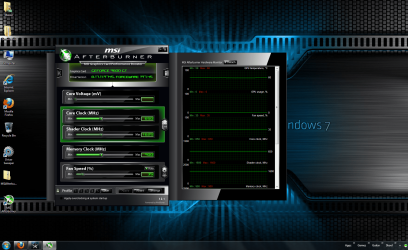
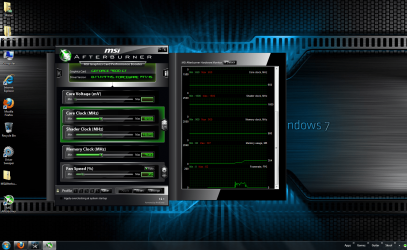
Ok, i uninstalled my graphics driver, ran driver sweeper in safe mode, rebooted, and installed the 197.45, but the problem remains. However, i think i just found what is causing it! i ran afterburn (very nice by the way, i can't believe i didn't know about it) and it says my GPU usage is 0%. i ran Call of Duty and it was still at 0.

Also, when i ran Driver Sweeper, there is an ATI Display driver in the list. Weird sense i have an nVidia card.
 

My Computer

Computer Manufacturer/Model Number
Self-Build
OS
Windows 7 Home Premium x64, Ubuntu Linux
CPU
Intel [email protected]
Motherboard
ASUS P5N-D nForce 750i SLI
Memory
8GB Patroit Gamer Series PC6400 DDR2
Graphics Card(s)
PNY GTX 470
Sound Card
Realtek HD Audio
Monitor(s) Displays
Acer X233H
Screen Resolution
1920x1080
Hard Drives
Western Digital 1TB
Western Digital 2TB
Corsair Neutron 120GB SSD
PSU
900 watt, efficient to 750 watts
Case
NZXT M59
Cooling
Ultra Chilltec Silver CPU Cooler, 120mm fan x2, 140mm fan x2
Keyboard
Razer Marauder (Starcraft 2)
Mouse
Razer Spectre (Starcraft 2)
Internet Speed
Cable (2-5Mb/s)
must be a glitch your GPU must have been doing something , have you been into your bios and set your PCIe slot as your primary display adapter? (your mobo doesnt have onboard graphics does it?)

what about your core and memory speeds did they shoot up to 3d speeds when you launched a game?

MSI afterburner is an app based on Riva Tuner it was developed for MSI by the guy who wrote Riva Tuner but its much easier to use so better for recommending. If you get into any major tweaking look into riva tuner and nHancer
 

My Computer

Computer type
PC/Desktop
Computer Manufacturer/Model Number
Custom
OS
Win 10 Home Premium 64 Bit
CPU
I7 5930K @ 4.5
Motherboard
Asus X99 s
Memory
16GB Kingston Hyper X Fury DDR4
Graphics Card(s)
EVGA 980ti SC + ACX 2.0
Sound Card
Onboard
Monitor(s) Displays
ROG Swift PG278Q
Screen Resolution
2560x1440
Hard Drives
Kingston Hyper X 250gb SSD
Samsung 2TB mechanical
PSU
Corsair RM 850
Case
NZXT H440 Red
Cooling
Corsair H100i GTX
Keyboard
Razer Reclusa
Mouse
Logitech G5 Gamer
Internet Speed
34mb
Antivirus
Eset Smart Security
Browser
Firefox
View attachment 75640Here are two pics of what afterburn says while running Call of Duty. One pic is the top half of the chart, the other is the bottom half. As you can see some things like the memory usage go up. you can also see that the GPU usage is at a constant 0%.
 

Attachments

  • Untitled.png
    Untitled.png
    1.5 MB · Views: 55
  • Untitled 2.png
    Untitled 2.png
    1.5 MB · Views: 23

My Computer

Computer Manufacturer/Model Number
Self-Build
OS
Windows 7 Home Premium x64, Ubuntu Linux
CPU
Intel [email protected]
Motherboard
ASUS P5N-D nForce 750i SLI
Memory
8GB Patroit Gamer Series PC6400 DDR2
Graphics Card(s)
PNY GTX 470
Sound Card
Realtek HD Audio
Monitor(s) Displays
Acer X233H
Screen Resolution
1920x1080
Hard Drives
Western Digital 1TB
Western Digital 2TB
Corsair Neutron 120GB SSD
PSU
900 watt, efficient to 750 watts
Case
NZXT M59
Cooling
Ultra Chilltec Silver CPU Cooler, 120mm fan x2, 140mm fan x2
Keyboard
Razer Marauder (Starcraft 2)
Mouse
Razer Spectre (Starcraft 2)
Internet Speed
Cable (2-5Mb/s)
its odd that bioshock a DX10 game runs ok but DX 9 games dont? did you use the DX update tool i linked too? did it install anything?

ill look into the 0% vidoe usage
 

My Computer

Computer type
PC/Desktop
Computer Manufacturer/Model Number
Custom
OS
Win 10 Home Premium 64 Bit
CPU
I7 5930K @ 4.5
Motherboard
Asus X99 s
Memory
16GB Kingston Hyper X Fury DDR4
Graphics Card(s)
EVGA 980ti SC + ACX 2.0
Sound Card
Onboard
Monitor(s) Displays
ROG Swift PG278Q
Screen Resolution
2560x1440
Hard Drives
Kingston Hyper X 250gb SSD
Samsung 2TB mechanical
PSU
Corsair RM 850
Case
NZXT H440 Red
Cooling
Corsair H100i GTX
Keyboard
Razer Reclusa
Mouse
Logitech G5 Gamer
Internet Speed
34mb
Antivirus
Eset Smart Security
Browser
Firefox
its odd that bioshock a DX10 game runs ok but DX 9 games dont? did you use the DX update tool i linked too? did it install anything?

ill look into the 0% vidoe usage


What's even more odd is bioshock runs fine in DX 10, but farcry 2 has the same problem that everything else has even if i run it in DX 10.

As for the Update tool, your link took me to a microsoft page that had bunch of DX 9 and 8 updates. i didn't see any update tool and i couldn't get the latest DX 9 to install. Could you post a link directly to the update tool?

Good hunting on 0% GPU usage.
 

My Computer

Computer Manufacturer/Model Number
Self-Build
OS
Windows 7 Home Premium x64, Ubuntu Linux
CPU
Intel [email protected]
Motherboard
ASUS P5N-D nForce 750i SLI
Memory
8GB Patroit Gamer Series PC6400 DDR2
Graphics Card(s)
PNY GTX 470
Sound Card
Realtek HD Audio
Monitor(s) Displays
Acer X233H
Screen Resolution
1920x1080
Hard Drives
Western Digital 1TB
Western Digital 2TB
Corsair Neutron 120GB SSD
PSU
900 watt, efficient to 750 watts
Case
NZXT M59
Cooling
Ultra Chilltec Silver CPU Cooler, 120mm fan x2, 140mm fan x2
Keyboard
Razer Marauder (Starcraft 2)
Mouse
Razer Spectre (Starcraft 2)
Internet Speed
Cable (2-5Mb/s)
Back
Top