Slow internet speed with wired and wireless connection

DillonH

New member
Local time
6:59 AM
Messages
16
Location
Illinois
I recently clean installed windows 7 on an ssd i bought for my custom built computer and after installing all the updates and every driver has even been updated to the latest, I still have slow internet speeds and that's with my ethernet and wirless adapter.

I have google just about everything and can't seem to find how to fix this, but some help would be every appreciated.

Also, I'm not sure which specs and info you need to know for this but just tell me what you need to know and I'll post it in the next reply.
 

My Computer My Computer

At a glance

Windows 7 Professional 64bitIntel i5-4690K16.0 GB RamNVIDIA GeForce GTX 970
Computer type
PC/Desktop
Computer Manufacturer/Model Number
Custom Build
OS
Windows 7 Professional 64bit
CPU
Intel i5-4690K
Motherboard
ASRock Z97 Extreme6
Memory
16.0 GB Ram
Graphics Card(s)
NVIDIA GeForce GTX 970
Hard Drives
500gb SSD 1T HDD
Antivirus
none
Browser
Chrome

My Computer My Computer

At a glance

Windows 10 Pro. 64/ version 1709 Windows 7 Pr...Intel i7-6800K @ 4.3Corsair Platinum 16 gig @2400EVGA GTX 1070 OC
Computer type
PC/Desktop
Computer Manufacturer/Model Number
Home made Desktop
OS
Windows 10 Pro. 64/ version 1709 Windows 7 Pro/64
CPU
Intel i7-6800K @ 4.3
Motherboard
ASUS X-99 Deluxe II
Memory
Corsair Platinum 16 gig @2400
Graphics Card(s)
EVGA GTX 1070 OC
Monitor(s) Displays
Asus 27" LED LCD/VE278Q
Screen Resolution
1920-1080 or 1280-720 HDMI
Hard Drives
INTEL SSD 730-240 Gb Sata 3.0/
PSU
EVGA Platium 1200W
Case
Phanteks Luxe Tempered Glass 8 fans/ one radiator
Cooling
XSPC/ Water Cooled CPU
Keyboard
Das 4 Professional
Mouse
Logitech M705/MX Anywhere 2-S
Internet Speed
100 mbits
Antivirus
Microsoft Security Essentials/ Malwarebytes Premium 3.0/ SAS
Browser
I.E. 11 default/Firefox/ ISP Time Warner Cable/Spectrum
Other Info
LG BluRay Burner/
Sound system-KLipsch-THX/
Icy Dock ssd Hot Swap bays.
I'm using Cable its through NewWave and the package is for 15mg and when I test it with my iphone through the wifi i get around 11mg download with it and at first my pc was getting around 1mg download ive since google things and messed with some stuff and its up to 5mg download and that's using ethernet
 

My Computer My Computer

At a glance

Windows 7 Professional 64bitIntel i5-4690K16.0 GB RamNVIDIA GeForce GTX 970
Computer type
PC/Desktop
Computer Manufacturer/Model Number
Custom Build
OS
Windows 7 Professional 64bit
CPU
Intel i5-4690K
Motherboard
ASRock Z97 Extreme6
Memory
16.0 GB Ram
Graphics Card(s)
NVIDIA GeForce GTX 970
Hard Drives
500gb SSD 1T HDD
Antivirus
none
Browser
Chrome
Hi Dillon,
open your network devices >> ethernet & wifi adapter >> Advanced
what are the settings.

Roy
 

My Computer My Computer

At a glance

W7 home premium 32bit/W7HP 64bit/w10 tp insid...E5300 dual core3gbNvidia Geforce 7100 Nforce 630i
Computer type
PC/Desktop
Computer Manufacturer/Model Number
medionl/Aspire 6930G/acer x55a
OS
W7 home premium 32bit/W7HP 64bit/w10 tp insider ring
CPU
E5300 dual core
Motherboard
medion MS7366
Memory
3gb
Graphics Card(s)
Nvidia Geforce 7100 Nforce 630i
Monitor(s) Displays
avixc
Internet Speed
n (isp resticted to 72)
Antivirus
mse/pands
Browser
palemoon
Other Info
Belkin Fd7050 n USB using Railink RT2870 drivers, more upto date
Can you tell me how to get to network devices? Or are you talking about network adapters in device manager?

Sorry if I'm sounding dumb
 

My Computer My Computer

At a glance

Windows 7 Professional 64bitIntel i5-4690K16.0 GB RamNVIDIA GeForce GTX 970
Computer type
PC/Desktop
Computer Manufacturer/Model Number
Custom Build
OS
Windows 7 Professional 64bit
CPU
Intel i5-4690K
Motherboard
ASRock Z97 Extreme6
Memory
16.0 GB Ram
Graphics Card(s)
NVIDIA GeForce GTX 970
Hard Drives
500gb SSD 1T HDD
Antivirus
none
Browser
Chrome
These are the settings on my Intel Ethernet Connection:

Gigabit Master Slave Mode
Interrupt Moderation
Jumbo Packet
Large Send Offload V2 (IPv4)
Large Send Offload V2 (IPv6)
Legacy Switch Compatibility Mode
Log Link State Event
Offloading Options
Performance Options
Priority & VLAN
Receive Side Scaling
Receive Side Scaling Queues
Wait For Link

I also purchased a Gigabyte GC-WB867D-I WiFi adapter and I just unhooked the power cord for it on my motherboard because I thought it might have been the cause for my slow internet speeds.

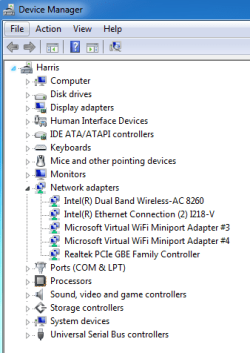
Here's a screen cap of my Device Manager
Device Manager.PNG
 

My Computer My Computer

At a glance

Windows 7 Professional 64bitIntel i5-4690K16.0 GB RamNVIDIA GeForce GTX 970
Computer type
PC/Desktop
Computer Manufacturer/Model Number
Custom Build
OS
Windows 7 Professional 64bit
CPU
Intel i5-4690K
Motherboard
ASRock Z97 Extreme6
Memory
16.0 GB Ram
Graphics Card(s)
NVIDIA GeForce GTX 970
Hard Drives
500gb SSD 1T HDD
Antivirus
none
Browser
Chrome
Internet speeds go back to normal when I'm in Safe Mode With Networking
 

My Computer My Computer

At a glance

Windows 7 Professional 64bitIntel i5-4690K16.0 GB RamNVIDIA GeForce GTX 970
Computer type
PC/Desktop
Computer Manufacturer/Model Number
Custom Build
OS
Windows 7 Professional 64bit
CPU
Intel i5-4690K
Motherboard
ASRock Z97 Extreme6
Memory
16.0 GB Ram
Graphics Card(s)
NVIDIA GeForce GTX 970
Hard Drives
500gb SSD 1T HDD
Antivirus
none
Browser
Chrome
Still could use some help with this
 

My Computer My Computer

At a glance

Windows 7 Professional 64bitIntel i5-4690K16.0 GB RamNVIDIA GeForce GTX 970
Computer type
PC/Desktop
Computer Manufacturer/Model Number
Custom Build
OS
Windows 7 Professional 64bit
CPU
Intel i5-4690K
Motherboard
ASRock Z97 Extreme6
Memory
16.0 GB Ram
Graphics Card(s)
NVIDIA GeForce GTX 970
Hard Drives
500gb SSD 1T HDD
Antivirus
none
Browser
Chrome
Wireless Settings Setup:

Router settings:
Setup; Wireless; Settings; Manual:
802.11 Mode : 802.11 N only
Wireless Channel : 9
Channel Width : Auto 20/40MHz
Encryption: WPA2/AES
Advanced
QoS Engine:
Disable everything - This really slow transfer speeds down!!
Firewall Settings:
Enable SPI: Unchecked
Advanced Wireless:
WLAN Partition: Checked
WMM Enable: Checked
Short GI: Unchecked
Extra Wireless: Unchecked
Save settings reboot router!!!

Wireless Card Settings:
Channel Width 2,4/5Ghz: Auto
AD Hoc power management: Disabled
Ad Hoc QoS mode: WMM Enabled
Fat Channel Intolerant: Enabled
Mixed mode protection: CTS to self enabled
Throughput enhancement: Enabled
 

My Computer My Computer

At a glance

windows 7 64 bit1.8 GHz8gb
Computer type
Laptop
Computer Manufacturer/Model Number
Dell
OS
windows 7 64 bit
CPU
1.8 GHz
Memory
8gb
Hard Drives
1 TB
Antivirus
Avast
Browser
Firefox
Back
Top