Slow transfer rate on Wifi Lan

Mercador

New member
Local time
8:15 AM
Messages
6
Hey guys,

Maybe someone got this issue as well; I was transfering data between my old (vista 32) and my new computer (win 7 64 7100) and I got a transfer rate of 1mb/sec.

All my house is wireless and I'm used to do 5-6mb/sec between my old PC and my laptop (win XP Media Center).

I got WMP54G on the new PC and WMP54GS (S for speedbooster) on my old PC. WRT54GS for the router.

If you have any ideas / tips :)

Thanks!
 

My Computer My Computer

At a glance

Windows Vista
OS
Windows Vista
Bumpity
 

My Computer My Computer

At a glance

Windows Vista
OS
Windows Vista
Same Problems Too

I have the same problem, WiFi transfers between a PC and a laptop both running Win 7 RTM (legal) are slow usually lower than 1 Mbps, anyone else having this issue and any ideas on how to fix it?
 

My Computer My Computer

At a glance

Windows 7
OS
Windows 7
I have the same problem, WiFi transfers between a PC and a laptop both running Win 7 RTM (legal) are slow usually lower than 1 Mbps, anyone else having this issue and any ideas on how to fix it?

Couple of things to try. First disable IPv6 support in newtork and sharing. Then turn off the RDC (remote desktop compression).

Whats the network setup like? router?, cable modem?, etc

Ken
 

My Computer My Computer

At a glance

Win 8 Release candidate 8400[email protected]4 gigsNvidia 9600M
Computer Manufacturer/Model Number
HP Pavillion dv-7 1005 Tx
OS
Win 8 Release candidate 8400
CPU
[email protected]
Memory
4 gigs
Graphics Card(s)
Nvidia 9600M
Sound Card
HD built-in
Monitor(s) Displays
17" Wxga
Screen Resolution
1440x900
Cooling
none
Internet Speed
45Mb down 5Mb up
You have to remember wireless is nothing like wired. Those bits are freely floating thought the air and are a lot more vulnerable to interference. Large continues network usage will be a lot slower then random burst. The slower the information goes the easier it is for the communicating partners to get the whole file uncorrupted.

There is also other traffic to consider, multiple data streams floating though the air can mix about and collide. You will never get substantial high-speed connections on large/long transmissions.

BTW leaving Remote Differential Compression on really is not going to effect this. It in fact can be very help when syncing files from multiple computers, RDC will only send the files that have changed. It works with DFS, and Offline Files. But it does nothing when its two computer sharing files though explorer, etc.

It might take longer, but it will get the file there with less corruption and resending of packets. In fact it might go faster if it has to only resend a few packets versus 50% of the packets normally lost.
 

My Computer My Computer

At a glance

Windows 10 Pro (x64)Intel Core i7-3930K (3.2GHz - 4.5GHz)4x Samsung 4GB PC3-12800 DDR3 (16GB 1600MHz)Nvidia Geforce GTX 690
Computer type
PC/Desktop
Computer Manufacturer/Model Number
Alienware Aurora ALX R4
OS
Windows 10 Pro (x64)
CPU
Intel Core i7-3930K (3.2GHz - 4.5GHz)
Motherboard
Alienware Aurora-R4 x79
Memory
4x Samsung 4GB PC3-12800 DDR3 (16GB 1600MHz)
Graphics Card(s)
Nvidia Geforce GTX 690
Sound Card
SteelSeries Siberia Elite
Monitor(s) Displays
Dell UltraSharp U3011
Screen Resolution
2560x1600
Hard Drives
Samsung 850 Pro 256 GB, Seagate 1TB Desktop Hybrid HDD, 2x Western Digital 4TB Green HDD
PSU
875W Some Dell PSU <.<
Case
Alienware Aurora ALX
Cooling
Custom Liquid Cooling (EK CPU & GPU blocks) dual EK 480RAD
Keyboard
Logitech G710+ Mechanical
Mouse
Logitech G700s
Internet Speed
Verizon Fios (50 mbps average)
Other Info
Server: Intel NUC D54250WYK: i5-4250U, 16GB, 256 GB mSATA, Windows Server 2012 R2
No Improvement

I tried that and it did not help much, my transfer speeds are about 625 KBps or about 5Mbps in the previous post I meant for the b to be capital as in bytes.

My network consists of a WRT110 Linksys wireless router and a wired/wireless desktop and laptop. All machines are running windows 7.
 

My Computer My Computer

At a glance

Windows 7
OS
Windows 7
Hi, I am so frustrated. I am running a lenovo t60 with Win7 x86. The wireless transfer rate is so bad. When trying to copy files from another pc I am getting transfer rate of 1mb or less/sec. When I had xp on this I had no issue. I did a clean install too. I have ddWRT linksys router. The wifi is connnected at 54mbps . I can't figure it out..tried everything....

Has anyone having this same issue able to find any solution?

Thanks.
 

My Computer My Computer

At a glance

win 7
OS
win 7
My solution

I figured out my solution embarrassingly enough, my slow rate was due to the fact that both the desktop and the laptop were connected to the wifi, when I would connect one or the other via Ethernet to the router, my rates would jump back up.

one would think that you would only lose half the bandwidth with both devices on wifi, instead It drops way low. This might be an issue with Win7, I am not sure, I always had one device connected to the router when I had xp/vista.

Again, I am not sure this will solve your problem this is only what I figured out was the issue with mine.
 

My Computer My Computer

At a glance

Windows 7
OS
Windows 7
...one would think that you would only lose half the bandwidth with both devices on wifi, instead It drops way low. This might be an issue with Win7, I am not sure, I always had one device connected to the router when I had xp/vista.

Again, I am not sure this will solve your problem this is only what I figured out was the issue with mine.

It depend on where they are in relation to the wireless hub and to each other. I touched on this in my post above, wireless has bits flowing freeform though the air where interferences are abundant.
 

My Computer My Computer

At a glance

Windows 10 Pro (x64)Intel Core i7-3930K (3.2GHz - 4.5GHz)4x Samsung 4GB PC3-12800 DDR3 (16GB 1600MHz)Nvidia Geforce GTX 690
Computer type
PC/Desktop
Computer Manufacturer/Model Number
Alienware Aurora ALX R4
OS
Windows 10 Pro (x64)
CPU
Intel Core i7-3930K (3.2GHz - 4.5GHz)
Motherboard
Alienware Aurora-R4 x79
Memory
4x Samsung 4GB PC3-12800 DDR3 (16GB 1600MHz)
Graphics Card(s)
Nvidia Geforce GTX 690
Sound Card
SteelSeries Siberia Elite
Monitor(s) Displays
Dell UltraSharp U3011
Screen Resolution
2560x1600
Hard Drives
Samsung 850 Pro 256 GB, Seagate 1TB Desktop Hybrid HDD, 2x Western Digital 4TB Green HDD
PSU
875W Some Dell PSU <.<
Case
Alienware Aurora ALX
Cooling
Custom Liquid Cooling (EK CPU & GPU blocks) dual EK 480RAD
Keyboard
Logitech G710+ Mechanical
Mouse
Logitech G700s
Internet Speed
Verizon Fios (50 mbps average)
Other Info
Server: Intel NUC D54250WYK: i5-4250U, 16GB, 256 GB mSATA, Windows Server 2012 R2
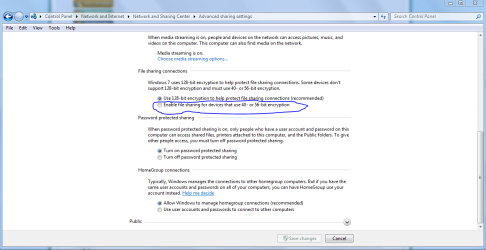
I subscribe to a tech letter called 'Windows Secrets' and in this week's edition one of the editors wrote about a test he tried as he had this problem occasionally and knew lots of people who also suffered from slowdowns on their wifi transmissions. He turned off the Windows HomeGroup (which you'll find in the Networking section of your Control Panel and is enabled by default) and slowed down the encryption from 128 bits to 56. Instant fix! In other words he just reverted to the classic network group and what is the standard level of encryption for XP users and that has solved the problem consistently for him. Highly recommend Windows Secrets for Windows users, by the way - I've learnt all kinds of useful tips over the years and I'm not particularly techie. Anyhow, spread the word and hopefully MS will stop HomeGroup being such a resource hog in some future Service Pack!
 

My Computer My Computer

At a glance

Windows 7 Pro x64
OS
Windows 7 Pro x64

My Computer My Computer

At a glance

MS Windows 7 Ultimate SP1 64-bitAMD A10-4600M6.00 GB Dual-Channel DDR3 @ 798MHz (11-11-12-28)AMD Radeon HD 7660G
Computer Manufacturer/Model Number
Toshiba Satellite S875D-S7239 laptop
OS
MS Windows 7 Ultimate SP1 64-bit
CPU
AMD A10-4600M
Motherboard
AMD Pumori (Socket FT1)
Memory
6.00 GB Dual-Channel DDR3 @ 798MHz (11-11-12-28)
Graphics Card(s)
AMD Radeon HD 7660G
Sound Card
High Definition Audio Device
Monitor(s) Displays
Generic PnP Monitor (1600x900@60Hz)
Screen Resolution
1600x900@60Hz
Hard Drives
SSD 119GB Corsair CSSD-V128GB2 ATA Device
Keyboard
Standard PS/2 Keyboard
Mouse
HP Wireless Optical Mobile Mouse Model FHA-3410
Internet Speed
What the local pub, local coffee shop offers.
Other Info
Optical Drive:MATSHITA BD-CMB UJ160B ATA Device


Also have an Asus ha1002xp netbook with Win 7 Ultimate installed.
Why not just keep using Homegroups and change to 56 bit encryption? Although it's not as secure it works either way. As for these so called slow downs, I have not seem them myself and I've tested my wireless through two walls and 50 feet accross the yard and still get 15Mbps.
 

Attachments

  • change encryption.PNG
    change encryption.PNG
    37.4 KB · Views: 1,913

My Computer My Computer

At a glance

Windows 7 Ult, Windows 8.1 Pro,Q9650-4.275GHz, E8600 4.5GHz, E6750-3.8GHzG.Skill PC2 9600 1200Mhz 5 5 5 15 2TGTX480
Computer type
PC/Desktop
Computer Manufacturer/Model Number
Home built
OS
Windows 7 Ult, Windows 8.1 Pro,
CPU
Q9650-4.275GHz, E8600 4.5GHz, E6750-3.8GHz
Motherboard
Evga 780i FTW
Memory
G.Skill PC2 9600 1200Mhz 5 5 5 15 2T
Graphics Card(s)
GTX480
Sound Card
Asus Xonar D2
Monitor(s) Displays
HannsG
Screen Resolution
1680X1050
Hard Drives
GSkill Phoenix Pro 120GB SSD
PSU
ThermalTake Toughpower 1000Watt modular
Case
ThermalTake XaserV
Cooling
Xigmatek S1283
Keyboard
Logitech G15
Mouse
Logitech G9
Internet Speed
T1
You can. For a complete answer to your question, I defer to the aforementioned link.
 

My Computer My Computer

At a glance

MS Windows 7 Ultimate SP1 64-bitAMD A10-4600M6.00 GB Dual-Channel DDR3 @ 798MHz (11-11-12-28)AMD Radeon HD 7660G
Computer Manufacturer/Model Number
Toshiba Satellite S875D-S7239 laptop
OS
MS Windows 7 Ultimate SP1 64-bit
CPU
AMD A10-4600M
Motherboard
AMD Pumori (Socket FT1)
Memory
6.00 GB Dual-Channel DDR3 @ 798MHz (11-11-12-28)
Graphics Card(s)
AMD Radeon HD 7660G
Sound Card
High Definition Audio Device
Monitor(s) Displays
Generic PnP Monitor (1600x900@60Hz)
Screen Resolution
1600x900@60Hz
Hard Drives
SSD 119GB Corsair CSSD-V128GB2 ATA Device
Keyboard
Standard PS/2 Keyboard
Mouse
HP Wireless Optical Mobile Mouse Model FHA-3410
Internet Speed
What the local pub, local coffee shop offers.
Other Info
Optical Drive:MATSHITA BD-CMB UJ160B ATA Device


Also have an Asus ha1002xp netbook with Win 7 Ultimate installed.
Oh I read the link karl, the problem is that he disabled Homegroups instead of just switching to 56 bit encryption then he blamed Homegroups for the slowdown rather than just the encryption which is kind of lame considering that it's a well know that using any type of encryption tends to slow down file transfers.

Homegroups wasn't made to move files anyway, it was made to have a collection of all your pictures videos that reside on different drives all in the same place. Moving large files always works better using the standard Workgroup.
 

My Computer My Computer

At a glance

Windows 7 Ult, Windows 8.1 Pro,Q9650-4.275GHz, E8600 4.5GHz, E6750-3.8GHzG.Skill PC2 9600 1200Mhz 5 5 5 15 2TGTX480
Computer type
PC/Desktop
Computer Manufacturer/Model Number
Home built
OS
Windows 7 Ult, Windows 8.1 Pro,
CPU
Q9650-4.275GHz, E8600 4.5GHz, E6750-3.8GHz
Motherboard
Evga 780i FTW
Memory
G.Skill PC2 9600 1200Mhz 5 5 5 15 2T
Graphics Card(s)
GTX480
Sound Card
Asus Xonar D2
Monitor(s) Displays
HannsG
Screen Resolution
1680X1050
Hard Drives
GSkill Phoenix Pro 120GB SSD
PSU
ThermalTake Toughpower 1000Watt modular
Case
ThermalTake XaserV
Cooling
Xigmatek S1283
Keyboard
Logitech G15
Mouse
Logitech G9
Internet Speed
T1
Maybe a reread of the article, in detail, will bring you to another conclusion regarding his conclusions.
 

My Computer My Computer

At a glance

MS Windows 7 Ultimate SP1 64-bitAMD A10-4600M6.00 GB Dual-Channel DDR3 @ 798MHz (11-11-12-28)AMD Radeon HD 7660G
Computer Manufacturer/Model Number
Toshiba Satellite S875D-S7239 laptop
OS
MS Windows 7 Ultimate SP1 64-bit
CPU
AMD A10-4600M
Motherboard
AMD Pumori (Socket FT1)
Memory
6.00 GB Dual-Channel DDR3 @ 798MHz (11-11-12-28)
Graphics Card(s)
AMD Radeon HD 7660G
Sound Card
High Definition Audio Device
Monitor(s) Displays
Generic PnP Monitor (1600x900@60Hz)
Screen Resolution
1600x900@60Hz
Hard Drives
SSD 119GB Corsair CSSD-V128GB2 ATA Device
Keyboard
Standard PS/2 Keyboard
Mouse
HP Wireless Optical Mobile Mouse Model FHA-3410
Internet Speed
What the local pub, local coffee shop offers.
Other Info
Optical Drive:MATSHITA BD-CMB UJ160B ATA Device


Also have an Asus ha1002xp netbook with Win 7 Ultimate installed.
Sorry but I flatly to not agree with anything that guy said. Read what I said and you might eventually understand.

And I have some news for anyone who believes that one adjustment will make your WLAN go from very slow to very fast...It ain't gunna work. ;)
 

My Computer My Computer

At a glance

Windows 7 Ult, Windows 8.1 Pro,Q9650-4.275GHz, E8600 4.5GHz, E6750-3.8GHzG.Skill PC2 9600 1200Mhz 5 5 5 15 2TGTX480
Computer type
PC/Desktop
Computer Manufacturer/Model Number
Home built
OS
Windows 7 Ult, Windows 8.1 Pro,
CPU
Q9650-4.275GHz, E8600 4.5GHz, E6750-3.8GHz
Motherboard
Evga 780i FTW
Memory
G.Skill PC2 9600 1200Mhz 5 5 5 15 2T
Graphics Card(s)
GTX480
Sound Card
Asus Xonar D2
Monitor(s) Displays
HannsG
Screen Resolution
1680X1050
Hard Drives
GSkill Phoenix Pro 120GB SSD
PSU
ThermalTake Toughpower 1000Watt modular
Case
ThermalTake XaserV
Cooling
Xigmatek S1283
Keyboard
Logitech G15
Mouse
Logitech G9
Internet Speed
T1
Worked for me....went from 200kB/s to 2.3MB/s over wifi by disabling homegroups and lowering encryption.

sweet.
 

My Computer My Computer

At a glance

7 home 32
OS
7 home 32
Back
Top