Slow transfer speed to external USB Hard disk?

jonnyremembered

New member
Local time
12:32 PM
Messages
3
Hi

Im getting really slow transfer speeds to external usb hard disk.
Transfering a big file it starts off quite quick and gets up to 5% or so quite quickly.
Then it starts to slow down until it settles at around 5MB/s

Im at a loss i was expecting around 40MB/s maybe on USB 2 ?

My specs are (taken from CPUID)
Gigabyte GA-MA780G-UD3H motherboard
8GB DD2 4-4-4-12 @401Mhz
AMD Phenom II x4 940 @ 3013Mhz

Im at a loss. Is it a driver issue? When connected it shows under "Universal Serial Bus Controllers" as "USB Mass Storage Device"

any ideas please?
 

My Computer My Computer

OS
Windows 7 Ultimate x64
For normal external USB 2 HDD I might expect ~30MB/s for a sequential file transfer.
What type of USB HDD are you using?

You could download CrystalDiskMark and post the performance figures.
Download Center - Crystal Dew World

Running the test on another HDD as well would be useful if you can get your hands on one. Might indicate a drive specific issue.
 

My Computer My Computer

Computer type
PC/Desktop
Computer Manufacturer/Model Number
Own build
OS
Windows 7x64 Home Premium SP1
CPU
Intel i7 2600k
Motherboard
ASUS P8Z68 Deluxe
Memory
G.Skill Ripjaws (DDR3-1600) 2x4GB
Graphics Card(s)
Nvidia GeForce GTS 450; Intel HD Graphics 3000(GT2+)
Monitor(s) Displays
Dell Ultrasharp IPS panel U2311H, Samsung SyncMaster P2350
Screen Resolution
1920x1080
Hard Drives
Samsung 850 Pro SSD 256GB, Samsung SSD 840 120GB, Seagates 1TB Barracuda ST31000528AS x2
PSU
Seasonic M12II 520W
Case
Lian Li Lancool PC-K60
Cooling
Case: 1x120mm, 3x140mm CPU: Hyper 212+
Keyboard
Logitech MK520 (wireless)
Mouse
Logitech MK520
Internet Speed
6-7 Mbps
Antivirus
Norton Security Premium, Malwarebytes on 2 (MSE on 3rd PC)
Browser
FireFox
Other Info
Audio: Logitech Z523 2.1
Did you enable "write caching" - in Device Manager > Properties of the disk > Policies button
 

My Computer My Computer

Computer Manufacturer/Model Number
HP, Dell, Gateway, Toshiba - 4 laptops and 2 desktops
OS
Vista, Windows7, Mint Mate, Zorin, Windows 8
CPU
from 1.6GHz Duo to i7
Monitor(s) Displays
2x HP w2207
Hard Drives
5x HDD, 7x SSD, 12x Externals
Keyboard
with trackball - no mices
Mouse
Trackball mice
Internet Speed
DSL 6000
Here's some 3rd party software that can help you:

TeraCopy - a freeware file copy utility which can replace Windows’ own copy handler; very stable and provides much faster file transfers.

FastCopy – excellent and generally thought to be better/faster than TeraCopy

(For a comparison between the two, see: Windows Ranks Third in File Transfer Tests - Softpedia)
 

My Computer My Computer

Computer Manufacturer/Model Number
HP Pavillion dv5t (generation 1)
OS
Vista 64 bit and 32 bit (SP2)
CPU
Intel(R) Core(TM)2 Duo Processor T9400 (2.53 GHz
Memory
4GB DDR2 System Memory (2 Dimm)
Graphics Card(s)
512 MB NVIDIA GeForce 9600M GT
Monitor(s) Displays
15.4" diagonal WSXGA+ High-Definition HP BrightView Widescre
Screen Resolution
1680 x 1050
Hard Drives
320GB 5400RPM SATA Hard Drive with HP ProtectSmart Hard Drive Protection
Keyboard
Built-in HP
Mouse
Built in - Synaptics TouchPad V6.5 on PS/2 Port
Internet Speed
Max
Other Info
~ Intel Next-Gen Wireless-N Mini-card w/Bluetooth ~ Blu-Ray ROM DVD+/-R/RW ~ Integ. HDTV Hybrid Tuner ~ 12 Cell Battery ~ MS Office (Home Premium) 2007 ~
Irrespective of your final choice of copy software, a standard "Windows" sequential file transfer should not run at 5MB/s to a USB connected HDD.
I would sort out the root cause of your problem first.

Note: Transfer rates to a USB flash drive/stick is normally slow.
 

My Computer My Computer

Computer type
PC/Desktop
Computer Manufacturer/Model Number
Own build
OS
Windows 7x64 Home Premium SP1
CPU
Intel i7 2600k
Motherboard
ASUS P8Z68 Deluxe
Memory
G.Skill Ripjaws (DDR3-1600) 2x4GB
Graphics Card(s)
Nvidia GeForce GTS 450; Intel HD Graphics 3000(GT2+)
Monitor(s) Displays
Dell Ultrasharp IPS panel U2311H, Samsung SyncMaster P2350
Screen Resolution
1920x1080
Hard Drives
Samsung 850 Pro SSD 256GB, Samsung SSD 840 120GB, Seagates 1TB Barracuda ST31000528AS x2
PSU
Seasonic M12II 520W
Case
Lian Li Lancool PC-K60
Cooling
Case: 1x120mm, 3x140mm CPU: Hyper 212+
Keyboard
Logitech MK520 (wireless)
Mouse
Logitech MK520
Internet Speed
6-7 Mbps
Antivirus
Norton Security Premium, Malwarebytes on 2 (MSE on 3rd PC)
Browser
FireFox
Other Info
Audio: Logitech Z523 2.1
Hi,

thanks for the replys

yes, write caching is selected for the drive under device manager "better performance"

the drive is a Western Digital My Passport 500GB


crystaldiskmark gives the following for the drive:-
-----------------------------------------------------------------------
CrystalDiskMark 3.0.1 x64 (C) 2007-2010 hiyohiyo
Crystal Dew World : Crystal Dew World
-----------------------------------------------------------------------
* MB/s = 1,000,000 byte/s [SATA/300 = 300,000,000 byte/s]

Sequential Read : 26.723 MB/s
Sequential Write : 5.398 MB/s
Random Read 512KB : 18.373 MB/s
Random Write 512KB : 5.433 MB/s
Random Read 4KB (QD=1) : 0.482 MB/s [ 117.7 IOPS]
Random Write 4KB (QD=1) : 0.388 MB/s [ 94.8 IOPS]
Random Read 4KB (QD=32) : 0.526 MB/s [ 128.5 IOPS]
Random Write 4KB (QD=32) : 0.433 MB/s [ 105.6 IOPS]

Test : 1000 MB [H: 43.8% (193.5/441.6 GB)] (x1)
Date : 2011/06/08 19:38:55
OS : Windows 7 Ultimate Edition [6.1 Build 7600] (x64)

I only have one other usb hdd i can try and thats also a My Passport but its a 300GB i think, same test ran on crystaldisk gives:-
-----------------------------------------------------------------------
CrystalDiskMark 3.0.1 x64 (C) 2007-2010 hiyohiyo
Crystal Dew World : Crystal Dew World
-----------------------------------------------------------------------
* MB/s = 1,000,000 byte/s [SATA/300 = 300,000,000 byte/s]

Sequential Read : 26.732 MB/s
Sequential Write : 24.482 MB/s
Random Read 512KB : 18.179 MB/s
Random Write 512KB : 23.046 MB/s
Random Read 4KB (QD=1) : 0.441 MB/s [ 107.6 IOPS]
Random Write 4KB (QD=1) : 0.860 MB/s [ 210.1 IOPS]
Random Read 4KB (QD=32) : 0.515 MB/s [ 125.8 IOPS]
Random Write 4KB (QD=32) : 0.876 MB/s [ 213.8 IOPS]

Test : 1000 MB [H: 0.3% (0.1/32.2 GB)] (x1)
Date : 2011/06/08 19:47:49
OS : Windows 7 Ultimate Edition [6.1 Build 7600] (x64)


Different results? Is the drive faulty somehow?

EDIT: Just noticed the drive giving better performance has write caching disabled which seems the wrong way round to me
EDIT AGAIN: Disabled write caching on the slow drive as an experiment but it made it slower
 

My Computer My Computer

OS
Windows 7 Ultimate x64
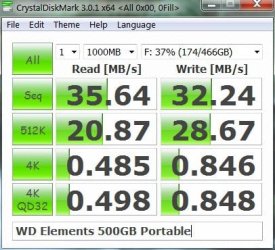
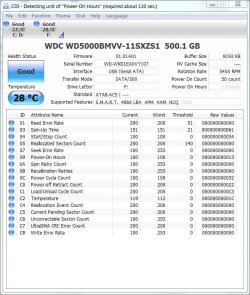
Here are my similar results. Write caching disabled (for quick removal).
WDtest-DM-9_6_11.jpg
WDtest-DI-9_6_11.jpg

Your drive isn't near full. I always choose elements drives with the basic firmware requirements. Unless you have some firmware upgrade issue specific to your drive I'd be returning the drive for replacement if possible.

EDIT: I am using USB 2. From my experience expect some variation in sequential speed tests (~+-10%).
 
Last edited:

My Computer My Computer

Computer type
PC/Desktop
Computer Manufacturer/Model Number
Own build
OS
Windows 7x64 Home Premium SP1
CPU
Intel i7 2600k
Motherboard
ASUS P8Z68 Deluxe
Memory
G.Skill Ripjaws (DDR3-1600) 2x4GB
Graphics Card(s)
Nvidia GeForce GTS 450; Intel HD Graphics 3000(GT2+)
Monitor(s) Displays
Dell Ultrasharp IPS panel U2311H, Samsung SyncMaster P2350
Screen Resolution
1920x1080
Hard Drives
Samsung 850 Pro SSD 256GB, Samsung SSD 840 120GB, Seagates 1TB Barracuda ST31000528AS x2
PSU
Seasonic M12II 520W
Case
Lian Li Lancool PC-K60
Cooling
Case: 1x120mm, 3x140mm CPU: Hyper 212+
Keyboard
Logitech MK520 (wireless)
Mouse
Logitech MK520
Internet Speed
6-7 Mbps
Antivirus
Norton Security Premium, Malwarebytes on 2 (MSE on 3rd PC)
Browser
FireFox
Other Info
Audio: Logitech Z523 2.1
ok, thanks, suspected as much. i think ive had it for over 12 months now so ill have to live with it i guess
 

My Computer My Computer

OS
Windows 7 Ultimate x64

My Computer My Computer

Computer type
PC/Desktop
Computer Manufacturer/Model Number
Own build
OS
Windows 7x64 Home Premium SP1
CPU
Intel i7 2600k
Motherboard
ASUS P8Z68 Deluxe
Memory
G.Skill Ripjaws (DDR3-1600) 2x4GB
Graphics Card(s)
Nvidia GeForce GTS 450; Intel HD Graphics 3000(GT2+)
Monitor(s) Displays
Dell Ultrasharp IPS panel U2311H, Samsung SyncMaster P2350
Screen Resolution
1920x1080
Hard Drives
Samsung 850 Pro SSD 256GB, Samsung SSD 840 120GB, Seagates 1TB Barracuda ST31000528AS x2
PSU
Seasonic M12II 520W
Case
Lian Li Lancool PC-K60
Cooling
Case: 1x120mm, 3x140mm CPU: Hyper 212+
Keyboard
Logitech MK520 (wireless)
Mouse
Logitech MK520
Internet Speed
6-7 Mbps
Antivirus
Norton Security Premium, Malwarebytes on 2 (MSE on 3rd PC)
Browser
FireFox
Other Info
Audio: Logitech Z523 2.1
ok, thanks, suspected as much. i think ive had it for over 12 months now so ill have to live with it i guess

Why don't you try the 3rd party apps I suggested:

TeraCopy - a freeware file copy utility which can replace Windows’ own copy handler; very stable and provides much faster file transfers.

FastCopy – excellent and generally thought to be better/faster than TeraCopy

(For a comparison between the two, see: Windows Ranks Third in File Transfer Tests - Softpedia)
 

My Computer My Computer

Computer Manufacturer/Model Number
HP Pavillion dv5t (generation 1)
OS
Vista 64 bit and 32 bit (SP2)
CPU
Intel(R) Core(TM)2 Duo Processor T9400 (2.53 GHz
Memory
4GB DDR2 System Memory (2 Dimm)
Graphics Card(s)
512 MB NVIDIA GeForce 9600M GT
Monitor(s) Displays
15.4" diagonal WSXGA+ High-Definition HP BrightView Widescre
Screen Resolution
1680 x 1050
Hard Drives
320GB 5400RPM SATA Hard Drive with HP ProtectSmart Hard Drive Protection
Keyboard
Built-in HP
Mouse
Built in - Synaptics TouchPad V6.5 on PS/2 Port
Internet Speed
Max
Other Info
~ Intel Next-Gen Wireless-N Mini-card w/Bluetooth ~ Blu-Ray ROM DVD+/-R/RW ~ Integ. HDTV Hybrid Tuner ~ 12 Cell Battery ~ MS Office (Home Premium) 2007 ~
Back
Top