
Solved Slowdown

shippou

New member
Member
Local time
11:53 AM
Messages
93
The slowdown happens for 3 seconds and makes the action stop for the duration of the 3 seconds

There are 3 actions I am doing regulerly that activates slowdown upon starting them:
1) Resuming play on windows media player
2) Double clicking "my computer"
3) Using "save as"

Before formatting my computer this did not happen, and I have an SSD so why is my computer experiencing slowdowns?
 

My Computer

Computer type
PC/Desktop
OS
windows 7 ultimate x64

My Computer

Computer type
PC/Desktop
Computer Manufacturer/Model Number
Self built custom
OS
64-bit Windows 11 Pro for Workstations
CPU
Intel i7-8700K OC'd to 5 GHz
Motherboard
ASUS ROG Maximus XI Formula Z390
Memory
64 GB (4x16GB) G.SKILL TridentZ RGB DDR4 3600 MHz
Graphics Card(s)
ASUS ROG-STRIX-GTX1080TI-O11G-GAMING
Sound Card
Integrated
Monitor(s) Displays
2 x Samsung Odyssey G7 27"
Screen Resolution
2560x1440
Hard Drives
1TB Samsung 990 PRO M.2,
4TB Samsung 990 PRO PRO M.2,
TerraMaster F8 SSD Plus NAS
PSU
Seasonic Prime Titanium 850W
Case
Thermaltake Core P3
Cooling
Corsair Hydro H115i
Keyboard
Logitech wireless K800
Mouse
Logitech MX Master 4
Internet Speed
2 Gb/s Download and 100 Mb/s Upload
Antivirus
Malwarebyte Anti-Malware Premium
Browser
Google Chrome
Other Info
Logitech Z625 speaker system,
Logitech BRIO 4K Pro webcam,
HP Color LaserJet Pro MFP M477fdn,
APC SMART-UPS RT 1000 XL - SURT1000XLI,
Galaxy S23 Plus phone
I don't understand how to perform the 3rd step.

"3. Establish a Clean Boot by unchecking everything in msconfig>Startup except AV: Startup Programs - Change. After reboot enter msconfig>Services, check the box to "Hide All MS Services," repeat above steps. Check back periodically that nothing has written itself in to either list, turn it off in its Program Preferences or Uninstall it. A program can wait to start until you click on it. Freeloaders slow startup, can be a drag on CPU/RAM, cause issues and spy on you. If you have a question about an item google to find out what it does."

Hello Shippou,

That short delay almost seems like the time it takes for the hard drives to spin back up after being turned off. Double check using the tutorial below to see if you have the Turn off hard disk after set to something other than Never or a longer amount of time you would like instead.

http://www.sevenforums.com/tutorials/140592-hard-drive-turn-off-hard-disk-after-idle-never.html

Hope this helps, :)
Shawn
It was set to 20 minutes, I have changes it to never as of this moment

Edit: The slowdown still happens even after changing the settings
 
Last edited:

My Computer

Computer type
PC/Desktop
OS
windows 7 ultimate x64

My Computer

Computer type
PC/Desktop
Computer Manufacturer/Model Number
Self built custom
OS
64-bit Windows 11 Pro for Workstations
CPU
Intel i7-8700K OC'd to 5 GHz
Motherboard
ASUS ROG Maximus XI Formula Z390
Memory
64 GB (4x16GB) G.SKILL TridentZ RGB DDR4 3600 MHz
Graphics Card(s)
ASUS ROG-STRIX-GTX1080TI-O11G-GAMING
Sound Card
Integrated
Monitor(s) Displays
2 x Samsung Odyssey G7 27"
Screen Resolution
2560x1440
Hard Drives
1TB Samsung 990 PRO M.2,
4TB Samsung 990 PRO PRO M.2,
TerraMaster F8 SSD Plus NAS
PSU
Seasonic Prime Titanium 850W
Case
Thermaltake Core P3
Cooling
Corsair Hydro H115i
Keyboard
Logitech wireless K800
Mouse
Logitech MX Master 4
Internet Speed
2 Gb/s Download and 100 Mb/s Upload
Antivirus
Malwarebyte Anti-Malware Premium
Browser
Google Chrome
Other Info
Logitech Z625 speaker system,
Logitech BRIO 4K Pro webcam,
HP Color LaserJet Pro MFP M477fdn,
APC SMART-UPS RT 1000 XL - SURT1000XLI,
Galaxy S23 Plus phone
searching msconfig comes up with nothing
 

My Computer

Computer type
PC/Desktop
OS
windows 7 ultimate x64

My Computer

Computer type
PC/Desktop
Computer Manufacturer/Model Number
Self built custom
OS
64-bit Windows 11 Pro for Workstations
CPU
Intel i7-8700K OC'd to 5 GHz
Motherboard
ASUS ROG Maximus XI Formula Z390
Memory
64 GB (4x16GB) G.SKILL TridentZ RGB DDR4 3600 MHz
Graphics Card(s)
ASUS ROG-STRIX-GTX1080TI-O11G-GAMING
Sound Card
Integrated
Monitor(s) Displays
2 x Samsung Odyssey G7 27"
Screen Resolution
2560x1440
Hard Drives
1TB Samsung 990 PRO M.2,
4TB Samsung 990 PRO PRO M.2,
TerraMaster F8 SSD Plus NAS
PSU
Seasonic Prime Titanium 850W
Case
Thermaltake Core P3
Cooling
Corsair Hydro H115i
Keyboard
Logitech wireless K800
Mouse
Logitech MX Master 4
Internet Speed
2 Gb/s Download and 100 Mb/s Upload
Antivirus
Malwarebyte Anti-Malware Premium
Browser
Google Chrome
Other Info
Logitech Z625 speaker system,
Logitech BRIO 4K Pro webcam,
HP Color LaserJet Pro MFP M477fdn,
APC SMART-UPS RT 1000 XL - SURT1000XLI,
Galaxy S23 Plus phone
I'm not sure what's unclear about unchecking everything except your AV (and any sync, stickies, or gadgets you use) in msconfig>Startup and then msconfig>Services after Hiding All MS Services?

Nothing else in those lists is needed and likely unneeded crapware like an updater which exist mainly to spy on you. Some do leave the Flash updater because browser stability can depend upon having the latest.
 
I'm not sure what's unclear about unchecking everything except your AV (and any sync, stickies, or gadgets you use) in msconfig>Startup and then msconfig>Services after Hiding All MS Services?

He may just not be as an experienced as us, and needs a bit more details about it. That's all. :)
 

My Computer

Computer type
PC/Desktop
Computer Manufacturer/Model Number
Self built custom
OS
64-bit Windows 11 Pro for Workstations
CPU
Intel i7-8700K OC'd to 5 GHz
Motherboard
ASUS ROG Maximus XI Formula Z390
Memory
64 GB (4x16GB) G.SKILL TridentZ RGB DDR4 3600 MHz
Graphics Card(s)
ASUS ROG-STRIX-GTX1080TI-O11G-GAMING
Sound Card
Integrated
Monitor(s) Displays
2 x Samsung Odyssey G7 27"
Screen Resolution
2560x1440
Hard Drives
1TB Samsung 990 PRO M.2,
4TB Samsung 990 PRO PRO M.2,
TerraMaster F8 SSD Plus NAS
PSU
Seasonic Prime Titanium 850W
Case
Thermaltake Core P3
Cooling
Corsair Hydro H115i
Keyboard
Logitech wireless K800
Mouse
Logitech MX Master 4
Internet Speed
2 Gb/s Download and 100 Mb/s Upload
Antivirus
Malwarebyte Anti-Malware Premium
Browser
Google Chrome
Other Info
Logitech Z625 speaker system,
Logitech BRIO 4K Pro webcam,
HP Color LaserJet Pro MFP M477fdn,
APC SMART-UPS RT 1000 XL - SURT1000XLI,
Galaxy S23 Plus phone
Again I cannot enter msconfig, searching it yields no result and I can't really go back to a date before the issue happened because the issue happened after I formatted the computer


I'm not sure what's unclear about unchecking everything except your AV (and any sync, stickies, or gadgets you use) in msconfig>Startup and then msconfig>Services after Hiding All MS Services?

He may just not be as an experienced as us, and needs a bit more details about it. That's all. :)
<3
 

My Computer

Computer type
PC/Desktop
OS
windows 7 ultimate x64
Again I cannot enter msconfig, searching it yields no result and I can't really go back to a date before the issue happened because the issue happened after I formatted the computer


I'm not sure what's unclear about unchecking everything except your AV (and any sync, stickies, or gadgets you use) in msconfig>Startup and then msconfig>Services after Hiding All MS Services?

He may just not be as an experienced as us, and needs a bit more details about it. That's all. :)
<3


See if you may be able to run msconfig directly from it's source folder below.

"C:\Windows\System32\msconfig.exe"
 

My Computer

Computer type
PC/Desktop
Computer Manufacturer/Model Number
Self built custom
OS
64-bit Windows 11 Pro for Workstations
CPU
Intel i7-8700K OC'd to 5 GHz
Motherboard
ASUS ROG Maximus XI Formula Z390
Memory
64 GB (4x16GB) G.SKILL TridentZ RGB DDR4 3600 MHz
Graphics Card(s)
ASUS ROG-STRIX-GTX1080TI-O11G-GAMING
Sound Card
Integrated
Monitor(s) Displays
2 x Samsung Odyssey G7 27"
Screen Resolution
2560x1440
Hard Drives
1TB Samsung 990 PRO M.2,
4TB Samsung 990 PRO PRO M.2,
TerraMaster F8 SSD Plus NAS
PSU
Seasonic Prime Titanium 850W
Case
Thermaltake Core P3
Cooling
Corsair Hydro H115i
Keyboard
Logitech wireless K800
Mouse
Logitech MX Master 4
Internet Speed
2 Gb/s Download and 100 Mb/s Upload
Antivirus
Malwarebyte Anti-Malware Premium
Browser
Google Chrome
Other Info
Logitech Z625 speaker system,
Logitech BRIO 4K Pro webcam,
HP Color LaserJet Pro MFP M477fdn,
APC SMART-UPS RT 1000 XL - SURT1000XLI,
Galaxy S23 Plus phone
If you go to Start :orb: and type in msconfig and tap Enter, what happens?
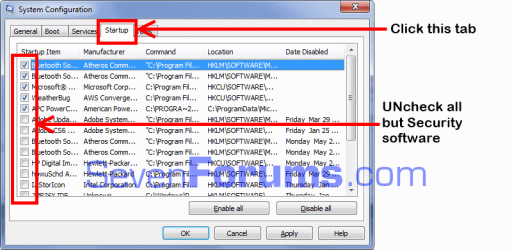
See the attached snip for disabling Startup Items.

msconfig.png
 

My Computer

Computer type
PC/Desktop
Computer Manufacturer/Model Number
Home Built Desktop By DataTech
OS
Windows 7 Ultimate X64 SP1
CPU
Intel i5-2550K, Differing ~4.4-4.8GHz No built in GPU
Motherboard
ASUS P8Z68-V PRO/GEN3
Memory
16GB G.Skill Sniper 1866MHz @ 2133MHz 2x8GB
Graphics Card(s)
ASUS GTX650TIB-DC2OC-2GD5, (650TI Boost)
Sound Card
Onboard Realtek 5-1
Monitor(s) Displays
Samsung P2570HD
Screen Resolution
1920x1080
Hard Drives
Samsung 840 Pro 256GB SSD for OS, 500GB Seagate Constellation (Enterprise drive) for Data
PSU
Corsair HX650W
Case
Inwin Dragon Rider
Cooling
Hyper 212 EVO w/two Noctua fans, push-pull, @1300 RPM
Keyboard
E-Z Eyes, bright yellow keys with large characters
Mouse
steelseries SENSEI Laser Pro Gaming
Internet Speed
48-51Mbs Mbs down, 11 Mbs up Xfinity Cable
Antivirus
Norton Internet Security 2013
Browser
IE 10, Opera, Pale Moon if needed
Other Info
4 case fans, LG BluRay-RE, ASUS DVD-RW, Mr. Fusion power supply, 1.21 gigawatts.
What happens if you type "msconfig" without the quotes in Start Search box. Then right click to Run as Admin.
 
msconfig was indeed in system32, I now restarted my computer and I guess I will wait to see if the slowdown returns. I think AVG doesn't fully work though, it didn't activate itself and when I activated it the icon did not appear in my sidebar(bottom left next to clock and date). Hopefully a million viruses are not eating my computer alive
 

My Computer

Computer type
PC/Desktop
OS
windows 7 ultimate x64
AVG fell out of popularity some years back before Win7 was even released, so it's never been recommended here but does show up with problems fairly regularly. You might consider uninstalling it to try the recommended free lightweight Microsoft Security Essentials or Avast which is a strong second recommendation around here.

Most important in the Troubleshooting Steps for Windows 7 is to establish a Clean Boot, stress test your RAM - Test with Memtest86+ for 5-6 passes or overnight, install CrystalDiskInfo - Software to read your HDD SMART status, scan the logs for repeat errors to resolve, utilize the System Resources to check for problems and solutions.
 
Holy crap I think my computer just crashed or something.

I tried to activate avg but it said it I have no right and I need to log in as an administrator then the internet stopped working and to finish the deal everything stopped working. I restarted and activated my startup programs again, that scared the bajesus out of me. Is it avg causing this?
 

My Computer

Computer type
PC/Desktop
OS
windows 7 ultimate x64
Are you running an Administrator-level account? You can check or change it in Control Panel>User Accounts.

What exactly were you trying to do to activate AVG? Can you provide screenshots of this using the Snipping Tool in Start Menu, save and attach using paper clip in reply box?

What I would do is uninstall AVG in the Control Panel>Programs and Features, then after reboot run it's Removal Tool at AVG | Download tools and utilities

Then install Microsoft Security Essentials to test the difference. Leave all other msconfig>Startups and >Services (after Hiding all MS Services) unchecked except MSE.
 
Yes I am marked as an admin, basically when a problem is detected the action center pops up and asks me to fix the problem at hand. At the moment I needed to activate AVG so it gacve me the option to do so and then the message popped. Might take a screenshot when I have the time.

Tommorow I will try to download MSE and then provide results here.

Edit: It appears I can no longer mouse wheel on this site but can in other sites. I am cursed
 

My Computer

Computer type
PC/Desktop
OS
windows 7 ultimate x64
Be sure to fully uninstall AVG and reboot before installing MSE. What would even be better is if you have a System Restore before AVG was installed to get back before it.

Change any battery in the mouse or USB port if applicable, in Device Manager uninstall the driver for mouse and reboot by setting the Power Button in Power Options to Shutdown. This will reinstall the mouse driver.
 

My Computer

Computer type
PC/Desktop
Computer Manufacturer/Model Number
Home Built Desktop By DataTech
OS
Windows 7 Ultimate X64 SP1
CPU
Intel i5-2550K, Differing ~4.4-4.8GHz No built in GPU
Motherboard
ASUS P8Z68-V PRO/GEN3
Memory
16GB G.Skill Sniper 1866MHz @ 2133MHz 2x8GB
Graphics Card(s)
ASUS GTX650TIB-DC2OC-2GD5, (650TI Boost)
Sound Card
Onboard Realtek 5-1
Monitor(s) Displays
Samsung P2570HD
Screen Resolution
1920x1080
Hard Drives
Samsung 840 Pro 256GB SSD for OS, 500GB Seagate Constellation (Enterprise drive) for Data
PSU
Corsair HX650W
Case
Inwin Dragon Rider
Cooling
Hyper 212 EVO w/two Noctua fans, push-pull, @1300 RPM
Keyboard
E-Z Eyes, bright yellow keys with large characters
Mouse
steelseries SENSEI Laser Pro Gaming
Internet Speed
48-51Mbs Mbs down, 11 Mbs up Xfinity Cable
Antivirus
Norton Internet Security 2013
Browser
IE 10, Opera, Pale Moon if needed
Other Info
4 case fans, LG BluRay-RE, ASUS DVD-RW, Mr. Fusion power supply, 1.21 gigawatts.
Back
Top