Solved Slowdown

Reinstall the AV to get it functional, then go into it to turn off its Real Time protection, uncheck it in msconfig>Startup and >Services, reboot, then uninstall the AV without it running at all.

You can then install Microsoft Security Essentials
 
Followed your instructions and I believe it was effective! Super effective I might add. Weird that AV creates lag
 

My Computer

Computer type
PC/Desktop
OS
windows 7 ultimate x64
Most AV program will have a routine it does just before or during booting to detect crap before Windows starts.
 

My Computer

Computer type
PC/Desktop
Computer Manufacturer/Model Number
Home Built Desktop By DataTech
OS
Windows 7 Ultimate X64 SP1
CPU
Intel i5-2550K, Differing ~4.4-4.8GHz No built in GPU
Motherboard
ASUS P8Z68-V PRO/GEN3
Memory
16GB G.Skill Sniper 1866MHz @ 2133MHz 2x8GB
Graphics Card(s)
ASUS GTX650TIB-DC2OC-2GD5, (650TI Boost)
Sound Card
Onboard Realtek 5-1
Monitor(s) Displays
Samsung P2570HD
Screen Resolution
1920x1080
Hard Drives
Samsung 840 Pro 256GB SSD for OS, 500GB Seagate Constellation (Enterprise drive) for Data
PSU
Corsair HX650W
Case
Inwin Dragon Rider
Cooling
Hyper 212 EVO w/two Noctua fans, push-pull, @1300 RPM
Keyboard
E-Z Eyes, bright yellow keys with large characters
Mouse
steelseries SENSEI Laser Pro Gaming
Internet Speed
48-51Mbs Mbs down, 11 Mbs up Xfinity Cable
Antivirus
Norton Internet Security 2013
Browser
IE 10, Opera, Pale Moon if needed
Other Info
4 case fans, LG BluRay-RE, ASUS DVD-RW, Mr. Fusion power supply, 1.21 gigawatts.
Aaaaaand slowdown has made his glorious return! Again it is only a brief freeze but why does it happen? Dx
 

My Computer

Computer type
PC/Desktop
OS
windows 7 ultimate x64
Disabled MSE and actiavted windows defender. Problem is still there
 

My Computer

Computer type
PC/Desktop
OS
windows 7 ultimate x64
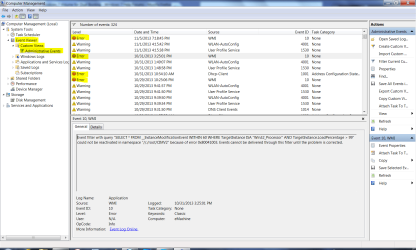
Phew finally back, went through steps 1-3 again just to check. Step 4 requires me to use Event Viewer>Custom>Admin view, I started checking event viewer for like 10 minutes and I could not for the life of me find the custom option. I clicked the link in the guide but it did not explain where the custom button is.
 

My Computer

Computer type
PC/Desktop
OS
windows 7 ultimate x64
Wow I have like 2000 errors, what do I do?
 

My Computer

Computer type
PC/Desktop
OS
windows 7 ultimate x64

My Computer

Computer type
PC/Desktop
OS
windows 7 ultimate x64
The same steps in Clean Reinstall - Factory OEM Windows 7 if followed closely will result in a perfect install even for retail.

What I do is google some of the text and ID number for any repeat error to see how others have resolved it. Over time I like to winnow out all of the errors. This process will also make apparent any error that may be causing an issue.
 
As far as I remember I did the clean install a month ago, I don't mind doing it again but I don't know if it will help.

npck.jpg


I saw error 7023 and 102 a lot so I googled it, however I did not really reach any solution. Maybe I should make an extra thread just for that
 

My Computer

Computer type
PC/Desktop
OS
windows 7 ultimate x64
Whenever I type into Google the text and identifying number of an error, I have always gotten threads where a solution to the error is discussed.

What's important is that you follow the steps in the reinstall tutorial as they pertain to the way drivers are handled by Win7, the tools and methods which work best.

If the problem continues after getting a baseline perfect reinstall to a HD wiped with Diskpart Clean Command then I would test the hardware from Troubleshooting Steps for Windows 7
 
Can you write the specific words you typed into google? Maybe I worded it wrong
 

My Computer

Computer type
PC/Desktop
OS
windows 7 ultimate x64
Just type the exact wording of each error. You should actually see it autocomplete where others have typed it in before you, so you don't have to type the whole thing. If it returns an incorrect reference then refine the search by adding the error number or ID.

I've never seen an error that doesn't have activity where others have searched it, what they have tried, what worked and didn't.

This process requires reading, trial and error, learning what to act upon or pass over. It is a learning process. If it's not to your liking, then try the other steps. You may want to take it to a shop if you're not the DIY type. But you can always ask us any questions you have.
 
Just give me one example, please
 

My Computer

Computer type
PC/Desktop
OS
windows 7 ultimate x64

My Computer

Computer type
PC/Desktop
OS
windows 7 ultimate x64
Look at a repeat error in Custom>Admin log. Type the wording you see there into Google. You will probably see it autocompleting if you have Google search set to autocomplete. You only need to type enough in to get some relevant results. If not then add the Error number.
 
Back
Top