
Related Q:
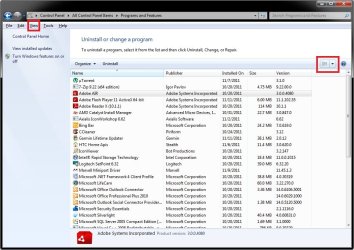
How to add a Small and Large icon for Uninstall a Program in Control Panel View: Large and Small?
I hate searching the Main List or a Control Panel in Category view, as not all icons or function seen.
Reg file patch preferred.
Thanks, Donald
How to add a Small and Large icon for Uninstall a Program in Control Panel View: Large and Small?
I hate searching the Main List or a Control Panel in Category view, as not all icons or function seen.
Reg file patch preferred.
Thanks, Donald
My Computer
At a glance
Windows 7 Pro 64BitAMD Phenom II 965Corsair XMS2 4GB PC6400 DDR2 800MHz Memory Up...GeForce 9500 GT Video Card, 1GB DDR2
- Computer Manufacturer/Model Number
- Home build
- OS
- Windows 7 Pro 64Bit
- CPU
- AMD Phenom II 965
- Motherboard
- Biostar 790GXE
- Memory
- Corsair XMS2 4GB PC6400 DDR2 800MHz Memory Upgrade - 2x2048M
- Graphics Card(s)
- GeForce 9500 GT Video Card, 1GB DDR2
- Sound Card
- Realtek Digital Audio 6.1
- Monitor(s) Displays
- Acer X223W
- Screen Resolution
- 680Hx1050H
- Hard Drives
- WDC WD1002-FAEX-00Z3A0 1000GB SATA2 64MB CACHE
WDC WD2002-FAEX-007BA0 2000GB SATA2 64MB CACHE
- PSU
- Ultra X4 750-Watt Modular Power Supply - 135mm Fan, ATX
- Case
- CoolerMaster Elite 300 (Black)
- Cooling
- Enermax 120mm HiVolocity, CoolerMaster
- Keyboard
- Logitech Deluxe 250 (PS/2)
- Mouse
- Logitech Optical Mouse 852149-0000 (PS/2)
- Internet Speed
- AT&T (3Gb/s: so they claim)
- Other Info
- Logitech C600 Webcam HD, Logitech
Logitech Z-4(3-driver) 40 watts 2.1 Speakers w/subwoofer



 . And here am I, thinking I knew Windows 7.