Small window and small text

archmonde11

New member
Local time
8:04 PM
Messages
3
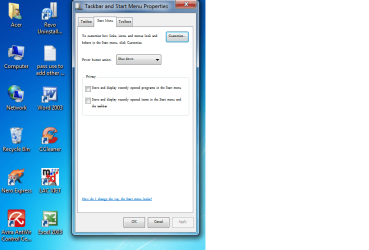
my "taskbar and start menu properties" window's text is SO small. Some of my application window's text face the same problem. The text is tiny that make it impossible to read. I've reset the screen resolution, the text size from 100% to 125 ... but they increase the size of text and the icon on the desktop only, not the text in the window. I'm totally confused now. I miss the simple XP in the old time :( ... I'm using win7 premium, i don't know whether 32 or 64 ...
 

My Computer

OS
win7 premium unknown bit
The old-style display properties panel is now located at Control Panel -> Personalization -> Window Color -> Advanced appearance settings.

Whether these will have any effect will depend on the theme that you are using. If you are using an Aero theme, chances are this panel will be useless for you. If, however, you are using the Windows Basic theme, i.e. have Aero turned off, then this panel will work just like in XP.

These settings have nothing to do with whether your OS is 32- or 64-bit.

Finally, most programs have their own tools to change the font size. For example in Firefox you can press Ctrl and move the mouse wheel while holding that key. you will see the font size change.

Hope that helps.
 

My Computer

Computer Manufacturer/Model Number
Dell Inspiron 530
OS
Windows 7 Ultimate (x64)
CPU
Q6600
Memory
8 GB
Graphics Card(s)
ATI Radeon HD 2600 XT
Monitor(s) Displays
Samsung Syncmaster P2450
Screen Resolution
1920x1080
Hard Drives
Samsung HD103UJ
Samsung HD501LJ
Internet Speed
25 Mb/s
I will post some screen shots. You can compare window's text and the desktop icon's text. The small text problem also happens to some other applications.

attachment.php
 

Attachments

  • Untitled.png
    Untitled.png
    49.4 KB · Views: 1,087

My Computer

OS
win7 premium unknown bit

My Computer

Computer Manufacturer/Model Number
Micro-Star International/MS-7529
OS
Windows 7 Ultimate x32
CPU
DualCore Intel Pentium E2200, 2218 MHz (11 x 202)
Motherboard
MSI G31M3 V2 (MS-7529) (2 PCI, 1 PCI-E x16,2 DDR2 DIMM)
Memory
2 GB DDR2-800 DDR2 SDRAM
Graphics Card(s)
nVIDIA GeForce 9500GT 1GB
Sound Card
Realtek ALC888/1200 @ Intel 82801GB ICH7
Monitor(s) Displays
Samsung SyncMaster 2253BW (Digital) 22'' LCD
Screen Resolution
1680x1050
Hard Drives
SAMSUNG HD322IJ ATA Device (298 GB , IDE)
Have you tried changing the display properties in the old-style panel? Try changing the fonts as well to see which settings directly affects the taskbar properties window.
 

My Computer

Computer Manufacturer/Model Number
Dell Inspiron 530
OS
Windows 7 Ultimate (x64)
CPU
Q6600
Memory
8 GB
Graphics Card(s)
ATI Radeon HD 2600 XT
Monitor(s) Displays
Samsung Syncmaster P2450
Screen Resolution
1920x1080
Hard Drives
Samsung HD103UJ
Samsung HD501LJ
Internet Speed
25 Mb/s
It's obvious that the font has been changed from the normal system font (Segoe UI). You need to undo any changes you've made. Use System Restore to go back to before the fonts were too small. They definitely weren't like that right after installation.
 

My Computer

Computer Manufacturer/Model Number
Custom
OS
Windows 7 Ultimate RTM (Technet)
CPU
3.00 gigahertz Intel Core2 Duo E8400
Motherboard
ASUSTeK Computer INC. P5K/EPU Rev 1.xx
Memory
4GB
Graphics Card(s)
ATI Radeon X1950 Pro
Sound Card
Built in HD Audio
Monitor(s) Displays
22" Gateway LCD
Screen Resolution
1920 x 1200
Hard Drives
ST3160023A [Hard drive] (160.04 GB) -- drive 0, rev 8.01, ST3500630AS [Hard drive] (500.11 GB) -- drive 2, rev 3.AAK
ST3500630AS [Hard drive] (500.11 GB) -- drive 1, rev 3.AAK
Keyboard
Logitech G11
Mouse
Microsoft Wireless Laser Mouse 5000
Internet Speed
13.44 Mbps

My Computer

Computer Manufacturer/Model Number
Hewlett Packard Compaq Presario CQ60-305au
OS
Windows Seven Home Premium 32bit SP1
CPU
AMD Athlon QI46 2.1Ghz
Motherboard
Wistron 303c
Memory
2048 Mb DDR2 SD RAM
Graphics Card(s)
NVidea GE GoForce 8200M G/256mb dedicated graphics memory
Sound Card
MCP78S NVidea high definition
Monitor(s) Displays
15.6" High definition Brightview Widescreen
Screen Resolution
1336x768
Hard Drives
Toshiba MK2555GSX ATA
I decided to use System Restore and all got back to normal. thanks for all of your suggestions.
 

My Computer

OS
win7 premium unknown bit
You're welcome, and if you would, please mark this problem solved.
 

My Computer

Computer Manufacturer/Model Number
Custom
OS
Windows 7 Ultimate RTM (Technet)
CPU
3.00 gigahertz Intel Core2 Duo E8400
Motherboard
ASUSTeK Computer INC. P5K/EPU Rev 1.xx
Memory
4GB
Graphics Card(s)
ATI Radeon X1950 Pro
Sound Card
Built in HD Audio
Monitor(s) Displays
22" Gateway LCD
Screen Resolution
1920 x 1200
Hard Drives
ST3160023A [Hard drive] (160.04 GB) -- drive 0, rev 8.01, ST3500630AS [Hard drive] (500.11 GB) -- drive 2, rev 3.AAK
ST3500630AS [Hard drive] (500.11 GB) -- drive 1, rev 3.AAK
Keyboard
Logitech G11
Mouse
Microsoft Wireless Laser Mouse 5000
Internet Speed
13.44 Mbps
Back
Top