So far Im impressed, but my computer wont turn off..?

Power Options Set To Shut Down

I have checked all my power management settings, but all are set to Shut Down the computer. I have looked on the Asus website, but cannot see any mention of the problem there. I am curious to know if anyone has this issue who does not have an Asus motherboard.
 

My Computer My Computer

At a glance

Windows 7
OS
Windows 7
Hi everyone :)

I'm Mikey, new here, just joined up since I'm actually having this very same problem.

Already a little light has been shed on the matter - I'm also using an Asus mobo, a P5B-VM. So I guess it looks as though it might be an Asus compatibility issue?

Someone else put a link up on another post discussing ACPI which might be helpful (I would give credit but I'm not sure who it was now!):
ASUSTeK Computer Inc.-Forum- Latest BIOS, Drivers and Utilities for P5B Deluxe [/WiFi-AP] Updated May 5, 2009

I haven't fully read it yet myself, or tested it, but there seems to be a bunch of W7 compatible drivers and utilities there, updated as of May 5. It's for the P5B Deluxe, so they might not all be compatible with other models, but hopefully some are worth a shot, especially if you're within the P5B range like me.

Having read this thread I'm going to check my power management settings again too, although I do have the power button within the start menu set to 'shutdown'.

Some people offering advice seem to be misunderstanding the problem, so just to clarify...
Windows 7 DOES shut down. The PC however DOES NOT turn off - it stays powered up, e.g. fans and lights.

W7 seems very cool to me, but this problem is driving me a bit mental :sarc::D
 
Last edited:

My Computer My Computer

At a glance

XP / Windows 7 RC1Intel Core2 Duo E6600 2.4GHz (4mb L2, 1066 MH...2x 512mb Crucial Ballistix + 2x 1gb Crucial B...Intel G965 Ecpress (Onboard)
Computer Manufacturer/Model Number
Asus / Intel (self built)
OS
XP / Windows 7 RC1
CPU
Intel Core2 Duo E6600 2.4GHz (4mb L2, 1066 MHz FSB)
Motherboard
Asus P5B-VM
Memory
2x 512mb Crucial Ballistix + 2x 1gb Crucial Ballistix (3gb)
Graphics Card(s)
Intel G965 Ecpress (Onboard)
Sound Card
Korg Zero8 (Ext. Firewire) / Novation X Station (Ext. USB)
Monitor(s) Displays
Xerox XM3 Widescreen LCD
Screen Resolution
1680 x 1050
Hard Drives
1x 80gb Samsung HD082GJ SATA (Partitioned dual boot - XP/7)
1x 500gb Western Digital WD5000AAKS-00TMA0 SATA
1x 750gb Samsung HD753LJ SATA
1x 80gb Maxtor IDE
1x 150gb Lacie 'Porsche' external USB
TOTAL = 1.56TB
PSU
ThermalTake PSU TR2 500W Black Silent + ATX 12V 2.0
Case
Antec Performance One P182
Cooling
Thermaltake heatsink + fan combo
Keyboard
Trust DS-3200 Wireless
Mouse
Trust DS-3200 Wireless
Internet Speed
3.87mbps downstream / 0.38mbps upstream
Other Info
1x HP DVD940i Lightscribe DVD RW
Someone found the solution

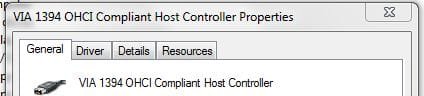
Click “Start”, on “Computer” click right mouse button and select “Properties”, click “Device Manager”, select “IEEE 1394 Bus Host Controllers” group, only contains one device called “VIA 1394 OHCI Compilant Host COntroller” on that click right mouse button and select “Properties”, select “Power Management” tab, and finally check the “Allow the computer to tur off this device to save power” box!

Mini Tech Blog » Windows 7 Beta: Shutdown problem
 

My Computer My Computer

At a glance

Windows 7 RC
OS
Windows 7 RC
I'm having a similar problem but I do not have an ASUS mobo. If I go directly to shutdown, w7 logs me off then goes to shutdown. It goes through (I imagine) the entire process it needs to with the little rotating circle animation and "Shutting Down..." but then the rotation animation stops and the system hangs there. It never goes any further. I read in another thread that if a person logs off first and then shuts down, that it might work. I tried this and it does indeed work as long as it's being shut down normally as opposed to after installing something.
 

My Computer My Computer

At a glance

Windows 7 RC1 build 7127
OS
Windows 7 RC1 build 7127
Winterset, I've had this problem before and the only solution is to format from what I've found.
 

My Computer My Computer

At a glance

Windows 7 UltimateAMD Phenom II X6 1055T 2.8GHz4x G.SKILL Sniper 4GB DDR3 (PC3 12800)XFX Radeon HD 6950 1GB DDR3
OS
Windows 7 Ultimate
CPU
AMD Phenom II X6 1055T 2.8GHz
Memory
4x G.SKILL Sniper 4GB DDR3 (PC3 12800)
Graphics Card(s)
XFX Radeon HD 6950 1GB DDR3
Monitor(s) Displays
Main Display: LG Flatron W2343T 23" | Secondary Display: 19"
Screen Resolution
Main: 1920x1080 | Secondary: 1360 x 768
Hard Drives
Main:
Corsair 50GB SSD
Western Digital Blue Drive 500GB 7200rpm

Server:
4TB worth of drives (no special branding)
Case
Antec 600
Cooling
Cooler Master V6GT
Keyboard
Razer Lycosta
Mouse
Logitech MX Revolution
Different Problem

Hi Winterset, sounds like a slightly different issue. The problem I have is that the machine does fully shut down. Monitor goes into sleep mode, but the tower stays on (fans, lights etc.) I have reformatted the machine and still have the same issues (with no other software or drivers installed).

When I get some spare time I am going to try to install some of the beta drivers that MikeySilo suggests.
 

My Computer My Computer

At a glance

Windows 7
OS
Windows 7
Click “Start”, on “Computer” click right mouse button and select “Properties”, click “Device Manager”, select “IEEE 1394 Bus Host Controllers” group, only contains one device called “VIA 1394 OHCI Compilant Host COntroller” on that click right mouse button and select “Properties”, select “Power Management” tab, and finally check the “Allow the computer to tur off this device to save power” box!

Mini Tech Blog » Windows 7 Beta: Shutdown problem

Awesome :D I'll give that a try sometime soon. Right now I've gone back to XP since I just need to get some stuff done, and I skipped Vista completely. It's not as imperitive any longer anyway since I've now also discovered 7 doesn't seem to like my firewire soundcard, which I can't do without.

I'll post back here if it works for me. Thanks!
 

My Computer My Computer

At a glance

XP / Windows 7 RC1Intel Core2 Duo E6600 2.4GHz (4mb L2, 1066 MH...2x 512mb Crucial Ballistix + 2x 1gb Crucial B...Intel G965 Ecpress (Onboard)
Computer Manufacturer/Model Number
Asus / Intel (self built)
OS
XP / Windows 7 RC1
CPU
Intel Core2 Duo E6600 2.4GHz (4mb L2, 1066 MHz FSB)
Motherboard
Asus P5B-VM
Memory
2x 512mb Crucial Ballistix + 2x 1gb Crucial Ballistix (3gb)
Graphics Card(s)
Intel G965 Ecpress (Onboard)
Sound Card
Korg Zero8 (Ext. Firewire) / Novation X Station (Ext. USB)
Monitor(s) Displays
Xerox XM3 Widescreen LCD
Screen Resolution
1680 x 1050
Hard Drives
1x 80gb Samsung HD082GJ SATA (Partitioned dual boot - XP/7)
1x 500gb Western Digital WD5000AAKS-00TMA0 SATA
1x 750gb Samsung HD753LJ SATA
1x 80gb Maxtor IDE
1x 150gb Lacie 'Porsche' external USB
TOTAL = 1.56TB
PSU
ThermalTake PSU TR2 500W Black Silent + ATX 12V 2.0
Case
Antec Performance One P182
Cooling
Thermaltake heatsink + fan combo
Keyboard
Trust DS-3200 Wireless
Mouse
Trust DS-3200 Wireless
Internet Speed
3.87mbps downstream / 0.38mbps upstream
Other Info
1x HP DVD940i Lightscribe DVD RW
Hey again everyone

Ok, I just tried the Firewire properties solution... but got no joy out of it. I don't even see the same options as described, and I'm using the release candidate, build 7100.

...select “IEEE 1394 Bus Host Controllers” group, only contains one device called “VIA 1394 OHCI Compilant Host COntroller”

Nope... I've got 2 devices listed, as shown in the attached 'Capture1'. I have firewire ports both built into my mobo and on a PCI card.

on that click right mouse button and select “Properties”, select “Power Management” tab, and finally check the “Allow the computer to tur off this device to save power” box!

Mini Tech Blog » Windows 7 Beta: Shutdown problem

I don't have a 'Power Management' tab... just those shown in 'Capture2'. No options for advanced settings or anything.

So, thanks anyway, but it's not the solution for me at least. Weird. The more I read about this the more it seems to be an issue exclusive to Asus motherboards. I'd be interested to know if anyone here has some success with the above solution.
 

Attachments

  • Capture1.JPG
    Capture1.JPG
    13.2 KB · Views: 20
  • Capture2.JPG
    Capture2.JPG
    14.9 KB · Views: 13

My Computer My Computer

At a glance

XP / Windows 7 RC1Intel Core2 Duo E6600 2.4GHz (4mb L2, 1066 MH...2x 512mb Crucial Ballistix + 2x 1gb Crucial B...Intel G965 Ecpress (Onboard)
Computer Manufacturer/Model Number
Asus / Intel (self built)
OS
XP / Windows 7 RC1
CPU
Intel Core2 Duo E6600 2.4GHz (4mb L2, 1066 MHz FSB)
Motherboard
Asus P5B-VM
Memory
2x 512mb Crucial Ballistix + 2x 1gb Crucial Ballistix (3gb)
Graphics Card(s)
Intel G965 Ecpress (Onboard)
Sound Card
Korg Zero8 (Ext. Firewire) / Novation X Station (Ext. USB)
Monitor(s) Displays
Xerox XM3 Widescreen LCD
Screen Resolution
1680 x 1050
Hard Drives
1x 80gb Samsung HD082GJ SATA (Partitioned dual boot - XP/7)
1x 500gb Western Digital WD5000AAKS-00TMA0 SATA
1x 750gb Samsung HD753LJ SATA
1x 80gb Maxtor IDE
1x 150gb Lacie 'Porsche' external USB
TOTAL = 1.56TB
PSU
ThermalTake PSU TR2 500W Black Silent + ATX 12V 2.0
Case
Antec Performance One P182
Cooling
Thermaltake heatsink + fan combo
Keyboard
Trust DS-3200 Wireless
Mouse
Trust DS-3200 Wireless
Internet Speed
3.87mbps downstream / 0.38mbps upstream
Other Info
1x HP DVD940i Lightscribe DVD RW
Hi,

I have just registered as I have just succeeded in fixing this problem :D

I am running Win7 build 7100 on an Asus P5B-E motherboard.

Firstly I did this:

Click “Start”, on “Computer” click right mouse button and select “Properties”, click “Device Manager”, select “IEEE 1394 Bus Host Controllers” group, only contains one device called “VIA 1394 OHCI Compilant Host COntroller” on that click right mouse button and select “Properties”, select “Power Management” tab, and finally check the “Allow the computer to tur off this device to save power” box!

Mini Tech Blog » Windows 7 Beta: Shutdown problem

And then I followed "Step 6" of the below link:

Power Options and Sleep Mode Problems - Vista Forums

Et voila! I don't know which one worked so just try both!

N.B - On Step 9 of "Step 6" from the above link, Win7 is slightly different to Vista. I went to "Wake Up Capabilities" and changed it from "MagicPacket & PatternMagic" to "None"

Hope that helps others :)
 

My Computer My Computer

At a glance

Windows 7 beta build 7100
OS
Windows 7 beta build 7100
With Win_7 so great, I'm running it 36 hrs a day / 31 days a month ;)
 

My Computer My Computer

At a glance

Win7 Enterprise, Win7 x86 (Ult 7600), Win7 x6...AMD fx8350 4ghz, AMD-32 2400mhz, AMD-64 3200m...2gb, 4gb on the Ult 7600, 4gb on Technet RTM,...Draw my own Graphics, several nVidia cards
Computer type
PC/Desktop
Computer Manufacturer/Model Number
Built them myself, Science Experiments !
OS
Win7 Enterprise, Win7 x86 (Ult 7600), Win7 x64 Ult 7600, TechNet RTM on AMD x64 (2.8Ghz)
CPU
AMD fx8350 4ghz, AMD-32 2400mhz, AMD-64 3200mhz, AMDx64 2.8G
Motherboard
SIS 755, ECS-K8M890M-M (Ult 7600), GigaByte & others
Memory
2gb, 4gb on the Ult 7600, 4gb on Technet RTM, 32gb on FX8350
Graphics Card(s)
Draw my own Graphics, several nVidia cards
Sound Card
on motherboard
Monitor(s) Displays
19" flat scr, 28" I-Inc widescr,22" Emprex Widescr, 23" Acer
Screen Resolution
1280 x 1024, 1440 x 900, 1920 x 1080
Hard Drives
6 pata Ide HD's & 2 Sata HD's
added 80gb external on Ult 7600 computer,
numerous extra 1tb, 2TB, 3Tb SATA HD's
A collection of ext HD Docks w/ HDs
PSU
430w, 550w, 600w, 700, 800, etc
Case
All Generic Full Towers
Cooling
Open Air & a few fans, some w/ colored LEDs
Keyboard
Compaq & Dell recycled from GoodWill
Mouse
Made in China Optical Wired Mouse
Internet Speed
Fast Cable InterNet
Antivirus
AVG Free on 24 different Desktops, NO Problems!
Browser
IE 8 is preferred, but use FireFox sometimes
Other Info
Linksys Routers, switches, & Hubs
Too Many USB Flash Drives to count, Biggest is 64GB !
Eight computers in my home network.
Sixteen computers at my business network.
Linked via TeamViewer !
Lots of old used spare computer parts everywhere!
I have this same problem. My monitor turn black, but fans, hd, keep running, and i need to push the power button.

My mother board is P5K-SE.


No body had a solution, or some Bios settings for me?


Thanks anyway.
 

My Computer My Computer

At a glance

Windows 7 beta build 7100
OS
Windows 7 beta build 7100
I have this same problem. My monitor turn black, but fans, hd, keep running, and i need to push the power button.

My mother board is P5K-SE.


No body had a solution, or some Bios settings for me?


Thanks anyway.
1st we need lots of System specs.? adapter, internet setup, wired wireless.
2n we need to know x86 or x64 on Win7 7201
3d show a snip of how your power settings are marked.

also if your problems are exactly the same as Mambo Scrambo then you should apply his FIX.
Have you applied his fix?
Did his fix your problem?
If No, then plz show the above requested.
 
Yes, I followed Mambo Scrambo tips, but on my "VIA 1394 OHCI Compilant Host" doesnt have “Power Management” tab. Because it i cant do this step.

My pc specs: windows 7229 x64
core2duo E4500

and my mobo is asus p5k-se with lastest BIOS.

Please help-me
 
Last edited:
Look threw all devices in device manager and check for any power management tabs. They should read turn off to save power. Same for your network adapters, make sure nothing is set to allow them to wake. You can get to them from the network & sharing center, on the left look for "Change adapter settings" in the new window right click on your adapters and choose properties. Then click "Configure" check the "Advanced" tab and "Power Management".

Also check all your bios settings for anything stating keep awake or allow to wake.

If you completely fill in your system specs on the this site from the "User CP" at the top this page, then on the left click "Edit System Spec" it would help us help you.
 

My Computer My Computer

At a glance

OS3.5celerymemory never forgetsOB
Computer Manufacturer/Model Number
POS
OS
OS3.5
CPU
celery
Motherboard
Good Question ...Unknown
Memory
memory never forgets
Graphics Card(s)
OB
Sound Card
OB
Monitor(s) Displays
HUGE
Screen Resolution
168000000x105000000
Hard Drives
full
PSU
OEM 65watt
Case
N/A
Cooling
OB
Keyboard
OB
Mouse
mouse
Internet Speed
1 Trillion MBps
Other Info
Still An Awesome Forum!
Well I think it's similar, but I can't get my computer to sleep... Every time I put it to sleep it goes into sleep mode (Fans off, everything shuts down) and then starts back up a few seconds later..


Do you have a second monitor runnning? I know on my laptop when I have my second monitor plugged in it will go to sleep and then the login screen will come back up.
 

My Computer My Computer

At a glance

Windows 7 Ultimate retail // Windows 7 build ...Intel Core i7 920 // Intel Core2Duo T-5550 1....12 GB Corsair XMS3 Tri-channel 1333 // 4 GB DDR2EVGA GTX 295 // Nvidia GeForce 8800 GTS
Computer Manufacturer/Model Number
Self-built // Gateway FX P-6860
OS
Windows 7 Ultimate retail // Windows 7 build 7264 x64, Vista Home Premium SP2 x64
CPU
Intel Core i7 920 // Intel Core2Duo T-5550 1.86x1.86
Motherboard
EVGA x58 SLI LE //
Memory
12 GB Corsair XMS3 Tri-channel 1333 // 4 GB DDR2
Graphics Card(s)
EVGA GTX 295 // Nvidia GeForce 8800 GTS
Sound Card
Integrated Realtek // RealTek HD integrated sound
Monitor(s) Displays
19" Acer flatpanel // Laptop Display, Secondary CRT
Screen Resolution
1440 x 900 1152x864 // 1440x900, 1152x864
Hard Drives
750 GB WD Caviar Black 7200 RPM - in desktop
320 GB -laptop
80 GB - laptop secondary drive
PSU
Corsair HX1000w // Laptop PSU?
Case
Thermaltake Armor+
Cooling
Assload of fans, intel stock cpu cooler // GearHead Fan dock
Keyboard
Razer Lycosa // laptop keyboard
Mouse
Razer DeathAdder // Logitech Laser
Internet Speed
3.0 MB down/ 768 Kb up
Other Info
Just built my computer in 12/09
Click “Start”, on “Computer” click right mouse button and select “Properties”, click “Device Manager”, select “IEEE 1394 Bus Host Controllers” group, only contains one device called “VIA 1394 OHCI Compilant Host COntroller” on that click right mouse button and select “Properties”, select “Power Management” tab, and finally check the “Allow the computer to tur off this device to save power” box!

Mini Tech Blog » Windows 7 Beta: Shutdown problem

tried the above and worked perfectly solving the shutdown issue!

i have Win 7 Ultimate x64 and an Asus P5B Deluxe

thanks again!
 

My Computer My Computer

At a glance

Windows 7 Ultimate x64
OS
Windows 7 Ultimate x64
Back
Top