
So W7 troubles...

OK, i've installed ImgBurn to create this little 'How-To' for you.

Step 1, Click 'Write Image File to disk'
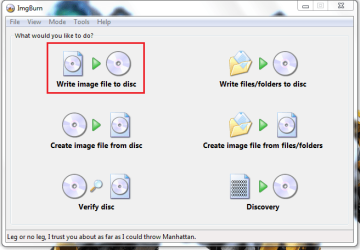
Capture.PNG

Step 2, Click the 'Browse' button & select the ISO you wish to burn
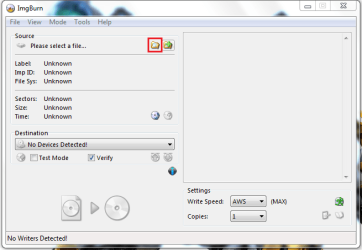
Capture1.PNG

Step 3, Set burn speed to 4x or below, then click Burn/Write
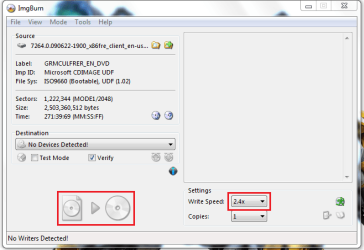
Capture2.PNG

That's all there is to it :D
 

My Computer

Computer Manufacturer/Model Number
Compaq Desktop
OS
Windows 7 Ultimate x64
CPU
AMD Sempron Dual Core
Memory
3GB
Graphics Card(s)
NVIDIA GeForce 6150SE nForce 430
Screen Resolution
1024x768
Hard Drives
150GB Sata
Hmmm

So I was able to burn it again, my spped was AWS...restart the pc to boot from cd


it says Boot from CD: then comes to Vista
 

My Computer

OS
Windows 7
The actual message is 'Press any key to boot from CD/DVD....' if you press ENTER then it will start the install process.
 

My Computer

Computer Manufacturer/Model Number
Compaq Desktop
OS
Windows 7 Ultimate x64
CPU
AMD Sempron Dual Core
Memory
3GB
Graphics Card(s)
NVIDIA GeForce 6150SE nForce 430
Screen Resolution
1024x768
Hard Drives
150GB Sata
I did press enter... skips it
 

My Computer

OS
Windows 7
Ok, you may need to try SPACE or another button but it should work.
 

My Computer

Computer Manufacturer/Model Number
Compaq Desktop
OS
Windows 7 Ultimate x64
CPU
AMD Sempron Dual Core
Memory
3GB
Graphics Card(s)
NVIDIA GeForce 6150SE nForce 430
Screen Resolution
1024x768
Hard Drives
150GB Sata
Ok, you may need to try SPACE or another button but it should work.

i think it only gives u somet like 5-10 secs to press a key.

homer simpson: 'where's the ANY key?'
 

My Computer

OS
Windows 7 Ultimate 64Bit
CPU
AMD Athlon x4 650 3Ghz
Motherboard
ASUS
Memory
4gb
Graphics Card(s)
ATI Radeon 3000 series Onboard
thanks Jeff, i like pressies lol.
 

My Computer

OS
Windows 7 Ultimate 64Bit
CPU
AMD Athlon x4 650 3Ghz
Motherboard
ASUS
Memory
4gb
Graphics Card(s)
ATI Radeon 3000 series Onboard
OKAYM NO KEY DOESNT WORKL, Im backing up my files like it says, then I have to check boot order in bios, but Im lost, do I have to follow installation to a tee?
 

My Computer

OS
Windows 7
Yes, you need to check the boot order, CD/DVD needs to be first. I would advise following the installation advice 100%
 

My Computer

Computer Manufacturer/Model Number
Compaq Desktop
OS
Windows 7 Ultimate x64
CPU
AMD Sempron Dual Core
Memory
3GB
Graphics Card(s)
NVIDIA GeForce 6150SE nForce 430
Screen Resolution
1024x768
Hard Drives
150GB Sata
Ok, so I backed up my files, got the correct boot order, and it is still skipping over installation....do I have to create a partition? how?
 

My Computer

OS
Windows 7
Are you pressing when it says 'Press any key' or are you missing it? It only lasts about 3 seconds. It could also be a bad burn which means you would need to re-burn at 4x speed or slower.
 

My Computer

Computer Manufacturer/Model Number
Compaq Desktop
OS
Windows 7 Ultimate x64
CPU
AMD Sempron Dual Core
Memory
3GB
Graphics Card(s)
NVIDIA GeForce 6150SE nForce 430
Screen Resolution
1024x768
Hard Drives
150GB Sata
do you have e-mail, [Email Address removed by Moderator]
 
Last edited by a moderator:

My Computer

OS
Windows 7
Back
Top