
So what is this comp's bottleneck?!?!?!?!?!

So i just got home,

Turned on the rig to perfrom a few checks on drivers etc. as i have DX related issues with Avatar, and found some intresting things.

Turns out that my 8800 GTX's @ Ultra setting are running not @ DX10, not @ DX10.1 but DX11 i have attached proof in the form of a screen shoot (attached)

Proberly a glich, but i dont care!, it says DX11 and when is "dxdiag" system check ever wrong!

So as i have betten the ATI Radeon 4870 not only on the windows 7 score and matched it on the DX front i have only the Crysis fps to beat. So forum tell me what does the 4870 fps in Crysis bench mark at the following settings;

Ultra high settings - DX10 - 1920*1200 rez - 4xAA. ?

I have been informed that is 41fps. ?

Anyway to the thread starter "Artonox" hows the overclocking going. ?
 

Attachments
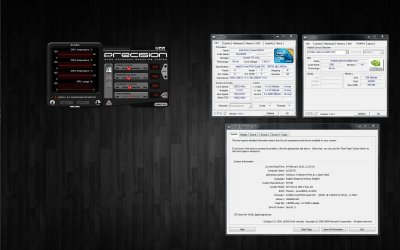
  • Tri Sli 8800 GTX @ DX11.jpg
    Tri Sli 8800 GTX @ DX11.jpg
    230.5 KB · Views: 26

My Computer

Computer Manufacturer/Model Number
Self Built
OS
Windows 7 Ultimate [64bit]
CPU
Intel Core 2 Quad CPU Q6700 @ 3.5GHz [Water Cooled]
Motherboard
XFX nForce 780i 3-Way SLI
Memory
4.00 GB OCZ DDR2 PC2-9600 Flex EX Series @ 1100MHz
Graphics Card(s)
3x 8800 GTX @ Ultra Settings [Water Cooled]
Sound Card
On Board + Razer Barracuda HP-1 Gaming Headphones
Monitor(s) Displays
BenQ 24"
Screen Resolution
1920x1200
Hard Drives
6x WD Raptor 36GB @ Raid 0
PSU
Antec 1100w PSU
Case
Thermaltake Armor
Cooling
Water Cooled
Keyboard
Razer Tarantula
Mouse
Razer Copper Head
Internet Speed
16mb/s download - 1.9mb/s upload (there or thereabouts)
Other Info
Nvidia 8800 GTX Rule. (36+ fps Crysis Bench Mark, DX10, 1920x1200, Ultra high settings, 4xAA)
It's not a glitch, 7 supports DX11; however, your cards do not... along those same lines, DXDiag is not telling you you're running games with DX11; it's physically impossible to do so.
 

My Computer

OS
7 Ultimate x64
CPU
i5-2500k
Motherboard
Asus P8P67 Pro
Memory
8GB G.Skill Ripjaws X F3-12800CL7D-8GBXH 1866MHz 8-9-8-24
Graphics Card(s)
EVGA GTX 570 SC
Sound Card
X-Fi Titanium Fatality
Monitor(s) Displays
Samsung S27A550H 27" LED
Screen Resolution
1920x1080
Hard Drives
OCZ Vertex 3 120GB.
1TB Samsung F3.
2TB Samsung F4.
PSU
PC Power & Cooling Silencer 760
Case
Lian Li Lancool K62
Cooling
Thermalright Venomous X Black/Scythe S-Flex/Shin-Etsu X23
Keyboard
MS Natural Elite 4000 Ergonomic
Mouse
Logitech G500
Internet Speed
6MB/768
Other Info
Logitech Z-5500 505 watts.
D-Link DGL-4500.
Tripp-Lite Smart Pro 1500.
i havent started on overclocking yet - im in the process of getting a cooler from a mate along with some arctic compound, since im still on stock atm. Will update after finished ocing
 

My Computer

OS
Windows 7
CPU
Phenom Quad Core 9500
Motherboard
Asrock ALive NF5SLi-1394
Memory
4gb Geil pc-6400 800mhz
Graphics Card(s)
Sapphire 4870 512mb
Sound Card
Razor Barracuda
Monitor(s) Displays
Samsung SyncMaster 2032bw
Screen Resolution
1680x1050
Hard Drives
1tb harddrive
PSU
600w CoolerMaster
So i just got home,

Turned on the rig to perfrom a few checks on drivers etc. as i have DX related issues with Avatar, and found some intresting things.

Turns out that my 8800 GTX's @ Ultra setting are running not @ DX10, not @ DX10.1 but DX11 i have attached proof in the form of a screen shoot (attached)

Proberly a glich, but i dont care!, it says DX11 and when is "dxdiag" system check ever wrong!

So as i have betten the ATI Radeon 4870 not only on the windows 7 score and matched it on the DX front i have only the Crysis fps to beat. So forum tell me what does the 4870 fps in Crysis bench mark at the following settings;

Ultra high settings - DX10 - 1920*1200 rez - 4xAA. ?

I have been informed that is 41fps. ?

Anyway to the thread starter "Artonox" hows the overclocking going. ?

No further than high settings and no AA. At that resolution AA is usually unnecessary.
 

My Computer

Computer Manufacturer/Model Number
Sony Vaio Z46GDU
OS
Windows 7 Ultimate x86-64
CPU
[email protected] 1066MHz FSB
Motherboard
Sony branded
Memory
6GB DDR3 1066MHz
Graphics Card(s)
9300M GS 256MB Dedicated (Speed) + Intel4500MHD (Stamina)
Sound Card
Realtek HD Audio
Monitor(s) Displays
13.1' WXGA
Screen Resolution
1600x900
Hard Drives
320GB 7200RPM w/ 16MB cache
Internet Speed
1MB/s
"Fumz"

Thanks for pointing out the obvious, what i didnt tell you guys is that i run "nvidia's system information" from "nvidia control panel" and from that it confirms it's only DX10. As it is impossible for the 8800 GTX's to run DX11.

"Artonox"

Keep us updated....

"Frostmourne"

I'll re-run the bench mark again in using the following;

High settings.
1920*1200 rez.
DX10.
no AA.
 

My Computer

Computer Manufacturer/Model Number
Self Built
OS
Windows 7 Ultimate [64bit]
CPU
Intel Core 2 Quad CPU Q6700 @ 3.5GHz [Water Cooled]
Motherboard
XFX nForce 780i 3-Way SLI
Memory
4.00 GB OCZ DDR2 PC2-9600 Flex EX Series @ 1100MHz
Graphics Card(s)
3x 8800 GTX @ Ultra Settings [Water Cooled]
Sound Card
On Board + Razer Barracuda HP-1 Gaming Headphones
Monitor(s) Displays
BenQ 24"
Screen Resolution
1920x1200
Hard Drives
6x WD Raptor 36GB @ Raid 0
PSU
Antec 1100w PSU
Case
Thermaltake Armor
Cooling
Water Cooled
Keyboard
Razer Tarantula
Mouse
Razer Copper Head
Internet Speed
16mb/s download - 1.9mb/s upload (there or thereabouts)
Other Info
Nvidia 8800 GTX Rule. (36+ fps Crysis Bench Mark, DX10, 1920x1200, Ultra high settings, 4xAA)

My Computer

OS
7 Ultimate x64
CPU
i5-2500k
Motherboard
Asus P8P67 Pro
Memory
8GB G.Skill Ripjaws X F3-12800CL7D-8GBXH 1866MHz 8-9-8-24
Graphics Card(s)
EVGA GTX 570 SC
Sound Card
X-Fi Titanium Fatality
Monitor(s) Displays
Samsung S27A550H 27" LED
Screen Resolution
1920x1080
Hard Drives
OCZ Vertex 3 120GB.
1TB Samsung F3.
2TB Samsung F4.
PSU
PC Power & Cooling Silencer 760
Case
Lian Li Lancool K62
Cooling
Thermalright Venomous X Black/Scythe S-Flex/Shin-Etsu X23
Keyboard
MS Natural Elite 4000 Ergonomic
Mouse
Logitech G500
Internet Speed
6MB/768
Other Info
Logitech Z-5500 505 watts.
D-Link DGL-4500.
Tripp-Lite Smart Pro 1500.
alriighhhtht!
Finally got the goods - changed the stock cooling to some noctua heatsink with 2 fans - makes the temp drop (from HWMoniter) to average 43degress (max under load is 53) which im guessing is not bad.

So i went and done a simple overclock - just jumped the figure bus speed in Bios from 200 to 210 (so core speed of 2310mhz from 2200). tried another 10mhz and it crashes (memory dump BSOD i think) by the time it reaches startup. Im a noob for this so any suggestions?

PS: ive also swapped back to the 8800gt (ive returned the 4870 as it didnt seem like the worthwhile upgrade atm). Also FSB: DRAM ratio is now 1:2 is that bad?
 
Last edited:

My Computer

OS
Windows 7
CPU
Phenom Quad Core 9500
Motherboard
Asrock ALive NF5SLi-1394
Memory
4gb Geil pc-6400 800mhz
Graphics Card(s)
Sapphire 4870 512mb
Sound Card
Razor Barracuda
Monitor(s) Displays
Samsung SyncMaster 2032bw
Screen Resolution
1680x1050
Hard Drives
1tb harddrive
PSU
600w CoolerMaster
"Fumz"

No worries mate? not sure what your asking forgiveness for but all is forgiven!

"Artonox"

About time....

Those temps you posted 43c average + 53c max dont sound that bad.

(As a rule of thumb never exceed 60c)

Are those the temp at 2.3GHz or 2.2GHz?

Basic Overclocking....


A simple over overclock involves doing very little, basicly the only things you need to be changing are the Bus Speed + CPU voltage + FSB:RAM ratio.
  1. Your standard CPU Bus Speed is 200MHz with a multiplier of x11 which gives you a CPU speed of 2.2GHz, to get the CPU running @ 2.4GHz you need to change the Bus Speed to 218MHz. Now because the CPU is running at a 2.4GHz it requires alittle more voltage to maintain stability. You will need to increase the CPU voltage by a few notches to do this.
  2. The reason you keep getting a blue screen when booting over 2.31GHz is most likely your RAM failing due to the increased FSB. You will need to change FSB:RAM ratio to maintain the RAM's original FSB setting or to as close to it as possible do not exceed the original frequency. You should find that your computer will start up fine.
  3. Once you have the computer booting up with the CPU running at 2.4GHz, you need to run a CPU stress test to check that you have stable overclock and to also check that your CPU doesnt exceed 60c. You do this by increasing and lowering the CPU voltage, untill you have a stable CPU that does not exceed 60c.
  4. Once your happy that your CPU is stable and cool you can then go back to adjusting your RAM. Unless you have expensive RAM very well cooled you really carnt push it very hard. By using the FSB:RAM ratio mainly + Slightly adjusting the Bus Speed to get the RAM running at its original FSB. But keep and eye on the CPU frequency, as adjusting the Bus Speed you will be changing the CPU clock.
Remember;

Do not run your CPU over 60c.

Do not change the voltage on the RAM, keep to manufactures specs.

Hope this helps....
 

My Computer

Computer Manufacturer/Model Number
Self Built
OS
Windows 7 Ultimate [64bit]
CPU
Intel Core 2 Quad CPU Q6700 @ 3.5GHz [Water Cooled]
Motherboard
XFX nForce 780i 3-Way SLI
Memory
4.00 GB OCZ DDR2 PC2-9600 Flex EX Series @ 1100MHz
Graphics Card(s)
3x 8800 GTX @ Ultra Settings [Water Cooled]
Sound Card
On Board + Razer Barracuda HP-1 Gaming Headphones
Monitor(s) Displays
BenQ 24"
Screen Resolution
1920x1200
Hard Drives
6x WD Raptor 36GB @ Raid 0
PSU
Antec 1100w PSU
Case
Thermaltake Armor
Cooling
Water Cooled
Keyboard
Razer Tarantula
Mouse
Razer Copper Head
Internet Speed
16mb/s download - 1.9mb/s upload (there or thereabouts)
Other Info
Nvidia 8800 GTX Rule. (36+ fps Crysis Bench Mark, DX10, 1920x1200, Ultra high settings, 4xAA)
... So i went and done a simple overclock - just jumped the figure bus speed in Bios from 200 to 210 (so core speed of 2310mhz from 2200). tried another 10mhz and it crashes (memory dump BSOD i think) by the time it reaches startup. Im a noob for this so any suggestions?...

Yes: Stop. The willy-nilly approach usually does more harm than good. Do not take tidbits of information just because it's posted on a forum... and tidbits of relevant info is all that you've gotten so far.

Read up on how to OC your processor, read up on what your board can handle and read up on what timings and voltages your RAM likes. Know what you're doing before you do it, or at least have a very good idea of what you're doing and what to expect.

Increasing voltages, "by a few notches", isn't something you should be doing as right now you have no idea what a "notch" is... and to be honest, neither do I... I don't know how many volts make up a notch.

Just start reading, and I guarantee you'll be a much happier camper, and a more informed and better overclocker. You'll thank you, and so will your hardware.
 

My Computer

OS
7 Ultimate x64
CPU
i5-2500k
Motherboard
Asus P8P67 Pro
Memory
8GB G.Skill Ripjaws X F3-12800CL7D-8GBXH 1866MHz 8-9-8-24
Graphics Card(s)
EVGA GTX 570 SC
Sound Card
X-Fi Titanium Fatality
Monitor(s) Displays
Samsung S27A550H 27" LED
Screen Resolution
1920x1080
Hard Drives
OCZ Vertex 3 120GB.
1TB Samsung F3.
2TB Samsung F4.
PSU
PC Power & Cooling Silencer 760
Case
Lian Li Lancool K62
Cooling
Thermalright Venomous X Black/Scythe S-Flex/Shin-Etsu X23
Keyboard
MS Natural Elite 4000 Ergonomic
Mouse
Logitech G500
Internet Speed
6MB/768
Other Info
Logitech Z-5500 505 watts.
D-Link DGL-4500.
Tripp-Lite Smart Pro 1500.
... So i went and done a simple overclock - just jumped the figure bus speed in Bios from 200 to 210 (so core speed of 2310mhz from 2200). tried another 10mhz and it crashes (memory dump BSOD i think) by the time it reaches startup. Im a noob for this so any suggestions?...

Yes: Stop. The willy-nilly approach usually does more harm than good. Do not take tidbits of information just because it's posted on a forum... and tidbits of relevant info is all that you've gotten so far.

Read up on how to OC your processor, read up on what your board can handle and read up on what timings and voltages your RAM likes. Know what you're doing before you do it, or at least have a very good idea of what you're doing and what to expect.

Increasing voltages, "by a few notches", isn't something you should be doing as right now you have no idea what a "notch" is... and to be honest, neither do I... I don't know how many volts make up a notch.

Just start reading, and I guarantee you'll be a much happier camper, and a more informed and better overclocker. You'll thank you, and so will your hardware.

i guess that makes sense, though i have a feeling slice knows what he is on about. well, guess itll take some time before i can oc properly then. Im gonna go read up on my stuff - this thread may be dead by then so if anyone has any "good" guides that they have while im gone, please post.
 

My Computer

OS
Windows 7
CPU
Phenom Quad Core 9500
Motherboard
Asrock ALive NF5SLi-1394
Memory
4gb Geil pc-6400 800mhz
Graphics Card(s)
Sapphire 4870 512mb
Sound Card
Razor Barracuda
Monitor(s) Displays
Samsung SyncMaster 2032bw
Screen Resolution
1680x1050
Hard Drives
1tb harddrive
PSU
600w CoolerMaster
One of the first things you're going to learn is that the trick to overclocking properly is doing it with as little voltage as possible; so you always start with stock vcore. While Slice may have the best intentions, and I believe he does, he's already steering you in the wrong direction by suggesting you increase voltage sight unseen. Never do that.

The second thing you're going to learn is how to test your oc before you boot into Windows, so you don't corrupt your OS and then have to hassle with a re-install. Memtest is a very good tool, use it. Tests 1-4 are fsb related, 5 and up memory related. It's well advised to remember this when testing your oc, which you must do religiously, so when you do see errors, and at some point you will, you will know where slight increases in voltage are necessary.

Here's a guide for your quad, and some other good reading: http://forums.overclockersclub.com/index.php?showtopic=71656

http://ocztechnologyforum.com/forum/showthread.php?22297-Intel-975-chipset-strap-overclocking-guide
 

My Computer

OS
7 Ultimate x64
CPU
i5-2500k
Motherboard
Asus P8P67 Pro
Memory
8GB G.Skill Ripjaws X F3-12800CL7D-8GBXH 1866MHz 8-9-8-24
Graphics Card(s)
EVGA GTX 570 SC
Sound Card
X-Fi Titanium Fatality
Monitor(s) Displays
Samsung S27A550H 27" LED
Screen Resolution
1920x1080
Hard Drives
OCZ Vertex 3 120GB.
1TB Samsung F3.
2TB Samsung F4.
PSU
PC Power & Cooling Silencer 760
Case
Lian Li Lancool K62
Cooling
Thermalright Venomous X Black/Scythe S-Flex/Shin-Etsu X23
Keyboard
MS Natural Elite 4000 Ergonomic
Mouse
Logitech G500
Internet Speed
6MB/768
Other Info
Logitech Z-5500 505 watts.
D-Link DGL-4500.
Tripp-Lite Smart Pro 1500.
Have a read through this!

How to Overclock a;

Intel Pentium, Intel Core 2 Quad, Intel Core i5, Intel Core i7 + AMD Phenom II.

Regards....
 

Attachments

My Computer

Computer Manufacturer/Model Number
Self Built
OS
Windows 7 Ultimate [64bit]
CPU
Intel Core 2 Quad CPU Q6700 @ 3.5GHz [Water Cooled]
Motherboard
XFX nForce 780i 3-Way SLI
Memory
4.00 GB OCZ DDR2 PC2-9600 Flex EX Series @ 1100MHz
Graphics Card(s)
3x 8800 GTX @ Ultra Settings [Water Cooled]
Sound Card
On Board + Razer Barracuda HP-1 Gaming Headphones
Monitor(s) Displays
BenQ 24"
Screen Resolution
1920x1200
Hard Drives
6x WD Raptor 36GB @ Raid 0
PSU
Antec 1100w PSU
Case
Thermaltake Armor
Cooling
Water Cooled
Keyboard
Razer Tarantula
Mouse
Razer Copper Head
Internet Speed
16mb/s download - 1.9mb/s upload (there or thereabouts)
Other Info
Nvidia 8800 GTX Rule. (36+ fps Crysis Bench Mark, DX10, 1920x1200, Ultra high settings, 4xAA)
Back
Top