

So what’s the difference between USB Versions?
So what’s the difference between USB Versions?
Well firstly let me start off with some background Information:
USB – Universal Serial Bus
USB 1.1 – 1.5 Mbit/s
USB 2.0 – 35 MB/s
USB 3.0 – 4 Gbit/s
USB was designed to standardize the connection of computer peripherals (including keyboards, pointing devices, digital cameras, printers, portable media players, disk drives and network adapters) to personal computers, both to communicate and to supply electric power.
Lets get Technical:

USB 2: 4 Connectors
USB 3: 5 Connectors
An extra connector has allowed a USB 3 to be 10 times faster!
USB 3.0, the latest generation of the Universal Series Bus, operates on the same principles as USB 2.0 technology but with some improvements. Also referred to as Super Speed, USB 3.0 offers faster data transfer rates and a theoretical 4.8 Gbps, or speeds that are ten times faster than USB.
Lets not Forget that USB is backward Compatible!
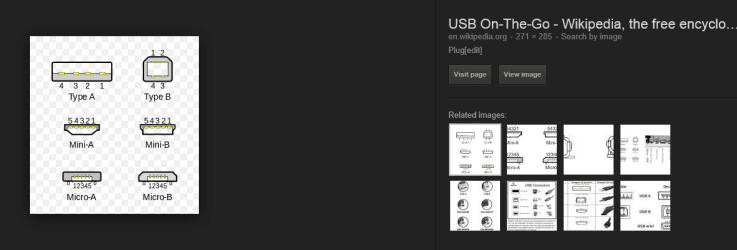
Different Types of USB Connectors:

^ This is referred to as a Type “A”

^ This is referred to as a Type “B”
I hope you learnt something reading this, as i sure did making it!
If you would like anymore information that i have not covered, please make a post!
So what’s the difference between USB Versions?
Well firstly let me start off with some background Information:
USB – Universal Serial Bus
USB 1.1 – 1.5 Mbit/s
USB 2.0 – 35 MB/s
USB 3.0 – 4 Gbit/s
USB was designed to standardize the connection of computer peripherals (including keyboards, pointing devices, digital cameras, printers, portable media players, disk drives and network adapters) to personal computers, both to communicate and to supply electric power.
Lets get Technical:
USB 2: 4 Connectors
USB 3: 5 Connectors
An extra connector has allowed a USB 3 to be 10 times faster!
USB 3.0, the latest generation of the Universal Series Bus, operates on the same principles as USB 2.0 technology but with some improvements. Also referred to as Super Speed, USB 3.0 offers faster data transfer rates and a theoretical 4.8 Gbps, or speeds that are ten times faster than USB.
Lets not Forget that USB is backward Compatible!
Different Types of USB Connectors:
^ This is referred to as a Type “A”
^ This is referred to as a Type “B”
I hope you learnt something reading this, as i sure did making it!
If you would like anymore information that i have not covered, please make a post!
My Computer
- Computer type
- PC/Desktop
- Computer Manufacturer/Model Number
- Custom Build
- OS
- Windows 7 Ultimate 64-bit
- CPU
- Intel G3420 3.2GHZ Dual Core
- Motherboard
- Gigabyte H87-HD3
- Memory
- Kingson 8GB 1600mhz
- Graphics Card(s)
- MSI R7970 TF 3GD5/OC BE
- Monitor(s) Displays
- 21" LG & "19 Vertical Samsung
- Hard Drives
- 120GB SSD - Boot
1TB WD
350GB External
2TB External (Wireless)
- PSU
- Corsair CX 500 modular
- Case
- Zalman Z11 Plus (modified)
- Cooling
- Corsair H55, 2x 120mm SP Corsair, 1x 140 Coolermaster
- Keyboard
- Corsair K50
- Mouse
- CSL Gaming
- Internet Speed
- 164Mbps
- Antivirus
- Avast, Malwarebytes
- Browser
- Google Chrome, IE, Firefox


 .
.


