itsmikerofl
New member
- Local time
- 2:44 AM
- Messages
- 5
Please read the entire post thoroughly before suggesting a solution.
Mobo: ASUS P8Z68-V LX, on the latest BIOS version. Eight USB 2.0 ports, two USB 3.0 ports. Intel i5-2500K LGA1155 CPU. 8GB of DDR3 RAM. Graphics card is NVIDIA GTS 8800 512, and I have a GTX 960 FTW on the way. Corsair CSX500 PSU.
Problem Drive Model: WDBHML0040HAL-NESN
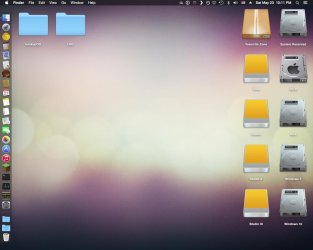
- I ordered this 4TB WD Studio drive off eBay for $109, used. The drive was previously used on OS X, and I had planned to use it between both Windows 7, 10, and OS X 10 via dual boot.
- The PC boots regularly without the drive plugged in, but it hangs at the splash screen if the drive is connected in any of my 10 USB ports.
- I am unable to get into the BIOS with the drive connected, and if I enter the BIOS without it connected, the BIOS freezes once I do connect it.
- I have went into the BIOS, (with the device disconnected), and moved external drives to the lowest boot priority. This had no effect.
- The PC recognizes the drive if it is connected after boot. I can copy files to and from the drive flawlessly.
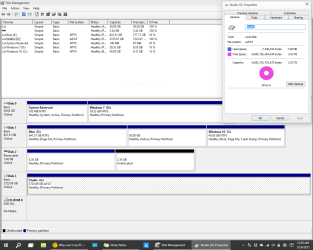
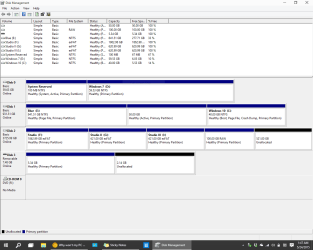
- When received, the drive was formatted with a 200MB EFI System partition in front, (I have no background knowledge on this), with the rest ~3.5TB being free HFS+ space.
- I immediately formatted the HFS+ partition and separated it into exFAT and NTFS.
- Deleting the EFI partition at command line had no effect.
Someone online said that this is due to the ASUS P8Z68 trying to boot from the drive, and to disable "Legacy USB Support" from the BIOS, but that to my knowledge means all USB devices are disabled, including keyboards. I am currently doing a FULL format of the drive, and will update the post as I try these solutions.
I am really at a dead end here, guys. Any help at all is appreciated.
Mobo: ASUS P8Z68-V LX, on the latest BIOS version. Eight USB 2.0 ports, two USB 3.0 ports. Intel i5-2500K LGA1155 CPU. 8GB of DDR3 RAM. Graphics card is NVIDIA GTS 8800 512, and I have a GTX 960 FTW on the way. Corsair CSX500 PSU.
Problem Drive Model: WDBHML0040HAL-NESN
- I ordered this 4TB WD Studio drive off eBay for $109, used. The drive was previously used on OS X, and I had planned to use it between both Windows 7, 10, and OS X 10 via dual boot.
- The PC boots regularly without the drive plugged in, but it hangs at the splash screen if the drive is connected in any of my 10 USB ports.
- I am unable to get into the BIOS with the drive connected, and if I enter the BIOS without it connected, the BIOS freezes once I do connect it.
- I have went into the BIOS, (with the device disconnected), and moved external drives to the lowest boot priority. This had no effect.
- The PC recognizes the drive if it is connected after boot. I can copy files to and from the drive flawlessly.
- When received, the drive was formatted with a 200MB EFI System partition in front, (I have no background knowledge on this), with the rest ~3.5TB being free HFS+ space.
- I immediately formatted the HFS+ partition and separated it into exFAT and NTFS.
- Deleting the EFI partition at command line had no effect.
Someone online said that this is due to the ASUS P8Z68 trying to boot from the drive, and to disable "Legacy USB Support" from the BIOS, but that to my knowledge means all USB devices are disabled, including keyboards. I am currently doing a FULL format of the drive, and will update the post as I try these solutions.
I am really at a dead end here, guys. Any help at all is appreciated.
My Computer
At a glance
Windows 7 x64, Windows 10 x64, OS X 10.10.2Intel i5-2500K LGA11558GB Corsair DDR3NVIDIA GeForce 8800 GTS 512, EVGA GTX 960 FTW
- Computer type
- PC/Desktop
- Computer Manufacturer/Model Number
- Custom Build
- OS
- Windows 7 x64, Windows 10 x64, OS X 10.10.2
- CPU
- Intel i5-2500K LGA1155
- Motherboard
- ASUS P8Z68-V LX
- Memory
- 8GB Corsair DDR3
- Graphics Card(s)
- NVIDIA GeForce 8800 GTS 512, EVGA GTX 960 FTW
- Hard Drives
- 64GB Kensington SSD
1TB WD Blue
4TB WD My Book Studio
- Antivirus
- Security Essentials