Software with smaller pixel-size than MS paint?

EmilFrederiksen

New member
Local time
8:27 AM
Messages
23
Hello everyone

This might be a really obvios question to some in here, but I would like to know anyway.

When you use the 'pen' in MS paint and colour one pixel in 100% zoom, does that equal one pixel on the screen?

Is there a software, Paint Shop Pro fx. that can colour smaller pixels, and make more detailed pictures?


Hope my questions makes sense. Thank you for answering.

Best regards
 

My Computer My Computer

Computer type
PC/Desktop
OS
Windows 7 32bit
Not sure I follow your questions, but here's my thinking.

A pixel is a pixel, whether you are at 100% zoom or 1200%. At 1200 percent, it will simply appear larger on your screen.

So, yes to your first question.

As to your second question, I don't quite follow it and don't know what you mean by "smaller pixels". All pixels on your screen should be the same size. None are "smaller" than others. If you can color one, you should be able to color any, though it obviously helps to zoom in considerably so the pixel APPEARS larger.

I haven't used Paint in 20 years and have no idea about its functionality or how clumsy it might be. Maybe you can't zoom in sufficiently so that you can easily color a single pixel?
 

My Computer My Computer

Computer type
PC/Desktop
Computer Manufacturer/Model Number
Ignatz Special; 4 speed manual gearbox; factory air conditioning; one of one
OS
Windows 7 Home Premium SP1, 64-bit
CPU
Intel Skylake i5-6600K, not overclocked
Motherboard
AsRock Z170M Extreme 4, micro ATX
Memory
8 GB HyperX DDR4-2666 (2 x 4 GB)
Graphics Card(s)
none; graphics are integrated on CPU
Sound Card
onboard: Realtek ALC1150; external: USB Behringer UF0-202
Monitor(s) Displays
Dell S2340M 23 inch IPS
Screen Resolution
1600 x 900
Hard Drives
System: Crucial MX100 series SSD, 128 GB;
Data: Samsung Spinpoint 103SJ, 1 TB;
Backup: WD Caviar Green WD30EZRX-00D8PB0, 3 TB
PSU
Rosewill SilentNight 500 watt fanless, semi-modular
Case
Antec Solo II
Cooling
Noctua NH-U12S; Noctua F12 intake, Noctua S12A exhaust
Keyboard
Microsoft 200 6JH-00001 USB
Mouse
Dell or Microsoft optical wired; USB
Antivirus
Microsoft Security Essentials and Malwarebytes Premium
Browser
Pale Moon
Other Info
All fans PWM; speeds at idle: CPU circa 500 rpm; intake circa 600 rpm; exhaust circa 600 rpm; CPU temps 27 idle and 47 C load in a warm room (27 C/81 F) when running Intel Extreme Tuning Utility stress test.
Hi,
Not sure but depending on the images ppi = pixels per inch or dpi = dots per inch
Dots per inch - Wikipedia, the free encyclopedia

One pixel :/
Pen tool is brush size that can be adjusted to different widths...
I would suggest using a real photo editing program and not M$ Paint for serious editing controls,

There is a PaintNet free program along with free GIMP that are pretty good.
 

My Computer My Computer

Computer type
PC/Desktop
Computer Manufacturer/Model Number
Custom assembled by me :}
OS
Win-7-Pro64bit 7-H-Prem-64bit
CPU
i7-5930K 2nd i9-9940x both water blocked VRM's too
Motherboard
ASUS SABERTOOTH X99 2nd ASUS x299 Apex
Memory
Trident-z 3200C14 2nd Trident-z 3600C16
Graphics Card(s)
EVGA 1080ti ftw3 2nd Titan Xp both water blocked
Sound Card
Built-in Realtek
Monitor(s) Displays
1-AOC G2460PG 24"G-Sync 144Hz/ 2nd 1-ASUS VG248QE 24" 144Hz
Screen Resolution
1920 x 1080 144Hz
Hard Drives
2-Samsung M.2 Evo & Evo Plus
2-Samsung 850 EVO 500GB SSD's/ 3-2.5 W.D. Black 1tb-&3-1tb/3-3.5 WD Black 1tb hdd's
PSU
EVGA SuperNOVA 1000-P2 2nd 1200-P2
Case
2-Corsair Obsidian Series 450D Black ATX Mid Tower
Cooling
Custom water loops
Keyboard
Logitech G710+/ 2nd Logitech G910
Mouse
2-RedDragon M901 Perdition 16400 dpi Gaming mouse = wired
Internet Speed
Comcast Ping 19ms 89.31mbps download speed 6.12mbps upload
Antivirus
Malwarebytes Pro/ Superantispyware Pro
Browser
FireFox & Pale moon
Other Info
2nd ASUS X299 Apex/Intel i9-9940x with Custom water loop/7H-Prem-x64/Corsair 450D case/Ram Trident-z 3600C16 4x8gb / Samsung970Evo plus 500gb SSD/Dual ssd EZ swap evo/PSU EVGA SuperNova 1200w-P2 80+Platinum/GPU Titan Xp /8-ML-140 on push-pull on 2-280GTX rads
So I think my question is: Is there any editing software with higher DPI than MS Paint?

I tried PaintNET and PIXLR.com, both with same DPI as MS Paint.
 

My Computer My Computer

Computer type
PC/Desktop
OS
Windows 7 32bit

My Computer My Computer

Computer type
PC/Desktop
Computer Manufacturer/Model Number
Custom Build
OS
Windows 7 Ultimate x64 SP1
CPU
AMD Phenom 2 1090T
Motherboard
Gigabyte GA-890FXA-UD5
Memory
2x8GB Kingston HyperX Fury Black 1600Mhz Unganged
Graphics Card(s)
MSI GTX 970 Gaming 4G
Sound Card
Realtek On-Board HD 7.1 Audio / Logitech G35
Monitor(s) Displays
3xAcer GD245HQ
Screen Resolution
1920x1080
Hard Drives
Samsung 850 Pro 512GB SSD - OS /
WD Caviar Black SATA 3 - 1 TBx2 - Dynamic RAID 0 /
WD Caviar Green SATA 2 - 640GBx2 - Dynamic RAID 0 /
WD Caviar Green SATA 2 - 640GB - Internal Backup /
Seagate Barracude SATA 3 - 3TB - External Backup/ Sync
PSU
HighPower 1000W
Case
Cooler Master HAF 932
Cooling
Noctua NH-D14
Keyboard
Logitech G19
Mouse
Logitech G500
Internet Speed
100/4 Mbit Cable (100GB quota)
Antivirus
ZoneAlarm Extreme Security / MBAM Pro / MBAE Free / SAS Free
Browser
IE 11 - Firefox - Chrome
Other Info
Logitech F710/ G27/ G940/ Z5500 // TrackIR 5 // Nvidia 3D Surround Vision
Thank you

I have just tried it, same DPI as the others.

I guess that you cannot draw smaller than a pixel?

Because then the "picture" would not be visible in 100%, since the screen cannot display smaller than a pixel, right?
 

My Computer My Computer

Computer type
PC/Desktop
OS
Windows 7 32bit
Dpi or ppi depends on the image,
If creating an image it depends on the settings of the project file otherwise you'd have to resample the image keeping the original size but adding more pixels to it
I believe a screen capture and pasting in paint is a 120 dpi or ppi image

In GIMP you create a new project or new image,
Resolution under Advanced options,
Make it what ever you want 300.000 is 300 ppi or dpi
View attachment 359883
 
Last edited:

My Computer My Computer

Computer type
PC/Desktop
Computer Manufacturer/Model Number
Custom assembled by me :}
OS
Win-7-Pro64bit 7-H-Prem-64bit
CPU
i7-5930K 2nd i9-9940x both water blocked VRM's too
Motherboard
ASUS SABERTOOTH X99 2nd ASUS x299 Apex
Memory
Trident-z 3200C14 2nd Trident-z 3600C16
Graphics Card(s)
EVGA 1080ti ftw3 2nd Titan Xp both water blocked
Sound Card
Built-in Realtek
Monitor(s) Displays
1-AOC G2460PG 24"G-Sync 144Hz/ 2nd 1-ASUS VG248QE 24" 144Hz
Screen Resolution
1920 x 1080 144Hz
Hard Drives
2-Samsung M.2 Evo & Evo Plus
2-Samsung 850 EVO 500GB SSD's/ 3-2.5 W.D. Black 1tb-&3-1tb/3-3.5 WD Black 1tb hdd's
PSU
EVGA SuperNOVA 1000-P2 2nd 1200-P2
Case
2-Corsair Obsidian Series 450D Black ATX Mid Tower
Cooling
Custom water loops
Keyboard
Logitech G710+/ 2nd Logitech G910
Mouse
2-RedDragon M901 Perdition 16400 dpi Gaming mouse = wired
Internet Speed
Comcast Ping 19ms 89.31mbps download speed 6.12mbps upload
Antivirus
Malwarebytes Pro/ Superantispyware Pro
Browser
FireFox & Pale moon
Other Info
2nd ASUS X299 Apex/Intel i9-9940x with Custom water loop/7H-Prem-x64/Corsair 450D case/Ram Trident-z 3600C16 4x8gb / Samsung970Evo plus 500gb SSD/Dual ssd EZ swap evo/PSU EVGA SuperNova 1200w-P2 80+Platinum/GPU Titan Xp /8-ML-140 on push-pull on 2-280GTX rads
It still does not change anything.

If it is 1 or if it is 4000 in X and Y resolution.

The pixels are still the same size.
 

My Computer My Computer

Computer type
PC/Desktop
OS
Windows 7 32bit
If you alter the screen resolution of your monitor to a greater resolution than it is set now then the actual individual pixel will get smaller. Similarly if you set your screen resoluion to 800 x 600 the usual setting if you boot up in safe mode then the pixels will appear bigger.
 

My Computer My Computer

Computer type
PC/Desktop
OS
Microsoft Windows 7 Home Premium 64-bit 7601 Multiprocessor Free Service Pack 1
CPU
Intel(R) Core(TM) i7-3770 CPU @ 3.40GHz
Motherboard
ASUSTeK COMPUTER INC. P8H77-M
Memory
8.00 GB
Graphics Card(s)
Intel(R) HD Graphics 4000
Sound Card
On Board
Monitor(s) Displays
Dell 24"
Screen Resolution
1920 x 1080
Hard Drives
(1) INTEL SSDSC2CT180A3 ATA Device (2) ST500DM002-1BD142 ATA Device (3) WDC WD3200AAKS-75L9A0 ATA Device (4) Generic- Compact Flash USB Device (5) Generic- MS/MS-Pro USB Device (6) Generic- SD/MMC USB Device (7) Generic- SM/xD-Picture USB
PSU
500w Corsair
Case
Cooler Master
Cooling
3 Fans
Keyboard
Logitech MK300
Mouse
Logitech WOM
Internet Speed
75Mb
Antivirus
Norton 360
Browser
Firefox, Opera, IE
"The values in the X resolution and Y resolution fields relate mainly to printing: they do not affect the size of the image in pixels, but they may determine its physical size when it is printed."

Ahh, that is why! I can only see the difference, when it is printed.

So there is no software, where is it possibe to see the difference then?
 

My Computer My Computer

Computer type
PC/Desktop
OS
Windows 7 32bit
Depends on your perception of 1px. and why your concerned with insisting on 1px or I suppose smaller :/

Yes it's about printing but also about High resolution quality images and or the lack of having any high resolution images to see the difference in pixels on the same Zoom rate.
Cheers.
 

My Computer My Computer

Computer type
PC/Desktop
Computer Manufacturer/Model Number
Custom assembled by me :}
OS
Win-7-Pro64bit 7-H-Prem-64bit
CPU
i7-5930K 2nd i9-9940x both water blocked VRM's too
Motherboard
ASUS SABERTOOTH X99 2nd ASUS x299 Apex
Memory
Trident-z 3200C14 2nd Trident-z 3600C16
Graphics Card(s)
EVGA 1080ti ftw3 2nd Titan Xp both water blocked
Sound Card
Built-in Realtek
Monitor(s) Displays
1-AOC G2460PG 24"G-Sync 144Hz/ 2nd 1-ASUS VG248QE 24" 144Hz
Screen Resolution
1920 x 1080 144Hz
Hard Drives
2-Samsung M.2 Evo & Evo Plus
2-Samsung 850 EVO 500GB SSD's/ 3-2.5 W.D. Black 1tb-&3-1tb/3-3.5 WD Black 1tb hdd's
PSU
EVGA SuperNOVA 1000-P2 2nd 1200-P2
Case
2-Corsair Obsidian Series 450D Black ATX Mid Tower
Cooling
Custom water loops
Keyboard
Logitech G710+/ 2nd Logitech G910
Mouse
2-RedDragon M901 Perdition 16400 dpi Gaming mouse = wired
Internet Speed
Comcast Ping 19ms 89.31mbps download speed 6.12mbps upload
Antivirus
Malwarebytes Pro/ Superantispyware Pro
Browser
FireFox & Pale moon
Other Info
2nd ASUS X299 Apex/Intel i9-9940x with Custom water loop/7H-Prem-x64/Corsair 450D case/Ram Trident-z 3600C16 4x8gb / Samsung970Evo plus 500gb SSD/Dual ssd EZ swap evo/PSU EVGA SuperNova 1200w-P2 80+Platinum/GPU Titan Xp /8-ML-140 on push-pull on 2-280GTX rads
pixel - picture element - the smallest unit in an image

how can there be anything smaller ?
 

My Computer My Computer

Computer type
PC/Desktop
Computer Manufacturer/Model Number
self build
OS
Windows 7 Pro x64 sp1
CPU
i7 4770K
Motherboard
MSI B85M-E45
Memory
8GB Corsair Vengeance 1600MHz
Graphics Card(s)
onboard
Monitor(s) Displays
LG 27MP35
Screen Resolution
1920-1080
Hard Drives
Seagate 2TB
PSU
Cooler Master GX 750
Case
Antec 300
Cooling
Seidon 120V
Internet Speed
60/18
Antivirus
MSE
Browser
Firefox
A pixel is the smallest unit when you are editing a picture right? I just wanted to hear if there is a smaller unit. For example in gimp, the smallest pen size is 1.0 pixel.
 

My Computer My Computer

Computer type
PC/Desktop
OS
Windows 7 32bit
A pixel is the smallest unit when you are editing a picture right?
YES
I just wanted to hear if there is a smaller unit. For example in gimp, the smallest pen size is 1.0 pixel.
That's because there is nothing smaller than a pixel. Of course as I said earlier the physical size of a pixel is relative to your screen size and the resolution it dispays.
 

My Computer My Computer

Computer type
PC/Desktop
OS
Microsoft Windows 7 Home Premium 64-bit 7601 Multiprocessor Free Service Pack 1
CPU
Intel(R) Core(TM) i7-3770 CPU @ 3.40GHz
Motherboard
ASUSTeK COMPUTER INC. P8H77-M
Memory
8.00 GB
Graphics Card(s)
Intel(R) HD Graphics 4000
Sound Card
On Board
Monitor(s) Displays
Dell 24"
Screen Resolution
1920 x 1080
Hard Drives
(1) INTEL SSDSC2CT180A3 ATA Device (2) ST500DM002-1BD142 ATA Device (3) WDC WD3200AAKS-75L9A0 ATA Device (4) Generic- Compact Flash USB Device (5) Generic- MS/MS-Pro USB Device (6) Generic- SD/MMC USB Device (7) Generic- SM/xD-Picture USB
PSU
500w Corsair
Case
Cooler Master
Cooling
3 Fans
Keyboard
Logitech MK300
Mouse
Logitech WOM
Internet Speed
75Mb
Antivirus
Norton 360
Browser
Firefox, Opera, IE
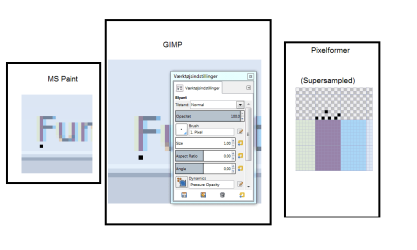
This was the closet thing I could come in what I was looking for.

The software Pixelformer, enables you to use the function 'Supersampled', so you can make "smaller pixels" than normal, without using any zoom-function.

When you export the file and open it in GIMP, MS Paint etc. the pixels are the regular size, and shows the dominant colour of the combined 'supersampled pixel'.

Pixelformer.png
 

My Computer My Computer

Computer type
PC/Desktop
OS
Windows 7 32bit
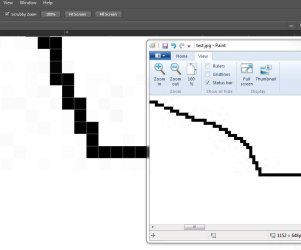
I drew a pixel line in MS Paint, then viewed it in Photoshop CC. In this snip PS can zoom in a bit more, but it's still the smallest unit to work with in either program. A pixel is a pixel.

pixeltest.jpg
 

My Computer My Computer

Computer type
PC/Desktop
Computer Manufacturer/Model Number
self build
OS
Windows 7 Pro x64 sp1
CPU
i7 4770K
Motherboard
MSI B85M-E45
Memory
8GB Corsair Vengeance 1600MHz
Graphics Card(s)
onboard
Monitor(s) Displays
LG 27MP35
Screen Resolution
1920-1080
Hard Drives
Seagate 2TB
PSU
Cooler Master GX 750
Case
Antec 300
Cooling
Seidon 120V
Internet Speed
60/18
Antivirus
MSE
Browser
Firefox
Super sample sounds like Resampling an image keeping the original size but adding more pixels,
I already mentioned Resampling the image to something higher 300-600 ppi/ dpi and keeping the original size.
That forces the program ps/ gimp.. to add more pixels.
 

My Computer My Computer

Computer type
PC/Desktop
Computer Manufacturer/Model Number
Custom assembled by me :}
OS
Win-7-Pro64bit 7-H-Prem-64bit
CPU
i7-5930K 2nd i9-9940x both water blocked VRM's too
Motherboard
ASUS SABERTOOTH X99 2nd ASUS x299 Apex
Memory
Trident-z 3200C14 2nd Trident-z 3600C16
Graphics Card(s)
EVGA 1080ti ftw3 2nd Titan Xp both water blocked
Sound Card
Built-in Realtek
Monitor(s) Displays
1-AOC G2460PG 24"G-Sync 144Hz/ 2nd 1-ASUS VG248QE 24" 144Hz
Screen Resolution
1920 x 1080 144Hz
Hard Drives
2-Samsung M.2 Evo & Evo Plus
2-Samsung 850 EVO 500GB SSD's/ 3-2.5 W.D. Black 1tb-&3-1tb/3-3.5 WD Black 1tb hdd's
PSU
EVGA SuperNOVA 1000-P2 2nd 1200-P2
Case
2-Corsair Obsidian Series 450D Black ATX Mid Tower
Cooling
Custom water loops
Keyboard
Logitech G710+/ 2nd Logitech G910
Mouse
2-RedDragon M901 Perdition 16400 dpi Gaming mouse = wired
Internet Speed
Comcast Ping 19ms 89.31mbps download speed 6.12mbps upload
Antivirus
Malwarebytes Pro/ Superantispyware Pro
Browser
FireFox & Pale moon
Other Info
2nd ASUS X299 Apex/Intel i9-9940x with Custom water loop/7H-Prem-x64/Corsair 450D case/Ram Trident-z 3600C16 4x8gb / Samsung970Evo plus 500gb SSD/Dual ssd EZ swap evo/PSU EVGA SuperNova 1200w-P2 80+Platinum/GPU Titan Xp /8-ML-140 on push-pull on 2-280GTX rads
Photoshop joke/true story -

Lady shows pic of her house to a Photoshop dude. There's a trashcan in front of the house spoiling the pic.

'Can you remove the trashcan ?'

'Sure'

'Fantastic. You'll be able to see my dog - he was behind the trashcan'

ThrashZone refers to resampling to higher res - you can't invent data (like the dog ^^).
 
Last edited:

My Computer My Computer

Computer type
PC/Desktop
Computer Manufacturer/Model Number
self build
OS
Windows 7 Pro x64 sp1
CPU
i7 4770K
Motherboard
MSI B85M-E45
Memory
8GB Corsair Vengeance 1600MHz
Graphics Card(s)
onboard
Monitor(s) Displays
LG 27MP35
Screen Resolution
1920-1080
Hard Drives
Seagate 2TB
PSU
Cooler Master GX 750
Case
Antec 300
Cooling
Seidon 120V
Internet Speed
60/18
Antivirus
MSE
Browser
Firefox

My Computer My Computer

Computer type
PC/Desktop
Computer Manufacturer/Model Number
Custom assembled by me :}
OS
Win-7-Pro64bit 7-H-Prem-64bit
CPU
i7-5930K 2nd i9-9940x both water blocked VRM's too
Motherboard
ASUS SABERTOOTH X99 2nd ASUS x299 Apex
Memory
Trident-z 3200C14 2nd Trident-z 3600C16
Graphics Card(s)
EVGA 1080ti ftw3 2nd Titan Xp both water blocked
Sound Card
Built-in Realtek
Monitor(s) Displays
1-AOC G2460PG 24"G-Sync 144Hz/ 2nd 1-ASUS VG248QE 24" 144Hz
Screen Resolution
1920 x 1080 144Hz
Hard Drives
2-Samsung M.2 Evo & Evo Plus
2-Samsung 850 EVO 500GB SSD's/ 3-2.5 W.D. Black 1tb-&3-1tb/3-3.5 WD Black 1tb hdd's
PSU
EVGA SuperNOVA 1000-P2 2nd 1200-P2
Case
2-Corsair Obsidian Series 450D Black ATX Mid Tower
Cooling
Custom water loops
Keyboard
Logitech G710+/ 2nd Logitech G910
Mouse
2-RedDragon M901 Perdition 16400 dpi Gaming mouse = wired
Internet Speed
Comcast Ping 19ms 89.31mbps download speed 6.12mbps upload
Antivirus
Malwarebytes Pro/ Superantispyware Pro
Browser
FireFox & Pale moon
Other Info
2nd ASUS X299 Apex/Intel i9-9940x with Custom water loop/7H-Prem-x64/Corsair 450D case/Ram Trident-z 3600C16 4x8gb / Samsung970Evo plus 500gb SSD/Dual ssd EZ swap evo/PSU EVGA SuperNova 1200w-P2 80+Platinum/GPU Titan Xp /8-ML-140 on push-pull on 2-280GTX rads
deleted
 
Last edited:

My Computer My Computer

Computer type
PC/Desktop
Computer Manufacturer/Model Number
self build
OS
Windows 7 Pro x64 sp1
CPU
i7 4770K
Motherboard
MSI B85M-E45
Memory
8GB Corsair Vengeance 1600MHz
Graphics Card(s)
onboard
Monitor(s) Displays
LG 27MP35
Screen Resolution
1920-1080
Hard Drives
Seagate 2TB
PSU
Cooler Master GX 750
Case
Antec 300
Cooling
Seidon 120V
Internet Speed
60/18
Antivirus
MSE
Browser
Firefox
Back
Top