Someone hacked/Disabled my internet?

Phillip94

New member
Local time
4:39 AM
Messages
16
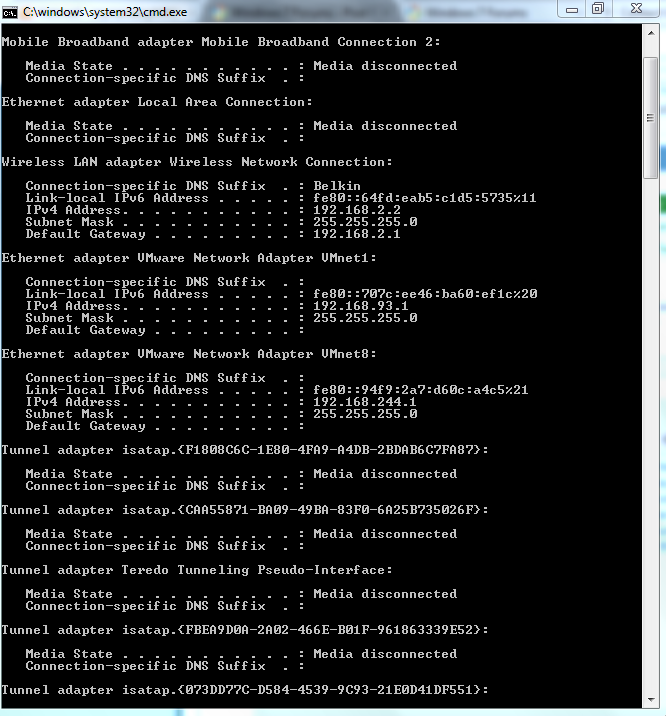
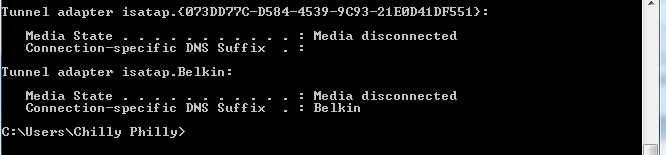
Okay well basically i recently annoyed someone over the internet and they got to the point of saying "GF INTERNET(goodfight internet), now a day later my internet isn't working anymore. Im currently using my other shitty usb modem. I have reason to believe that he has messed with my modem or something... because i can connect to that internet on other computers. Iv'e done so much research but basically there all saying the same thing.. Here are some picture of my ipconfig and the error thing.

DNS Error
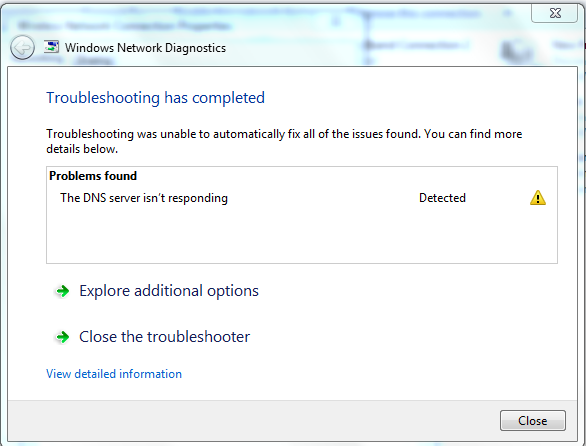
EmoUA.png

Ipconfig part1/2
WreHQ.png

Part2/2
n9PtL.png


Yes and i have virus scanned my computer/resset the router, uninstalled it etc.
Operating system: Windows 7 Home Premium/64 bit
 

My Computer My Computer

OS
window 7 home premium 64bit

My Computer My Computer

Computer Manufacturer/Model Number
Samsung NP530U4B-S02IN
OS
Windows® 8 Pro (64-bit)
CPU
Intel® Core™ i5 Processor 2467M (1.60GHz, 3MB L3 Cache)
Motherboard
Samsung Electronics
Memory
6GB DDR3 System Memory at 1,333MHz (on BD 4GB + 2GB x 1)
Graphics Card(s)
AMD Radeon™ HD7550M 1GB DDR3 (Ext. Graphic)
Sound Card
Realtek High Definition Audio
Monitor(s) Displays
35.56cm (14.0) SuperBright 300nit HD LED Display
Screen Resolution
1366x768
Hard Drives
1TB S-ATA II Hard Drive (5400RPM) with ExpressCache 16GB SSD
Internet Speed
sucks
Antivirus
Microsoft Security Essentials
Browser
Google Chrome (Sync enabled)
Okay i ran the file as an administrator and then it booted back u. Finally connected to the internet but only for about 5 seconds.... then the DNS error kicked back in.
Just a wild guess.. this person could be forcing my internet not to connect to the DNS server somehow? i have virus scanned and nothing has showed up.
 

My Computer My Computer

OS
window 7 home premium 64bit
I would be inclined to:
  1. Reset your router to its default settings.
  2. Disable your network adapter then re-enable it.
  3. Check to see if you have a Microsoft Virtual WiFi Miniport Adapter.
  4. If you have, delete it.
 

My Computer My Computer

Computer Manufacturer/Model Number
HP Pavilion Elite 495UK
OS
Windows 7 Ultimate SP1 64-Bit
CPU
Intel Core i7 870 @ 2.93GHz
Motherboard
MSI 2A9C (CPU1)
Memory
8Gb Dual-Channel DDR3 @ 664MHz
Graphics Card(s)
nVidia GeForce GTX 460 1024MB dedicated RAM
Sound Card
Realtek HD Audio
Monitor(s) Displays
HP2310i
Screen Resolution
1920 x 1080
Hard Drives
1x1954GB Hitachi HDS22020ALA 330 (RAID), 1x1954GB Hitachi External for backup and storage
PSU
460W
Case
HP Elite
Cooling
Air cooled
Keyboard
Logitech K750 solar-powered keyboard
Mouse
Logitech Wireless M180 mouse
Internet Speed
2Mb
Other Info
Pure Avanti Flow Internet Radio with iPod Dock, 64Gb iPod, HP USB Speakers, Sony MDR-V500 Headphones, Sony Vaio F-Series Laptop
how do i find the microsoft virtual adapter?
 

My Computer My Computer

OS
window 7 home premium 64bit
I would be inclined to:
  1. Reset your router to its default settings.
  2. Disable your network adapter then re-enable it.
  3. Check to see if you have a Microsoft Virtual WiFi Miniport Adapter.
  4. If you have, delete it.

Okay i done all of that, however i checked my network connections and i don't have a virtual microsoft adapter.
 

My Computer My Computer

OS
window 7 home premium 64bit
if anyone can give me good information that will fix my problem i will literally pay them $15.. if that's allowed in threads im not sure.
 

My Computer My Computer

OS
window 7 home premium 64bit
I really need my other internet back up for work i do at home, please people.
 

My Computer My Computer

OS
window 7 home premium 64bit
Do you know how to set the DNS settings on your Network Interface Card to - say - opendns servers? See here.
 

My Computer My Computer

Computer type
Laptop
Computer Manufacturer/Model Number
Employer provided Dell Latitude
OS
W7 Pro SP1 64bit
CPU
i7
Memory
8GB
Graphics Card(s)
Intel HD Graphics
Hard Drives
crappy SSD
Antivirus
Employer mandated Symantec Endpoint Protection
Browser
Pale Moon 64bit, IE11 64bit & Chrome 64bit
Thanks for helping, however i just tryed opendns servers, im still getting the same diagnostics message.
 

My Computer My Computer

OS
window 7 home premium 64bit
It looks like an issue from your ISP's end. Did you call them up to check if everything's OK from their end?
 

My Computer My Computer

Computer Manufacturer/Model Number
Samsung NP530U4B-S02IN
OS
Windows® 8 Pro (64-bit)
CPU
Intel® Core™ i5 Processor 2467M (1.60GHz, 3MB L3 Cache)
Motherboard
Samsung Electronics
Memory
6GB DDR3 System Memory at 1,333MHz (on BD 4GB + 2GB x 1)
Graphics Card(s)
AMD Radeon™ HD7550M 1GB DDR3 (Ext. Graphic)
Sound Card
Realtek High Definition Audio
Monitor(s) Displays
35.56cm (14.0) SuperBright 300nit HD LED Display
Screen Resolution
1366x768
Hard Drives
1TB S-ATA II Hard Drive (5400RPM) with ExpressCache 16GB SSD
Internet Speed
sucks
Antivirus
Microsoft Security Essentials
Browser
Google Chrome (Sync enabled)
You mentioned in your first post that you "...can connect to that internet on other computers." Are these other computers able to stay connected and keep using DNS via the Belkin router? And what do you mean by "USB router"? Did you mean a USB NIC?
 

My Computer My Computer

Computer type
Laptop
Computer Manufacturer/Model Number
Employer provided Dell Latitude
OS
W7 Pro SP1 64bit
CPU
i7
Memory
8GB
Graphics Card(s)
Intel HD Graphics
Hard Drives
crappy SSD
Antivirus
Employer mandated Symantec Endpoint Protection
Browser
Pale Moon 64bit, IE11 64bit & Chrome 64bit
I don't get how it's my ISP's. When all my other laptop's/computers work on it.
 

My Computer My Computer

OS
window 7 home premium 64bit
You mentioned in your first post that you "...can connect to that internet on other computers." Are these two able to stay connected and keep using DNS via the Belkin router? And what do you mean by "USB router"? Did you mean USB a NIC?

Yes, they stay connected to it using the Belkin router and DNS, and the other internet i have is a HAUWEI 3G modem(all you do is plug it into your computer and away it goes). Which im using right now.
 

My Computer My Computer

OS
window 7 home premium 64bit
can you disable the VMware NIC?
edit: in the computer that is not working.
 

My Computer My Computer

Computer type
Laptop
Computer Manufacturer/Model Number
Employer provided Dell Latitude
OS
W7 Pro SP1 64bit
CPU
i7
Memory
8GB
Graphics Card(s)
Intel HD Graphics
Hard Drives
crappy SSD
Antivirus
Employer mandated Symantec Endpoint Protection
Browser
Pale Moon 64bit, IE11 64bit & Chrome 64bit
Yes these other computers work with the belkin router, i also have a network adapter which also doesn't work work on this computer with this belkin router.
 

My Computer My Computer

OS
window 7 home premium 64bit
sorry about that - once I realized that the thread had gone to a second page - I found the post where I asked you about the other computers. I thought that the post had gotten lost, so I posted it agian. Once I saw what happened, I edited that repeat post to move on to the next question about the VMware NIC

I find it odd that the LAN NIC has a x.x.2.x address and the VMware NIC has a x.x.244.x address.
 

My Computer My Computer

Computer type
Laptop
Computer Manufacturer/Model Number
Employer provided Dell Latitude
OS
W7 Pro SP1 64bit
CPU
i7
Memory
8GB
Graphics Card(s)
Intel HD Graphics
Hard Drives
crappy SSD
Antivirus
Employer mandated Symantec Endpoint Protection
Browser
Pale Moon 64bit, IE11 64bit & Chrome 64bit
the network adapter i have is the VMware , which i just disabled. Tryed to connect again and still didn't work. If your willing i would allow you to connect to my computer remotely. Because i know i may not be making any sense at these computer topics.
 

My Computer My Computer

OS
window 7 home premium 64bit
Most computer help forums discourage members from making remote control sessions. I'm pretty new to this forum and I'm not sure of the policy here towards such sessions... maybe Dinesh knows.

Do you have a network cable plugged into the computer that will not work right and is that network cable still tied to the belkin router even when you are using the 3G NIC?
 

My Computer My Computer

Computer type
Laptop
Computer Manufacturer/Model Number
Employer provided Dell Latitude
OS
W7 Pro SP1 64bit
CPU
i7
Memory
8GB
Graphics Card(s)
Intel HD Graphics
Hard Drives
crappy SSD
Antivirus
Employer mandated Symantec Endpoint Protection
Browser
Pale Moon 64bit, IE11 64bit & Chrome 64bit
To be honest i just got lost, i don't know if this is what your trying to get at but. I just unplugged my vmare adapter and 3g modem, and the belkin router is still not working. I could usualy have them all plugged in and enabled, and just use one of them to connect to belkin.
 

My Computer My Computer

OS
window 7 home premium 64bit
Back
Top