
You are using an out of date browser. It may not display this or other websites correctly.
You should upgrade or use an alternative browser.
You should upgrade or use an alternative browser.
Someone must know how I can fix my disc drive?
- Thread starter Liisa
- Start date
- Local time
- 6:30 AM
- Messages
- 1,741
try reinstalling the driver nowSince I uninstalled it my drive won't show up when I check my hardware, it used to :s
If it's doesn't show up when you restart then manually search for new hardware and use the locating the driver files

Ohjaimet ja ladattavat tiedostot
i had a look at the dell site in finland for drivers for the dvd/cd player can you identify the model?
i had a look at the dell site in finland for drivers for the dvd/cd player can you identify the model?
My Computer
At a glance
Operating System : Windows 7 Home Premium Edi...Processor : Intel Core 2 Quad Q8300 @ 2500 MHzPhysical Memory :8GB Corsair4x 2GB 800MHz C5 ...Video Card : XFX 6700 AMD
- Computer Manufacturer/Model Number
- packard bell IXTREME M5722
- OS
- Operating System : Windows 7 Home Premium Edition 6.01.7600 SP1 (x64)
- CPU
- Processor : Intel Core 2 Quad Q8300 @ 2500 MHz
- Motherboard
- Mainboard : Packard Bell (Acer EG43M )
- Memory
- Physical Memory :8GB Corsair4x 2GB 800MHz C5 DDR2
- Graphics Card(s)
- Video Card : XFX 6700 AMD
- Monitor(s) Displays
- Maestro 234DL - BenQ V2220 - BenQ VW2420H
- Screen Resolution
- Current Display :1920x1080p pixels at 60 Hz in HD LED
- Hard Drives
- Hard Disks : WDC (1000 GB)
Drive C: (Hard Disk) : 428 GB available on 491 GB
Drive D: (Hard Disk) : 426 GB available on 492 GB
SAMSUNG spinpoint HD103SJ 1000.2 GB
(X 2) KINGSTON SSD NOW V 30GB
- PSU
- XFX ProSeries 550W PSU
- Case
- PACKARD BELL IXTREME
- Cooling
- System Blower Current: 150mA Air Flow16CFM ;Akasa 90mm rear
- Keyboard
- Gigabyte Aivia K8100
- Mouse
- TRUST-Wireless Laser Mouse - Carbon edition MI-7770C
- Internet Speed
- TP-LINK > TL-WN951N / AV500 Gigabit Powerline Adapters
- Browser
- chrome dev
- Other Info
- EXTRA COOLING>(FAN CONTROLLER) PC Bay Cooler 3 x 40mm fans; Akasa AK-HD-BL Blue hard drive cooler 2 x 40 mm fan 4500 rpm 29.7 dBA
Bios> American Megatrends Inc.
Version : P01-A1
Date : 08/31/2009
Everything thus far has been focusing on the drive itself. Maybe it's time to escalate the troubleshooting to something within the system that interfaces with the drive. I'd try System File Checker first, and if that doesn't work, a Repair Install. If neither of these restore functionality to the drive, it's possible the drive is damaged.
My Computer
At a glance
Win 7 Pro 64-bitIntel i5 2.4 Ghz8GB DDR3Intel HD 3000
- Computer type
- Laptop
- Computer Manufacturer/Model Number
- Sony Vaio VPCEB47GM Laptop
- OS
- Win 7 Pro 64-bit
- CPU
- Intel i5 2.4 Ghz
- Memory
- 8GB DDR3
- Graphics Card(s)
- Intel HD 3000
- Sound Card
- IDT High Definition
- Monitor(s) Displays
- 15.6 WGXA Anti-Glare LED
- Screen Resolution
- 1280x800
- Hard Drives
- 640Gb 7200rpm
- Antivirus
- MSE
- Browser
- Opera (primary) with IE9 backup
yes you are right also try and run system scan and here is a microsoft site for help http://www.microsoft.com/athome/troubleshoot101.aspx
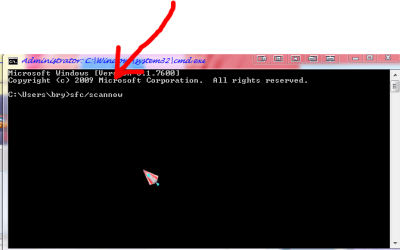
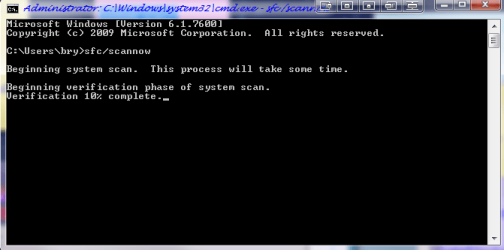
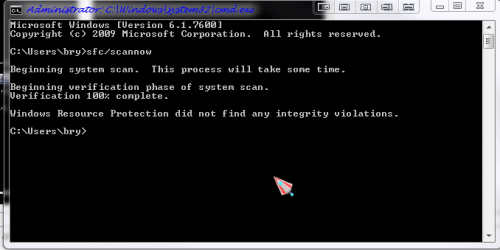
sfc/scannow
to open elevated cmd prompt >
1) press windows key + r (on keyboard)
2) type cmd in box and press enter
3) copy and paste > sfc/scannow next to c:Users\******> (*your user name see png pic) and then press enter on keyboard.
4) let windows scan the file system if it finds errors it will correct and let you no in the cmd window.

sfc/scannow
to open elevated cmd prompt >
1) press windows key + r (on keyboard)
2) type cmd in box and press enter
3) copy and paste > sfc/scannow next to c:Users\******> (*your user name see png pic) and then press enter on keyboard.
4) let windows scan the file system if it finds errors it will correct and let you no in the cmd window.
Attachments

Last edited:
My Computer
At a glance
Operating System : Windows 7 Home Premium Edi...Processor : Intel Core 2 Quad Q8300 @ 2500 MHzPhysical Memory :8GB Corsair4x 2GB 800MHz C5 ...Video Card : XFX 6700 AMD
- Computer Manufacturer/Model Number
- packard bell IXTREME M5722
- OS
- Operating System : Windows 7 Home Premium Edition 6.01.7600 SP1 (x64)
- CPU
- Processor : Intel Core 2 Quad Q8300 @ 2500 MHz
- Motherboard
- Mainboard : Packard Bell (Acer EG43M )
- Memory
- Physical Memory :8GB Corsair4x 2GB 800MHz C5 DDR2
- Graphics Card(s)
- Video Card : XFX 6700 AMD
- Monitor(s) Displays
- Maestro 234DL - BenQ V2220 - BenQ VW2420H
- Screen Resolution
- Current Display :1920x1080p pixels at 60 Hz in HD LED
- Hard Drives
- Hard Disks : WDC (1000 GB)
Drive C: (Hard Disk) : 428 GB available on 491 GB
Drive D: (Hard Disk) : 426 GB available on 492 GB
SAMSUNG spinpoint HD103SJ 1000.2 GB
(X 2) KINGSTON SSD NOW V 30GB
- PSU
- XFX ProSeries 550W PSU
- Case
- PACKARD BELL IXTREME
- Cooling
- System Blower Current: 150mA Air Flow16CFM ;Akasa 90mm rear
- Keyboard
- Gigabyte Aivia K8100
- Mouse
- TRUST-Wireless Laser Mouse - Carbon edition MI-7770C
- Internet Speed
- TP-LINK > TL-WN951N / AV500 Gigabit Powerline Adapters
- Browser
- chrome dev
- Other Info
- EXTRA COOLING>(FAN CONTROLLER) PC Bay Cooler 3 x 40mm fans; Akasa AK-HD-BL Blue hard drive cooler 2 x 40 mm fan 4500 rpm 29.7 dBA
Bios> American Megatrends Inc.
Version : P01-A1
Date : 08/31/2009

For now, what comes to my mind is hardware failure. You can try cleaning the inside of the CPU and check if the IDE and SATA cables (cables that connect the drives to the motherboard) are properly and tightly connected. Try cleaning it up, dust is a killer you know.
And yes, please give a little more info on the exact model of your drive, your computer and just a little more details on how the DVD drive fails. Do you recall doing anything you don't do often just before this happened??
And yes, please give a little more info on the exact model of your drive, your computer and just a little more details on how the DVD drive fails. Do you recall doing anything you don't do often just before this happened??
My Computer
At a glance
Windows 7 Ultimate 32 Bit, Windows Developer ...Intel Pentium Dual CPU E2180@2GHzNVIDIA GeForce 7200 GS
- Computer Manufacturer/Model Number
- Custom Built
- OS
- Windows 7 Ultimate 32 Bit, Windows Developer Preview, Linux Mint 9 Gnome 32 Bit
- CPU
- Intel Pentium Dual CPU E2180@2GHz
- Motherboard
- Elitegroup 671T-M3
- Graphics Card(s)
- NVIDIA GeForce 7200 GS
- Monitor(s) Displays
- AOC TFT1560 15" LCD Monitor
- Screen Resolution
- 1024x768
- Keyboard
- Logitech USB Keyboard
My Computer
At a glance
Operating System : Windows 7 Home Premium Edi...Processor : Intel Core 2 Quad Q8300 @ 2500 MHzPhysical Memory :8GB Corsair4x 2GB 800MHz C5 ...Video Card : XFX 6700 AMD
- Computer Manufacturer/Model Number
- packard bell IXTREME M5722
- OS
- Operating System : Windows 7 Home Premium Edition 6.01.7600 SP1 (x64)
- CPU
- Processor : Intel Core 2 Quad Q8300 @ 2500 MHz
- Motherboard
- Mainboard : Packard Bell (Acer EG43M )
- Memory
- Physical Memory :8GB Corsair4x 2GB 800MHz C5 DDR2
- Graphics Card(s)
- Video Card : XFX 6700 AMD
- Monitor(s) Displays
- Maestro 234DL - BenQ V2220 - BenQ VW2420H
- Screen Resolution
- Current Display :1920x1080p pixels at 60 Hz in HD LED
- Hard Drives
- Hard Disks : WDC (1000 GB)
Drive C: (Hard Disk) : 428 GB available on 491 GB
Drive D: (Hard Disk) : 426 GB available on 492 GB
SAMSUNG spinpoint HD103SJ 1000.2 GB
(X 2) KINGSTON SSD NOW V 30GB
- PSU
- XFX ProSeries 550W PSU
- Case
- PACKARD BELL IXTREME
- Cooling
- System Blower Current: 150mA Air Flow16CFM ;Akasa 90mm rear
- Keyboard
- Gigabyte Aivia K8100
- Mouse
- TRUST-Wireless Laser Mouse - Carbon edition MI-7770C
- Internet Speed
- TP-LINK > TL-WN951N / AV500 Gigabit Powerline Adapters
- Browser
- chrome dev
- Other Info
- EXTRA COOLING>(FAN CONTROLLER) PC Bay Cooler 3 x 40mm fans; Akasa AK-HD-BL Blue hard drive cooler 2 x 40 mm fan 4500 rpm 29.7 dBA
Bios> American Megatrends Inc.
Version : P01-A1
Date : 08/31/2009

This method has been used in the past on vista. not sure if works on win7no you wont need a shop have faith in the forums !!
Tried that twice and rebooted and nothing yet :sarc:
I suggest you look at the full artical linked here before you try this method. Also always back up your registry before making changes, Good luck to you with this problem.If you didn’t find the UpperFilter or LowerFilter in your registry this method may not be applicable to your computer. Try one of the other solutions below.
- Click Start, and then click All Programs.
- Click Accessories, and then click Run.
- Type regedit, and then click OK. If you are prompted for an administrator password or for a confirmation, type the password, or click Allow.
- In the navigation pane, locate and then click the following registry subkey:
HKEY_LOCAL_MACHINE\SYSTEM\CurrentControlSet\Control\Class\{4D36E965-E325-11CE-BFC1-08002BE10318}- In the right pane, click UpperFilters. You may also see an UpperFilters.bak registry entry. You do not have to remove that entry. Click UpperFilters only. If you do not see the UpperFilters registry entry, you still might have to remove the LowerFilters registry entry. To do this, go to step 8.
- On the Edit menu, click Delete.
- When you are prompted to confirm the deletion, click Yes.
- In the right pane, click LowerFilters.
- On the Edit menu, click Delete.
- When you are prompted to confirm the deletion, click Yes.
- Exit Registry Editor.
- Restart the computer.
Windows 7 DVD Drive Not Working Problem Missing Disappeared Error Gone Not Found Not Recognized in x64 and x86 | Capitalhead.com
My Computer
At a glance
Windows 7 Ulti. x64AMD Phenom 8450 triple-core 2.10 ghz4GBATI Radion HD 3200
- Computer Manufacturer/Model Number
- Gateway GT5692
- OS
- Windows 7 Ulti. x64
- CPU
- AMD Phenom 8450 triple-core 2.10 ghz
- Memory
- 4GB
- Graphics Card(s)
- ATI Radion HD 3200
- Monitor(s) Displays
- Gateway FPD1775W
- Screen Resolution
- 1280x720
- Hard Drives
- 465.6613 Gibibytes
