Something is wrong - can anyone help?

LuiseMS

New member
Local time
8:45 PM
Messages
6
My computer has been increasingly behaving weird the past 2 months.

1) Firefox keeps opening new windows at inconvenient times that I have never clicked on, never searched for and it's not a pop-up (all pop-ups are blocked)

2) Sometimes my computer won't shut down (I have a laptop). I know it's bad to unplug, so I'd leave it for the night and the next morning it would still stay "Logging off". Then I have no choice but to unplug and reboot. (This doesn't happen much anymore...)

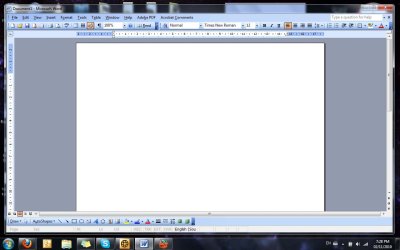
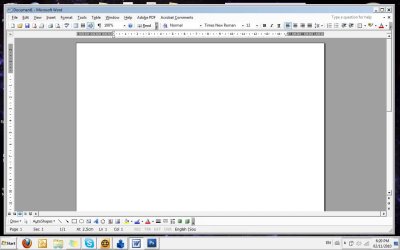
3) Sometimes my win7 theme would flicker to a different outdated windows theme (almost looks like win98!?) and go back to win7 within 1-7 seconds or stay in the old theme until I shut down or restart.

All of this is so unpredictable. I have no idea what to expect or when. I have been suspecting a virus and have run different anti-virus and anti-spyware software (AVG, Norton, McCaffee, Panda, Ad-Aware), but they don't get much. They have removed some trojans and the logging off problem have gone away (until I try to log off tonight, probably), but they don't get much more than cookies anyway.

I've also tried the system restore, but I don't get points further back than 7 days and on trying to create a point, it didn't work. (I don't know how, I guess. I did read the tutorial, but it didn't help me with the correct words or whatever to create the point)

What's going on? Have I done something wrong? Can it be fixed? Is this some kind of crazy virus that no anti-virus software can detect? Should I take my computer to a technician?

I'd appreciate any advice!
 

My Computer

Computer Manufacturer/Model Number
Fujitsu-Siemens Amilo Notebook Si 3655
OS
Windows 7 Home Premium 32bit
CPU
Intel Core2 Duo CPU
Motherboard
Where do I get this info? Can't seem to find it.
Memory
4 GB
Graphics Card(s)
Onboard chip: Mobile Intelо Graphics Media Accelerator
Sound Card
Came standard with laptop
Monitor(s) Displays
13.3" WXGH LCD widescreen
Screen Resolution
1280 x 800
Hard Drives
SATA 320GB 5400 rpm
PSU
DC-in
Keyboard
Standard PS/2 Keyboard
Mouse
Logitech M310 wireless
Internet Speed
High speed DSL, wireless modem
hi.......to rule out malware d/l and run
mbam
hitman pro

Sometimes my Windows 7 theme would flicker to a different outdated windows theme (almost looks like win98!?) and go back to Windows 7 within 1-7 seconds or stay in the old theme until I shut down or restart.

it could be a display driver issue too but first give mbam/hmp a spin
 

My Computer

OS
windows 7 ultimate 64 bit,Windows 7 ultimate 32 bit,Windows XP sp3 home
My computer has been increasingly behaving weird the past 2 months.

1) Firefox keeps opening new windows at inconvenient times that I have never clicked on, never searched for and it's not a pop-up (all pop-ups are blocked)

What version of firefox? what URL's pop up?


2) Sometimes my computer won't shut down (I have a laptop). I know it's bad to unplug, so I'd leave it for the night and the next morning it would still stay "Logging off". Then I have no choice but to unplug and reboot. (This doesn't happen much anymore...)

What OS? when logging off (in win 7) it will show you what needs to be closed before it can shut down. What are they?


3) Sometimes my win7 theme would flicker to a different outdated windows theme (almost looks like win98!?) and go back to win7 within 1-7 seconds or stay in the old theme until I shut down or restart.

Video driver, or power problem.

All of this is so unpredictable. I have no idea what to expect or when. I have been suspecting a virus and have run different anti-virus and anti-spyware software (AVG, Norton, McCaffee, Panda, Ad-Aware), but they don't get much. They have removed some trojans and the logging off problem have gone away (until I try to log off tonight, probably), but they don't get much more than cookies anyway.

I hope you havent installed all these on your computer. This in itself may be the cause of the shutdown problem, and the video.


I've also tried the system restore, but I don't get points further back than 7 days and on trying to create a point, it didn't work. (I don't know how, I guess. I did read the tutorial, but it didn't help me with the correct words or whatever to create the point)

If your last first restore point is from 7 days ago it probably isnt going to to much good (I suspect the problem has been going on longer though you dont say)


What's going on? Have I done something wrong? Can it be fixed? Is this some kind of crazy virus that no anti-virus software can detect? Should I take my computer to a technician?

Dont spend good money on getting it fixed. we can help you and it is free.


I'd appreciate any advice!


Ok lets get some info. Do you have a win 7 dvd to do a repair install? or is it the "restore" dvd?

Can we get the rest of your system specs like video card, etc?


Thanks

Ken J
 

My Computer

Computer Manufacturer/Model Number
HP Pavillion dv-7 1005 Tx
OS
Win 8 Release candidate 8400
CPU
[email protected]
Memory
4 gigs
Graphics Card(s)
Nvidia 9600M
Sound Card
HD built-in
Monitor(s) Displays
17" Wxga
Screen Resolution
1440x900
Cooling
none
Internet Speed
45Mb down 5Mb up
Thanks - I'll see if I can answer your questions:

1) Version 3.6.12
The URL's that open are different each time and I've never recognised any of them.

2) Win 7 Home Premium (no version is specified on my Computer Properties)

3) I have installed the anti-virus software separately each time. Currently I only have Avast and Ad-aware. Should I uninstall Ad-aware as well to only keep Avast? I used only AVG up to the point when I started having trouble.

Unfortunately I do not have my Win7 disc with me. I just moved to a different country and I accidently left it behind. I will be able to get it in a few months' time when I visit or if you think it is critical I can get someone to mail it to me.

System Specs:
- Display Adapters: Mobile Intel(R) 45 Express Chipset Family (Microsoft Corporation - WDDM 1.1) version 8.15.10.1749
- Monitor: Generic PnP Monitor version 6.1.7600.16385
- Processor: Intel Core2 Duo CPU P8400 @ 2.26 GHz version 6.1.7600.16385
- Sound, Video and Game controllers: Realtek High Definition Audio version 6.0.1.5624
- Network Adapters:
a) Bluetooth Device (Personal Area Network) version 6.1.7600.16385
b) Bluetooth Device (RFCOMM Protocol TDI) version 6.1.7600.16385
c) Intel(R) 82567LF Gigabit Network Connection version 10.0.2.2
d) Intel(R) WiFi Link 5100 AGN version 12.4.1.4

Is this what you need? Please let me know if there is anything else.

Thanks so much for your help, Ken.

Regards.
 

My Computer

Computer Manufacturer/Model Number
Fujitsu-Siemens Amilo Notebook Si 3655
OS
Windows 7 Home Premium 32bit
CPU
Intel Core2 Duo CPU
Motherboard
Where do I get this info? Can't seem to find it.
Memory
4 GB
Graphics Card(s)
Onboard chip: Mobile Intelо Graphics Media Accelerator
Sound Card
Came standard with laptop
Monitor(s) Displays
13.3" WXGH LCD widescreen
Screen Resolution
1280 x 800
Hard Drives
SATA 320GB 5400 rpm
PSU
DC-in
Keyboard
Standard PS/2 Keyboard
Mouse
Logitech M310 wireless
Internet Speed
High speed DSL, wireless modem
Firefox popups

Just as I finished my post another popup happened and I checked my history, copying the urls. It's kind of freaky - very long urls which tells me they can't be normal. This one was actually more frightening than before, because it looks just like a Windows screen and it says that you have virusses on your computer and to scan now, but it's clearly a threat itself.

Only one popup was shown, but the history showed that several were visited at the same time.

Here are the urls:

[REMOVED BY ADMIN]


I am also attaching the screenshots of what the screen actually looks like when the theme changes. Screenshot1 is normal and Screenshot2 is during/after the brief flicker.


Oh, and I am finding out more about my system specs. I'm a bit new, so wasn't sure what to search for. I am updating my system specs on my profile as I find them. Hope that'll help!
 

Attachments

  • Screenshot1.jpg
    Screenshot1.jpg
    90.4 KB · Views: 16
  • Screenshot2.jpg
    Screenshot2.jpg
    82.3 KB · Views: 9

My Computer

Computer Manufacturer/Model Number
Fujitsu-Siemens Amilo Notebook Si 3655
OS
Windows 7 Home Premium 32bit
CPU
Intel Core2 Duo CPU
Motherboard
Where do I get this info? Can't seem to find it.
Memory
4 GB
Graphics Card(s)
Onboard chip: Mobile Intelо Graphics Media Accelerator
Sound Card
Came standard with laptop
Monitor(s) Displays
13.3" WXGH LCD widescreen
Screen Resolution
1280 x 800
Hard Drives
SATA 320GB 5400 rpm
PSU
DC-in
Keyboard
Standard PS/2 Keyboard
Mouse
Logitech M310 wireless
Internet Speed
High speed DSL, wireless modem
Oops!! Didn't realise the urls would be live! And it also changed to links, not showing the full url. Sorry! Hope this isn't a problem?! Please delete it if it is!

Also, I guess you can ignore the Google and Loading. The urls look a bit different - I'll attach a text file with them and change the http so it won't be live. Maybe that will be of more help.
 

Attachments

My Computer

Computer Manufacturer/Model Number
Fujitsu-Siemens Amilo Notebook Si 3655
OS
Windows 7 Home Premium 32bit
CPU
Intel Core2 Duo CPU
Motherboard
Where do I get this info? Can't seem to find it.
Memory
4 GB
Graphics Card(s)
Onboard chip: Mobile Intelо Graphics Media Accelerator
Sound Card
Came standard with laptop
Monitor(s) Displays
13.3" WXGH LCD widescreen
Screen Resolution
1280 x 800
Hard Drives
SATA 320GB 5400 rpm
PSU
DC-in
Keyboard
Standard PS/2 Keyboard
Mouse
Logitech M310 wireless
Internet Speed
High speed DSL, wireless modem

My Computer

Computer Manufacturer/Model Number
Micro-Star International/MS-7529
OS
Windows 7 Ultimate x32
CPU
DualCore Intel Pentium E2200, 2218 MHz (11 x 202)
Motherboard
MSI G31M3 V2 (MS-7529) (2 PCI, 1 PCI-E x16,2 DDR2 DIMM)
Memory
2 GB DDR2-800 DDR2 SDRAM
Graphics Card(s)
nVIDIA GeForce 9500GT 1GB
Sound Card
Realtek ALC888/1200 @ Intel 82801GB ICH7
Monitor(s) Displays
Samsung SyncMaster 2253BW (Digital) 22'' LCD
Screen Resolution
1680x1050
Hard Drives
SAMSUNG HD322IJ ATA Device (298 GB , IDE)
If you are going to run thathagat's suggestions, it is best not to run them in safe mode. It is also best to run Hitman Pro first. If you can't get it to run, use Hitman Pro in Force Breach Mode «.
 
Last edited:

My Computer

OS
Arch Linux 64-bit
Hi, LuiseMS.

I reported your post with the live links so a Moderator can either edit the URLs to make them unclickable or remove them from your post. The links lead to pages that try to install programs that steal private information, use your computer to attack others, or damage your system. In other words, your computer is severely infected. Since it is likely password-stealing trojans are already installed on your computer, your best recourse would be a reinstall.

In the event you wish to attempt a cleanup, follow the instructions at BleepingComputer: How to remove Google Redirects or the TDSS, TDL3, or Alureon rootkit using TDSSKiller.
 

My Computer

OS
Windows 7 & Windows Vista Ultimate
Hi Corrine

Thank you for reporting the links - as soon as I realised they were live I wanted to delete it, but didn't know how!

Thanks for identifying what they are and providing a sollution. I'm going to check that out right now.
 

My Computer

Computer Manufacturer/Model Number
Fujitsu-Siemens Amilo Notebook Si 3655
OS
Windows 7 Home Premium 32bit
CPU
Intel Core2 Duo CPU
Motherboard
Where do I get this info? Can't seem to find it.
Memory
4 GB
Graphics Card(s)
Onboard chip: Mobile Intelо Graphics Media Accelerator
Sound Card
Came standard with laptop
Monitor(s) Displays
13.3" WXGH LCD widescreen
Screen Resolution
1280 x 800
Hard Drives
SATA 320GB 5400 rpm
PSU
DC-in
Keyboard
Standard PS/2 Keyboard
Mouse
Logitech M310 wireless
Internet Speed
High speed DSL, wireless modem
You are very welcome, LuiseMS. Please let us know how you make out or if additional assistance is needed.
 

My Computer

OS
Windows 7 & Windows Vista Ultimate
LuiseMS, in the future, you can edit your post ... just so you know. :)
 

My Computer

Computer type
PC/Desktop
Computer Manufacturer/Model Number
Bruce ... somewhere in his 40's
OS
Windows 7 Ultimate 32bit SP1
CPU
Intel(R) Core(TM)2 Quad CPU @ 2.40GHz, 2400 MHz
Motherboard
INTEL/D975XBX2
Memory
4 GB
Graphics Card(s)
ATI Radeon HD 2600 Pro
Monitor(s) Displays
Samsung SyncMaster 914v
Screen Resolution
1280 x 1024
Hard Drives
2/500GB each ... ST3500630AS ATA Device.
One is not connected
PSU
Rocketfish 700 W
Case
G.Skill Gigabyte Chassis
Keyboard
Standard PS/2 Keyboard
Mouse
Microsoft PS/2 Mouse
Internet Speed
DSL
Antivirus
Avira Internet Security
Browser
IE 11
Other Info
ATI HDMI Audio
Hi guys!

Thanks for all the advice and tips - I really appreciate it!

I ran TDSSKiller about 4 hours ago and it found a threat which was solved and I also ran HitmanPro after that and it found nothing.

So far I haven't had any suspicious activity on my computer since I've done these. I will keep an eye on everything and let you know if something happens, but for now, I just want to say thank you!
I am feeling a lot calmer about my PC and I wouldn't have been able to do it without all your advice and kind words. Thanks for sticking by such a confused newbie like myself! :)
 

My Computer

Computer Manufacturer/Model Number
Fujitsu-Siemens Amilo Notebook Si 3655
OS
Windows 7 Home Premium 32bit
CPU
Intel Core2 Duo CPU
Motherboard
Where do I get this info? Can't seem to find it.
Memory
4 GB
Graphics Card(s)
Onboard chip: Mobile Intelо Graphics Media Accelerator
Sound Card
Came standard with laptop
Monitor(s) Displays
13.3" WXGH LCD widescreen
Screen Resolution
1280 x 800
Hard Drives
SATA 320GB 5400 rpm
PSU
DC-in
Keyboard
Standard PS/2 Keyboard
Mouse
Logitech M310 wireless
Internet Speed
High speed DSL, wireless modem
You are very welcome, LuiseMS. We are all newbies at something.

In your initial post, you indicated that you had run AVG, Norton, McAfee, Panda, Ad-Aware. I am hoping that you have already uninstalled the extra antivirus software programs. If not, please do so since you could run into serious conflicts. It also wouldn't hurt to run Uninstall & Remove McAfee Norton & More Antivirus Applications — OPSWAT AppRemover to take care of the leftovers since A/V uninstalls are not always thorough.

To check if your system is missing security updates or has insecure applications, install Secunia Personal Software Inspector or, alternatively, visit OSI - Consumer - Products . The Secunia Software Inspector runs through your browser with no installation or download required and does the following:
  • Detects insecure versions of applications installed
  • Verifies that all Microsoft patches are applied
  • Assists you in updating your system and applications
 

My Computer

OS
Windows 7 & Windows Vista Ultimate
Back
Top