Something like Fast Boot for Windows 7?

MrMii Win 7

Personalization Freak
Member
Local time
4:34 PM
Messages
94
Location
Missouri, USA
I'm aware that Windows 8.x and 10 have the Fast Boot feature where the session is stored within "hiberfile.sys" and read from to dramatically speed up boot, but is there a way to have something like that for Windows 7 without grabbing an SSD or messing with msconfig? (If I make a file called hyberfile.sys, will that work? Jk) If this has been asked before I apologize.
 

My Computer My Computer

At a glance

Windows 7 Professional x64 (SP1)AMD FX-6300 Six Core Processor 3.5GHz (Not OC'd)G.Skill Ripjaws - 4x4GB (16GB)MSI GeForce GTX 970 TwinFrozr 4GB
Computer type
PC/Desktop
Computer Manufacturer/Model Number
MrMiios (Custom Build by Me)
OS
Windows 7 Professional x64 (SP1)
CPU
AMD FX-6300 Six Core Processor 3.5GHz (Not OC'd)
Motherboard
ASROCK 980DE3/US3S
Memory
G.Skill Ripjaws - 4x4GB (16GB)
Graphics Card(s)
MSI GeForce GTX 970 TwinFrozr 4GB
Sound Card
[[Using Onboard HD Audio]]
Monitor(s) Displays
HP 27es
Screen Resolution
1920x1080
Hard Drives
Western Digital Red 1TB (Internal)
Toshiba Canvio 2TB USB 3.0 Desktop Hard Drive (External)
PSU
EVGA 850W 80+ GOLD 220-G2-0850-XR (Fully Modular)
Case
DIYPC Ranger-R4-R
Cooling
Cooler Master Hyper 212 Evo
Keyboard
Dell USB Keyboard
Mouse
Red Logitech Wireless Mouse
Internet Speed
DL: 95mb/s, UL: 5.9mb/s
Antivirus
Norton Security (previous year's)
Browser
Google Chrome
Other Info
Now Aero SOMETIMES works on start, but everything's sluggish and Aero will usually crash back to Basic. Restarting still resolves the issue. I'll probably clean install later... But what a pain reinstalling the programs will be... ugh...
Hi,
Fast start is hibernation.
Any default balanced power plan is the same thing.
That and using clean boot.
 

My Computer My Computer

At a glance

Win-7-Pro64bit 7-H-Prem-64biti7-5930K 2nd i9-9940x both water blocked VRM'...Trident-z 3200C14 2nd Trident-z 3600C16EVGA 1080ti ftw3 2nd Titan Xp both water blocked
Computer type
PC/Desktop
Computer Manufacturer/Model Number
Custom assembled by me :}
OS
Win-7-Pro64bit 7-H-Prem-64bit
CPU
i7-5930K 2nd i9-9940x both water blocked VRM's too
Motherboard
ASUS SABERTOOTH X99 2nd ASUS x299 Apex
Memory
Trident-z 3200C14 2nd Trident-z 3600C16
Graphics Card(s)
EVGA 1080ti ftw3 2nd Titan Xp both water blocked
Sound Card
Built-in Realtek
Monitor(s) Displays
1-AOC G2460PG 24"G-Sync 144Hz/ 2nd 1-ASUS VG248QE 24" 144Hz
Screen Resolution
1920 x 1080 144Hz
Hard Drives
2-Samsung M.2 Evo & Evo Plus
2-Samsung 850 EVO 500GB SSD's/ 3-2.5 W.D. Black 1tb-&3-1tb/3-3.5 WD Black 1tb hdd's
PSU
EVGA SuperNOVA 1000-P2 2nd 1200-P2
Case
2-Corsair Obsidian Series 450D Black ATX Mid Tower
Cooling
Custom water loops
Keyboard
Logitech G710+/ 2nd Logitech G910
Mouse
2-RedDragon M901 Perdition 16400 dpi Gaming mouse = wired
Internet Speed
Comcast Ping 19ms 89.31mbps download speed 6.12mbps upload
Antivirus
Malwarebytes Pro/ Superantispyware Pro
Browser
FireFox & Pale moon
Other Info
2nd ASUS X299 Apex/Intel i9-9940x with Custom water loop/7H-Prem-x64/Corsair 450D case/Ram Trident-z 3600C16 4x8gb / Samsung970Evo plus 500gb SSD/Dual ssd EZ swap evo/PSU EVGA SuperNova 1200w-P2 80+Platinum/GPU Titan Xp /8-ML-140 on push-pull on 2-280GTX rads
With Win 7 you can use Hibernate and/or Sleep.
The difference is you would not normally turn off the PC, you would use Sleep or Hibernate rather than shutdown.
With Hibernate or Sleep when you "restart" the PC later, it will restore the previous Windows session.

I've been using Hybrid Sleep for many years reliably with Win 7.
Hybrid Sleep does both a Sleep (save to RAM) and Hibernate (save to hiberfil file) when the PC sleeps.
If the power goes out while sleeping and the Sleep/RAM session is lost, Hibernate kicks in and restores the session.

Some people don't like to use sleep/hibernate and prefer to do a shutdown/restart.

With Legacy hardware i can wake from Sleep in a matter of seconds, with my previous Windows session, including all open/running programs.

I don't believe there is a one size fits all answer.
You would need to test Hibernate and Sleep to see what works best for you.

To enable Hibernate and create the hiberfil.sys file use this command from an elevated command prompt:
powercfg -h on

To use Hybrid sleep you need to use Control Panel / Power Options / Change plan settings / Change advanced power settings
 

My Computer My Computer

At a glance

Multi-Boot W7_Pro_x64 W8.1_Pro_x64 W10_Pro_x6...AMD Athlon II x4 6206GB GSkill DDR2 800AMD 4670 GPU + AMD 4200 IGP
Computer type
PC/Desktop
Computer Manufacturer/Model Number
home built
OS
Multi-Boot W7_Pro_x64 W8.1_Pro_x64 W10_Pro_x64 +Linux_VMs +Chromium_VM
CPU
AMD Athlon II x4 620
Motherboard
Gigabyte GA-MA785G-UD3H
Memory
6GB GSkill DDR2 800
Graphics Card(s)
AMD 4670 GPU + AMD 4200 IGP
Sound Card
on board Realtek ALC889A
Monitor(s) Displays
RCA 40" LCD TV, Insignia 32" LCD TV, HP 15" LCD monitor
Screen Resolution
1680 x 1050
Hard Drives
OCZ Vertex 3 120GB,
Samsung F3 1TB (3),
Several others - WD, Seagate, Hitachi, ...
PSU
Corsair 500 W
Case
Rosewill mid tower
Cooling
CM 90mm rifle
Keyboard
Gyration wireless, Logitech wireless, Dell USB wired
Mouse
Gyration wireless, Logitech wireless, V7 USB wired
Internet Speed
Spectrum - 100Mbps D / 10Mbps U
Antivirus
Avast, MBAM3, EMET, WinPatrol
Browser
Pale Moon, Firefox, IE
Other Info
2 multi-boot PC's
Mainly HTPC/Office/Gen purpose (no gaming).
Trendnet USB KVM.
LG DVD burner/Blue Ray Player.
Tray system for removable SATA backup drives.

Not currently OCd, under-volted.
I use Hybrid sleep, rarely re-boot or shutdown.

Hauppauge HD-PVR, Avermedia PCIe TV Tuner, Hauppauge PCI TV Tuner.
Fast Boot in Windows 8 and later is a hybrid between hibernation and a normal shutdown - startup. In this the kernel goes into hibernation while the user session does a normal shutdown. During startup the kernel is brought out of hibernation by loading it from hiberfil.sys while the user session does a normal startup. While relatively simple to describe the details are very complex and mostly undocumented. This is not something that can be done by a third party. Only Microsoft could add this and that isn't going to happen for Windows 7.
 

My Computer My Computer

At a glance

Windows 7 Pro 64 bitXeon W35208 GBNvidia Geforce 210
Computer type
PC/Desktop
Computer Manufacturer/Model Number
HP
OS
Windows 7 Pro 64 bit
CPU
Xeon W3520
Memory
8 GB
Graphics Card(s)
Nvidia Geforce 210
Using Hybrid Sleep causes unnecessary CPU heat rises, it usually idled at 82 F, but hasn't idled at less than 90+ since I first used hybrid sleep, even after many restarts. Though it does cause almost instant start up xD
 

My Computer My Computer

At a glance

Windows 7 Professional x64 (SP1)AMD FX-6300 Six Core Processor 3.5GHz (Not OC'd)G.Skill Ripjaws - 4x4GB (16GB)MSI GeForce GTX 970 TwinFrozr 4GB
Computer type
PC/Desktop
Computer Manufacturer/Model Number
MrMiios (Custom Build by Me)
OS
Windows 7 Professional x64 (SP1)
CPU
AMD FX-6300 Six Core Processor 3.5GHz (Not OC'd)
Motherboard
ASROCK 980DE3/US3S
Memory
G.Skill Ripjaws - 4x4GB (16GB)
Graphics Card(s)
MSI GeForce GTX 970 TwinFrozr 4GB
Sound Card
[[Using Onboard HD Audio]]
Monitor(s) Displays
HP 27es
Screen Resolution
1920x1080
Hard Drives
Western Digital Red 1TB (Internal)
Toshiba Canvio 2TB USB 3.0 Desktop Hard Drive (External)
PSU
EVGA 850W 80+ GOLD 220-G2-0850-XR (Fully Modular)
Case
DIYPC Ranger-R4-R
Cooling
Cooler Master Hyper 212 Evo
Keyboard
Dell USB Keyboard
Mouse
Red Logitech Wireless Mouse
Internet Speed
DL: 95mb/s, UL: 5.9mb/s
Antivirus
Norton Security (previous year's)
Browser
Google Chrome
Other Info
Now Aero SOMETIMES works on start, but everything's sluggish and Aero will usually crash back to Basic. Restarting still resolves the issue. I'll probably clean install later... But what a pain reinstalling the programs will be... ugh...
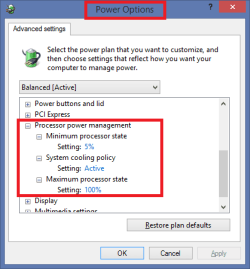
Check your Power Options / Processor power management settings.
Here is an example (default settings for me).

PowerOptions.png
 

My Computer My Computer

At a glance

Multi-Boot W7_Pro_x64 W8.1_Pro_x64 W10_Pro_x6...AMD Athlon II x4 6206GB GSkill DDR2 800AMD 4670 GPU + AMD 4200 IGP
Computer type
PC/Desktop
Computer Manufacturer/Model Number
home built
OS
Multi-Boot W7_Pro_x64 W8.1_Pro_x64 W10_Pro_x64 +Linux_VMs +Chromium_VM
CPU
AMD Athlon II x4 620
Motherboard
Gigabyte GA-MA785G-UD3H
Memory
6GB GSkill DDR2 800
Graphics Card(s)
AMD 4670 GPU + AMD 4200 IGP
Sound Card
on board Realtek ALC889A
Monitor(s) Displays
RCA 40" LCD TV, Insignia 32" LCD TV, HP 15" LCD monitor
Screen Resolution
1680 x 1050
Hard Drives
OCZ Vertex 3 120GB,
Samsung F3 1TB (3),
Several others - WD, Seagate, Hitachi, ...
PSU
Corsair 500 W
Case
Rosewill mid tower
Cooling
CM 90mm rifle
Keyboard
Gyration wireless, Logitech wireless, Dell USB wired
Mouse
Gyration wireless, Logitech wireless, V7 USB wired
Internet Speed
Spectrum - 100Mbps D / 10Mbps U
Antivirus
Avast, MBAM3, EMET, WinPatrol
Browser
Pale Moon, Firefox, IE
Other Info
2 multi-boot PC's
Mainly HTPC/Office/Gen purpose (no gaming).
Trendnet USB KVM.
LG DVD burner/Blue Ray Player.
Tray system for removable SATA backup drives.

Not currently OCd, under-volted.
I use Hybrid sleep, rarely re-boot or shutdown.

Hauppauge HD-PVR, Avermedia PCIe TV Tuner, Hauppauge PCI TV Tuner.
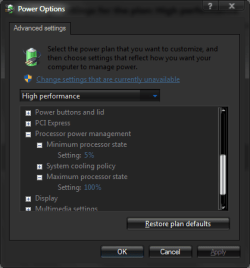
Yep on a performance power plan the minimum processor state is 100%.
 

My Computer My Computer

At a glance

Win-7-Pro64bit 7-H-Prem-64biti7-5930K 2nd i9-9940x both water blocked VRM'...Trident-z 3200C14 2nd Trident-z 3600C16EVGA 1080ti ftw3 2nd Titan Xp both water blocked
Computer type
PC/Desktop
Computer Manufacturer/Model Number
Custom assembled by me :}
OS
Win-7-Pro64bit 7-H-Prem-64bit
CPU
i7-5930K 2nd i9-9940x both water blocked VRM's too
Motherboard
ASUS SABERTOOTH X99 2nd ASUS x299 Apex
Memory
Trident-z 3200C14 2nd Trident-z 3600C16
Graphics Card(s)
EVGA 1080ti ftw3 2nd Titan Xp both water blocked
Sound Card
Built-in Realtek
Monitor(s) Displays
1-AOC G2460PG 24"G-Sync 144Hz/ 2nd 1-ASUS VG248QE 24" 144Hz
Screen Resolution
1920 x 1080 144Hz
Hard Drives
2-Samsung M.2 Evo & Evo Plus
2-Samsung 850 EVO 500GB SSD's/ 3-2.5 W.D. Black 1tb-&3-1tb/3-3.5 WD Black 1tb hdd's
PSU
EVGA SuperNOVA 1000-P2 2nd 1200-P2
Case
2-Corsair Obsidian Series 450D Black ATX Mid Tower
Cooling
Custom water loops
Keyboard
Logitech G710+/ 2nd Logitech G910
Mouse
2-RedDragon M901 Perdition 16400 dpi Gaming mouse = wired
Internet Speed
Comcast Ping 19ms 89.31mbps download speed 6.12mbps upload
Antivirus
Malwarebytes Pro/ Superantispyware Pro
Browser
FireFox & Pale moon
Other Info
2nd ASUS X299 Apex/Intel i9-9940x with Custom water loop/7H-Prem-x64/Corsair 450D case/Ram Trident-z 3600C16 4x8gb / Samsung970Evo plus 500gb SSD/Dual ssd EZ swap evo/PSU EVGA SuperNova 1200w-P2 80+Platinum/GPU Titan Xp /8-ML-140 on push-pull on 2-280GTX rads
Unless I manually changed the minimum processor state for high, mine is set at 5%
 

Attachments

  • Minimum is 5.png
    Minimum is 5.png
    12.5 KB · Views: 22

My Computer My Computer

At a glance

Windows 7 Professional x64 (SP1)AMD FX-6300 Six Core Processor 3.5GHz (Not OC'd)G.Skill Ripjaws - 4x4GB (16GB)MSI GeForce GTX 970 TwinFrozr 4GB
Computer type
PC/Desktop
Computer Manufacturer/Model Number
MrMiios (Custom Build by Me)
OS
Windows 7 Professional x64 (SP1)
CPU
AMD FX-6300 Six Core Processor 3.5GHz (Not OC'd)
Motherboard
ASROCK 980DE3/US3S
Memory
G.Skill Ripjaws - 4x4GB (16GB)
Graphics Card(s)
MSI GeForce GTX 970 TwinFrozr 4GB
Sound Card
[[Using Onboard HD Audio]]
Monitor(s) Displays
HP 27es
Screen Resolution
1920x1080
Hard Drives
Western Digital Red 1TB (Internal)
Toshiba Canvio 2TB USB 3.0 Desktop Hard Drive (External)
PSU
EVGA 850W 80+ GOLD 220-G2-0850-XR (Fully Modular)
Case
DIYPC Ranger-R4-R
Cooling
Cooler Master Hyper 212 Evo
Keyboard
Dell USB Keyboard
Mouse
Red Logitech Wireless Mouse
Internet Speed
DL: 95mb/s, UL: 5.9mb/s
Antivirus
Norton Security (previous year's)
Browser
Google Chrome
Other Info
Now Aero SOMETIMES works on start, but everything's sluggish and Aero will usually crash back to Basic. Restarting still resolves the issue. I'll probably clean install later... But what a pain reinstalling the programs will be... ugh...
I imagine you did
Restore the defaults for the power plan it should be 100%
Otherwise they would have to rename it to balanced :)
 

My Computer My Computer

At a glance

Win-7-Pro64bit 7-H-Prem-64biti7-5930K 2nd i9-9940x both water blocked VRM'...Trident-z 3200C14 2nd Trident-z 3600C16EVGA 1080ti ftw3 2nd Titan Xp both water blocked
Computer type
PC/Desktop
Computer Manufacturer/Model Number
Custom assembled by me :}
OS
Win-7-Pro64bit 7-H-Prem-64bit
CPU
i7-5930K 2nd i9-9940x both water blocked VRM's too
Motherboard
ASUS SABERTOOTH X99 2nd ASUS x299 Apex
Memory
Trident-z 3200C14 2nd Trident-z 3600C16
Graphics Card(s)
EVGA 1080ti ftw3 2nd Titan Xp both water blocked
Sound Card
Built-in Realtek
Monitor(s) Displays
1-AOC G2460PG 24"G-Sync 144Hz/ 2nd 1-ASUS VG248QE 24" 144Hz
Screen Resolution
1920 x 1080 144Hz
Hard Drives
2-Samsung M.2 Evo & Evo Plus
2-Samsung 850 EVO 500GB SSD's/ 3-2.5 W.D. Black 1tb-&3-1tb/3-3.5 WD Black 1tb hdd's
PSU
EVGA SuperNOVA 1000-P2 2nd 1200-P2
Case
2-Corsair Obsidian Series 450D Black ATX Mid Tower
Cooling
Custom water loops
Keyboard
Logitech G710+/ 2nd Logitech G910
Mouse
2-RedDragon M901 Perdition 16400 dpi Gaming mouse = wired
Internet Speed
Comcast Ping 19ms 89.31mbps download speed 6.12mbps upload
Antivirus
Malwarebytes Pro/ Superantispyware Pro
Browser
FireFox & Pale moon
Other Info
2nd ASUS X299 Apex/Intel i9-9940x with Custom water loop/7H-Prem-x64/Corsair 450D case/Ram Trident-z 3600C16 4x8gb / Samsung970Evo plus 500gb SSD/Dual ssd EZ swap evo/PSU EVGA SuperNova 1200w-P2 80+Platinum/GPU Titan Xp /8-ML-140 on push-pull on 2-280GTX rads
I don't understand why using Hybrid Sleep would cause a temperature change.
If you are using the High Performance plan, try the Balanced plan.

You can use Sleep and/or Hibernation without using Hybrid Sleep, so you could test that.
Win 7 Hybrid Sleep just does both when going to sleep.

You could also check your voltages with each "configuration", to see if they are different.
More voltage = more heat.

Are the PC/fans/vents clean of dust ?
 

My Computer My Computer

At a glance

Multi-Boot W7_Pro_x64 W8.1_Pro_x64 W10_Pro_x6...AMD Athlon II x4 6206GB GSkill DDR2 800AMD 4670 GPU + AMD 4200 IGP
Computer type
PC/Desktop
Computer Manufacturer/Model Number
home built
OS
Multi-Boot W7_Pro_x64 W8.1_Pro_x64 W10_Pro_x64 +Linux_VMs +Chromium_VM
CPU
AMD Athlon II x4 620
Motherboard
Gigabyte GA-MA785G-UD3H
Memory
6GB GSkill DDR2 800
Graphics Card(s)
AMD 4670 GPU + AMD 4200 IGP
Sound Card
on board Realtek ALC889A
Monitor(s) Displays
RCA 40" LCD TV, Insignia 32" LCD TV, HP 15" LCD monitor
Screen Resolution
1680 x 1050
Hard Drives
OCZ Vertex 3 120GB,
Samsung F3 1TB (3),
Several others - WD, Seagate, Hitachi, ...
PSU
Corsair 500 W
Case
Rosewill mid tower
Cooling
CM 90mm rifle
Keyboard
Gyration wireless, Logitech wireless, Dell USB wired
Mouse
Gyration wireless, Logitech wireless, V7 USB wired
Internet Speed
Spectrum - 100Mbps D / 10Mbps U
Antivirus
Avast, MBAM3, EMET, WinPatrol
Browser
Pale Moon, Firefox, IE
Other Info
2 multi-boot PC's
Mainly HTPC/Office/Gen purpose (no gaming).
Trendnet USB KVM.
LG DVD burner/Blue Ray Player.
Tray system for removable SATA backup drives.

Not currently OCd, under-volted.
I use Hybrid sleep, rarely re-boot or shutdown.

Hauppauge HD-PVR, Avermedia PCIe TV Tuner, Hauppauge PCI TV Tuner.
Back
Top