Something wrong with my Aero

ItsJust2020

New member
Local time
7:54 PM
Messages
2
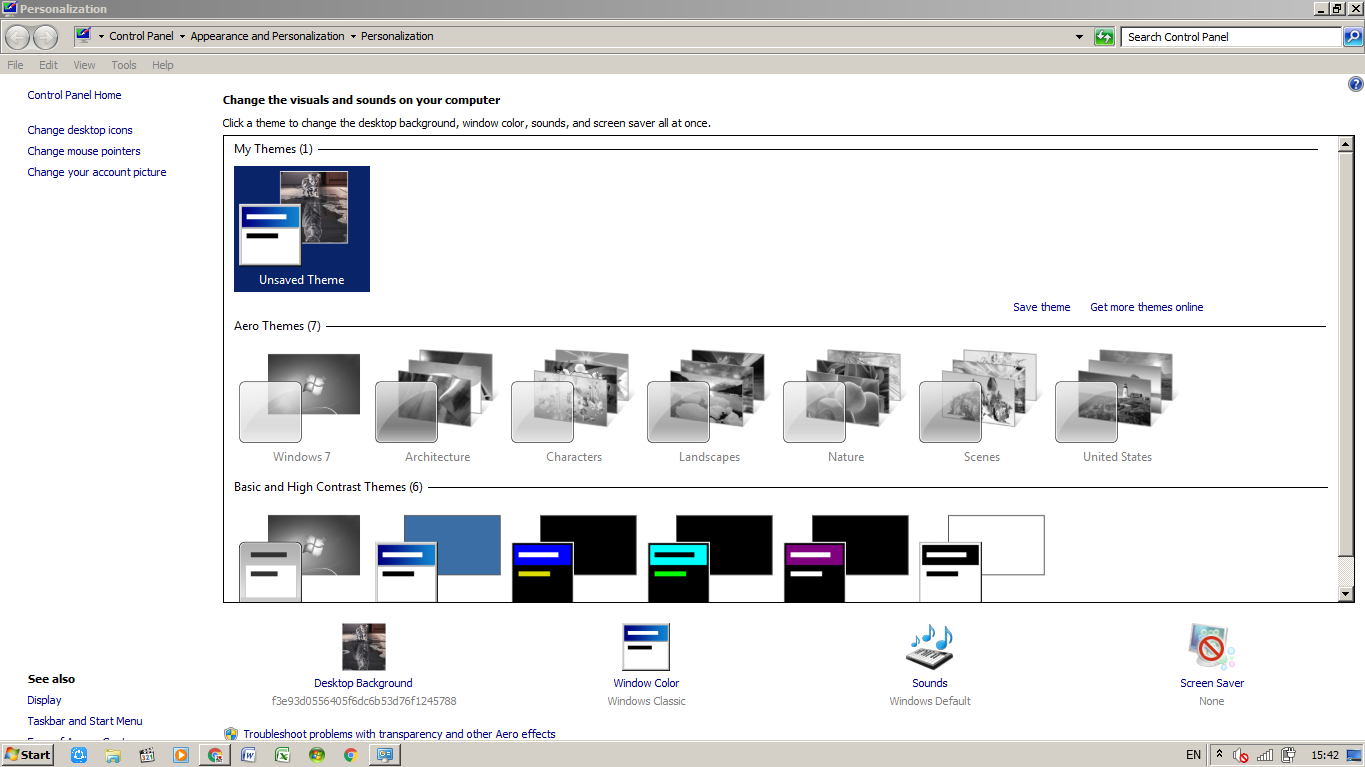
I can't apply my Aero,but i had activated Windows,my screen is in 32 bit color,but its still cannot be applied. it looks like this.
zZBH9hn
 

My Computer

Computer type
Laptop
Computer Manufacturer/Model Number
Lenovo
OS
Windows 7 Ultimate
CPU
Celeron Dual Core 1017U
Motherboard
Intel SR105 BM5290
Memory
4 GB
Hi ItsJust2020,

Welcome to Sevenforums!
Don't see anything as to what the/your screen looks like.
Did you try and post a screenshot or snippet? If so it didn't work.
If you attached it, you have to click the paperclip which is next to the smiley face which inserts the code in your post.

Snick
 

My Computer

Computer type
PC/Desktop
Computer Manufacturer/Model Number
HP Desktop & Compaq Laptop
OS
Win 10 x64, Linux Lite, Win 7 x64, BlackArch, & Kali
Hard Drives
Samsung 850 Pro 256Gb,
Hitachi HDD 1Tb,
Crucial MX SSD 250Gb
Segate 3Tb USB 3.0 Ext. Backup HDD
Internet Speed
150Mbps dn, 20Mbps up
Antivirus
Avast Free, Malwarebytes Anti-Exploit & Anti-Ransomware
Browser
Firefox, Chrome, Opera, & VPN
If this is a new install you will install the drivers first.
 

My Computers

System One System Two

Hi ItsJust2020,

Welcome to Sevenforums!
Don't see anything as to what the/your screen looks like.
Did you try and post a screenshot or snippet? If so it didn't work.
If you attached it, you have to click the paperclip which is next to the smiley face which inserts the code in your post.

Snick
heres the link of the picture.
Capture7 — ImgBB
I used the Classic theme,but now i can't apply Aero.
 

My Computer

Computer type
Laptop
Computer Manufacturer/Model Number
Lenovo
OS
Windows 7 Ultimate
CPU
Celeron Dual Core 1017U
Motherboard
Intel SR105 BM5290
Memory
4 GB
click the windows button on the start menu, typ cmd. Press enter. In the cmd box type first


net stop uxsms


and press enter, then type


net start uxsms


and press enter. Now you should be able to enable aero themes again. This seems to be a bug in the system, dont ask me why they didnt fix it
 

My Computer

Computer type
PC/Desktop
OS
Windows 7 Ultimate x64
If you quote his post he wrapped img tags around the image which did not get parsed for some reason. This is the link. Capture — ImgBB

Edit- Now I know. It's due to no extension like a .jpg or .gif, etc.
 

My Computer

Computer type
PC/Desktop
OS
Windows 7 Ultimate x64
Capture.png


It's a png. Maybe from the website or as original capture.
 

My Computer

Computer type
PC/Desktop
OS
Windows 7 Ultimate x64
I would uninstall and reinstall the graphics drivers.
 

My Computers

System One System Two

Back
Top