Somethings wrong with my computer

mithatkn

New member
Local time
11:38 PM
Messages
24
i have a toshiba laptop 4 gb ram 2.66 processor 9800mgt video card
this week i have installed windows 7 and whenever i open a new window my computer seems to slow down like the window comes but slower
and in flash games whenever i play a flash game it's slows down like when you get low fps on normal games
 

My Computer

Computer Manufacturer/Model Number
Toshiba/Qosmio x300
OS
Windows 7 build 7201 x86
CPU
Intel (R) Core(TM)2 Duo
Motherboard
Mobile Intel® PM45
Memory
4 GB DDR3 1066 Mhz
Graphics Card(s)
NVIDIA® GeForce® 9800M GTS supporting TurboCache™ technology
Sound Card
Harman Kardon® stere
Monitor(s) Displays
Lcd 17"
Screen Resolution
1440x990
If you can fill out the rest of your computer stats that will help. As for what you have said it sounds like a video driver. Make sure you have the latest drivers from Nvidia for your video card.
 

My Computer

Computer Manufacturer/Model Number
Custom Build
OS
Windows 7 Ultimate x64 SP1
CPU
AMD Phenom II 1090 3.2 six core
Motherboard
MSI 890FXA-GD65
Memory
16 gig DDR3
Graphics Card(s)
MSI R6950 2gig
Sound Card
on board
Monitor(s) Displays
Acer 23inch led
Screen Resolution
1900x1080 widescreen
Hard Drives
Seagate 1tb SATA6
2x 1tb HITACHI Deskstar
PSU
CORSAIR Enthusiast Series TX750 V2 750W
Case
CoolMaster HAF 922
Cooling
Box AMD Heatsink/Fan
Internet Speed
Cable 12Mbps/3Mbps
something worng

i have a toshiba laptop 4 gb ram 2.66 processor 9800mgt video card
this week i have installed windows 7 and whenever i open a new window my computer seems to slow down like the window comes but slower
and in flash games whenever i play a flash game it's slows down like when you get low fps on normal games

Welsome to sevenforums. could you give us more info on your system? 32bit or 64, what vid card, etc. We could help you narrow it down much faster if you filled in the "my system specs" in control panel

ken
 

My Computer

Computer Manufacturer/Model Number
HP Pavillion dv-7 1005 Tx
OS
Win 8 Release candidate 8400
CPU
[email protected]
Memory
4 gigs
Graphics Card(s)
Nvidia 9600M
Sound Card
HD built-in
Monitor(s) Displays
17" Wxga
Screen Resolution
1440x900
Cooling
none
Internet Speed
45Mb down 5Mb up
hi it's a great forum and thanks everybody for helping
i filled my system specs you can check it out
i need help desperately
 

My Computer

Computer Manufacturer/Model Number
Toshiba/Qosmio x300
OS
Windows 7 build 7201 x86
CPU
Intel (R) Core(TM)2 Duo
Motherboard
Mobile Intel® PM45
Memory
4 GB DDR3 1066 Mhz
Graphics Card(s)
NVIDIA® GeForce® 9800M GTS supporting TurboCache™ technology
Sound Card
Harman Kardon® stere
Monitor(s) Displays
Lcd 17"
Screen Resolution
1440x990
If you can fill out the rest of your computer stats that will help. As for what you have said it sounds like a video driver. Make sure you have the latest drivers from Nvidia for your video card.

Seen it before. DarkXeno is right. Update your VideoCard drivers. Install them from the CD that came with it or just download the drivers from here:

32-bit:
http://www.laptopvideo2go.com/drivers/vista/181.51

64-bit:
http://www.laptopvideo2go.com/drivers/vista64/181.51
 

My Computer

Computer type
PC/Desktop
Computer Manufacturer/Model Number
Multirama PC Expert [Bulgaria]
OS
Windows 7 Home Premium [64-Bit]
CPU
Intel Core 2 Quad CPU Q8200 @ 2.33 GHz
Motherboard
GIGABYTE GA-G31M-S2C
Memory
4094 MB DDR2
Graphics Card(s)
SAPPHIRE Radeon HD 6970 (2 GB VRAM)
Sound Card
Realtek ALC883 @ Intel 82801GB ICH7 - High Definition Audio
Monitor(s) Displays
Samsung SyncMaster BX2235 [21.5" LCD with LED Backlight]
Screen Resolution
1920x1080
Hard Drives
Hitachi HDT721075SLA360 - 750 GB
PSU
Cooler Master GX750 - 750W
Case
Multirama (Black / 2010 Revision)
Cooling
Stock + Cooler Master
Keyboard
Logitech G510 (Gaming Keyboard)
Mouse
Razer Lachesis (4000 DPI, Blue Version)
Internet Speed
Vivacom Optical [100 Mbps]
Browser
Chrome [Windows]
i have downloaded 186.03 from nvidias official site but it's like that i think 186.03 is the latest driver but still i have the same problem
 

My Computer

Computer Manufacturer/Model Number
Toshiba/Qosmio x300
OS
Windows 7 build 7201 x86
CPU
Intel (R) Core(TM)2 Duo
Motherboard
Mobile Intel® PM45
Memory
4 GB DDR3 1066 Mhz
Graphics Card(s)
NVIDIA® GeForce® 9800M GTS supporting TurboCache™ technology
Sound Card
Harman Kardon® stere
Monitor(s) Displays
Lcd 17"
Screen Resolution
1440x990
there is another detail that i want to share
the video quality was very bad when i installed the windows 7 so i made a research and did little changes in nvidia control panel could it be cause of the problem
 

My Computer

Computer Manufacturer/Model Number
Toshiba/Qosmio x300
OS
Windows 7 build 7201 x86
CPU
Intel (R) Core(TM)2 Duo
Motherboard
Mobile Intel® PM45
Memory
4 GB DDR3 1066 Mhz
Graphics Card(s)
NVIDIA® GeForce® 9800M GTS supporting TurboCache™ technology
Sound Card
Harman Kardon® stere
Monitor(s) Displays
Lcd 17"
Screen Resolution
1440x990
there is another detail that i want to share
the video quality was very bad when i installed the windows 7 so i made a research and did little changes in nvidia control panel could it be cause of the problem

With reading this my next question is was this an Upgrade or a Clean install?
 

My Computer

Computer Manufacturer/Model Number
Custom Build
OS
Windows 7 Ultimate x64 SP1
CPU
AMD Phenom II 1090 3.2 six core
Motherboard
MSI 890FXA-GD65
Memory
16 gig DDR3
Graphics Card(s)
MSI R6950 2gig
Sound Card
on board
Monitor(s) Displays
Acer 23inch led
Screen Resolution
1900x1080 widescreen
Hard Drives
Seagate 1tb SATA6
2x 1tb HITACHI Deskstar
PSU
CORSAIR Enthusiast Series TX750 V2 750W
Case
CoolMaster HAF 922
Cooling
Box AMD Heatsink/Fan
Internet Speed
Cable 12Mbps/3Mbps
upgrade
 

My Computer

Computer Manufacturer/Model Number
Toshiba/Qosmio x300
OS
Windows 7 build 7201 x86
CPU
Intel (R) Core(TM)2 Duo
Motherboard
Mobile Intel® PM45
Memory
4 GB DDR3 1066 Mhz
Graphics Card(s)
NVIDIA® GeForce® 9800M GTS supporting TurboCache™ technology
Sound Card
Harman Kardon® stere
Monitor(s) Displays
Lcd 17"
Screen Resolution
1440x990
Try lowering your screen resolution. then reboot with lower resolution set. Seems to help on some systems.
 
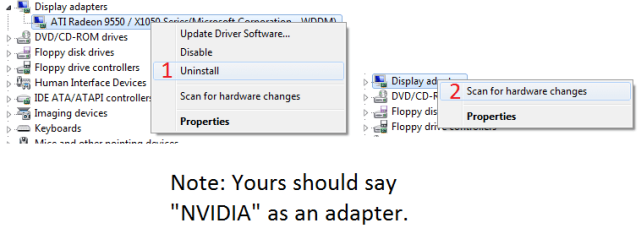
With this being an upgrade I think that maybe some old drivers have been left behind and causing the problem, so what you want to do is uninstall all video drivers for your card. Then go into device manager and remove the video card there. Once you have done this reboot and let windows look for new hardware after that is done install the newest driver install that you got from Nvidia.
 

My Computer

Computer Manufacturer/Model Number
Custom Build
OS
Windows 7 Ultimate x64 SP1
CPU
AMD Phenom II 1090 3.2 six core
Motherboard
MSI 890FXA-GD65
Memory
16 gig DDR3
Graphics Card(s)
MSI R6950 2gig
Sound Card
on board
Monitor(s) Displays
Acer 23inch led
Screen Resolution
1900x1080 widescreen
Hard Drives
Seagate 1tb SATA6
2x 1tb HITACHI Deskstar
PSU
CORSAIR Enthusiast Series TX750 V2 750W
Case
CoolMaster HAF 922
Cooling
Box AMD Heatsink/Fan
Internet Speed
Cable 12Mbps/3Mbps
...Then go into device manager and remove the video card there. Once you have done this reboot and let windows look for new hardware...

Interesting, seems like a solution... What I should add is maybe screens:
Untitled.png
 

My Computer

Computer type
PC/Desktop
Computer Manufacturer/Model Number
Multirama PC Expert [Bulgaria]
OS
Windows 7 Home Premium [64-Bit]
CPU
Intel Core 2 Quad CPU Q8200 @ 2.33 GHz
Motherboard
GIGABYTE GA-G31M-S2C
Memory
4094 MB DDR2
Graphics Card(s)
SAPPHIRE Radeon HD 6970 (2 GB VRAM)
Sound Card
Realtek ALC883 @ Intel 82801GB ICH7 - High Definition Audio
Monitor(s) Displays
Samsung SyncMaster BX2235 [21.5" LCD with LED Backlight]
Screen Resolution
1920x1080
Hard Drives
Hitachi HDT721075SLA360 - 750 GB
PSU
Cooler Master GX750 - 750W
Case
Multirama (Black / 2010 Revision)
Cooling
Stock + Cooler Master
Keyboard
Logitech G510 (Gaming Keyboard)
Mouse
Razer Lachesis (4000 DPI, Blue Version)
Internet Speed
Vivacom Optical [100 Mbps]
Browser
Chrome [Windows]
how do i uninstall drivers and if i remove the video card will i be able to see the screen after reboot ?
 

My Computer

Computer Manufacturer/Model Number
Toshiba/Qosmio x300
OS
Windows 7 build 7201 x86
CPU
Intel (R) Core(TM)2 Duo
Motherboard
Mobile Intel® PM45
Memory
4 GB DDR3 1066 Mhz
Graphics Card(s)
NVIDIA® GeForce® 9800M GTS supporting TurboCache™ technology
Sound Card
Harman Kardon® stere
Monitor(s) Displays
Lcd 17"
Screen Resolution
1440x990
He didn't litteraly mean remove the thing from your mother board (lol). Just go to the Device Manager, select your GPU and get it out of the way! From then on follow DarkXeno's post.
 

My Computer

Computer type
PC/Desktop
Computer Manufacturer/Model Number
Multirama PC Expert [Bulgaria]
OS
Windows 7 Home Premium [64-Bit]
CPU
Intel Core 2 Quad CPU Q8200 @ 2.33 GHz
Motherboard
GIGABYTE GA-G31M-S2C
Memory
4094 MB DDR2
Graphics Card(s)
SAPPHIRE Radeon HD 6970 (2 GB VRAM)
Sound Card
Realtek ALC883 @ Intel 82801GB ICH7 - High Definition Audio
Monitor(s) Displays
Samsung SyncMaster BX2235 [21.5" LCD with LED Backlight]
Screen Resolution
1920x1080
Hard Drives
Hitachi HDT721075SLA360 - 750 GB
PSU
Cooler Master GX750 - 750W
Case
Multirama (Black / 2010 Revision)
Cooling
Stock + Cooler Master
Keyboard
Logitech G510 (Gaming Keyboard)
Mouse
Razer Lachesis (4000 DPI, Blue Version)
Internet Speed
Vivacom Optical [100 Mbps]
Browser
Chrome [Windows]
how do i uninstall drivers
 

My Computer

Computer Manufacturer/Model Number
Toshiba/Qosmio x300
OS
Windows 7 build 7201 x86
CPU
Intel (R) Core(TM)2 Duo
Motherboard
Mobile Intel® PM45
Memory
4 GB DDR3 1066 Mhz
Graphics Card(s)
NVIDIA® GeForce® 9800M GTS supporting TurboCache™ technology
Sound Card
Harman Kardon® stere
Monitor(s) Displays
Lcd 17"
Screen Resolution
1440x990
there's absolutely something wrong with my computer today i was just looking at device manager suddenly my computer was frozen comletely and the colours start to change there was image on display but like broken image i had to restart my computer please help me i'm sick of all these
 

My Computer

Computer Manufacturer/Model Number
Toshiba/Qosmio x300
OS
Windows 7 build 7201 x86
CPU
Intel (R) Core(TM)2 Duo
Motherboard
Mobile Intel® PM45
Memory
4 GB DDR3 1066 Mhz
Graphics Card(s)
NVIDIA® GeForce® 9800M GTS supporting TurboCache™ technology
Sound Card
Harman Kardon® stere
Monitor(s) Displays
Lcd 17"
Screen Resolution
1440x990
there's absolutely something wrong with my computer today i was just looking at device manager suddenly my computer was frozen comletely and the colours start to change there was image on display but like broken image i had to restart my computer please help me i'm sick of all these

Hi, your picture is to small, try this way for uploading your pictures, it is a much better way.

http://www.sevenforums.com/general-...ed-method-uploading-posting-screen-shots.htmlhttp://www.sevenforums.com/general-...ed-method-uploading-posting-screen-shots.html
 

My Computer

Computer Manufacturer/Model Number
Self Build 64bit
OS
Vista Ult64, Win7600
CPU
Intel Core 2 Quad Q6600 @ 2400 MHz 64bit OS
Motherboard
Asus P5E3 Deluxe WiFi @p 64 bit OS
Memory
4096 MB DDR3-SDRAM
Graphics Card(s)
ATI Radeon HD 3870 Series x2 Crossfired
Sound Card
Realtek on board
Monitor(s) Displays
Samsung SyncMaster - 23 inches
Screen Resolution
1680x1050 pixels at 60 Hz in True Colors
Hard Drives
Hitachi (250 GB)/Samsung 750 GB. /Barracuda 160 GB.
My Book 1 TB external..
PSU
Cooler Master 1000w
Case
Cooler Master Cosmos 1000.
Cooling
Fans and fresh air,
Keyboard
Wireless
Mouse
Wireless
Internet Speed
Never fast enough
Other Info
I use a Magnum.
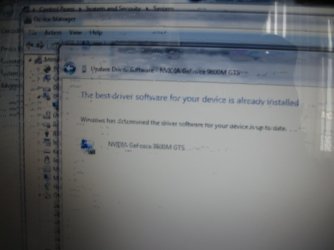
there's absolutely something wrong with my computer today i was just looking at device manager suddenly my computer was frozen comletely and the colours start to change there was image on display but like broken image i had to restart my computer please help me i'm sick of all these when i go to device manager and click uninstall drivers my graphic card disappears and then when i restart it automatically installs and the same thing hapens i'm really desperate i should have stayed with vista ( sorry for quality of images and my english)
 

Attachments

  • IMG_1001.JPG
    IMG_1001.JPG
    366.6 KB · Views: 26
  • IMG_1004.JPG
    IMG_1004.JPG
    242.3 KB · Views: 15
  • IMG_1006.JPG
    IMG_1006.JPG
    137.3 KB · Views: 22
Last edited:

My Computer

Computer Manufacturer/Model Number
Toshiba/Qosmio x300
OS
Windows 7 build 7201 x86
CPU
Intel (R) Core(TM)2 Duo
Motherboard
Mobile Intel® PM45
Memory
4 GB DDR3 1066 Mhz
Graphics Card(s)
NVIDIA® GeForce® 9800M GTS supporting TurboCache™ technology
Sound Card
Harman Kardon® stere
Monitor(s) Displays
Lcd 17"
Screen Resolution
1440x990
We can get a clear picture of your problem only if you take screen shots from within the Operating System. Click on Start orb and type "Snipping Tool" and click on it. Then snip the screen and post it here.
 

My Computer

Computer type
Laptop
Computer Manufacturer/Model Number
Samsung
OS
Windows 8 x64
CPU
Intel Core i7 3630QM
Motherboard
Intel HM76
Memory
Samsung 8 GB DDR3 800 Mhz
Graphics Card(s)
ATI Radeon HD Graphics 7670M + Intel HD Graphics 4000
Screen Resolution
1366x768
Hard Drives
SAMSUNG Spinpoint M8 1TB
Internet Speed
4 Mb/sDownload Speed, 2 Mb/s Upload Speed
Antivirus
avast!
when this thing happens i can't do on any operation on my computer so i can't use the snipping tool either.
 

My Computer

Computer Manufacturer/Model Number
Toshiba/Qosmio x300
OS
Windows 7 build 7201 x86
CPU
Intel (R) Core(TM)2 Duo
Motherboard
Mobile Intel® PM45
Memory
4 GB DDR3 1066 Mhz
Graphics Card(s)
NVIDIA® GeForce® 9800M GTS supporting TurboCache™ technology
Sound Card
Harman Kardon® stere
Monitor(s) Displays
Lcd 17"
Screen Resolution
1440x990
Back
Top