sound blaster audigy giving errors

ranjan2001

New member
Power User
Local time
6:32 AM
Messages
143
Location
NewDelhi, India
Win 7 x64 build 7100
I cleaned the dust from the comp & since then I am getting this error, sound is only working on front 2 speakers. i ensured the card is properly installed, which it is. Last 4 months its been working fine with 4.1 speakers.

Now I cant start the EAX control setting.

I uninstalled the card & drivers & cleaned the registry then reinstalled the drivers from CD.

On installation of the drivers & sound it detects by old speakers as stereo only but all 4 speakers give sound which is too bad, I can now use the EAX control settings
then I run the windows update it download a creative driver which when installed does show me 4.1 speakers but now the EAX control panel wont open & gives error
"the audio device supported by this application is not detected. The application will exit"

any clue what went wrong & how can I get this working?

 
Last edited:

My Computer

Computer Manufacturer/Model Number
Custom Built
OS
Windows 7 Ultimate x64 build 7600
CPU
Intel C2D 6300 1.86MHz
Motherboard
Asus P5B-dlx wifi
Memory
4x1Gb Transcend JetRAM DDR2 PC2-6400 800MHz
Graphics Card(s)
XFX 7600GT
Sound Card
Creative Audigy Value
Monitor(s) Displays
Lenovo 20"
Screen Resolution
1680x1050
Hard Drives
4 x 1.5TB Seagate barracuda
PSU
Zebronics Platinum 450Watts
Case
Zebronics Peace
Cooling
stock cooling
Keyboard
silicon keyboard
Mouse
Logitech 3 button mouse
Internet Speed
1mbps
any clue what went wrong & how can I get this working?

Yes, this,

On installation of the drivers & sound it detects by old speakers as stereo only but all 4 speakers give sound which is too bad, I can now use the EAX control settings
then I run the windows update it download a creative driver

Don't install the driver from Windows Update if things are working. In fact it is a good idea to NEVER install a sound or video driver from Windows Update, they haver a very bad habit of breaking things.

Uninstall the Windows Update driver and see if things start working again. If that doesn't work running System Restore using the last restore point before the Windows Update driver got installed should fix it.
 

My Computer

Computer type
PC/Desktop
Computer Manufacturer/Model Number
Me
OS
Win 7 Ultimate x64
CPU
FX-8350 @ 4.6 GHz so far
Motherboard
Asus M5A97 EVO
Memory
ADATA XPG V1 Series Black 8GB DDR3 1600
Graphics Card(s)
Sapphire R9 270x Dual-X
Sound Card
Xonar DGX w/ Corsair Vengence 1300
Monitor(s) Displays
Acer S232HL Abid
Screen Resolution
1920x1080
Hard Drives
120 GB OCZ Vertex 3
500 GB Seagate 7200.12
PSU
Antec Earthwatts 650W Green
Case
Antec Three Hundred
Cooling
Cooler Master 212 EVO
Keyboard
Logitech G510
Mouse
Logitech G500s
Internet Speed
35000/3000
here is the latest 64-bit driver for your SoundBlaster Audigy Value....

Creative Worldwide Support

After installing this, it will also install an AutoUpdate applet that you can search and update your creative drivers and apps.

I thought EAX support on DirectSound was dropped with Vista (Becasue DX10 didn't include DirectSound)?

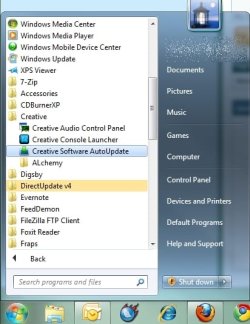
Look for the Creative Console Launcher
and also Alchemy, which is a work-around for restoring EAX to DirectSound games.


Alchemy use to be free for X-Fi only,10 bucks for audigy, but after a backlash, they made is free....

You can read more here about the app and decide if you want it:
http://connect.creativelabs.com/alchemy/ALchemy for Audigy/Home.aspx
 

My Computer

Computer Manufacturer/Model Number
Built Myself
OS
Windows 7 7600.16384 x64
CPU
Intel Core i7 OC'd to 3.20 GHz
Motherboard
Gigabyte
Memory
6GB GSkillz Triple Channel DDR3 OC'd to 1600 MHz
Graphics Card(s)
Nvidia GTX 280
Sound Card
X-Fi Platinum
Monitor(s) Displays
Dual 2001FWP
Screen Resolution
1680x1050 x 2
Hard Drives
System - Dual 150GB Raptors Raid0
Doc Storage - 1TB SATA 32MB cache Samsung
TV Recordings - 1TB SATA 32MB cache Samsung
PSU
Gigawatt Antec
Case
Antec 900
Keyboard
Saitek
Mouse
logitech MX 10000
Internet Speed
30 mb/s
7echno7im
Thanks its now working with the new drivers which you gave the link, but the EAX does not load separately as it was in the earlier version which I installed from the CD, instaed it now loads along with sound properties.
 

Attachments

  • 2009-07-21_205216.jpg
    2009-07-21_205216.jpg
    49.4 KB · Views: 715

My Computer

Computer Manufacturer/Model Number
Custom Built
OS
Windows 7 Ultimate x64 build 7600
CPU
Intel C2D 6300 1.86MHz
Motherboard
Asus P5B-dlx wifi
Memory
4x1Gb Transcend JetRAM DDR2 PC2-6400 800MHz
Graphics Card(s)
XFX 7600GT
Sound Card
Creative Audigy Value
Monitor(s) Displays
Lenovo 20"
Screen Resolution
1680x1050
Hard Drives
4 x 1.5TB Seagate barracuda
PSU
Zebronics Platinum 450Watts
Case
Zebronics Peace
Cooling
stock cooling
Keyboard
silicon keyboard
Mouse
Logitech 3 button mouse
Internet Speed
1mbps
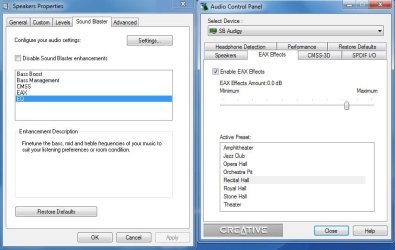
I cant get the bass boost/bass management & EQ to work at all.
When I select EQ & hit the setting button the same window (shown at right) opens up which does not show any equalizer.

How do I get the equalizer?

Another question I don't game at all will I benefit by installing Creative ALchemy 1.25.10 in my mp3 music & watching movies?

The note on creative site says
Do not install this application if you do not play DirectSound3D games in Windows Vista.
 
Last edited:

My Computer

Computer Manufacturer/Model Number
Custom Built
OS
Windows 7 Ultimate x64 build 7600
CPU
Intel C2D 6300 1.86MHz
Motherboard
Asus P5B-dlx wifi
Memory
4x1Gb Transcend JetRAM DDR2 PC2-6400 800MHz
Graphics Card(s)
XFX 7600GT
Sound Card
Creative Audigy Value
Monitor(s) Displays
Lenovo 20"
Screen Resolution
1680x1050
Hard Drives
4 x 1.5TB Seagate barracuda
PSU
Zebronics Platinum 450Watts
Case
Zebronics Peace
Cooling
stock cooling
Keyboard
silicon keyboard
Mouse
Logitech 3 button mouse
Internet Speed
1mbps

Attachments

  • cautoupdate.jpg
    cautoupdate.jpg
    37.1 KB · Views: 509

My Computer

Computer Manufacturer/Model Number
Built Myself
OS
Windows 7 7600.16384 x64
CPU
Intel Core i7 OC'd to 3.20 GHz
Motherboard
Gigabyte
Memory
6GB GSkillz Triple Channel DDR3 OC'd to 1600 MHz
Graphics Card(s)
Nvidia GTX 280
Sound Card
X-Fi Platinum
Monitor(s) Displays
Dual 2001FWP
Screen Resolution
1680x1050 x 2
Hard Drives
System - Dual 150GB Raptors Raid0
Doc Storage - 1TB SATA 32MB cache Samsung
TV Recordings - 1TB SATA 32MB cache Samsung
PSU
Gigawatt Antec
Case
Antec 900
Keyboard
Saitek
Mouse
logitech MX 10000
Internet Speed
30 mb/s
Another way to get the the EQ from the bast driver is
go to control panel>Sound>right click speakers>properties>Tone
You just get the basic treble and bass but its better than the muffled sound of the default sound.
 

My Computer

Computer Manufacturer/Model Number
Built Myself
OS
Windows 7 7600.16384 x64
CPU
Intel Core i7 OC'd to 3.20 GHz
Motherboard
Gigabyte
Memory
6GB GSkillz Triple Channel DDR3 OC'd to 1600 MHz
Graphics Card(s)
Nvidia GTX 280
Sound Card
X-Fi Platinum
Monitor(s) Displays
Dual 2001FWP
Screen Resolution
1680x1050 x 2
Hard Drives
System - Dual 150GB Raptors Raid0
Doc Storage - 1TB SATA 32MB cache Samsung
TV Recordings - 1TB SATA 32MB cache Samsung
PSU
Gigawatt Antec
Case
Antec 900
Keyboard
Saitek
Mouse
logitech MX 10000
Internet Speed
30 mb/s
Back
Top