Sound card controls only headphones, not speakers!

Hindo

New member
Local time
9:52 PM
Messages
5
Hi.

I have a sound card problem after I installed Windows 7. Previously I had Windows XP and after I replaced OS some days after I noticed something weird - I can control headphones ONLY (volume, balance etc.) but my built in speakers are living completely independent life.:shock: If I`m playing music (no matter if it is Winamp or Media Player) I can control speakers only with player`s volume control but not with laptop`s volume button. And if I`m turning mute on, there is no sound from headphones but speakers continue playing. I already reinstalled driver - nothing happened. Tried to install HP driver which is meant for Vista - says failure. So, I`m out of ideas. Maybe you can help me? If nothing`s gonna help, I will be forced to go back to XP, but that is not a thing I would like to do that easy.:cry:
My PC is HP dv2000, the little one. There is written on the laptop that Windows Vista capable so I thought that there shouldn`t be any problem with Windows 7 but now I see that there is.
OS is Windows 7 Ultimate 32bit.
 

My Computer My Computer

At a glance

Windows 7 Ultimate 32bitHP dv2000
OS
Windows 7 Ultimate 32bit
CPU
HP dv2000
Sound Card
Conexant High Definition Audio
Hi hindo, welcome to the forums :)

Firstly if you click the 'User CP' option at the top of the forum you can input your 'System Specs' (left hand column). This will help us asses your issue in more depth.

Additional: Have you tried to download & install the latest drivers for your sound card (not necessarily from HP)?


OS
 

My Computer My Computer

At a glance

Windows 7 Ultimate x64AMD Sempron Dual Core3GBNVIDIA GeForce 6150SE nForce 430
Computer Manufacturer/Model Number
Compaq Desktop
OS
Windows 7 Ultimate x64
CPU
AMD Sempron Dual Core
Memory
3GB
Graphics Card(s)
NVIDIA GeForce 6150SE nForce 430
Screen Resolution
1024x768
Hard Drives
150GB Sata
Hi.

I have a sound card problem after I installed Windows 7. Previously I had Windows XP and after I replaced OS some days after I noticed something weird - I can control headphones ONLY (volume, balance etc.) but my built in speakers are living completely independent life.:shock: If I`m playing music (no matter if it is Winamp or Media Player) I can control speakers only with player`s volume control but not with laptop`s volume button. And if I`m turning mute on, there is no sound from headphones but speakers continue playing. I already reinstalled driver - nothing happened. Tried to install HP driver which is meant for Vista - says failure. So, I`m out of ideas. Maybe you can help me? If nothing`s gonna help, I will be forced to go back to XP, but that is not a thing I would like to do that easy.:cry:
My PC is HP dv2000, the little one. There is written on the laptop that Windows Vista capable so I thought that there shouldn`t be any problem with Windows 7 but now I see that there is.
OS is Windows 7 Ultimate 32bit.


Take the vista driver and install it in compatibility mode

right click the installer>properties>compatibility>pick Vista


Good Luck


Ken
 

My Computer My Computer

At a glance

Win 8 Release candidate 8400[email protected]4 gigsNvidia 9600M
Computer Manufacturer/Model Number
HP Pavillion dv-7 1005 Tx
OS
Win 8 Release candidate 8400
CPU
[email protected]
Memory
4 gigs
Graphics Card(s)
Nvidia 9600M
Sound Card
HD built-in
Monitor(s) Displays
17" Wxga
Screen Resolution
1440x900
Cooling
none
Internet Speed
45Mb down 5Mb up

My Computer My Computer

At a glance

Windows 7 Ultimate x64AMD Sempron Dual Core3GBNVIDIA GeForce 6150SE nForce 430
Computer Manufacturer/Model Number
Compaq Desktop
OS
Windows 7 Ultimate x64
CPU
AMD Sempron Dual Core
Memory
3GB
Graphics Card(s)
NVIDIA GeForce 6150SE nForce 430
Screen Resolution
1024x768
Hard Drives
150GB Sata
Open "Volume Mixer", look at the most left hand tile. It should show you a speaker icon (or a headphone), under that icon there should be a drop down box, change it to your sound card's instead of your headphone.

zzz2496
 

My Computer My Computer

At a glance

Windows7 Ultimate 64bitIntel Core 2 Quad Q6600DDR2 Adata 4GBNvidia GeForce GTX 285 1024 and Nvidia GeForc...
Computer Manufacturer/Model Number
Self Built
OS
Windows7 Ultimate 64bit
CPU
Intel Core 2 Quad Q6600
Motherboard
Abit IN9-32X-MMAX
Memory
DDR2 Adata 4GB
Graphics Card(s)
Nvidia GeForce GTX 285 1024 and Nvidia GeForce 8800GT 512
Sound Card
Asus Xonar HDAV 1.3
Monitor(s) Displays
Dell 2407WFP and BenQ 2400v and Philips 150v3
Screen Resolution
3840x1200 and 1024x768
Hard Drives
2 WDC 1TB
1 WDC 1.5TB
1 WDC 640GB
1 WDC 320GB
1 Seagate 200GB
PSU
Corsair TX 850W
Case
Cooler Master HAF932
Cooling
Arctic Cooling Freezer Extreme and plenty of fans...
Keyboard
MicrosoftNaturalKeyboard 4000/Apple Alu keyboard/Dinovo mini
Mouse
Logitech G5/MarbleMouseTrackball/PerformanceMX/SpacePilotPRO
Internet Speed
1.5Mbps down/384Kbps up
Other Info
APC SURT 1000XL
Logitech Z-560
Wiimote
Mikrotik Router
Linksys (now Cisco) SD2008 8 port Gigabit switch
Linksys WRT54G (acting as AP)
Apple wireless Aluminium keyboard
Apple Magic Mouse
Xbox360 wired controller
Thanks for your replies.

I tried that compatibility thing but it didn`t help. Keeps saying failure after trying to install that driver. I know that this laptop isn`t brand new top model, but that would be so unfair if I had no chance to use Windows 7 without any problem because of some ordinary built in soundcard and HP that can`t provide newer drivers for laptops that are older than two years. Even after releasing a brand new OS.
 

My Computer My Computer

At a glance

Windows 7 Ultimate 32bitHP dv2000
OS
Windows 7 Ultimate 32bit
CPU
HP dv2000
Sound Card
Conexant High Definition Audio
Open "Volume Mixer", look at the most left hand tile. It should show you a speaker icon (or a headphone), under that icon there should be a drop down box, change it to your sound card's instead of your headphone.

zzz2496

Unfortunately there is only two columns when I open that sound mixer. First from the left is called Speakers (can change volume up and down) and under that there is only mute button. And second one is called Applications and I can control System sounds with that. And, yes, when I turn mute on, speakers keep playing but headphones are speechless. I`ve searched through all of the possible settings to find some way to change it, but no good luck. In Playback options-->Properties - I found Jack Information. There is two positions: 1) L R Front Panel Analog Jack - (I know that jack (red light comes out of it). I used it when I had XP) 2) L R Front Panel 3,5 mm Jack (Used this one too - both worked fine). And I am not able to change anything in those settings. I am really out of ideas.
 

My Computer My Computer

At a glance

Windows 7 Ultimate 32bitHP dv2000
OS
Windows 7 Ultimate 32bit
CPU
HP dv2000
Sound Card
Conexant High Definition Audio
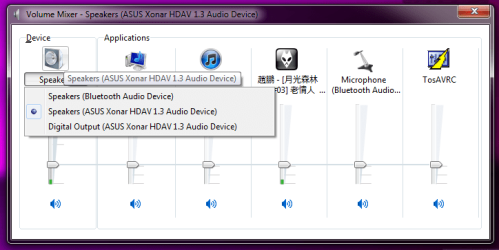
Here's what mine look like:

volmix.png

I currently have 3 output devices, a digital output on my Xonar HDAV, analogue speakers on Xonar HDAV, and a Bluetooth speakers (it's a Bluetooth headset). If I want to control my main speakers volume, I change it to "Speakers (ASUS Xonar HDAV 1.3 Audio Device)". If I want to control my bluetooth headset, I'd change it to "Speakers (Bluetooth Audio Device)", etc... You get the idea...

Can you make a screenshot of your volume mixer? Just in case we're not talking about the same volume mixer...

zzz2496
 

My Computer My Computer

At a glance

Windows7 Ultimate 64bitIntel Core 2 Quad Q6600DDR2 Adata 4GBNvidia GeForce GTX 285 1024 and Nvidia GeForc...
Computer Manufacturer/Model Number
Self Built
OS
Windows7 Ultimate 64bit
CPU
Intel Core 2 Quad Q6600
Motherboard
Abit IN9-32X-MMAX
Memory
DDR2 Adata 4GB
Graphics Card(s)
Nvidia GeForce GTX 285 1024 and Nvidia GeForce 8800GT 512
Sound Card
Asus Xonar HDAV 1.3
Monitor(s) Displays
Dell 2407WFP and BenQ 2400v and Philips 150v3
Screen Resolution
3840x1200 and 1024x768
Hard Drives
2 WDC 1TB
1 WDC 1.5TB
1 WDC 640GB
1 WDC 320GB
1 Seagate 200GB
PSU
Corsair TX 850W
Case
Cooler Master HAF932
Cooling
Arctic Cooling Freezer Extreme and plenty of fans...
Keyboard
MicrosoftNaturalKeyboard 4000/Apple Alu keyboard/Dinovo mini
Mouse
Logitech G5/MarbleMouseTrackball/PerformanceMX/SpacePilotPRO
Internet Speed
1.5Mbps down/384Kbps up
Other Info
APC SURT 1000XL
Logitech Z-560
Wiimote
Mikrotik Router
Linksys (now Cisco) SD2008 8 port Gigabit switch
Linksys WRT54G (acting as AP)
Apple wireless Aluminium keyboard
Apple Magic Mouse
Xbox360 wired controller
Ok, I`ve tried with compatibility mode but all that PC told me is that Incompatible Application.
It`s enough for me tonigh, maybe morning`s cleverer than this late night. :)

Thanks for your responsiveness. ;)

Good night and have a good day. :)
 

My Computer My Computer

At a glance

Windows 7 Ultimate 32bitHP dv2000
OS
Windows 7 Ultimate 32bit
CPU
HP dv2000
Sound Card
Conexant High Definition Audio
Eagerly waiting for your return :)
 

My Computer My Computer

At a glance

Windows 7 Ultimate x64AMD Sempron Dual Core3GBNVIDIA GeForce 6150SE nForce 430
Computer Manufacturer/Model Number
Compaq Desktop
OS
Windows 7 Ultimate x64
CPU
AMD Sempron Dual Core
Memory
3GB
Graphics Card(s)
NVIDIA GeForce 6150SE nForce 430
Screen Resolution
1024x768
Hard Drives
150GB Sata
Here's what mine look like:

View attachment 107141

I currently have 3 output devices, a digital output on my Xonar HDAV, analogue speakers on Xonar HDAV, and a Bluetooth speakers (it's a Bluetooth headset). If I want to control my main speakers volume, I change it to "Speakers (ASUS Xonar HDAV 1.3 Audio Device)". If I want to control my bluetooth headset, I'd change it to "Speakers (Bluetooth Audio Device)", etc... You get the idea...

Can you make a screenshot of your volume mixer? Just in case we're not talking about the same volume mixer...

zzz2496

I hope that my attachment will submit.
Yes, that is the same mixer only comparing to your mixer, I am not able to change anything there. :(
 

Attachments

  • Mixer.jpg
    Mixer.jpg
    14.2 KB · Views: 13

My Computer My Computer

At a glance

Windows 7 Ultimate 32bitHP dv2000
OS
Windows 7 Ultimate 32bit
CPU
HP dv2000
Sound Card
Conexant High Definition Audio
Back
Top