Sound Devices Have Disappeared

boweasel

New member
Power User
Local time
3:29 AM
Messages
678
Have a Gateway M-Series laptop that came with 32 bit Vista Home Premium installed. We upgraded to Windows 7 Home Premium (also 32 bit) several years ago and have had no problems until recently.

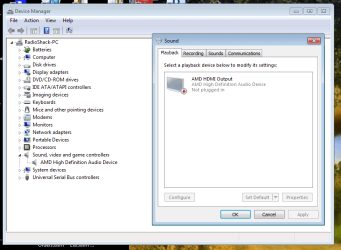
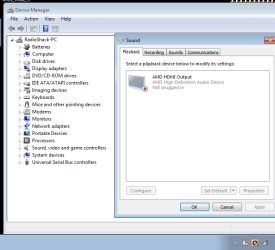
We have no sound. The speaker icon in the system tray has a red X to the right of it. Clicking on it opens a diagnostic page, that within 20 seconds says it couldn't identify the problem. When I go to Control Panel - Sound the Playback tab only displays an AMD High Definition Audio Device which it says is not plugged in. We DID have 2 other devices listed there previously, one of then being the default device labeled Speakers and Headphones. Device manager currently displays only the AMD HDMI sound device.

When I start the laptop I always get a msg that Catalyst Control Center host application has stopped working and that Windows is searching for a solution. It doesn't find one.

Yesterday I was somehow able to get everything back into place (Tweaking All in one repair?), but although it showed the speaker icon without the X, and another device displayed under Sound in Device Mgr, and the Speakers and Headphones was back under the Playback tab, and Windows Audio was enabled and started.... I still had no sound. A subsequent reboot brought back the red X in the system tray.

I have a W7 32 bit disk and when I attempt an in place upgrade it wants me to first deauthorize iTunes on the computer and remove ATI Catalyst Control Center and ATI Catalyst Install Manager. I have gone into Control Panel and (apparently) done a successful repair of AMD Catalyst Install Manager (I have no idea about the difference between ATI and AMD). After the 'repair' I rebooted and again got the msg that Catalyst Control Center host application has stopped working. I have no listing in the Programs and Features for anything referring to a Catalyst Control Center.
 

My Computer

Computer type
Laptop
OS
Windows 7 home premium 64 bit
CPU
AMD K10
Motherboard
Hewlett-Packard 1444 (Socket S1G4)
Memory
3.00GB Dual-Channel DDR3 @ 532MHz
Graphics Card(s)
ATI AMD M880G with ATI Mobility Radeon HD 4250 (HP)
Sound Card
Realtek
Screen Resolution
1366 x 768
Hard Drives
465GB Western Digital
Antivirus
MSE
ATI/AMD. ATI is now AMD, as it was bought by AMD several years ago. Catalyst Control Center would be for an ATI/AMD Video card. As this is a laptop, does this have a separate Video Card and does it have an HDMI connection? The Catalyst Control Center is not a "must have", just the video drivers however Windows probably downloaded the combination Catalyst Control Center and Video drivers. If you can figure out what video card you have, you can go to AMD and download the latest version and that may take care of the AMD problem.

Now, back to the PC Audio, which is a separate issue. Go to the Device Manager and Display the Sound Devices listed under Sound, Video and Game Controllers. The AMD HD Audio should be listed (for the HDMI Audio) and there should be another listing of your sound device (such as RealTek, VIA, etc). If there is a sound listed, what is it and does it show an error code? If it shows the generic basic function Windows installed "HD Audio Codec" that indicates the correct sound driver is not installed.

Please fill in the "My System Specs" so we know what we are dealing with. Helps us to help you and not speak in generalities, as I've done.
 

My Computer

Computer type
PC/Desktop
Computer Manufacturer/Model Number
My Own Build
OS
Windows 10 64 bit
CPU
Intel i7 6700K
Motherboard
ASUS ROG Maximus VIII Hero
Memory
16GB Corsair Dominator
Graphics Card(s)
Intel CPU Graphics
Sound Card
RealTek
Monitor(s) Displays
27" Dell S2719dgf
Screen Resolution
2560X1440
Hard Drives
1 TB Samsung 850 EVO SSD for Win 10 Pro
500GB Samsung 850 EVO SSD for Win 10 Insider
2 TB drive for backup
PSU
EVGA Supernova 750G2
Case
BeQuiet Silent Base 600
Cooling
Deepcool Captain 120EX
Keyboard
Microsoft Wireless 2000
Mouse
Microsoft wireless
Internet Speed
100 MB/sec (Cable)
Antivirus
Microsoft Defender and Malwarebytes
Browser
Edge/Firefox
Other Info
Cakewalk (Sonar) by BandLab and Studio One 4.1 Pro recording studio software. MOTU 896Mk3 Hybrid recording interface, Frontier Tranzport wireless control unit, Behringer X-Touch Control Surface.
Five USB connected optical drives for CD Audio production using Nero BurningROM
We have a BUNCH of computers at our house, so I saved the Belarc info for this laptop a word document, which is an attachment. As I mentioned in my post I currently have nothing in Device Manager - Sound Video and Game Controllers other than the AMD HD Audio, which is also the only thing in the Control Panel/Sound/Playback tab. It is listed as Not Plugged In.
 
Last edited by a moderator:

My Computer

Computer type
Laptop
OS
Windows 7 home premium 64 bit
CPU
AMD K10
Motherboard
Hewlett-Packard 1444 (Socket S1G4)
Memory
3.00GB Dual-Channel DDR3 @ 532MHz
Graphics Card(s)
ATI AMD M880G with ATI Mobility Radeon HD 4250 (HP)
Sound Card
Realtek
Screen Resolution
1366 x 768
Hard Drives
465GB Western Digital
Antivirus
MSE
The sound, according to what I find at Gateway is Sigmatel. HERE is the download.

It is not showing up in the Belarc advisor either. Check the BIOS as it may have been disabled in the BIOS. If its disabled in the BIOS, Windows will not detect it and you would not be able to install the drivers.
 

My Computer

Computer type
PC/Desktop
Computer Manufacturer/Model Number
My Own Build
OS
Windows 10 64 bit
CPU
Intel i7 6700K
Motherboard
ASUS ROG Maximus VIII Hero
Memory
16GB Corsair Dominator
Graphics Card(s)
Intel CPU Graphics
Sound Card
RealTek
Monitor(s) Displays
27" Dell S2719dgf
Screen Resolution
2560X1440
Hard Drives
1 TB Samsung 850 EVO SSD for Win 10 Pro
500GB Samsung 850 EVO SSD for Win 10 Insider
2 TB drive for backup
PSU
EVGA Supernova 750G2
Case
BeQuiet Silent Base 600
Cooling
Deepcool Captain 120EX
Keyboard
Microsoft Wireless 2000
Mouse
Microsoft wireless
Internet Speed
100 MB/sec (Cable)
Antivirus
Microsoft Defender and Malwarebytes
Browser
Edge/Firefox
Other Info
Cakewalk (Sonar) by BandLab and Studio One 4.1 Pro recording studio software. MOTU 896Mk3 Hybrid recording interface, Frontier Tranzport wireless control unit, Behringer X-Touch Control Surface.
Five USB connected optical drives for CD Audio production using Nero BurningROM
The sound, according to what I find at Gateway is Sigmatel. HERE is the download.
Thanks, but even though the properties of the link you provided - http://www.sevenforums.com/Gateway M-1629 indicate that it should take me to page from this forum that references this laptop, it does not. Clicking on your link removes the Gateway%20M-1629
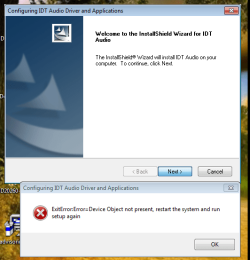
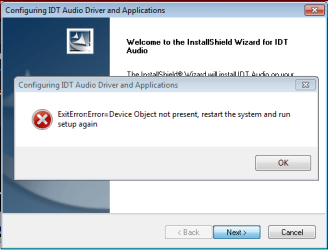
part of the address and then directs me to the main page. If I go to the Gateway Drivers and Downloads page Gateway Support - Downloads & Support Documents - Notebook / M Series / M-16 and download, extract and run the suggested Sigmatel Audio Driver I get a msg box

Configuring IDT Audio Driver and Applications
ExitError:Error=Device Object not present, restart the system and run setup again
It is not showing up in the Belarc advisor either. Check the BIOS as it may have been disabled in the BIOS. If its disabled in the BIOS, Windows will not detect it and you would not be able to install the drivers.
This seems to be a very rudimentary BIOS set of screens. I can find nothing audio or sound related.
 

Attachments

  • Capture.PNG
    Capture.PNG
    33.2 KB · Views: 48

My Computer

Computer type
Laptop
OS
Windows 7 home premium 64 bit
CPU
AMD K10
Motherboard
Hewlett-Packard 1444 (Socket S1G4)
Memory
3.00GB Dual-Channel DDR3 @ 532MHz
Graphics Card(s)
ATI AMD M880G with ATI Mobility Radeon HD 4250 (HP)
Sound Card
Realtek
Screen Resolution
1366 x 768
Hard Drives
465GB Western Digital
Antivirus
MSE
It still sounds like it was disabled in the BIOS. Some refer to the on board audio as "legacy audio". If you don't have any customization in the BIOS, try resetting the BIOS and see what happens. If you do have some customization, note what it is before resetting the BIOS, reset the BIOS and then do the custom configuring.
 

My Computer

Computer type
PC/Desktop
Computer Manufacturer/Model Number
My Own Build
OS
Windows 10 64 bit
CPU
Intel i7 6700K
Motherboard
ASUS ROG Maximus VIII Hero
Memory
16GB Corsair Dominator
Graphics Card(s)
Intel CPU Graphics
Sound Card
RealTek
Monitor(s) Displays
27" Dell S2719dgf
Screen Resolution
2560X1440
Hard Drives
1 TB Samsung 850 EVO SSD for Win 10 Pro
500GB Samsung 850 EVO SSD for Win 10 Insider
2 TB drive for backup
PSU
EVGA Supernova 750G2
Case
BeQuiet Silent Base 600
Cooling
Deepcool Captain 120EX
Keyboard
Microsoft Wireless 2000
Mouse
Microsoft wireless
Internet Speed
100 MB/sec (Cable)
Antivirus
Microsoft Defender and Malwarebytes
Browser
Edge/Firefox
Other Info
Cakewalk (Sonar) by BandLab and Studio One 4.1 Pro recording studio software. MOTU 896Mk3 Hybrid recording interface, Frontier Tranzport wireless control unit, Behringer X-Touch Control Surface.
Five USB connected optical drives for CD Audio production using Nero BurningROM
It still sounds like it was disabled in the BIOS. Some refer to the on board audio as "legacy audio". If you don't have any customization in the BIOS, try resetting the BIOS and see what happens. If you do have some customization, note what it is before resetting the BIOS, reset the BIOS and then do the custom configuring.
I wish there was some way to show you the BIOS screens - I have 4 headings at the top - Main, Advanced, Security, Boot and Exit

Main - System Date and Time are edit capable. CPU Type and Speed and Memory displays are not
Advanced - Has 1 submenu - I/O Device Configuration (Internal WLAN State, Internal Blue Tooth Power State, Wake on LAN Feature, Display Selection. Other items are Legacy USB Support, Large Disk Access Mode, Wake On LTD Switch, Auto Dim, Battery Auto Learning, Quiet Boot Mode
Security - Supervisor Password, User Password, etc
Boot - Displays current boot order, and boot devices

And that's it...

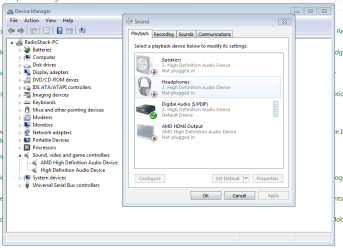
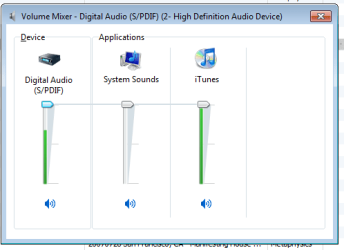
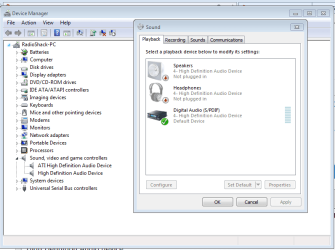
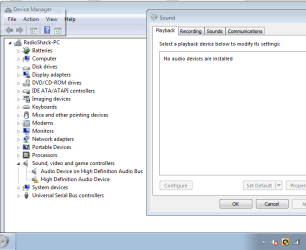
Here are a few more screen images - the first one is the Device Manager and Playback tab when I have a red X next to the speaker icon in the systray. The second is how it looks now. The third is how the mixer sound screen looks now when I'm playing something from iTunes. It looks like I should be hearing something, but I'm not. The 4th is a current Belarc reading, with the additional Playback devices.

I set the BIOS back to the default settings and saved it. After the reboot I was back to the red X in the volume taskbar icon, and back to the first attachment image of this post
 

Attachments

  • Capture2.PNG
    Capture2.PNG
    30.4 KB · Views: 2
  • Capture4.PNG
    Capture4.PNG
    28 KB · Views: 1
  • Capture5.PNG
    Capture5.PNG
    8 KB · Views: 44
  • Belarc 2.docx
    Belarc 2.docx
    59.1 KB · Views: 10
Last edited:

My Computer

Computer type
Laptop
OS
Windows 7 home premium 64 bit
CPU
AMD K10
Motherboard
Hewlett-Packard 1444 (Socket S1G4)
Memory
3.00GB Dual-Channel DDR3 @ 532MHz
Graphics Card(s)
ATI AMD M880G with ATI Mobility Radeon HD 4250 (HP)
Sound Card
Realtek
Screen Resolution
1366 x 768
Hard Drives
465GB Western Digital
Antivirus
MSE
The BIOS reset apparently worked. The fact that it now states "High Definition Audio Device" suggests the default, basic function, Windows installed sound driver is now installed. Try installing the correct sound driver, now.

Digital (S/PDIF) set as default playback device will not get you speaker sound, that is only for the S/PDIF port to some external digital device.
 

My Computer

Computer type
PC/Desktop
Computer Manufacturer/Model Number
My Own Build
OS
Windows 10 64 bit
CPU
Intel i7 6700K
Motherboard
ASUS ROG Maximus VIII Hero
Memory
16GB Corsair Dominator
Graphics Card(s)
Intel CPU Graphics
Sound Card
RealTek
Monitor(s) Displays
27" Dell S2719dgf
Screen Resolution
2560X1440
Hard Drives
1 TB Samsung 850 EVO SSD for Win 10 Pro
500GB Samsung 850 EVO SSD for Win 10 Insider
2 TB drive for backup
PSU
EVGA Supernova 750G2
Case
BeQuiet Silent Base 600
Cooling
Deepcool Captain 120EX
Keyboard
Microsoft Wireless 2000
Mouse
Microsoft wireless
Internet Speed
100 MB/sec (Cable)
Antivirus
Microsoft Defender and Malwarebytes
Browser
Edge/Firefox
Other Info
Cakewalk (Sonar) by BandLab and Studio One 4.1 Pro recording studio software. MOTU 896Mk3 Hybrid recording interface, Frontier Tranzport wireless control unit, Behringer X-Touch Control Surface.
Five USB connected optical drives for CD Audio production using Nero BurningROM
The BIOS reset apparently worked. The fact that it now states "High Definition Audio Device" suggests the default, basic function, Windows installed sound driver is now installed. Try installing the correct sound driver, now.
We are miscommunicating, somehow. In my last post I said I set the BIOS back to the default settings and saved it. After the reboot I was back to the red X in the volume taskbar icon, and back to the first attachment image of this post
What I meant by that:
In order to reset the BIOS it's necessary to reboot and hit F2, then hit F9 to load the defaults. Once I save those BIOS changes, the laptop continues to reboot. Now I am back to the red X. In the thumbnail below I've included the speaker taskbar icon.
 

Attachments

  • Capture6.PNG
    Capture6.PNG
    18.5 KB · Views: 41

My Computer

Computer type
Laptop
OS
Windows 7 home premium 64 bit
CPU
AMD K10
Motherboard
Hewlett-Packard 1444 (Socket S1G4)
Memory
3.00GB Dual-Channel DDR3 @ 532MHz
Graphics Card(s)
ATI AMD M880G with ATI Mobility Radeon HD 4250 (HP)
Sound Card
Realtek
Screen Resolution
1366 x 768
Hard Drives
465GB Western Digital
Antivirus
MSE
When I attempt to load the audio driver on the Gateway page I get this. And it doesn't matter which of the playback devices are present (or not present)
 

Attachments

  • Capture7.PNG
    Capture7.PNG
    11.9 KB · Views: 40

My Computer

Computer type
Laptop
OS
Windows 7 home premium 64 bit
CPU
AMD K10
Motherboard
Hewlett-Packard 1444 (Socket S1G4)
Memory
3.00GB Dual-Channel DDR3 @ 532MHz
Graphics Card(s)
ATI AMD M880G with ATI Mobility Radeon HD 4250 (HP)
Sound Card
Realtek
Screen Resolution
1366 x 768
Hard Drives
465GB Western Digital
Antivirus
MSE
Resetting the BIOS, assuming that the BIOS is not corrupt and working OK would enable the sound chip. It may be a hassle, but check to see if the CMOS (BIOS) backup battery is accessible. If it is, do the CMOS reset by removing the battery for at least 10 minutes (Intel says 15 minutes). This will force a complete BIOS reset. I've seen cases of the software reset with the F keys not fully reset a BIOS.

I don't remember if this is an Intel or AMD chipset motherboard. If its an Intel, download and reinstall the motherboard chipset drivers (or get them from Intel). If the chipset drivers were corrupted, it can cause devices to not be recognized and your problem, if its not a BIOS problem.
 

My Computer

Computer type
PC/Desktop
Computer Manufacturer/Model Number
My Own Build
OS
Windows 10 64 bit
CPU
Intel i7 6700K
Motherboard
ASUS ROG Maximus VIII Hero
Memory
16GB Corsair Dominator
Graphics Card(s)
Intel CPU Graphics
Sound Card
RealTek
Monitor(s) Displays
27" Dell S2719dgf
Screen Resolution
2560X1440
Hard Drives
1 TB Samsung 850 EVO SSD for Win 10 Pro
500GB Samsung 850 EVO SSD for Win 10 Insider
2 TB drive for backup
PSU
EVGA Supernova 750G2
Case
BeQuiet Silent Base 600
Cooling
Deepcool Captain 120EX
Keyboard
Microsoft Wireless 2000
Mouse
Microsoft wireless
Internet Speed
100 MB/sec (Cable)
Antivirus
Microsoft Defender and Malwarebytes
Browser
Edge/Firefox
Other Info
Cakewalk (Sonar) by BandLab and Studio One 4.1 Pro recording studio software. MOTU 896Mk3 Hybrid recording interface, Frontier Tranzport wireless control unit, Behringer X-Touch Control Surface.
Five USB connected optical drives for CD Audio production using Nero BurningROM
Here's an update on this fubar...
Yesterday I downloaded a tool called DriverEasy - you've seen these - they scan your system for outdated or missing drivers and usually (for a fee) let you download what's missing. DriverEasy has a free full feature version that lets you do all that - it's just slow as molasses. The very first driver it wanted me to update was something called AMD Audio Bus Device. It took over an hour to download, nearly a half hour to install,but when it was finished I had sound and no red X next to the speaker icon. However I noticed that itunes seemed sluggish to open - it took about a minute just to display my mp3 files. Once I started playing anything it was fine - no hesitation and good quality audio. Other non-itunes mp3s want to open with Window Media Player and that was also sluggish, taking nearly a minute to start playing. After a while I started getting service errors with WMP and no response from the itunes mp3s, so I shut the system down.
Rebooting got me right back to where I'd been - the red X next to the system tray speaker and no audio output device is installed when I hover the mouse over it. I reran DriverEasy and reinstalled the audio bus device. Nothing. I then installed an AMD HD audio driver from DriverEasy. Got a BSOD. Rebooted. Another BSOD. Rebooted to Last Good Configuration. Got the desktop and the red X next to the speaker.
Then I ran Setup on a driver I'd previously downloaded - AMD_VGADriver_Win7_32_64_VER13_25. Another BSOD. I didn't write down the details and I don't know how to find the log. I rebooted again to Last Good Config, and lo and behold I hear the Windows jingle. And no red X next to the speaker, but the sound access was again sluggish, although I got no service errors and, once itunes finally displayed, I had no problem playing anything.
I manually set a Restore Point and rebooted. I knew there would be a problem when I got a screen indicating that the system was waiting to play the logoff tune. It finally shut down without hearing the tune. Rebooting got me back to no audio device and the red X.
I do not get it - when I have sound, initiating a shutdown (apparently) removes the sound device. Reloading the driver named above gives me a BSOD (and this time I wrote it down - ATIHDW73.sys). Then tapping F8 on boot and using the last configuration that worked gives me my sound. Until I shutdown. When the cycle repeats.
 

My Computer

Computer type
Laptop
OS
Windows 7 home premium 64 bit
CPU
AMD K10
Motherboard
Hewlett-Packard 1444 (Socket S1G4)
Memory
3.00GB Dual-Channel DDR3 @ 532MHz
Graphics Card(s)
ATI AMD M880G with ATI Mobility Radeon HD 4250 (HP)
Sound Card
Realtek
Screen Resolution
1366 x 768
Hard Drives
465GB Western Digital
Antivirus
MSE
Continue to follow firebird's lead, this is if you're stuck or out of other options.

The x on the AMD HDMI "device" in Sound / Playback tab just means that there's no HDMI cable blugged in. The X on the systray is the issue, or part of the issue.

I've seen ATI sound conflicts on some machines. Try uninstalling AMD HD in device manager, remove software if prompted. You might have to disable the device if it keeps getting installed.

Bill
.
 

My Computer

Computer type
Laptop
Computer Manufacturer/Model Number
HP Pavilion dv6-6c10us
OS
x64 (6.3.9600) Win8.1 Pro & soon dual boot x64 (6.1.7601) Win7_SP1 HomePrem
CPU
AMD A6-3420M APU with Radeon(tm) HD Graphics
Motherboard
Hewlett-Packard 1805
Memory
6.00 GB
Graphics Card(s)
AMD Radeon(TM) HD 6520G
Sound Card
(1) AMD High Definition Audio Device (2) IDT High Definiti
Monitor(s) Displays
HP W2072a 20" LCD (1600 x 900) @ 60 Hz
Screen Resolution
1366 x 768 x 32 bits (4294967296 colors) @ 60 Hz
Hard Drives
ST640LM0 00 HM641JI SATA Disk Device
Keyboard
Logitech k520 wireless KB
Mouse
Logitech m320 wireless mouse (bundled with KB)
Internet Speed
15/5 | 54 MB Wireless 'n'
Antivirus
Realtime: Defender or Avast | On-demand: Malwarebytes, ESET
Browser
IE 11 on Win8, IE 10 on win 7
Other Info
Media: [Gimp, Audacity, VLC] || Comm: [WEmail 2012, Skype] || Productivity: [OpenOffice,| Textpad] || Utils: [Sysinternals, cCleaner, Speccy, Defraggler]
Once again I'm adrift without a paddle... fireberd I have no manual and don't want to rip the entire laptop apart looking for the CMOS battery. Google has not helped.

Slartybart, I used device manager and removed the AMD High Definition Audio device. A reboot replaced it with an ATI High Definition Audio device. And I still have no sound. Hope you got the Speccy report.
 

Attachments

  • Capture15.PNG
    Capture15.PNG
    23.7 KB · Views: 1

My Computer

Computer type
Laptop
OS
Windows 7 home premium 64 bit
CPU
AMD K10
Motherboard
Hewlett-Packard 1444 (Socket S1G4)
Memory
3.00GB Dual-Channel DDR3 @ 532MHz
Graphics Card(s)
ATI AMD M880G with ATI Mobility Radeon HD 4250 (HP)
Sound Card
Realtek
Screen Resolution
1366 x 768
Hard Drives
465GB Western Digital
Antivirus
MSE
Yes, thank you for Speccy.

fireberd indirectly suggested making Speakers or Headphones the default Playback device. Have you tried that?
Digital (S/PDIF) set as default playback device will not get you speaker sound, that is only for the S/PDIF port to some external digital device.

The screen shot in post 14 is what you reported seeing in post# 1 - correct?
Seems as though the driver rolled back (AMD to ATI)
Uninstall the ATI HD Audio device, remove software if option is present
Disable it if necessary to stop automatic device installation.

Is this an M-16 machine? (list of GW m series: Gateway Support - M Series
I'm basing that question on firebird and your conversation about Gateway pages.

I'll get around to reading the Speccy... I promise.

Bill
.
 

My Computer

Computer type
Laptop
Computer Manufacturer/Model Number
HP Pavilion dv6-6c10us
OS
x64 (6.3.9600) Win8.1 Pro & soon dual boot x64 (6.1.7601) Win7_SP1 HomePrem
CPU
AMD A6-3420M APU with Radeon(tm) HD Graphics
Motherboard
Hewlett-Packard 1805
Memory
6.00 GB
Graphics Card(s)
AMD Radeon(TM) HD 6520G
Sound Card
(1) AMD High Definition Audio Device (2) IDT High Definiti
Monitor(s) Displays
HP W2072a 20" LCD (1600 x 900) @ 60 Hz
Screen Resolution
1366 x 768 x 32 bits (4294967296 colors) @ 60 Hz
Hard Drives
ST640LM0 00 HM641JI SATA Disk Device
Keyboard
Logitech k520 wireless KB
Mouse
Logitech m320 wireless mouse (bundled with KB)
Internet Speed
15/5 | 54 MB Wireless 'n'
Antivirus
Realtime: Defender or Avast | On-demand: Malwarebytes, ESET
Browser
IE 11 on Win8, IE 10 on win 7
Other Info
Media: [Gimp, Audacity, VLC] || Comm: [WEmail 2012, Skype] || Productivity: [OpenOffice,| Textpad] || Utils: [Sysinternals, cCleaner, Speccy, Defraggler]

My Computer

Computer type
PC/Desktop
Computer Manufacturer/Model Number
Self Built
OS
Win 10 Pro x64
CPU
Intel I5-2500K @3.3GHz
Motherboard
Asrock P67 Extreme4
Memory
16GB G.Skill Ripjaws X (4x4GB)
Graphics Card(s)
EVGA GeForce 750 Ti SC 2GB
Sound Card
ASUS Xonar DG 5.1 Channels 24-bit 96KHz PCI Interface Sound
Monitor(s) Displays
auria eq2367
Screen Resolution
1920 x 1080
Hard Drives
250GB Samsung 850 EVO SSD
1TB WD Blue
1TB Hitachi
PSU
SeaSonic X 650W 80 Plus Gold
Case
Corsair Obsidian 750D
Cooling
Corsair H60, Three 140mm case fans
Keyboard
Logitech Wireless Keyboard K520
Mouse
Logitech Wireless Mouse M310
Internet Speed
Wave Broadband ~ 100 dn 5 up
Antivirus
Windows Defender, Malwarebytes Premium
Browser
Edge, IE11, Chrome
Other Info
Laptop specs: HP g7-1365dx /
CPU: AMD A6-3420M APU with Radeon(tm) HD Graphics /
RAM: Crucial 8Gb (2x4Gb) /
SSD: Crucial M4-CT128M4SSD2 ATA Device/ FW 000F /
GFX: AMD Radeon HD 6520G /
OS: Windows 10 Pro x64
fireberd indirectly suggested making Speakers or Headphones the default Playback device. Have you tried that?
Digital (S/PDIF) set as default playback device will not get you speaker sound, that is only for the S/PDIF port to some external digital device.
I don't know of any way to make either of them the default playback device other than by selecting the device and then clicking the Set Default button off the Playback Device screen. You probably can't tell from the screen images, but when a particular device says 'Not Plugged In', the Set Default button is grayed out.
The screen shot in post 14 is what you reported seeing in post# 1 - correct?
Yes, and it's essentially the same as the image that I posted in the BSOD subforum. ?The only difference is that the ATI High Definition Audio Device is now disabled, as per your request.
Seems as though the driver rolled back (AMD to ATI)
Uninstall the ATI HD Audio device, remove software if option is present
Disable it if necessary to stop automatic device installation.

Is this an M-16 machine? (list of GW m series: Gateway Support - M Series
I'm basing that question on firebird and your conversation about Gateway pages.
I can uninstall the ATI device although I don't know what you mean by 'remove software if option is present'. Where would I look to do that? And how do I disable it after it's uninstalled?

And yes, it's an M-1629, manufactured by Gateway
 

My Computer

Computer type
Laptop
OS
Windows 7 home premium 64 bit
CPU
AMD K10
Motherboard
Hewlett-Packard 1444 (Socket S1G4)
Memory
3.00GB Dual-Channel DDR3 @ 532MHz
Graphics Card(s)
ATI AMD M880G with ATI Mobility Radeon HD 4250 (HP)
Sound Card
Realtek
Screen Resolution
1366 x 768
Hard Drives
465GB Western Digital
Antivirus
MSE
Seems as though the driver rolled back (AMD to ATI)
Uninstall the ATI HD Audio device, remove software if option is present
Uninstalled the ATI HD Audio device and rebooted. Got this.
 

Attachments

  • Capture17.PNG
    Capture17.PNG
    19 KB · Views: 26

My Computer

Computer type
Laptop
OS
Windows 7 home premium 64 bit
CPU
AMD K10
Motherboard
Hewlett-Packard 1444 (Socket S1G4)
Memory
3.00GB Dual-Channel DDR3 @ 532MHz
Graphics Card(s)
ATI AMD M880G with ATI Mobility Radeon HD 4250 (HP)
Sound Card
Realtek
Screen Resolution
1366 x 768
Hard Drives
465GB Western Digital
Antivirus
MSE
I don't know of any way to make either of them the default playback device other than by selecting the device and then clicking the Set Default button off the Playback Device screen. You probably can't tell from the screen images, but when a particular device says 'Not Plugged In', the Set Default button is grayed out.
Ok, now the question is why are there no speakers, most laptops have built in speakers.

Yes, and it's essentially the same as the image that I posted in the BSOD subforum. ?The only difference is that the ATI High Definition Audio Device is now disabled, as per your request.
Thanks, just wanted to be sure where we were and where we are. It's a good sign that the :warn: is showing on the device (the warning was absent at one point even though the device driver was uninstalled).

I can uninstall the ATI device although I don't know what you mean by 'remove software if option is present'. Where would I look to do that? And how do I disable it after it's uninstalled?

And yes, it's an M-1629, manufactured by Gateway
Some devices have a checkbox or it prompts you to remove the software (driver?) when you uninstall a device. You don't have to look elsewhere and it appears that the HD Audio Device is down to the base MS driver. This is where I wanted to get - a base level.

I'll look at the 1629 information, there are some M series with Intel boards and some with Gateway boards.

Launch Services and export the list to a Text (Tab Delimitated) (*.txt) file and attach that output to a new post. I want to check the current status of the audio services.
 

My Computer

Computer type
Laptop
Computer Manufacturer/Model Number
HP Pavilion dv6-6c10us
OS
x64 (6.3.9600) Win8.1 Pro & soon dual boot x64 (6.1.7601) Win7_SP1 HomePrem
CPU
AMD A6-3420M APU with Radeon(tm) HD Graphics
Motherboard
Hewlett-Packard 1805
Memory
6.00 GB
Graphics Card(s)
AMD Radeon(TM) HD 6520G
Sound Card
(1) AMD High Definition Audio Device (2) IDT High Definiti
Monitor(s) Displays
HP W2072a 20" LCD (1600 x 900) @ 60 Hz
Screen Resolution
1366 x 768 x 32 bits (4294967296 colors) @ 60 Hz
Hard Drives
ST640LM0 00 HM641JI SATA Disk Device
Keyboard
Logitech k520 wireless KB
Mouse
Logitech m320 wireless mouse (bundled with KB)
Internet Speed
15/5 | 54 MB Wireless 'n'
Antivirus
Realtime: Defender or Avast | On-demand: Malwarebytes, ESET
Browser
IE 11 on Win8, IE 10 on win 7
Other Info
Media: [Gimp, Audacity, VLC] || Comm: [WEmail 2012, Skype] || Productivity: [OpenOffice,| Textpad] || Utils: [Sysinternals, cCleaner, Speccy, Defraggler]
M-1629 reference page: Gateway Support - 1015602R*Gateway M-1629 Notebook

SigmaTel - Wikipedia, the free encyclopedia
SigmaTel sold its PC audio business in mid-2006 to Integrated Device Technology, Inc. (IDT)

On February 4, 2008, Freescale Semiconductor announced that it had entered into a definitive agreement to acquire SigmaTel
This will make finding a Win7 compatible driver a bit more difficult, not impossible though.

This is why you got the no IDT device found I suppose. I don't know why your machine shows AMD/ATI, that's something to look at though. I'm equally suspicious of the other HD device, but need to look at the more information (Gateway and other things that you already posted).

A quick test would be to disable the Digital Audio (S/PDIF) device and see how the machine behaves. After a bit more reading, I might suggest uninstalling that device, but wait until I read more.

Could you attach the Windows Update (WU) log to a post? I'm wondering if WU 'helped' you with driver updates.
C:\Windows\WindowsUpdate.log

Thanks, you're doing great with all of the requests for information and other trouble shooting suggestions.

Bill
.
 

My Computer

Computer type
Laptop
Computer Manufacturer/Model Number
HP Pavilion dv6-6c10us
OS
x64 (6.3.9600) Win8.1 Pro & soon dual boot x64 (6.1.7601) Win7_SP1 HomePrem
CPU
AMD A6-3420M APU with Radeon(tm) HD Graphics
Motherboard
Hewlett-Packard 1805
Memory
6.00 GB
Graphics Card(s)
AMD Radeon(TM) HD 6520G
Sound Card
(1) AMD High Definition Audio Device (2) IDT High Definiti
Monitor(s) Displays
HP W2072a 20" LCD (1600 x 900) @ 60 Hz
Screen Resolution
1366 x 768 x 32 bits (4294967296 colors) @ 60 Hz
Hard Drives
ST640LM0 00 HM641JI SATA Disk Device
Keyboard
Logitech k520 wireless KB
Mouse
Logitech m320 wireless mouse (bundled with KB)
Internet Speed
15/5 | 54 MB Wireless 'n'
Antivirus
Realtime: Defender or Avast | On-demand: Malwarebytes, ESET
Browser
IE 11 on Win8, IE 10 on win 7
Other Info
Media: [Gimp, Audacity, VLC] || Comm: [WEmail 2012, Skype] || Productivity: [OpenOffice,| Textpad] || Utils: [Sysinternals, cCleaner, Speccy, Defraggler]
Back
Top