Sound Devices Have Disappeared

Your BIOS is clearly out of date and IMO, given all the problems/symptoms, your BIOS should be updated. (Gateway doesn't even list your current BIOS version on their website). Go to the Gateway support site for your model, select the Vista x32 OS and look for BIOS on Gateway site v9D.06 dated 2010. Download and follow their instructions.
Well, I guess the BIOS updated correctly. The screenshot below is the current BIOS, and if you compare it with the screenshot in post #51, you can see that it's changed. The version matches what you listed, although the date is 2008 and not 2010. The sound problem seems to be unaffected by the BIOS update, so I suppose additional guidance is needed.
If that doesn't help, I would have you refresh ONLY the controller for the Sigmatel chip. (But i will have to get back with instructions so you can identify which is which)

I can see all you devices in your DevMgr data. I suggest you NOT uninstall all of the other AMT system devices. The Audio device on Audio bus is the AMT HD audio for your HDMI (with the wrong name - until AMD is installed again) but I'd hold that off till we can complete testing of Sigmatel.

After BIOS update, if still needed we will attempt controller refresh again BUT ONLY the controller for Sigmatel.. I'll need to give you instruction to know which controller is which.

I appreciate @slaty's input. Uninstalling the ATI PCI express driver is another avenue but i'd prefer to first update the BIOS and then we try the controller refresh next
 

Attachments

  • Capture29.PNG
    Capture29.PNG
    13.2 KB · Views: 0

My Computer My Computer

Computer type
Laptop
OS
Windows 7 home premium 64 bit
CPU
AMD K10
Motherboard
Hewlett-Packard 1444 (Socket S1G4)
Memory
3.00GB Dual-Channel DDR3 @ 532MHz
Graphics Card(s)
ATI AMD M880G with ATI Mobility Radeon HD 4250 (HP)
Sound Card
Realtek
Screen Resolution
1366 x 768
Hard Drives
465GB Western Digital
Antivirus
MSE
STOP THE PRESSES!
After I updated the BIOS, I got a phone call which distracted me from the laptop. When I went back to it I was at the login screen and assumed I had restarted the PC. Apparently I had not, since a subsequent reboot showed the speaker icon without the little red X. I now have sound. Again. Of course, I'm terrified to shut it down again, worried that I'll get the msg about the shutdown tune being unable to play.
 

Attachments

  • Capture30.PNG
    Capture30.PNG
    8.2 KB · Views: 21
  • Capture31.PNG
    Capture31.PNG
    12.5 KB · Views: 0

My Computer My Computer

Computer type
Laptop
OS
Windows 7 home premium 64 bit
CPU
AMD K10
Motherboard
Hewlett-Packard 1444 (Socket S1G4)
Memory
3.00GB Dual-Channel DDR3 @ 532MHz
Graphics Card(s)
ATI AMD M880G with ATI Mobility Radeon HD 4250 (HP)
Sound Card
Realtek
Screen Resolution
1366 x 768
Hard Drives
465GB Western Digital
Antivirus
MSE
Rats! I was hoping updating your old BIOS might do the trick. It didn't (but still good your BIOS is up to spec)

This next step is up to you. I've uninstalled/reinstalled HD Audio controllers 100 times without crash. And, in fact, that process has many times fixing missing device problem. For your case, I can't be certain if (even installing just the one) would stilll cause another BSOD - tho you seem to know how recover from Last Known Configuration. So if you're up to try, you can either follow the steps in my post #60 or, it occurred to me, you can just go back to View by Connection and uninstall the controller you see connected to the modem (that's also the one for Sigmatel). Uninstall then scan for new hardware changes

After that, or if you want to skip above step, it makes sense to next try uninstall the PCI Express (3GIO) driver. One fyi: if that DOES seem to make a difference be aware in inspected the VGA driver from Gateway. That same 3GIO driver is packed within the VGA driver download from Gateway. So... VGA driver might cause the driver to re-install. Can't say for sure... But just fyi to keep a look out

 

My Computer My Computer

Computer type
PC/Desktop
Computer Manufacturer/Model Number
Dell Optiplex 360 and Optiplex 755
OS
Desk 1: Win 7 Pro x32; Desk 2: Windows 10 x64
Hard Drives
500GB Crucial SSD in both Desktops
Other Info
Buffalo 6TB NAS, Raid 1
Woo Hooo! Let's see if windows also received the right hwid now after the update.. Try installing sigmatel. If the right I'd now found it should install
 

My Computer My Computer

Computer type
PC/Desktop
Computer Manufacturer/Model Number
Dell Optiplex 360 and Optiplex 755
OS
Desk 1: Win 7 Pro x32; Desk 2: Windows 10 x64
Hard Drives
500GB Crucial SSD in both Desktops
Other Info
Buffalo 6TB NAS, Raid 1
Woo Hooo! Let's see if windows also received the right hwid now after the update.. Try installing sigmatel. If the right I'd now found it should install
I don't like to appear pessimistic, but although I currently can play mp3s from iTunes, it's becoming more sluggish all the time. After the BIOS update and reboot iTunes opened immediately and the songs started the second I clicked on them. Now, hours later, when I select a track from the iTunes library it takes nearly 90 seconds before it starts to play. This was exactly what it did when I had sound this past Friday, and it didn't matter whether I used iTunes as a playback device or Windows Media Player. Or if I kept iTunes out of the mix entirely by copying an mp3 from a flash drive onto the desktop and attempting to play using WMP.

But I've still got the Audio_SigmaTel_6.10.5609.0_Vistax86 folder on the desktop (along with seemingly dozens of other zip and extracted folders), so I'll run the setup.exe and keep my fingers crossed. I already know that setting a restore point is useless - when it was sluggish on Friday I set a RP before I rebooted. When the restart brought up the 'no audio output devices', I restored the laptop to the point I'd set. It didn't mean squat - after the restore completed successfully I still had no sound, which is where I stayed until few hours ago.

Well, here goes.... I'll report back.
*****
Reporting back. I'll try re-downloading the audio driver from Gateway - I assumed the folder I mentioned and ran setup from was correct.
 

Attachments

  • Capture32.PNG
    Capture32.PNG
    55.8 KB · Views: 19

My Computer My Computer

Computer type
Laptop
OS
Windows 7 home premium 64 bit
CPU
AMD K10
Motherboard
Hewlett-Packard 1444 (Socket S1G4)
Memory
3.00GB Dual-Channel DDR3 @ 532MHz
Graphics Card(s)
ATI AMD M880G with ATI Mobility Radeon HD 4250 (HP)
Sound Card
Realtek
Screen Resolution
1366 x 768
Hard Drives
465GB Western Digital
Antivirus
MSE
Okay. I re-downloaded the Vista 32 bit audio driver from Gateway, and successfully installed it. Of course it wanted me to restart to complete the install. It DID NOT hang on shutdown as it had in the past when the sound was working. I received no message that the logoff tune could not play. I had unfortunately muted the sound so I can't attest as to whether any sounds did or did not play on shutdown or startup. I only know that there was no red X next to the speaker.

That's the good news.

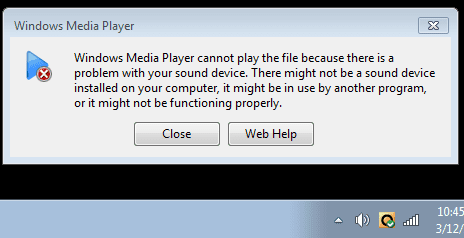
Now the bad news... when I attempt to play any of the system sounds, they don't play. When I tried to play an mp3 I get the following. Here also is a portion of DevMgr showing that the SigmaTel driver (or something related) did install.

I'm actually somewhat encouraged. Shutting down did not remove the sound devices.
 

Attachments

  • Capture34.PNG
    Capture34.PNG
    12.5 KB · Views: 0
  • Capture33.PNG
    Capture33.PNG
    5.7 KB · Views: 20
  • Capture35.PNG
    Capture35.PNG
    8.5 KB · Views: 20

My Computer My Computer

Computer type
Laptop
OS
Windows 7 home premium 64 bit
CPU
AMD K10
Motherboard
Hewlett-Packard 1444 (Socket S1G4)
Memory
3.00GB Dual-Channel DDR3 @ 532MHz
Graphics Card(s)
ATI AMD M880G with ATI Mobility Radeon HD 4250 (HP)
Sound Card
Realtek
Screen Resolution
1366 x 768
Hard Drives
465GB Western Digital
Antivirus
MSE
Progress but no doubt still a problem. A few things you might try that come to mind (Try 1, 2 and 3. 4 is more work so you may try or others here may have a better idea for a test)

1) Select Speakers, then click Properties then Advanced tab. Uncheck the option to allow Apps to take exclusive control of the sound.
2) When you say no system sounds, did you try clicking the Sound tab. Sound scheme should equal windows default, then try selecting a sound (like Asterisk), click Test. Do you hear any system sound?
3) Windows doesn't need a sound card to create system beeps. Download my copy of the BeepTool (attached) and run it to verify your built-in speakers are working
4) You might also try booting in Knoppix or similar. Or downloading Hirens boot cd and boot into mini-XP. Point is to see if sounds and speakers will work in another OS environment

btw.. in addition, i travel tomorrow so may not be back online till next Tuesday. Others may have ideas on how to proceed from here. I'll check back in when i can.
 

Attachments

My Computer My Computer

Computer type
PC/Desktop
Computer Manufacturer/Model Number
Dell Optiplex 360 and Optiplex 755
OS
Desk 1: Win 7 Pro x32; Desk 2: Windows 10 x64
Hard Drives
500GB Crucial SSD in both Desktops
Other Info
Buffalo 6TB NAS, Raid 1
Progress but no doubt still a problem. A few things you might try that come to mind (Try 1, 2 and 3. 4 is more work so you may try or others here may have a better idea for a test)

1) Select Speakers, then click Properties then Advanced tab. Uncheck the option to allow Apps to take exclusive control of the sound.
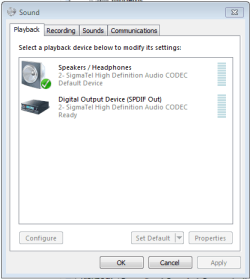
You've lost me... what do you mean by 'select speakers'? I interpreted it as meaning 'open playback devices, right click the speakers, then left-click properties'.... Hmmmm, no advanced tab, but wait... there's another Properties button, so I clicked on that, but again, no advanced tab there either. So I'm unsure what I was to do. But I did discover something interesting - when I right-click on Speakers / Headphones in Playback Devices I see an option called 'Test'. Clicking on that gives me the screenshot.
2) When you say no system sounds, did you try clicking the Sound tab. Sound scheme should equal windows default, then try selecting a sound (like Asterisk), click Test. Do you hear any system sound?
Yes, that is exactly what I did. And no, I heard no system sounds
3) Windows doesn't need a sound card to create system beeps. Download my copy of the BeepTool (attached) and run it to verify your built-in speakers are working
Downloaded, extracted, and run. No sounds [perhaps because of the results from 1)?]
4) You might also try booting in Knoppix or similar. Or downloading Hirens boot cd and boot into mini-XP. Point is to see if sounds and speakers will work in another OS environment
I have a Hiren's CD. I'll give it a try
 

Attachments

  • Capture36.PNG
    Capture36.PNG
    12.8 KB · Views: 18

My Computer My Computer

Computer type
Laptop
OS
Windows 7 home premium 64 bit
CPU
AMD K10
Motherboard
Hewlett-Packard 1444 (Socket S1G4)
Memory
3.00GB Dual-Channel DDR3 @ 532MHz
Graphics Card(s)
ATI AMD M880G with ATI Mobility Radeon HD 4250 (HP)
Sound Card
Realtek
Screen Resolution
1366 x 768
Hard Drives
465GB Western Digital
Antivirus
MSE
Oh, screw this....
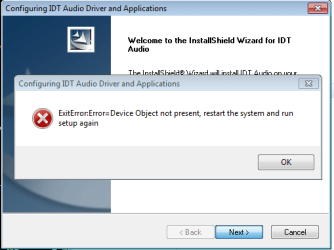
I think Windows did some kind of auto update overnight, and when I checked the laptop I was back to no audio output devices and the SigmaTel sound driver had the little yellow triangle next to it - it apparently could not start. I tried updating the driver, and it said I already had the best driver installed. I then deleted the driver and rebooted. No change. Nothing installed automatically. I then ran the setup.exe for the SigmaTel audio driver from Gateway and got the following. Why is it always 2 steps forward and 3 steps back?
 

Attachments

  • Capture37.PNG
    Capture37.PNG
    12.1 KB · Views: 16

My Computer My Computer

Computer type
Laptop
OS
Windows 7 home premium 64 bit
CPU
AMD K10
Motherboard
Hewlett-Packard 1444 (Socket S1G4)
Memory
3.00GB Dual-Channel DDR3 @ 532MHz
Graphics Card(s)
ATI AMD M880G with ATI Mobility Radeon HD 4250 (HP)
Sound Card
Realtek
Screen Resolution
1366 x 768
Hard Drives
465GB Western Digital
Antivirus
MSE
Have used the Hiren's disk and booted into mini-XP, and then attempted to run the Beep Tool suggested by ComputerGeek. Nothing. When I then rebooted I was back again to no audio output devices.

The BIOS update folder that I ran a few days ago that got the sound back contains 3 files. I'd run the one called 9D06W previously, but this time I ran 9D06 and got the following.
 

Attachments

  • Capture38.PNG
    Capture38.PNG
    26.8 KB · Views: 0

My Computer My Computer

Computer type
Laptop
OS
Windows 7 home premium 64 bit
CPU
AMD K10
Motherboard
Hewlett-Packard 1444 (Socket S1G4)
Memory
3.00GB Dual-Channel DDR3 @ 532MHz
Graphics Card(s)
ATI AMD M880G with ATI Mobility Radeon HD 4250 (HP)
Sound Card
Realtek
Screen Resolution
1366 x 768
Hard Drives
465GB Western Digital
Antivirus
MSE
Any luck since we last spoke? Didn't sound promising from your last few posts...
 

My Computer My Computer

Computer type
PC/Desktop
Computer Manufacturer/Model Number
Dell Optiplex 360 and Optiplex 755
OS
Desk 1: Win 7 Pro x32; Desk 2: Windows 10 x64
Hard Drives
500GB Crucial SSD in both Desktops
Other Info
Buffalo 6TB NAS, Raid 1
No, it's pretty much sucked all the way around. I have no idea how to make any real determination about the sound chip in this thing. Seems like there oughta be some sort of downloadable tool that will let you know if you have any defective chips, but I can't find anything.

I've had sound on several occasions in your absence, even once since my previous post, but it always disappears (along with my audio output devices) on a reboot.
 

My Computer My Computer

Computer type
Laptop
OS
Windows 7 home premium 64 bit
CPU
AMD K10
Motherboard
Hewlett-Packard 1444 (Socket S1G4)
Memory
3.00GB Dual-Channel DDR3 @ 532MHz
Graphics Card(s)
ATI AMD M880G with ATI Mobility Radeon HD 4250 (HP)
Sound Card
Realtek
Screen Resolution
1366 x 768
Hard Drives
465GB Western Digital
Antivirus
MSE
Back
Top