
Hi there,
Usually, I've been able to troubleshoot my PC woes and worries using my dear friend Google and/or some logic thinking. But there's something "strange" going on with my mediacenter-PC. As I've looked on these forums but couldn't find a solution (and to be honest : I'm baffled by this) : the following :
I was using Windows XP on my mediacenter until 2 weeks ago. No problems during playback whatsoever... Upgraded this system with Windows 7 recently, installed the Kazaa Lite Codec Pack + XBMC and experienced no problems during the installation. Upgraded the video (Nvidia 9600GT) and the audio drivers (provided on Gigabyte's site) and noticed during playback that the sound goes "off" after 15 minutes. It 'disappears' for 2 seconds and comes back again.
My setup : the motherboard : GA-MA74GM-S2H -> this is connected with an S/PDIF cable to my audio system (JVC amplifier) and the symptoms I see are :
- sound goes off
- my amplifier shows "Linear PCM" for a second
- the sound comes back and continues after 2 seconds
So, reinstalled Windows 7 again, didn't install any updates or extra drivers for the soundcard (just the Kazaa codec pack) and tried again with Media Player Classic (included in the codec pack) > same problem again.
Might anyone have any suggestions?
thanks a lot!
/dimi
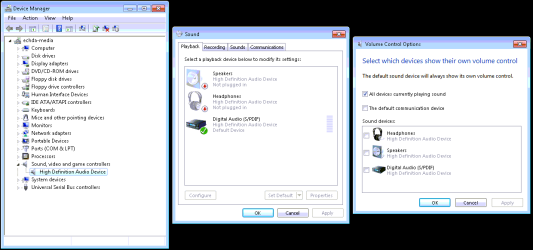
PS : I've included a screenshot of my device manager, the current sound properties and [not sure if this is related], the volume control options.
Usually, I've been able to troubleshoot my PC woes and worries using my dear friend Google and/or some logic thinking. But there's something "strange" going on with my mediacenter-PC. As I've looked on these forums but couldn't find a solution (and to be honest : I'm baffled by this) : the following :
I was using Windows XP on my mediacenter until 2 weeks ago. No problems during playback whatsoever... Upgraded this system with Windows 7 recently, installed the Kazaa Lite Codec Pack + XBMC and experienced no problems during the installation. Upgraded the video (Nvidia 9600GT) and the audio drivers (provided on Gigabyte's site) and noticed during playback that the sound goes "off" after 15 minutes. It 'disappears' for 2 seconds and comes back again.
My setup : the motherboard : GA-MA74GM-S2H -> this is connected with an S/PDIF cable to my audio system (JVC amplifier) and the symptoms I see are :
- sound goes off
- my amplifier shows "Linear PCM" for a second
- the sound comes back and continues after 2 seconds
So, reinstalled Windows 7 again, didn't install any updates or extra drivers for the soundcard (just the Kazaa codec pack) and tried again with Media Player Classic (included in the codec pack) > same problem again.
Might anyone have any suggestions?
thanks a lot!
/dimi
PS : I've included a screenshot of my device manager, the current sound properties and [not sure if this is related], the volume control options.
Attachments
My Computer
At a glance
Windows 7 - 64 bit
- OS
- Windows 7 - 64 bit

