
Sound Goes Loud and Quiet Continuously!

RealGem

New member
Member
VIP
Local time
4:54 PM
Messages
269
Location
UK
Hi,

This started happening a few weeks ago. I actually thought it was my old speakers that were faulty, so I replaced them with decent speakers, and as most of my work is tutorial videos (with speaking), I didn't notice it happening on my new speakers too, but then I played music and it was obvious.

It happens on my normal PC built-in sound card and also on my proper sound box for making music: Roland Duo Capture EX.

It just sounds like you're playing music and a little kid is continually messing with the volume button!

What is causing this?

And how do I make the sound consistent please?

thanks a lot
 

My Computer My Computer

At a glance

Windows 7 Home Premium 64 bitIntel® Core™ i5 650 Dual Core 2x 3.2Ghz 4MB C...Samsung 4GB (2x2GB) DDR3 1333MHznvidia GT430 1GB Graphics Card
Computer type
PC/Desktop
Computer Manufacturer/Model Number
iBuild™ custom PC
OS
Windows 7 Home Premium 64 bit
CPU
Intel® Core™ i5 650 Dual Core 2x 3.2Ghz 4MB Cache
Motherboard
ASUS P7H55-M 6x Rear USB 2.0 2x Front
Memory
Samsung 4GB (2x2GB) DDR3 1333MHz
Graphics Card(s)
nvidia GT430 1GB Graphics Card
Sound Card
Built-in audio
Monitor(s) Displays
Videoseven CMC 17" AD
Screen Resolution
1280 x 1024
Hard Drives
250GB 7200RPM SATA II
Hitachi 1TB Serial ATA II 32MB cache
PSU
Corsair 500Watt PSU
Case
Gigabyte GZ-X2 Black ATX MIDI Tower Case
Cooling
Standard CPU Cooling Fan
Keyboard
Packard Bell 9205
Mouse
Microsoft IntelliMouse Optical
Internet Speed
Supposed to be 100mbps (Average: 54mbps!)
Other Info
Also Windows 7 64 Bit on my Acer i3 Laptop

My Computer My Computer

At a glance

Windows 10 64 bitIntel i7 6700K16GB Corsair DominatorIntel CPU Graphics
Computer type
PC/Desktop
Computer Manufacturer/Model Number
My Own Build
OS
Windows 10 64 bit
CPU
Intel i7 6700K
Motherboard
ASUS ROG Maximus VIII Hero
Memory
16GB Corsair Dominator
Graphics Card(s)
Intel CPU Graphics
Sound Card
RealTek
Monitor(s) Displays
27" Dell S2719dgf
Screen Resolution
2560X1440
Hard Drives
1 TB Samsung 850 EVO SSD for Win 10 Pro
500GB Samsung 850 EVO SSD for Win 10 Insider
2 TB drive for backup
PSU
EVGA Supernova 750G2
Case
BeQuiet Silent Base 600
Cooling
Deepcool Captain 120EX
Keyboard
Microsoft Wireless 2000
Mouse
Microsoft wireless
Internet Speed
100 MB/sec (Cable)
Antivirus
Microsoft Defender and Malwarebytes
Browser
Edge/Firefox
Other Info
Cakewalk (Sonar) by BandLab and Studio One 4.1 Pro recording studio software. MOTU 896Mk3 Hybrid recording interface, Frontier Tranzport wireless control unit, Behringer X-Touch Control Surface.
Five USB connected optical drives for CD Audio production using Nero BurningROM
Hi Fireberd,

OK thanks but it can't be a Sonar issue, it must be a PC issue, as it happens with the normal internal sound card too.

I can't actually use Sonar because I don't have my MIDI keyboard here, so there are no devices.

I think maybe I complicated the issue by mentioning the external Roland sound card. The problem is definitely with the PC sound, or it would only happen in Sonar.

thanks

2crr3bl.png
 

My Computer My Computer

At a glance

Windows 7 Home Premium 64 bitIntel® Core™ i5 650 Dual Core 2x 3.2Ghz 4MB C...Samsung 4GB (2x2GB) DDR3 1333MHznvidia GT430 1GB Graphics Card
Computer type
PC/Desktop
Computer Manufacturer/Model Number
iBuild™ custom PC
OS
Windows 7 Home Premium 64 bit
CPU
Intel® Core™ i5 650 Dual Core 2x 3.2Ghz 4MB Cache
Motherboard
ASUS P7H55-M 6x Rear USB 2.0 2x Front
Memory
Samsung 4GB (2x2GB) DDR3 1333MHz
Graphics Card(s)
nvidia GT430 1GB Graphics Card
Sound Card
Built-in audio
Monitor(s) Displays
Videoseven CMC 17" AD
Screen Resolution
1280 x 1024
Hard Drives
250GB 7200RPM SATA II
Hitachi 1TB Serial ATA II 32MB cache
PSU
Corsair 500Watt PSU
Case
Gigabyte GZ-X2 Black ATX MIDI Tower Case
Cooling
Standard CPU Cooling Fan
Keyboard
Packard Bell 9205
Mouse
Microsoft IntelliMouse Optical
Internet Speed
Supposed to be 100mbps (Average: 54mbps!)
Other Info
Also Windows 7 64 Bit on my Acer i3 Laptop
Does this happen when the Duo-Capture is NOT plugged into the PC?

Just trying to get a reference.

According to what I see on the ASUS site, the internal sound is RealTek. Do you have the RealTek installed? or just the generic, basic function, windows installed HD Audio Codec? If RealTek is not installed that is the first step for the PC audio.
 

My Computer My Computer

At a glance

Windows 10 64 bitIntel i7 6700K16GB Corsair DominatorIntel CPU Graphics
Computer type
PC/Desktop
Computer Manufacturer/Model Number
My Own Build
OS
Windows 10 64 bit
CPU
Intel i7 6700K
Motherboard
ASUS ROG Maximus VIII Hero
Memory
16GB Corsair Dominator
Graphics Card(s)
Intel CPU Graphics
Sound Card
RealTek
Monitor(s) Displays
27" Dell S2719dgf
Screen Resolution
2560X1440
Hard Drives
1 TB Samsung 850 EVO SSD for Win 10 Pro
500GB Samsung 850 EVO SSD for Win 10 Insider
2 TB drive for backup
PSU
EVGA Supernova 750G2
Case
BeQuiet Silent Base 600
Cooling
Deepcool Captain 120EX
Keyboard
Microsoft Wireless 2000
Mouse
Microsoft wireless
Internet Speed
100 MB/sec (Cable)
Antivirus
Microsoft Defender and Malwarebytes
Browser
Edge/Firefox
Other Info
Cakewalk (Sonar) by BandLab and Studio One 4.1 Pro recording studio software. MOTU 896Mk3 Hybrid recording interface, Frontier Tranzport wireless control unit, Behringer X-Touch Control Surface.
Five USB connected optical drives for CD Audio production using Nero BurningROM
Does this happen when the Duo-Capture is NOT plugged into the PC?

Just trying to get a reference.

According to what I see on the ASUS site, the internal sound is RealTek. Do you have the RealTek installed? or just the generic, basic function, windows installed HD Audio Codec? If RealTek is not installed that is the first step for the PC audio.

Hi,

Yes it happens when the Duo Capture is not connected.

If I have to have RealTek (or whatever), I don't understand because I have had the PC since Feb 2011 and the problem only started happening a few weeks ago - just before Christmas 2013.

So I must have had the correct codec installed previously.

It is possible that the audio settings were changed when I got Sonar X2 (around October 2013 - possibly when I first thought the speakers were faulty. I can't be sure exactly when it was.)

Is there a way of finding out the name of the internal audio card? I'm sure its called Microsoft something.

this is what I have found:
fnsqr8.png


Wait, I just found this:

i2ljyw.png


So it looks like I did have Realtek previously, but how do I get it set up again please?

thanks
 
Last edited:

My Computer My Computer

At a glance

Windows 7 Home Premium 64 bitIntel® Core™ i5 650 Dual Core 2x 3.2Ghz 4MB C...Samsung 4GB (2x2GB) DDR3 1333MHznvidia GT430 1GB Graphics Card
Computer type
PC/Desktop
Computer Manufacturer/Model Number
iBuild™ custom PC
OS
Windows 7 Home Premium 64 bit
CPU
Intel® Core™ i5 650 Dual Core 2x 3.2Ghz 4MB Cache
Motherboard
ASUS P7H55-M 6x Rear USB 2.0 2x Front
Memory
Samsung 4GB (2x2GB) DDR3 1333MHz
Graphics Card(s)
nvidia GT430 1GB Graphics Card
Sound Card
Built-in audio
Monitor(s) Displays
Videoseven CMC 17" AD
Screen Resolution
1280 x 1024
Hard Drives
250GB 7200RPM SATA II
Hitachi 1TB Serial ATA II 32MB cache
PSU
Corsair 500Watt PSU
Case
Gigabyte GZ-X2 Black ATX MIDI Tower Case
Cooling
Standard CPU Cooling Fan
Keyboard
Packard Bell 9205
Mouse
Microsoft IntelliMouse Optical
Internet Speed
Supposed to be 100mbps (Average: 54mbps!)
Other Info
Also Windows 7 64 Bit on my Acer i3 Laptop
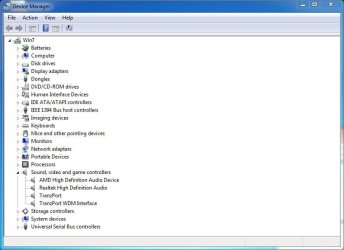
The Device Manager will list what Audio devices you have. Go to Start, RIGHT click on "Computer" and then LEFT click on Properties. The Device Manager will be listed in the upper left of the panel and you can access it there. I don't think installing Sonar would have caused it. I've had several different PC's and Sonar versions from Sonar 7 up to X3 and never had the problem you are having. I currently have Sonar X3 installed in my main recording studio PC which uses Windows 7 64 bit and on my backup system that has Windows 8.1.

Here is my Device Manager Audio section (without the Octa-Capture attached). The listed devices are the AMD High Definition Audio Device for HDMI audio, RealTek for PC audio and two Tranzport devices which are for my Frontier Tranzport wireless control surface (but has no bearing or affect on sound).
 

Attachments

  • Device Manager Capture.JPG
    Device Manager Capture.JPG
    48.5 KB · Views: 0

My Computer My Computer

At a glance

Windows 10 64 bitIntel i7 6700K16GB Corsair DominatorIntel CPU Graphics
Computer type
PC/Desktop
Computer Manufacturer/Model Number
My Own Build
OS
Windows 10 64 bit
CPU
Intel i7 6700K
Motherboard
ASUS ROG Maximus VIII Hero
Memory
16GB Corsair Dominator
Graphics Card(s)
Intel CPU Graphics
Sound Card
RealTek
Monitor(s) Displays
27" Dell S2719dgf
Screen Resolution
2560X1440
Hard Drives
1 TB Samsung 850 EVO SSD for Win 10 Pro
500GB Samsung 850 EVO SSD for Win 10 Insider
2 TB drive for backup
PSU
EVGA Supernova 750G2
Case
BeQuiet Silent Base 600
Cooling
Deepcool Captain 120EX
Keyboard
Microsoft Wireless 2000
Mouse
Microsoft wireless
Internet Speed
100 MB/sec (Cable)
Antivirus
Microsoft Defender and Malwarebytes
Browser
Edge/Firefox
Other Info
Cakewalk (Sonar) by BandLab and Studio One 4.1 Pro recording studio software. MOTU 896Mk3 Hybrid recording interface, Frontier Tranzport wireless control unit, Behringer X-Touch Control Surface.
Five USB connected optical drives for CD Audio production using Nero BurningROM
Hi Sorry, I have been adding to my last post with more pics, not realizing you posted again.


I didn't think just the installing of Sonar messed it up,
but I thought it oculd have been the messing about for two weeks with all the audio settings and being stuck on the Sonar forum while lots of people came to help me.

(They made me buy expensive equipment, and it turned out to be a damn "synth" setting that wasn't checked!)


Here's my audio settings in Device Manager. NVidia is what I've got:

2czkba.png


Always had that and it's always worked ok (although I thought it was a video codec, not audio).

Realtek is not listed here.

thanks
 

My Computer My Computer

At a glance

Windows 7 Home Premium 64 bitIntel® Core™ i5 650 Dual Core 2x 3.2Ghz 4MB C...Samsung 4GB (2x2GB) DDR3 1333MHznvidia GT430 1GB Graphics Card
Computer type
PC/Desktop
Computer Manufacturer/Model Number
iBuild™ custom PC
OS
Windows 7 Home Premium 64 bit
CPU
Intel® Core™ i5 650 Dual Core 2x 3.2Ghz 4MB Cache
Motherboard
ASUS P7H55-M 6x Rear USB 2.0 2x Front
Memory
Samsung 4GB (2x2GB) DDR3 1333MHz
Graphics Card(s)
nvidia GT430 1GB Graphics Card
Sound Card
Built-in audio
Monitor(s) Displays
Videoseven CMC 17" AD
Screen Resolution
1280 x 1024
Hard Drives
250GB 7200RPM SATA II
Hitachi 1TB Serial ATA II 32MB cache
PSU
Corsair 500Watt PSU
Case
Gigabyte GZ-X2 Black ATX MIDI Tower Case
Cooling
Standard CPU Cooling Fan
Keyboard
Packard Bell 9205
Mouse
Microsoft IntelliMouse Optical
Internet Speed
Supposed to be 100mbps (Average: 54mbps!)
Other Info
Also Windows 7 64 Bit on my Acer i3 Laptop
You must have a different motherboard than what listed, as ASUS lists RealTek for the P7H55-M motherboard.
Audio:

Realtek 8-Channel High Definition Audio CODEC
- BD Audio Layer Content Protection
- Support Jack-dectection, Multi-streaming,Front Panel Jack-Retasking (Mic in port)
- ASUS Noise Filter
- Optical S/PDIF out ports at back I/O

One thing that is suspect is the PC's power supply. Varying voltage(s) could cause the problem.

However, Go to the Control Panel/Hardware and Sound and finally the Sound Panel. In the Playback section your "Speakers" should be set as the Default Playback Device. In the Recording section, the "Stereo Mixer" (could be called System Mixer) should be set as the default recording device.

You could also "reinstall" the VIA by RIGHT clicking on the VIA entry in the Device Manager to highlight it and then LEFT click "Uninstall" DO NOT uninstall the drivers. Restart the PC (with the Duo-Capture disconnected) and when Windows starts it will detect and reinstall the VIA sound. This fixes a lot of problems and if there were any corruption between Windows and the sound this will also fix that.
 

My Computer My Computer

At a glance

Windows 10 64 bitIntel i7 6700K16GB Corsair DominatorIntel CPU Graphics
Computer type
PC/Desktop
Computer Manufacturer/Model Number
My Own Build
OS
Windows 10 64 bit
CPU
Intel i7 6700K
Motherboard
ASUS ROG Maximus VIII Hero
Memory
16GB Corsair Dominator
Graphics Card(s)
Intel CPU Graphics
Sound Card
RealTek
Monitor(s) Displays
27" Dell S2719dgf
Screen Resolution
2560X1440
Hard Drives
1 TB Samsung 850 EVO SSD for Win 10 Pro
500GB Samsung 850 EVO SSD for Win 10 Insider
2 TB drive for backup
PSU
EVGA Supernova 750G2
Case
BeQuiet Silent Base 600
Cooling
Deepcool Captain 120EX
Keyboard
Microsoft Wireless 2000
Mouse
Microsoft wireless
Internet Speed
100 MB/sec (Cable)
Antivirus
Microsoft Defender and Malwarebytes
Browser
Edge/Firefox
Other Info
Cakewalk (Sonar) by BandLab and Studio One 4.1 Pro recording studio software. MOTU 896Mk3 Hybrid recording interface, Frontier Tranzport wireless control unit, Behringer X-Touch Control Surface.
Five USB connected optical drives for CD Audio production using Nero BurningROM
You must have a different motherboard than what listed, as ASUS lists RealTek for the P7H55-M motherboard.
Audio:

Realtek 8-Channel High Definition Audio CODEC
- BD Audio Layer Content Protection
- Support Jack-dectection, Multi-streaming,Front Panel Jack-Retasking (Mic in port)
- ASUS Noise Filter
- Optical S/PDIF out ports at back I/O

One thing that is suspect is the PC's power supply. Varying voltage(s) could cause the problem.

However, Go to the Control Panel/Hardware and Sound and finally the Sound Panel. In the Playback section your "Speakers" should be set as the Default Playback Device. In the Recording section, the "Stereo Mixer" (could be called System Mixer) should be set as the default recording device.

You could also "reinstall" the VIA by RIGHT clicking on the VIA entry in the Device Manager to highlight it and then LEFT click "Uninstall" DO NOT uninstall the drivers. Restart the PC (with the Duo-Capture disconnected) and when Windows starts it will detect and reinstall the VIA sound. This fixes a lot of problems and if there were any corruption between Windows and the sound this will also fix that.


Hi,

Thanks a lot.

The system specs were copied and pasted from my receipt
from Powerc.com/uk who custom-built the PC in 2011.
As far as I know it is the correct motherboard.

Maybe they put a different sound card with it.


In control Panel > Playback:

245mzpt.png


check!


But in Recording I don't have Stereo Mixer or System Mixer:

bisaxc.png


...only the mic from my headset.


Trying to sort out the VIA now...

thanks
 

My Computer My Computer

At a glance

Windows 7 Home Premium 64 bitIntel® Core™ i5 650 Dual Core 2x 3.2Ghz 4MB C...Samsung 4GB (2x2GB) DDR3 1333MHznvidia GT430 1GB Graphics Card
Computer type
PC/Desktop
Computer Manufacturer/Model Number
iBuild™ custom PC
OS
Windows 7 Home Premium 64 bit
CPU
Intel® Core™ i5 650 Dual Core 2x 3.2Ghz 4MB Cache
Motherboard
ASUS P7H55-M 6x Rear USB 2.0 2x Front
Memory
Samsung 4GB (2x2GB) DDR3 1333MHz
Graphics Card(s)
nvidia GT430 1GB Graphics Card
Sound Card
Built-in audio
Monitor(s) Displays
Videoseven CMC 17" AD
Screen Resolution
1280 x 1024
Hard Drives
250GB 7200RPM SATA II
Hitachi 1TB Serial ATA II 32MB cache
PSU
Corsair 500Watt PSU
Case
Gigabyte GZ-X2 Black ATX MIDI Tower Case
Cooling
Standard CPU Cooling Fan
Keyboard
Packard Bell 9205
Mouse
Microsoft IntelliMouse Optical
Internet Speed
Supposed to be 100mbps (Average: 54mbps!)
Other Info
Also Windows 7 64 Bit on my Acer i3 Laptop
OK, I found what could be your motherboard, it could be the ASUS P7H55-M LX version as it does have VIA audio. They have quite a few different P7H55-M models. Download and run the free Speccy program and it will profile what you have.

Speccy - System Information - Free Download

The Stereo Mix apparently has never been activated. In the Sound/Recording Panel, RIGHT click in a blank area in that panel and then click to Show Disabled Devices and Disconnected Devices. The Stereo Mix should now appear and you can make that the default recording device. I don't know if it will affect the playback issue but something you need to do anyway.
 

My Computer My Computer

At a glance

Windows 10 64 bitIntel i7 6700K16GB Corsair DominatorIntel CPU Graphics
Computer type
PC/Desktop
Computer Manufacturer/Model Number
My Own Build
OS
Windows 10 64 bit
CPU
Intel i7 6700K
Motherboard
ASUS ROG Maximus VIII Hero
Memory
16GB Corsair Dominator
Graphics Card(s)
Intel CPU Graphics
Sound Card
RealTek
Monitor(s) Displays
27" Dell S2719dgf
Screen Resolution
2560X1440
Hard Drives
1 TB Samsung 850 EVO SSD for Win 10 Pro
500GB Samsung 850 EVO SSD for Win 10 Insider
2 TB drive for backup
PSU
EVGA Supernova 750G2
Case
BeQuiet Silent Base 600
Cooling
Deepcool Captain 120EX
Keyboard
Microsoft Wireless 2000
Mouse
Microsoft wireless
Internet Speed
100 MB/sec (Cable)
Antivirus
Microsoft Defender and Malwarebytes
Browser
Edge/Firefox
Other Info
Cakewalk (Sonar) by BandLab and Studio One 4.1 Pro recording studio software. MOTU 896Mk3 Hybrid recording interface, Frontier Tranzport wireless control unit, Behringer X-Touch Control Surface.
Five USB connected optical drives for CD Audio production using Nero BurningROM
OK, I found what could be your motherboard, it could be the ASUS P7H55-M LX version as it does have VIA audio. They have quite a few different P7H55-M models. Download and run the free Speccy program and it will profile what you have.

Speccy - System Information - Free Download

The Stereo Mix apparently has never been activated. In the Sound/Recording Panel, RIGHT click in a blank area in that panel and then click to Show Disabled Devices and Disconnected Devices. The Stereo Mix should now appear and you can make that the default recording device. I don't know if it will affect the playback issue but something you need to do anyway.

OK I did everything you said, and I got this box:

15zpcnk.png


So it won't let me add Stereo Mix as it is "unavailable" because "VIA" only applies to my headphones. I had to uncheck that as I want the speakers to playback, not the headphones.

(I record using the headset, but the output is the speakers most of the time, unless I am on Skype, then both are headphones.)

I did everything regarding rebooting, and the sound is still going in and out on playback.

thanks
 

My Computer My Computer

At a glance

Windows 7 Home Premium 64 bitIntel® Core™ i5 650 Dual Core 2x 3.2Ghz 4MB C...Samsung 4GB (2x2GB) DDR3 1333MHznvidia GT430 1GB Graphics Card
Computer type
PC/Desktop
Computer Manufacturer/Model Number
iBuild™ custom PC
OS
Windows 7 Home Premium 64 bit
CPU
Intel® Core™ i5 650 Dual Core 2x 3.2Ghz 4MB Cache
Motherboard
ASUS P7H55-M 6x Rear USB 2.0 2x Front
Memory
Samsung 4GB (2x2GB) DDR3 1333MHz
Graphics Card(s)
nvidia GT430 1GB Graphics Card
Sound Card
Built-in audio
Monitor(s) Displays
Videoseven CMC 17" AD
Screen Resolution
1280 x 1024
Hard Drives
250GB 7200RPM SATA II
Hitachi 1TB Serial ATA II 32MB cache
PSU
Corsair 500Watt PSU
Case
Gigabyte GZ-X2 Black ATX MIDI Tower Case
Cooling
Standard CPU Cooling Fan
Keyboard
Packard Bell 9205
Mouse
Microsoft IntelliMouse Optical
Internet Speed
Supposed to be 100mbps (Average: 54mbps!)
Other Info
Also Windows 7 64 Bit on my Acer i3 Laptop
Right click on the Stereo Mix and you should be able to enable it.

Also, temporarily disable Skype. It has been known to cause audio problems. And, if you have any mic plugged in, disconnect it. Also, disconnect the Duo-Capture. Only have the basic Windows items connected, keyboard, mouse, LAN (Internet) and speakers.

Are there other applications running that could be interfering?

Have you run the DPC Latency Checker to see if it shows any potential problems? This is not for audio latency, but for system latency (which could relate to the sound problem).
DPC Latency Checker
 

My Computer My Computer

At a glance

Windows 10 64 bitIntel i7 6700K16GB Corsair DominatorIntel CPU Graphics
Computer type
PC/Desktop
Computer Manufacturer/Model Number
My Own Build
OS
Windows 10 64 bit
CPU
Intel i7 6700K
Motherboard
ASUS ROG Maximus VIII Hero
Memory
16GB Corsair Dominator
Graphics Card(s)
Intel CPU Graphics
Sound Card
RealTek
Monitor(s) Displays
27" Dell S2719dgf
Screen Resolution
2560X1440
Hard Drives
1 TB Samsung 850 EVO SSD for Win 10 Pro
500GB Samsung 850 EVO SSD for Win 10 Insider
2 TB drive for backup
PSU
EVGA Supernova 750G2
Case
BeQuiet Silent Base 600
Cooling
Deepcool Captain 120EX
Keyboard
Microsoft Wireless 2000
Mouse
Microsoft wireless
Internet Speed
100 MB/sec (Cable)
Antivirus
Microsoft Defender and Malwarebytes
Browser
Edge/Firefox
Other Info
Cakewalk (Sonar) by BandLab and Studio One 4.1 Pro recording studio software. MOTU 896Mk3 Hybrid recording interface, Frontier Tranzport wireless control unit, Behringer X-Touch Control Surface.
Five USB connected optical drives for CD Audio production using Nero BurningROM
Right click on the Stereo Mix and you should be able to enable it.


As I say, if I have that as the default, then sound ONLY comes out of my headphones, which is not an option. So I have the speakers as default, and then it won't let me enable the Stereo Mix.

Sorry to disobey!

Or did you mean only for a tempory thing while it fixes the problem?


Also, temporarily disable Skype. It has been known to cause audio problems. And, if you have any mic plugged in, disconnect it. Also, disconnect the Duo-Capture. Only have the basic Windows items connected, keyboard, mouse, LAN (Internet) and speakers.

Are there other applications running that could be interfering?


No, no other apps or hardware that could interfere that I know of:

If it's any of the following, that would be difficult, as I need the big ones all day every day for work:

2ly1rpt.png


Have you run the DPC Latency Checker to see if it shows any potential problems? This is not for audio latency, but for system latency (which could relate to the sound problem).
DPC Latency Checker

I'm really hoping this is the solution. I will check this out

thanks a lot.

I appreciate your help. Sorry to take up your time.
 

My Computer My Computer

At a glance

Windows 7 Home Premium 64 bitIntel® Core™ i5 650 Dual Core 2x 3.2Ghz 4MB C...Samsung 4GB (2x2GB) DDR3 1333MHznvidia GT430 1GB Graphics Card
Computer type
PC/Desktop
Computer Manufacturer/Model Number
iBuild™ custom PC
OS
Windows 7 Home Premium 64 bit
CPU
Intel® Core™ i5 650 Dual Core 2x 3.2Ghz 4MB Cache
Motherboard
ASUS P7H55-M 6x Rear USB 2.0 2x Front
Memory
Samsung 4GB (2x2GB) DDR3 1333MHz
Graphics Card(s)
nvidia GT430 1GB Graphics Card
Sound Card
Built-in audio
Monitor(s) Displays
Videoseven CMC 17" AD
Screen Resolution
1280 x 1024
Hard Drives
250GB 7200RPM SATA II
Hitachi 1TB Serial ATA II 32MB cache
PSU
Corsair 500Watt PSU
Case
Gigabyte GZ-X2 Black ATX MIDI Tower Case
Cooling
Standard CPU Cooling Fan
Keyboard
Packard Bell 9205
Mouse
Microsoft IntelliMouse Optical
Internet Speed
Supposed to be 100mbps (Average: 54mbps!)
Other Info
Also Windows 7 64 Bit on my Acer i3 Laptop
I downloaded it and it says I should not be having problems:

2v0ibf7.png


What was the other thing you said about the power supply?

How do I test if it is that please?

thanks
 

My Computer My Computer

At a glance

Windows 7 Home Premium 64 bitIntel® Core™ i5 650 Dual Core 2x 3.2Ghz 4MB C...Samsung 4GB (2x2GB) DDR3 1333MHznvidia GT430 1GB Graphics Card
Computer type
PC/Desktop
Computer Manufacturer/Model Number
iBuild™ custom PC
OS
Windows 7 Home Premium 64 bit
CPU
Intel® Core™ i5 650 Dual Core 2x 3.2Ghz 4MB Cache
Motherboard
ASUS P7H55-M 6x Rear USB 2.0 2x Front
Memory
Samsung 4GB (2x2GB) DDR3 1333MHz
Graphics Card(s)
nvidia GT430 1GB Graphics Card
Sound Card
Built-in audio
Monitor(s) Displays
Videoseven CMC 17" AD
Screen Resolution
1280 x 1024
Hard Drives
250GB 7200RPM SATA II
Hitachi 1TB Serial ATA II 32MB cache
PSU
Corsair 500Watt PSU
Case
Gigabyte GZ-X2 Black ATX MIDI Tower Case
Cooling
Standard CPU Cooling Fan
Keyboard
Packard Bell 9205
Mouse
Microsoft IntelliMouse Optical
Internet Speed
Supposed to be 100mbps (Average: 54mbps!)
Other Info
Also Windows 7 64 Bit on my Acer i3 Laptop
First, the Recording Device. Right click the icon for the Stereo Mix and then enable it. That will not affect your microphone recording device with the regular PC audio (nothing to do with the Duo-Capture and Sonar). It will not change the default Playback device. This may not have anything to do with the playback volume changing but its what is normally set in ALL PC's as the default recording device. If you ever want to record audio from the internet, for one item, you must have the Stereo Mix enabled.

DPC Latency is very good, and we can rule that out.

Looking at the task list, nothing jumps out as potentially causing problems.

The PC's power supply is also a potential item, unfortunately the only real way of testing is to replace it with a known good power supply. But, since its both Sonar and PC audio it goes back to "common" items and the power supply falls into that category.
 

My Computer My Computer

At a glance

Windows 10 64 bitIntel i7 6700K16GB Corsair DominatorIntel CPU Graphics
Computer type
PC/Desktop
Computer Manufacturer/Model Number
My Own Build
OS
Windows 10 64 bit
CPU
Intel i7 6700K
Motherboard
ASUS ROG Maximus VIII Hero
Memory
16GB Corsair Dominator
Graphics Card(s)
Intel CPU Graphics
Sound Card
RealTek
Monitor(s) Displays
27" Dell S2719dgf
Screen Resolution
2560X1440
Hard Drives
1 TB Samsung 850 EVO SSD for Win 10 Pro
500GB Samsung 850 EVO SSD for Win 10 Insider
2 TB drive for backup
PSU
EVGA Supernova 750G2
Case
BeQuiet Silent Base 600
Cooling
Deepcool Captain 120EX
Keyboard
Microsoft Wireless 2000
Mouse
Microsoft wireless
Internet Speed
100 MB/sec (Cable)
Antivirus
Microsoft Defender and Malwarebytes
Browser
Edge/Firefox
Other Info
Cakewalk (Sonar) by BandLab and Studio One 4.1 Pro recording studio software. MOTU 896Mk3 Hybrid recording interface, Frontier Tranzport wireless control unit, Behringer X-Touch Control Surface.
Five USB connected optical drives for CD Audio production using Nero BurningROM
First, the Recording Device. Right click the icon for the Stereo Mix and then enable it. That will not affect your microphone recording device with the regular PC audio (nothing to do with the Duo-Capture and Sonar). It will not change the default Playback device. This may not have anything to do with the playback volume changing but its what is normally set in ALL PC's as the default recording device. If you ever want to record audio from the internet, for one item, you must have the Stereo Mix enabled.

DPC Latency is very good, and we can rule that out.

Looking at the task list, nothing jumps out as potentially causing problems.

The PC's power supply is also a potential item, unfortunately the only real way of testing is to replace it with a known good power supply. But, since its both Sonar and PC audio it goes back to "common" items and the power supply falls into that category.


OK thanks,

It finally let me "enable" the Stereo Mix, but only after I set the headphones as the default, then changed them back again.

But sadly the sound it still inconsistent. So I guess I have to try a new power supply.

Thanks for your help
 

My Computer My Computer

At a glance

Windows 7 Home Premium 64 bitIntel® Core™ i5 650 Dual Core 2x 3.2Ghz 4MB C...Samsung 4GB (2x2GB) DDR3 1333MHznvidia GT430 1GB Graphics Card
Computer type
PC/Desktop
Computer Manufacturer/Model Number
iBuild™ custom PC
OS
Windows 7 Home Premium 64 bit
CPU
Intel® Core™ i5 650 Dual Core 2x 3.2Ghz 4MB Cache
Motherboard
ASUS P7H55-M 6x Rear USB 2.0 2x Front
Memory
Samsung 4GB (2x2GB) DDR3 1333MHz
Graphics Card(s)
nvidia GT430 1GB Graphics Card
Sound Card
Built-in audio
Monitor(s) Displays
Videoseven CMC 17" AD
Screen Resolution
1280 x 1024
Hard Drives
250GB 7200RPM SATA II
Hitachi 1TB Serial ATA II 32MB cache
PSU
Corsair 500Watt PSU
Case
Gigabyte GZ-X2 Black ATX MIDI Tower Case
Cooling
Standard CPU Cooling Fan
Keyboard
Packard Bell 9205
Mouse
Microsoft IntelliMouse Optical
Internet Speed
Supposed to be 100mbps (Average: 54mbps!)
Other Info
Also Windows 7 64 Bit on my Acer i3 Laptop
There is no 100% guarantee that its the power supply. Just one possibility.
 

My Computer My Computer

At a glance

Windows 10 64 bitIntel i7 6700K16GB Corsair DominatorIntel CPU Graphics
Computer type
PC/Desktop
Computer Manufacturer/Model Number
My Own Build
OS
Windows 10 64 bit
CPU
Intel i7 6700K
Motherboard
ASUS ROG Maximus VIII Hero
Memory
16GB Corsair Dominator
Graphics Card(s)
Intel CPU Graphics
Sound Card
RealTek
Monitor(s) Displays
27" Dell S2719dgf
Screen Resolution
2560X1440
Hard Drives
1 TB Samsung 850 EVO SSD for Win 10 Pro
500GB Samsung 850 EVO SSD for Win 10 Insider
2 TB drive for backup
PSU
EVGA Supernova 750G2
Case
BeQuiet Silent Base 600
Cooling
Deepcool Captain 120EX
Keyboard
Microsoft Wireless 2000
Mouse
Microsoft wireless
Internet Speed
100 MB/sec (Cable)
Antivirus
Microsoft Defender and Malwarebytes
Browser
Edge/Firefox
Other Info
Cakewalk (Sonar) by BandLab and Studio One 4.1 Pro recording studio software. MOTU 896Mk3 Hybrid recording interface, Frontier Tranzport wireless control unit, Behringer X-Touch Control Surface.
Five USB connected optical drives for CD Audio production using Nero BurningROM
No problem, I understand

thanks a lot
 

My Computer My Computer

At a glance

Windows 7 Home Premium 64 bitIntel® Core™ i5 650 Dual Core 2x 3.2Ghz 4MB C...Samsung 4GB (2x2GB) DDR3 1333MHznvidia GT430 1GB Graphics Card
Computer type
PC/Desktop
Computer Manufacturer/Model Number
iBuild™ custom PC
OS
Windows 7 Home Premium 64 bit
CPU
Intel® Core™ i5 650 Dual Core 2x 3.2Ghz 4MB Cache
Motherboard
ASUS P7H55-M 6x Rear USB 2.0 2x Front
Memory
Samsung 4GB (2x2GB) DDR3 1333MHz
Graphics Card(s)
nvidia GT430 1GB Graphics Card
Sound Card
Built-in audio
Monitor(s) Displays
Videoseven CMC 17" AD
Screen Resolution
1280 x 1024
Hard Drives
250GB 7200RPM SATA II
Hitachi 1TB Serial ATA II 32MB cache
PSU
Corsair 500Watt PSU
Case
Gigabyte GZ-X2 Black ATX MIDI Tower Case
Cooling
Standard CPU Cooling Fan
Keyboard
Packard Bell 9205
Mouse
Microsoft IntelliMouse Optical
Internet Speed
Supposed to be 100mbps (Average: 54mbps!)
Other Info
Also Windows 7 64 Bit on my Acer i3 Laptop
Back
Top