Hello All,
I was wondering. Does any one know how to get the "Apply" button working again?
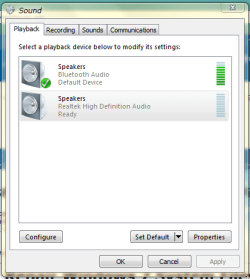
In my Windows 7 x64 on the Sound options in the Control Panel it is shaded grey all the time. So, when I'm trying to set the default sound to Bluetooth it is not possible to Apply any changes. To this end, the sound has be switched over manually every time I boot up the laptop.
Any ideas?
I was wondering. Does any one know how to get the "Apply" button working again?
In my Windows 7 x64 on the Sound options in the Control Panel it is shaded grey all the time. So, when I'm trying to set the default sound to Bluetooth it is not possible to Apply any changes. To this end, the sound has be switched over manually every time I boot up the laptop.
Any ideas?
My Computer
- Computer Manufacturer/Model Number
- Good luck secondhand system 350
- OS
- Windows 7 x64 Home Premium
- CPU
- AMD Phenom II x6 1055t 2.8GHz
- Motherboard
- ASRock 785GM-S3
- Memory
- Kingston KVR1333D3N9/4G x 2
- Graphics Card(s)
- Sapphire ATI HD5450 1Gb
- Sound Card
- Realtek HD audio
- Monitor(s) Displays
- AOC e2343F2
- Screen Resolution
- 1920 x 1080
- Hard Drives
- Seagate Barracuda 7200,16Mb,1 Tb
- PSU
- 480 W
- Case
- JNP C06
- Cooling
- Cooler Master Hyper TX3
- Keyboard
- Logitech K400
- Mouse
- Logitech K400
- Internet Speed
- 15 Mbps
- Other Info
- Optical Drive : Sony Optiarc AD-5360S