
Sound in Control Panel problem

jordan359

New member
Local time
2:17 PM
Messages
10
Hello All,

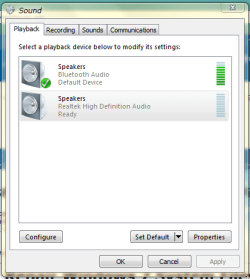
I was wondering. Does any one know how to get the "Apply" button working again?

In my Windows 7 x64 on the Sound options in the Control Panel it is shaded grey all the time. So, when I'm trying to set the default sound to Bluetooth it is not possible to Apply any changes. To this end, the sound has be switched over manually every time I boot up the laptop.

Any ideas?
 

My Computer

Computer Manufacturer/Model Number
Good luck secondhand system 350
OS
Windows 7 x64 Home Premium
CPU
AMD Phenom II x6 1055t 2.8GHz
Motherboard
ASRock 785GM-S3
Memory
Kingston KVR1333D3N9/4G x 2
Graphics Card(s)
Sapphire ATI HD5450 1Gb
Sound Card
Realtek HD audio
Monitor(s) Displays
AOC e2343F2
Screen Resolution
1920 x 1080
Hard Drives
Seagate Barracuda 7200,16Mb,1 Tb
PSU
480 W
Case
JNP C06
Cooling
Cooler Master Hyper TX3
Keyboard
Logitech K400
Mouse
Logitech K400
Internet Speed
15 Mbps
Other Info
Optical Drive : Sony Optiarc AD-5360S
That's really weird. How about restoring your pc before that problems occurs?
How about the OK button is also disabled?
 

My Computer

Computer Manufacturer/Model Number
HP G62-340US Notebook
OS
Win7 Pro SP1 x64
CPU
AMD K10 Athlon(tm) II P340 Dual-Core Processor ~2.2GHz
Motherboard
Hewlett-Packard 1444 69.37/AMD 785GX/BIOS F29
Memory
DDR3 4.0GB (3.74 Usable)
Graphics Card(s)
AMD M880G with ATI Mobility Radeon HD 4250 256MB Video
Sound Card
ATI RS785/RS880 - High Definition Audio Controller
Monitor(s) Displays
SAMSUNG 156AT09-H04
Screen Resolution
1366x768 - 344 x 194 mm, Pixel Clock 69.30 MHz
Hard Drives
WDC WD3200BEVT-60A23T0 320GB
Other Info
Bought on July 03, 2011
Have just started System Restore only to discover that I have one point to restore to. This point is after this issue with the "Apply" button started, so that would be ineffective. The "OK" button is fine.
 

My Computer

Computer Manufacturer/Model Number
Good luck secondhand system 350
OS
Windows 7 x64 Home Premium
CPU
AMD Phenom II x6 1055t 2.8GHz
Motherboard
ASRock 785GM-S3
Memory
Kingston KVR1333D3N9/4G x 2
Graphics Card(s)
Sapphire ATI HD5450 1Gb
Sound Card
Realtek HD audio
Monitor(s) Displays
AOC e2343F2
Screen Resolution
1920 x 1080
Hard Drives
Seagate Barracuda 7200,16Mb,1 Tb
PSU
480 W
Case
JNP C06
Cooling
Cooler Master Hyper TX3
Keyboard
Logitech K400
Mouse
Logitech K400
Internet Speed
15 Mbps
Other Info
Optical Drive : Sony Optiarc AD-5360S

My Computer

Computer type
PC/Desktop
Computer Manufacturer/Model Number
Novatech iRush Pro
OS
Windows 7 Ultimate SP1 - 64 Bit
CPU
Intel Core i5 2500k
Motherboard
Foxconn H67M-S/H67M-V/H67
Memory
2x4GB DDR3 1333Hz
Graphics Card(s)
Ati Radeon 6770
Sound Card
None
Monitor(s) Displays
Samsung S22B150
Screen Resolution
1920x1080
Hard Drives
2x500GB
PSU
500W
Cooling
Fan
Keyboard
HP KU0316
Mouse
Wireless Logitech M185
Internet Speed
20MB/s
Antivirus
Avast Free
Browser
Google Chrome
Other Info
Logitech M185 Mouse
KU-M316 Keyboard
I'd disable bluetooth because your sound settings may be set to "allow devices/programs to take control" of the soundchip, and in this connection it might explain the "greyed out" apply option...

Had similar problems when I left my settings like that, and when using one particular IM client, the soundchip was bound to the IM client by association, even after closing that program... which mean't I lost audio in every other respect...
 

My Computer

Computer Manufacturer/Model Number
Custom built machine
OS
W7 x64
CPU
Intel Q9300 2.5Ghz Quad LGA775 (Would like Q9650)
Motherboard
Gigabyte GA-EP45T-UD3R (F6 Bios)
Memory
4Gb OCZ Gold 1,333Mhz
Graphics Card(s)
Palit HD4850 O/C Sonic 512Mb DDR3, Dual DViD's
Sound Card
Azalia to twin Samson 50w Studio Monitors
Monitor(s) Displays
Twin Dell (E-IPS) U2311H 23.6" Screens
Screen Resolution
1920 x 1080 @ 60Hz
Hard Drives
Crucial M4 SSD, archives on twin Western Digital Caviar Black WD2002FAEX, 2TB, 7200rpm HDD's, Samsung Ritemaster CD/DVD Burner...
PSU
OCZ 600w
Case
Lian-Li PC8 acoustifoamed' aluminium tower
Cooling
Scythe 140mm Zipang
Keyboard
Cherry PS/2 custom model
Mouse
Lenovo USB laser "Thinkpad" Mouse
Internet Speed
ADSL2+ @14Mbps downstream & Cat6 Gigabit Ethernet
Antivirus
NOD32
Browser
Opera
Other Info
Silicon Dust HD Homerun Dual FTA (Ethernet) TV Tuners, Dray Tek Vigor 2850Vn router and 8x HP Gigabit Switch. Lian-Li CR26 Card Reader, Canon MF4430 iSensys laser printer/scanner.
No_Apply.PNG
 

My Computer

Computer Manufacturer/Model Number
Good luck secondhand system 350
OS
Windows 7 x64 Home Premium
CPU
AMD Phenom II x6 1055t 2.8GHz
Motherboard
ASRock 785GM-S3
Memory
Kingston KVR1333D3N9/4G x 2
Graphics Card(s)
Sapphire ATI HD5450 1Gb
Sound Card
Realtek HD audio
Monitor(s) Displays
AOC e2343F2
Screen Resolution
1920 x 1080
Hard Drives
Seagate Barracuda 7200,16Mb,1 Tb
PSU
480 W
Case
JNP C06
Cooling
Cooler Master Hyper TX3
Keyboard
Logitech K400
Mouse
Logitech K400
Internet Speed
15 Mbps
Other Info
Optical Drive : Sony Optiarc AD-5360S
My Computer

Computer type
PC/Desktop
Computer Manufacturer/Model Number
Novatech iRush Pro
OS
Windows 7 Ultimate SP1 - 64 Bit
CPU
Intel Core i5 2500k
Motherboard
Foxconn H67M-S/H67M-V/H67
Memory
2x4GB DDR3 1333Hz
Graphics Card(s)
Ati Radeon 6770
Sound Card
None
Monitor(s) Displays
Samsung S22B150
Screen Resolution
1920x1080
Hard Drives
2x500GB
PSU
500W
Cooling
Fan
Keyboard
HP KU0316
Mouse
Wireless Logitech M185
Internet Speed
20MB/s
Antivirus
Avast Free
Browser
Google Chrome
Other Info
Logitech M185 Mouse
KU-M316 Keyboard
Hey,

Iv'e tried to do the sfc /scannow repair thing using the original Windows 7 installation disk supplied with my laptop. I got the reply from the command prompt window of "Resource Protection could not start the repair service"

I think that I'm looking of a re-install of the Windows system.

So, this morning I decided to do a full Windows 7 re-installation. Now, would you believe it. The same greyed out "Apply" button is still there. This is odd!
 
Last edited:

My Computer

Computer Manufacturer/Model Number
Good luck secondhand system 350
OS
Windows 7 x64 Home Premium
CPU
AMD Phenom II x6 1055t 2.8GHz
Motherboard
ASRock 785GM-S3
Memory
Kingston KVR1333D3N9/4G x 2
Graphics Card(s)
Sapphire ATI HD5450 1Gb
Sound Card
Realtek HD audio
Monitor(s) Displays
AOC e2343F2
Screen Resolution
1920 x 1080
Hard Drives
Seagate Barracuda 7200,16Mb,1 Tb
PSU
480 W
Case
JNP C06
Cooling
Cooler Master Hyper TX3
Keyboard
Logitech K400
Mouse
Logitech K400
Internet Speed
15 Mbps
Other Info
Optical Drive : Sony Optiarc AD-5360S
Have now got that sfc /scannow working on my machine. It has reported that I did have some corrupt files, it has repaired them and then I rebooted. The lack of the "Apply" button is still evident.

Frustrating.
 

My Computer

Computer Manufacturer/Model Number
Good luck secondhand system 350
OS
Windows 7 x64 Home Premium
CPU
AMD Phenom II x6 1055t 2.8GHz
Motherboard
ASRock 785GM-S3
Memory
Kingston KVR1333D3N9/4G x 2
Graphics Card(s)
Sapphire ATI HD5450 1Gb
Sound Card
Realtek HD audio
Monitor(s) Displays
AOC e2343F2
Screen Resolution
1920 x 1080
Hard Drives
Seagate Barracuda 7200,16Mb,1 Tb
PSU
480 W
Case
JNP C06
Cooling
Cooler Master Hyper TX3
Keyboard
Logitech K400
Mouse
Logitech K400
Internet Speed
15 Mbps
Other Info
Optical Drive : Sony Optiarc AD-5360S
Back
Top