
Sound is displayed working on my pc but no sound coming out.

ajiri12345

New member
Local time
3:45 AM
Messages
2
Location
Hackney,London
Hi there im in need of help please sound is not coming out from any external audio devices from my computer and from my computer itself. The digital audio device is called:
Digital Audio (S/PIDF). AND I ALSO DOWNLOADED REALTELK TO FIX THE PROBLEM BUT DONT WORK.

MY COMPUTER IS RUNNING WINDOWS 7 32BIT AND IS A CUSTOM MACHINE


ANY HELP WILL BE MUCH APPRECIATED THANKS
 

My Computer My Computer

At a glance

Windows 7 32 BITPentium (R) Dual Core CPU E300 @2.60Ghz2.00
Computer Manufacturer/Model Number
Custom
OS
Windows 7 32 BIT
CPU
Pentium (R) Dual Core CPU E300 @2.60Ghz
Memory
2.00
Sound Card
High Definition Audio
Monitor(s) Displays
Intel(R) G35 Express Chipset Family ,
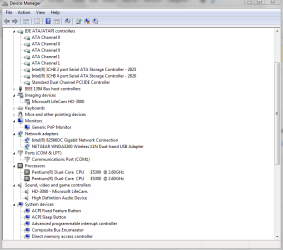
Go to device manager and see if there are any yellow exclaimation marks?

Also, make sure you do not have it muted.

Do you have another set of speakers to try on the computer?

Try running system restore.

Go to the control panel and check if the sound is working.

Try the speakers on another computer.
 
Last edited:

My Computer My Computer

At a glance

windows Home Premium 64 bit
Computer Manufacturer/Model Number
Custom Build
OS
windows Home Premium 64 bit
I didand i have other speakers like logictech i tried them no sound coming ouy
 

Attachments

  • Capture.PNG
    Capture.PNG
    23.3 KB · Views: 103

My Computer My Computer

At a glance

Windows 7 32 BITPentium (R) Dual Core CPU E300 @2.60Ghz2.00
Computer Manufacturer/Model Number
Custom
OS
Windows 7 32 BIT
CPU
Pentium (R) Dual Core CPU E300 @2.60Ghz
Memory
2.00
Sound Card
High Definition Audio
Monitor(s) Displays
Intel(R) G35 Express Chipset Family ,
Run the troubleshooter.
 
Last edited:

My Computer My Computer

At a glance

windows Home Premium 64 bit
Computer Manufacturer/Model Number
Custom Build
OS
windows Home Premium 64 bit
Do you have onboard sound or a soundcard? When you go into Device Manager, click on "view" at the top, if there is a problem the list will extend to show the problem device.

In Device Manager, you can also try, "Right clicking," on your sound devices and selecting, "Uninstall." Then, reboot to reload the drivers. See if it works now.

If still there is no sound, try http://www.sevenforums.com/tutorials/3413-repair-install.html?ltr=R

Sub Zero
 

My Computer My Computer

At a glance

windows Home Premium 64 bit
Computer Manufacturer/Model Number
Custom Build
OS
windows Home Premium 64 bit
I need more specs, what soundcard do you have, or are you using mobo sound ?
How are things hooked up, straight to speakers, or to a receiver ?
S/pdif would be used if you want to run it to an external DAC or USB s/pdif device , for speakers hooked up to the soundcard on the mobo, you want to select speakers

Control panel>sound...should look like the one on the left. If you don't see speakers, right click anywhere and select "show disabled devices". Right click the speakers and enable, then click configure to test all the speakers.

141184w.jpg


If you have speakers selected and it's not working, highlight speakers and click properites>advanced tab. You can see in my screenshot I have 24/192 selected, not all soundcards will support that bit rate. You can use the test button to see what the highest bit rate you can use.
 

My Computer My Computer

At a glance

Windows 7 Professional 642700k @ 4.8GHz 1.365v vcoreMushkin Enhanced Blackline Ridgeback 16 gigs2 x EVGA 570
Computer Manufacturer/Model Number
Custom
OS
Windows 7 Professional 64
CPU
2700k @ 4.8GHz 1.365v vcore
Motherboard
Asus P8P67 Deluxe
Memory
Mushkin Enhanced Blackline Ridgeback 16 gigs
Graphics Card(s)
2 x EVGA 570
Sound Card
HT Omega eClaro, Marantz receiver, Paradigm speakers
Monitor(s) Displays
3 x Samsung SA350 23"
Screen Resolution
5960x1080 Bezel Corrected
Hard Drives
Corsair Force GT 120g SSD, WD Caviar Black 1TB, WD Caviar Black 2TB
PSU
Corsair AX1200
Case
Mountain Mods U2-UFO, 7 x Gentle Typhoon AP-15 fans
Cooling
Apogee XT block, MCR220-QP rad, 655 pump in XSPC res
Other Info
MDPC sleeving, Lamptron FC5v2 Fan Controller, Lian Li card reader/usb/eSATA
Back
Top