Solved Sound on pc only works with head/earphones

fegsdc

New member
Member
VIP
Local time
8:38 PM
Messages
165
Location
Angola
Hi group.

I am using a windows 7 professional hp EliteBook 8470p laptop and a few months ago it used to make a lot of loud and noisy sound whenever i turned on the volume. I saw a video on youtube and i replaced the sound driver and now it works but only with head/earphones but it does not work normally without any audio device.

Is there any way to fix this? Can someone please help?
 

My Computer My Computer

At a glance

Windows 7
Computer type
PC/Desktop
OS
Windows 7
Hello fegsdc

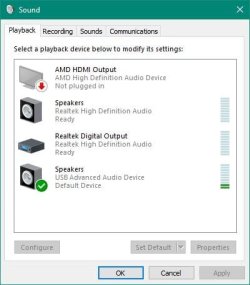
Open Sounds properties. What do you see? Should look like this Window:
Sound Properties.JPG

With Sound properties open, play a sound/audio file, then do you see the level indicators light up on right side?
 

My Computer My Computer

At a glance

Windows 7 x64, Vista x64, 8.1 smartphoneIntel E8400 65W 64-bitDDR2 2 x 2GB, 1GB x 2XFX Radeon HD5750
Computer type
PC/Desktop
OS
Windows 7 x64, Vista x64, 8.1 smartphone
CPU
Intel E8400 65W 64-bit
Motherboard
Gigabyte EP45-UD3LR
Memory
DDR2 2 x 2GB, 1GB x 2
Graphics Card(s)
XFX Radeon HD5750
Sound Card
AMD High Definition Audio; Realtek High Definition Audio
Monitor(s) Displays
iiyama prolite X2377HDS
Screen Resolution
1920 x 1080
Hard Drives
500GB 7200 rpm Seagate ST3500413AS 16MB, 500GB 5400 rpm Toshiba MQ02ABF050H 32MB, 200GB 7200 rpm Seagate ST3200820AS 8MB, 2TB 7200 rpm Western Digital WD20EZRX 64MB
PSU
Enermax Liberty Modular
Case
Antec P193 Midi Tower
Keyboard
Mionix ZIBAL 60
Mouse
Razer USB 2.0 Diamondback Mouse or Huion Graphics Tablet
Browser
Internet Explorer, Lunascape, Firefox, Opera, Avast Safezone
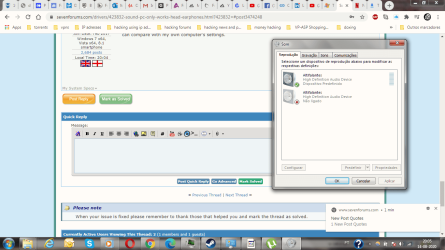
There are only 2 items, 2 "Altifalantes", it is in portuguese. It means speakers. (High definition audio devices).
One is turned on and the other is turned off and they are both the same type i mean they both look the same...
 

My Computer My Computer

At a glance

Windows 7
Computer type
PC/Desktop
OS
Windows 7
Click on each Speaker (Altifalantes) with a Right-mouse click, then select properties from the drop-down menu.

Does the Properties page for each connection give a clue as to which one is the internal speaker?

If you find the right connection, select it with left-mouse click, and then click the Set Default button. The Set Default button is in the Playback tab of the Sound Properties window.
 

My Computer My Computer

At a glance

Windows 7 x64, Vista x64, 8.1 smartphoneIntel E8400 65W 64-bitDDR2 2 x 2GB, 1GB x 2XFX Radeon HD5750
Computer type
PC/Desktop
OS
Windows 7 x64, Vista x64, 8.1 smartphone
CPU
Intel E8400 65W 64-bit
Motherboard
Gigabyte EP45-UD3LR
Memory
DDR2 2 x 2GB, 1GB x 2
Graphics Card(s)
XFX Radeon HD5750
Sound Card
AMD High Definition Audio; Realtek High Definition Audio
Monitor(s) Displays
iiyama prolite X2377HDS
Screen Resolution
1920 x 1080
Hard Drives
500GB 7200 rpm Seagate ST3500413AS 16MB, 500GB 5400 rpm Toshiba MQ02ABF050H 32MB, 200GB 7200 rpm Seagate ST3200820AS 8MB, 2TB 7200 rpm Western Digital WD20EZRX 64MB
PSU
Enermax Liberty Modular
Case
Antec P193 Midi Tower
Keyboard
Mionix ZIBAL 60
Mouse
Razer USB 2.0 Diamondback Mouse or Huion Graphics Tablet
Browser
Internet Explorer, Lunascape, Firefox, Opera, Avast Safezone
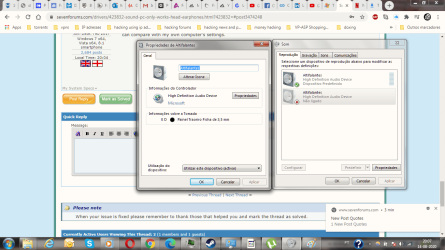
There is information about Power plugs, one says it is Back Panel 3,5 mm and it is the one that is not in use, or off.
The other one says ED: Analog Switch and ED: Right Panel Switch 3,5 mm and it is the one that is turned on.

I don't know where else to look for details you'd have to give me more details, one has more stuff than the other that's all i can say...
 

My Computer My Computer

At a glance

Windows 7
Computer type
PC/Desktop
OS
Windows 7
I did not find those options, there is a Sounds tab but no Set Default buttons.....I have no idea which one is the internal one, all i know is that one is on and the other one is off and says Not Switched On....
 

My Computer My Computer

At a glance

Windows 7
Computer type
PC/Desktop
OS
Windows 7
I did not find those options, there is a Sounds tab but no Set Default buttons.....I have no idea which one is the internal one, all i know is that one is on and the other one is off and says Not Switched On....

The Set Defaults button is in the Playback tab.

Perhaps you can upload screenshot of the different devices? Does not matter if they are in different language - I can compare with my own computer's settings.
 

My Computer My Computer

At a glance

Windows 7 x64, Vista x64, 8.1 smartphoneIntel E8400 65W 64-bitDDR2 2 x 2GB, 1GB x 2XFX Radeon HD5750
Computer type
PC/Desktop
OS
Windows 7 x64, Vista x64, 8.1 smartphone
CPU
Intel E8400 65W 64-bit
Motherboard
Gigabyte EP45-UD3LR
Memory
DDR2 2 x 2GB, 1GB x 2
Graphics Card(s)
XFX Radeon HD5750
Sound Card
AMD High Definition Audio; Realtek High Definition Audio
Monitor(s) Displays
iiyama prolite X2377HDS
Screen Resolution
1920 x 1080
Hard Drives
500GB 7200 rpm Seagate ST3500413AS 16MB, 500GB 5400 rpm Toshiba MQ02ABF050H 32MB, 200GB 7200 rpm Seagate ST3200820AS 8MB, 2TB 7200 rpm Western Digital WD20EZRX 64MB
PSU
Enermax Liberty Modular
Case
Antec P193 Midi Tower
Keyboard
Mionix ZIBAL 60
Mouse
Razer USB 2.0 Diamondback Mouse or Huion Graphics Tablet
Browser
Internet Explorer, Lunascape, Firefox, Opera, Avast Safezone
I just attached 3 files twice...but duno if the are being sent...
 

Attachments

  • Sound properties 1.png
    Sound properties 1.png
    69 KB · Views: 0
  • Sound properties 2.png
    Sound properties 2.png
    86.2 KB · Views: 1
  • Sound properties 3.png
    Sound properties 3.png
    81.7 KB · Views: 1

My Computer My Computer

At a glance

Windows 7
Computer type
PC/Desktop
OS
Windows 7
Where you have "E D", I have "L R" which is short for Left Right Speaker. So I suggest that "E D" is short for "Left" and "Right" in your language.

You have two Microsoft High Definition Audio Device installed. For the minute I cannot think why this is. Perhaps, do you know what sound chip the computer uses?

You cannot "Set Default" ("Set Default" is Greyed out) because there appears to be a fault with one of the Speaker devices (also Greyed out).

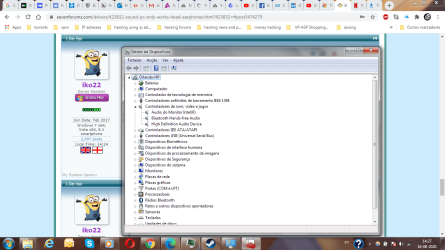
I'd like to know why one device is greyed out. Perhaps, you can open Device Manager and look at each device installed; are there any Exclamation mark (!) inside a yellow triangle next to any of the devices in Device Manager?
 

My Computer My Computer

At a glance

Windows 7 x64, Vista x64, 8.1 smartphoneIntel E8400 65W 64-bitDDR2 2 x 2GB, 1GB x 2XFX Radeon HD5750
Computer type
PC/Desktop
OS
Windows 7 x64, Vista x64, 8.1 smartphone
CPU
Intel E8400 65W 64-bit
Motherboard
Gigabyte EP45-UD3LR
Memory
DDR2 2 x 2GB, 1GB x 2
Graphics Card(s)
XFX Radeon HD5750
Sound Card
AMD High Definition Audio; Realtek High Definition Audio
Monitor(s) Displays
iiyama prolite X2377HDS
Screen Resolution
1920 x 1080
Hard Drives
500GB 7200 rpm Seagate ST3500413AS 16MB, 500GB 5400 rpm Toshiba MQ02ABF050H 32MB, 200GB 7200 rpm Seagate ST3200820AS 8MB, 2TB 7200 rpm Western Digital WD20EZRX 64MB
PSU
Enermax Liberty Modular
Case
Antec P193 Midi Tower
Keyboard
Mionix ZIBAL 60
Mouse
Razer USB 2.0 Diamondback Mouse or Huion Graphics Tablet
Browser
Internet Explorer, Lunascape, Firefox, Opera, Avast Safezone
You have two Microsoft High Definition Audio Device installed. For the minute I cannot think why this is. Perhaps, do you know what sound chip the computer uses?

It is okay, I can see from your other post that you have HP EliteBook 8470p . The HP EliteBook 8470p uses a IDT 92HD87 High Definition CODEC. I'll see what I can find out about that.
 

My Computer My Computer

At a glance

Windows 7 x64, Vista x64, 8.1 smartphoneIntel E8400 65W 64-bitDDR2 2 x 2GB, 1GB x 2XFX Radeon HD5750
Computer type
PC/Desktop
OS
Windows 7 x64, Vista x64, 8.1 smartphone
CPU
Intel E8400 65W 64-bit
Motherboard
Gigabyte EP45-UD3LR
Memory
DDR2 2 x 2GB, 1GB x 2
Graphics Card(s)
XFX Radeon HD5750
Sound Card
AMD High Definition Audio; Realtek High Definition Audio
Monitor(s) Displays
iiyama prolite X2377HDS
Screen Resolution
1920 x 1080
Hard Drives
500GB 7200 rpm Seagate ST3500413AS 16MB, 500GB 5400 rpm Toshiba MQ02ABF050H 32MB, 200GB 7200 rpm Seagate ST3200820AS 8MB, 2TB 7200 rpm Western Digital WD20EZRX 64MB
PSU
Enermax Liberty Modular
Case
Antec P193 Midi Tower
Keyboard
Mionix ZIBAL 60
Mouse
Razer USB 2.0 Diamondback Mouse or Huion Graphics Tablet
Browser
Internet Explorer, Lunascape, Firefox, Opera, Avast Safezone
No error message/sign for any device i just checked all of them.

E might be Esquerda meaning left, and D Direita meaning Right.
 

Attachments

  • Device manager screenshot.png
    Device manager screenshot.png
    87.6 KB · Views: 0

My Computer My Computer

At a glance

Windows 7
Computer type
PC/Desktop
OS
Windows 7
Hey, i updated more than 5 drivers in 2 different places i think and the sound suddently works now without the head/earphones and i restarted the pc so it is fixed now!!
 

My Computer My Computer

At a glance

Windows 7
Computer type
PC/Desktop
OS
Windows 7
Back
Top