
Sound Skipping, Rarely, But Sometimes

2010MegaScooter

Like To Talk And Help
Member
VIP
Local time
8:23 AM
Messages
171
Location
USA Minnesota
Sound Skipping, Rarely, But Sometimes

Hi Guys... Question For You (Obviously)

Every one and awhile my computer will skip kinda like a CD but its very obnoxious! >,<
Example, When I Start UP It Makes The Beautiful Windows 7 Start Up Sound....


Do Do Doo Do-Skips Obsessivley for 1 or 3 seconds- and resumes

It Does This Too When I Am Muti-Tasking, Right Now I Am Listening To Music, And It Works Very Nicely, But When It Does Eventually Skip, It Freezes My Computer For Like 3 Seconds, And Does The Obnoxious Noise.

Is It My Hard Drive? Or Like Is It My Processor?
I'm Only 15! Btw >.<

Its A Laptop. :)
Sound Card Information:
 

Attachments

  • Capture.JPG
    Capture.JPG
    37.9 KB · Views: 13

My Computer My Computer

Computer Manufacturer/Model Number
Compaq Presario CQ60
OS
Windows 7 Home Premium 64 bit SP1
CPU
[01]: Intel64 GenuineIntel 2.20 GHz
Motherboard
Hewlett-Packard 3612 (CPU)
Memory
2.0GB Dual-Channel DDR2 @ 332MHz (5-5-5-14)
Graphics Card(s)
Mobile Intel(R) GMA 4500M (797MB Memory)(64 Dedicated)
Sound Card
Conexant Pebble High Definition SmartAudio
Screen Resolution
1366x768 HD Intel 4 Series Express
Hard Drives
245GB High Speed TOSHIBA Disk Drive ATA Device (SATA) (Primary)
Cooling
Stock, w/ High Quality Cooling Pad.
Mouse
Synaptics Touchpad V 7.0
Internet Speed
Around 10 to 20 MB Per Sec. Comcast Internet.
The "skipping" at boot up can be where the sound is initialized in the Windows initialization process.

Skipping at other times, especially during multi-tasking can just be because the sound is on a shared IRQ with a higher priority IRQ item (common). 2GB of RAM is minimum for a 64 bit OS, I'd upgrade to at least 4GB of RAM. May not help the skipping but it will help the overall system.

One thing to try, go to the Device Manager, RIGHT click on the entry for the Conexant audio device and then LEFT click to "uninstall". DO NOT uninstall the drivers. Restart the PC and when Windows starts it will detect and reinstall the sound. This may also put it on a different shared IRQ and help with the skipping.
 

My Computer My Computer

Computer type
PC/Desktop
Computer Manufacturer/Model Number
My Own Build
OS
Windows 10 64 bit
CPU
Intel i7 6700K
Motherboard
ASUS ROG Maximus VIII Hero
Memory
16GB Corsair Dominator
Graphics Card(s)
Intel CPU Graphics
Sound Card
RealTek
Monitor(s) Displays
27" Dell S2719dgf
Screen Resolution
2560X1440
Hard Drives
1 TB Samsung 850 EVO SSD for Win 10 Pro
500GB Samsung 850 EVO SSD for Win 10 Insider
2 TB drive for backup
PSU
EVGA Supernova 750G2
Case
BeQuiet Silent Base 600
Cooling
Deepcool Captain 120EX
Keyboard
Microsoft Wireless 2000
Mouse
Microsoft wireless
Internet Speed
100 MB/sec (Cable)
Antivirus
Microsoft Defender and Malwarebytes
Browser
Edge/Firefox
Other Info
Cakewalk (Sonar) by BandLab and Studio One 4.1 Pro recording studio software. MOTU 896Mk3 Hybrid recording interface, Frontier Tranzport wireless control unit, Behringer X-Touch Control Surface.
Five USB connected optical drives for CD Audio production using Nero BurningROM
Wait, I Got Confuse when you said, click uninstall, DO NOT UNINSTALL The Drivers

This Is What I Am At
 

Attachments

  • Capture.JPG
    Capture.JPG
    31.5 KB · Views: 27

My Computer My Computer

Computer Manufacturer/Model Number
Compaq Presario CQ60
OS
Windows 7 Home Premium 64 bit SP1
CPU
[01]: Intel64 GenuineIntel 2.20 GHz
Motherboard
Hewlett-Packard 3612 (CPU)
Memory
2.0GB Dual-Channel DDR2 @ 332MHz (5-5-5-14)
Graphics Card(s)
Mobile Intel(R) GMA 4500M (797MB Memory)(64 Dedicated)
Sound Card
Conexant Pebble High Definition SmartAudio
Screen Resolution
1366x768 HD Intel 4 Series Express
Hard Drives
245GB High Speed TOSHIBA Disk Drive ATA Device (SATA) (Primary)
Cooling
Stock, w/ High Quality Cooling Pad.
Mouse
Synaptics Touchpad V 7.0
Internet Speed
Around 10 to 20 MB Per Sec. Comcast Internet.
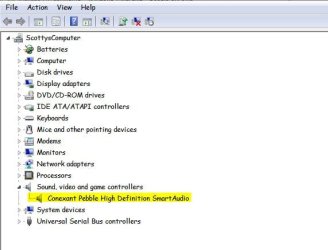
You "uninstall" the Conexent sound module but NOT the drivers for the Conexent. When you click uninstall you will get an option to also uninstall the drivers - DO NOT uninstall the drivers.

You are just uninstalling the Conexent from Windows, not from the PC. When you reboot and when Windows starts it will find the Conexent sound and reinstall it.
 

My Computer My Computer

Computer type
PC/Desktop
Computer Manufacturer/Model Number
My Own Build
OS
Windows 10 64 bit
CPU
Intel i7 6700K
Motherboard
ASUS ROG Maximus VIII Hero
Memory
16GB Corsair Dominator
Graphics Card(s)
Intel CPU Graphics
Sound Card
RealTek
Monitor(s) Displays
27" Dell S2719dgf
Screen Resolution
2560X1440
Hard Drives
1 TB Samsung 850 EVO SSD for Win 10 Pro
500GB Samsung 850 EVO SSD for Win 10 Insider
2 TB drive for backup
PSU
EVGA Supernova 750G2
Case
BeQuiet Silent Base 600
Cooling
Deepcool Captain 120EX
Keyboard
Microsoft Wireless 2000
Mouse
Microsoft wireless
Internet Speed
100 MB/sec (Cable)
Antivirus
Microsoft Defender and Malwarebytes
Browser
Edge/Firefox
Other Info
Cakewalk (Sonar) by BandLab and Studio One 4.1 Pro recording studio software. MOTU 896Mk3 Hybrid recording interface, Frontier Tranzport wireless control unit, Behringer X-Touch Control Surface.
Five USB connected optical drives for CD Audio production using Nero BurningROM
Heres My Result, Good News! :)

I Unistalled the software for the sound-card, NOT The sound card itself... here is a picture.


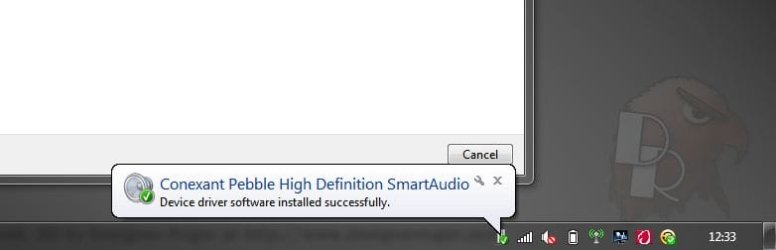
Then Restarted My Computer, And The Driver Reinstalled Itself.. :)
 

Attachments

  • Capture.JPG
    Capture.JPG
    40.7 KB · Views: 51
  • Capture1.JPG
    Capture1.JPG
    20.2 KB · Views: 19

My Computer My Computer

Computer Manufacturer/Model Number
Compaq Presario CQ60
OS
Windows 7 Home Premium 64 bit SP1
CPU
[01]: Intel64 GenuineIntel 2.20 GHz
Motherboard
Hewlett-Packard 3612 (CPU)
Memory
2.0GB Dual-Channel DDR2 @ 332MHz (5-5-5-14)
Graphics Card(s)
Mobile Intel(R) GMA 4500M (797MB Memory)(64 Dedicated)
Sound Card
Conexant Pebble High Definition SmartAudio
Screen Resolution
1366x768 HD Intel 4 Series Express
Hard Drives
245GB High Speed TOSHIBA Disk Drive ATA Device (SATA) (Primary)
Cooling
Stock, w/ High Quality Cooling Pad.
Mouse
Synaptics Touchpad V 7.0
Internet Speed
Around 10 to 20 MB Per Sec. Comcast Internet.
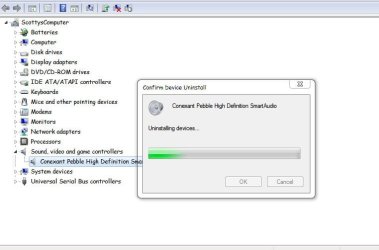
If you uninstalled the drivers then Windows had to go out and find new drivers and download them and install them.

But, whatever works. I've only been working with PC's and a PC Help Desk since they first came out. What do I know?
 

My Computer My Computer

Computer type
PC/Desktop
Computer Manufacturer/Model Number
My Own Build
OS
Windows 10 64 bit
CPU
Intel i7 6700K
Motherboard
ASUS ROG Maximus VIII Hero
Memory
16GB Corsair Dominator
Graphics Card(s)
Intel CPU Graphics
Sound Card
RealTek
Monitor(s) Displays
27" Dell S2719dgf
Screen Resolution
2560X1440
Hard Drives
1 TB Samsung 850 EVO SSD for Win 10 Pro
500GB Samsung 850 EVO SSD for Win 10 Insider
2 TB drive for backup
PSU
EVGA Supernova 750G2
Case
BeQuiet Silent Base 600
Cooling
Deepcool Captain 120EX
Keyboard
Microsoft Wireless 2000
Mouse
Microsoft wireless
Internet Speed
100 MB/sec (Cable)
Antivirus
Microsoft Defender and Malwarebytes
Browser
Edge/Firefox
Other Info
Cakewalk (Sonar) by BandLab and Studio One 4.1 Pro recording studio software. MOTU 896Mk3 Hybrid recording interface, Frontier Tranzport wireless control unit, Behringer X-Touch Control Surface.
Five USB connected optical drives for CD Audio production using Nero BurningROM
Aww, Your doing fine... My computer does not skip anymore.. :) Thanks
 

My Computer My Computer

Computer Manufacturer/Model Number
Compaq Presario CQ60
OS
Windows 7 Home Premium 64 bit SP1
CPU
[01]: Intel64 GenuineIntel 2.20 GHz
Motherboard
Hewlett-Packard 3612 (CPU)
Memory
2.0GB Dual-Channel DDR2 @ 332MHz (5-5-5-14)
Graphics Card(s)
Mobile Intel(R) GMA 4500M (797MB Memory)(64 Dedicated)
Sound Card
Conexant Pebble High Definition SmartAudio
Screen Resolution
1366x768 HD Intel 4 Series Express
Hard Drives
245GB High Speed TOSHIBA Disk Drive ATA Device (SATA) (Primary)
Cooling
Stock, w/ High Quality Cooling Pad.
Mouse
Synaptics Touchpad V 7.0
Internet Speed
Around 10 to 20 MB Per Sec. Comcast Internet.
Back
Top