Solved SP1 installs, every boot

iTitus

New member
Local time
6:16 AM
Messages
90
Dear SF users,

Since SP 1 has arrived, many people are glad, angry, but some are just confused:
I installed SP1 through the regular update system, etc etc.
Then the reboot, the screen saying(translation errors might occur):
"
Step 1 of 2:
Configuring Service pack
xx %
"

I didn't really pay attention, because eventually my desktop appeared.
But now I see the message on every boot, loosing at least 30 sec to it.
I also noticed the it gets to 58% and then skips to "welcome" and my desktop.

So I guess that it never really configured correctly...
What to do?

Thanks

Titus
 
Last edited:

My Computer

OS
.
Trying to uninstall it with the
"wusa.exe /uninstall /kb:976932" command
gives this error:
"
An error has occured: 0x8000ffff
Unrepearable error(I might have made a translation error ;) )
"

And the installed updates screens tells me there are no updates installed :S
 

My Computer

OS
.

My Computer

Computer type
PC/Desktop
Computer Manufacturer/Model Number
Bruce ... somewhere in his 40's
OS
Windows 7 Ultimate 32bit SP1
CPU
Intel(R) Core(TM)2 Quad CPU @ 2.40GHz, 2400 MHz
Motherboard
INTEL/D975XBX2
Memory
4 GB
Graphics Card(s)
ATI Radeon HD 2600 Pro
Monitor(s) Displays
Samsung SyncMaster 914v
Screen Resolution
1280 x 1024
Hard Drives
2/500GB each ... ST3500630AS ATA Device.
One is not connected
PSU
Rocketfish 700 W
Case
G.Skill Gigabyte Chassis
Keyboard
Standard PS/2 Keyboard
Mouse
Microsoft PS/2 Mouse
Internet Speed
DSL
Antivirus
Avira Internet Security
Browser
IE 11
Other Info
ATI HDMI Audio
This is what you do
Set updater to notify
Then when notified right click on update and then hide
Its gone,
then we can figure what to do.
 

My Computer

Computer type
PC/Desktop
Computer Manufacturer/Model Number
Dell XPS 420
OS
Windows 10, Home Clean Install
CPU
Intel Core2 processsor Q8200(2.33Ghz 1333FSB) Quad Core Tech
Motherboard
Dell
Memory
6 gb
Graphics Card(s)
ATI Radeon 256MB HD3650
Sound Card
Intergrated 7.1 Channel Audio
Monitor(s) Displays
Dell SP2009W 20"
Hard Drives
640 GB Serial ATA Hard drive
Cooling
Fan
Keyboard
Dell USB Keyboard
Mouse
Dell Premium Optical USB
Internet Speed
DSL 2.85
@jacee I ran the mild version(I can still run the aggressive version though).
No difference yet, the service pack still tried to install on boot. And still no change in the installed updates section, so I can't uninstall it. Command promt doesn't work either.

@Richc46, I don't understand what you mean, can you explain it?

Thanks guys for your time, I hope we can fix it without reinstalling windows(system restore seems to go up until after the SP install)
 

My Computer

OS
.
@jacee I ran the mild version(I can still run the aggressive version though).
No difference yet, the service pack still tried to install on boot. And still no change in the installed updates section, so I can't uninstall it. Command promt doesn't work either.

@Richc46, I don't understand what you mean, can you explain it?

Thanks guys for your time, I hope we can fix it without reinstalling windows(system restore seems to go up until after the SP install)

I would be very happy to explain. Follow this tutorial to change the update settings to notify and not to install automatically
http://www.sevenforums.com/tutorials/2797-windows-update-settings-change.html

You will now be notified that there is a new upadate. If its one that you want just instll it. If its SP1, just right click on it. Then you will see hide, just click on that. Now it will not install again. Then we can think about how to install and not have the problem, again.
 

My Computer

Computer type
PC/Desktop
Computer Manufacturer/Model Number
Dell XPS 420
OS
Windows 10, Home Clean Install
CPU
Intel Core2 processsor Q8200(2.33Ghz 1333FSB) Quad Core Tech
Motherboard
Dell
Memory
6 gb
Graphics Card(s)
ATI Radeon 256MB HD3650
Sound Card
Intergrated 7.1 Channel Audio
Monitor(s) Displays
Dell SP2009W 20"
Hard Drives
640 GB Serial ATA Hard drive
Cooling
Fan
Keyboard
Dell USB Keyboard
Mouse
Dell Premium Optical USB
Internet Speed
DSL 2.85
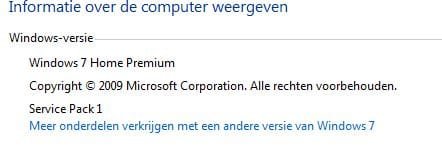
Thanks, I'll try that. But the problem is, the system things SP 1 is installed(see attachement) but on each boot it tries to complete the install cycle and stops after 59% and skips to the welcome screen.
 

Attachments

  • specs.JPG
    specs.JPG
    17.5 KB · Views: 8

My Computer

OS
.
Go back to before you tried to install with System Restore.
 

My Computer

Computer type
PC/Desktop
Computer Manufacturer/Model Number
Dell XPS 420
OS
Windows 10, Home Clean Install
CPU
Intel Core2 processsor Q8200(2.33Ghz 1333FSB) Quad Core Tech
Motherboard
Dell
Memory
6 gb
Graphics Card(s)
ATI Radeon 256MB HD3650
Sound Card
Intergrated 7.1 Channel Audio
Monitor(s) Displays
Dell SP2009W 20"
Hard Drives
640 GB Serial ATA Hard drive
Cooling
Fan
Keyboard
Dell USB Keyboard
Mouse
Dell Premium Optical USB
Internet Speed
DSL 2.85
I tried going back with system restore, to another point, but then some other things went wrong, so I went back to now. And since then I can't use system restore: The last point is after the SP1 install :(
So that's unfortunate...
 

My Computer

OS
.
Reinstalled windows 7.
Service pack did fine after that.

Close and/or delete topic
 

My Computer

OS
.
Back
Top