
I have something using up a huge chunk of my hard drive - I have installed and run win dir stat and it comes up with 164 g of my hard drive space used up by something unknown. How do I find out what it is?
I have run check disk, all clean ups, virus scans etc, but clearly there is something that is using up my hard drive.
I use acronis backup to an external drive, have asked on their forums in case it is my backup writing to the hard drive instead, but no answers, and as far as I can tell it is backing up to the external drive - which incidentally is also suspiciously short of space - a 2TB drive with only 184 g free seems a bit excessive use to me.
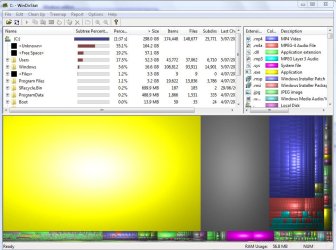
I have attached a screen shot of windirstat - the huge yellow rectangle is my missing space.
Any ideas?
I have run check disk, all clean ups, virus scans etc, but clearly there is something that is using up my hard drive.
I use acronis backup to an external drive, have asked on their forums in case it is my backup writing to the hard drive instead, but no answers, and as far as I can tell it is backing up to the external drive - which incidentally is also suspiciously short of space - a 2TB drive with only 184 g free seems a bit excessive use to me.
I have attached a screen shot of windirstat - the huge yellow rectangle is my missing space.
Any ideas?
Attachments
Last edited:
My Computer
At a glance
Windows 7 Home Premium 32 bitIntel(R) Pentium(R) D CPU 3.00GHz 2.99GHz2.00 GB
- Computer Manufacturer/Model Number
- Dell Dimension E520
- OS
- Windows 7 Home Premium 32 bit
- CPU
- Intel(R) Pentium(R) D CPU 3.00GHz 2.99GHz
- Memory
- 2.00 GB
- Monitor(s) Displays
- Flatron L1717S
- Keyboard
- Dell
- Mouse
- acer


