Speaker/headphone buzzing issues, caused by projector

kevdlandrig

New member
Local time
6:19 AM
Messages
38
Location
Indiana
so I just got a new projector, and plugged it in to my headphones and computer. As soon as I put the headphones on, they were buzzing rather noticeably. I have done a bunch of searches on the internet and to troubleshoot the problem, and the solutions I saw on the other forums didn't work for me. I need to know if there is A box I can buy that is capable of isolating and removing the buzzing so I don't go insane. My headphones are some standard in-ear ones.
 

My Computer My Computer

Computer type
Laptop
Computer Manufacturer/Model Number
Acer
OS
Windows 7 professional 64 bit
CPU
Intel i5
Memory
6 gb
Graphics Card(s)
Intel HD3000
Monitor(s) Displays
2
Screen Resolution
1366x786
Hard Drives
1 TB WD Blue
Keyboard
Microsoft Ergonomic 4000
Mouse
Logitech Wireless
Internet Speed
25 mb/s
Antivirus
Kaspersky Antivirus
Browser
Google Chrome
If your connections aren't inserted all the way in, they won't make a clean connection and makes that "buzz".

Also, buzzing is more noticeable at high volume than it is low. Try checking volume controls on the projector.
 

My Computer My Computer

Computer type
PC/Desktop
Computer Manufacturer/Model Number
Custom
OS
Microsoft Windows 7 Home Premium 64-bit Service Pack 1
CPU
AMD A10-6800K APU with Radeon(tm)™ HD Graphics 4100
Motherboard
ASRock FM2A85X Extreme4-M
Memory
(2) G.Skill F3-12800CL10-8GBXL
Graphics Card(s)
ASUS R7 250 Series (0x6610)
Sound Card
Realtek High Definition Audio
Monitor(s) Displays
Acer X213H LCD monitor, 21"
Screen Resolution
1920 x 1080 x 32 bits @ 60 Hz
Hard Drives
WD Black, 1.0TB, WDC WD1002FAEX-00Z3A0
PSU
Rosewill Quark-650
Case
Raidmax Comet SECC Steel ATX Mid Tower Computer Case
Cooling
1 x 80mm + 2 x 120mm + Stock cooler
Mouse
Gear Head Wireless Optical 5-button mouse
Internet Speed
FTTx 6000 / 1000
Antivirus
Avast! Free Antivirus 2015.10.0.2208
Browser
Google Chrome Version 40.0.2214.115
Other Info
*AMD Dual-Graphics
*Uses OpenDNS
*Uses Folding@Home
*HP 16x Super-Multi DVD Writer
*Superspeed 74-in-1 Card Reader
*Maximum overclock has not been determined.
You plugged your projector into your headphones? :confused: What exactly does that mean?

The buzzing sounds like it may be a ground loop. Are you sure you're using the correct plugs and jacks?
 

My Computer My Computer

Computer type
PC/Desktop
Computer Manufacturer/Model Number
Built 2/11/2011
OS
Windows 7 Pro-x64
CPU
i7-2600 3.4GHz - 3.8GHz Turbo
Motherboard
Intel DH67BL-B3
Memory
8Gb - 2x4GB, Muskin 991770 PC3-1333
Graphics Card(s)
Integrated Intel HD 2000
Sound Card
Integrated Intel 10.1 HD, RealTek ALC892
Monitor(s) Displays
Asus LCD VH222H, Haier HL24XSL2a
Screen Resolution
1920x1080, 1920x1080
Hard Drives
Crucial SSD C300-128Gb,
Western Digital WD5002AALX - 500Gb,
Western Digital WD7501AALS - 750Gb
PSU
Seasonic 650W 80+ Gold Modular
Case
Rosewill Defender
Cooling
Stock CPU, Four 120mm case fans, PCH fan added
Keyboard
Logitech EX100 Y-RBH94 Wireless
Mouse
Logitech EX100 M-RCE95 Wireless
Internet Speed
3.0/1.5 Mbs
Antivirus
Microsoft Security Essentials
Browser
Microsoft Internet Explorer 11
Other Info
Antec Veris Premier-Multimedia IR Station,
Cyber Accoustics-3602 Speakers,
AFT XM-5U Card Reader,
Hauppauge TV-HVR-2250,
Sony LX300 USB Turntable
:warn: A laptop only has a mic in jack and a headphone out jack. Make sure you didn't plug it into the mic jack!

so I just got a new projector, and plugged it in to my headphones and computer.

You plugged your projector into your headphones? :confused:
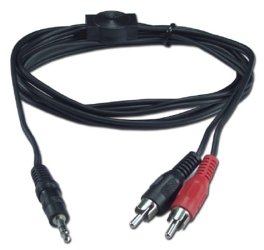
Anyone can get sound and video through a projector, by connecting a VGA, HDMI, or S-VIDEO cable to it and a 3.5mm to RCA jack connector.

Like this:
715_3.5mm-to-rca-cable.jpg
The only problem is, did you attach an audio cable into the video signal?
 
Last edited:

My Computer My Computer

Computer type
PC/Desktop
Computer Manufacturer/Model Number
Custom
OS
Microsoft Windows 7 Home Premium 64-bit Service Pack 1
CPU
AMD A10-6800K APU with Radeon(tm)™ HD Graphics 4100
Motherboard
ASRock FM2A85X Extreme4-M
Memory
(2) G.Skill F3-12800CL10-8GBXL
Graphics Card(s)
ASUS R7 250 Series (0x6610)
Sound Card
Realtek High Definition Audio
Monitor(s) Displays
Acer X213H LCD monitor, 21"
Screen Resolution
1920 x 1080 x 32 bits @ 60 Hz
Hard Drives
WD Black, 1.0TB, WDC WD1002FAEX-00Z3A0
PSU
Rosewill Quark-650
Case
Raidmax Comet SECC Steel ATX Mid Tower Computer Case
Cooling
1 x 80mm + 2 x 120mm + Stock cooler
Mouse
Gear Head Wireless Optical 5-button mouse
Internet Speed
FTTx 6000 / 1000
Antivirus
Avast! Free Antivirus 2015.10.0.2208
Browser
Google Chrome Version 40.0.2214.115
Other Info
*AMD Dual-Graphics
*Uses OpenDNS
*Uses Folding@Home
*HP 16x Super-Multi DVD Writer
*Superspeed 74-in-1 Card Reader
*Maximum overclock has not been determined.
As previously noted it sounds like a "ground loop hum" problem.

Are you using the laptop with battery only or are you using the AC power adapter? If you are using the AC power adapter, try the laptop with only internal battery power and see if it makes a difference.
 

My Computer My Computer

Computer type
PC/Desktop
Computer Manufacturer/Model Number
My Own Build
OS
Windows 10 64 bit
CPU
Intel i7 6700K
Motherboard
ASUS ROG Maximus VIII Hero
Memory
16GB Corsair Dominator
Graphics Card(s)
Intel CPU Graphics
Sound Card
RealTek
Monitor(s) Displays
27" Dell S2719dgf
Screen Resolution
2560X1440
Hard Drives
1 TB Samsung 850 EVO SSD for Win 10 Pro
500GB Samsung 850 EVO SSD for Win 10 Insider
2 TB drive for backup
PSU
EVGA Supernova 750G2
Case
BeQuiet Silent Base 600
Cooling
Deepcool Captain 120EX
Keyboard
Microsoft Wireless 2000
Mouse
Microsoft wireless
Internet Speed
100 MB/sec (Cable)
Antivirus
Microsoft Defender and Malwarebytes
Browser
Edge/Firefox
Other Info
Cakewalk (Sonar) by BandLab and Studio One 4.1 Pro recording studio software. MOTU 896Mk3 Hybrid recording interface, Frontier Tranzport wireless control unit, Behringer X-Touch Control Surface.
Five USB connected optical drives for CD Audio production using Nero BurningROM
I probably should have mentioned that I am extremely competent with computers. Now to answer some of the questions:

My Laptop is connected via a 25 foot HDMI cable to my pico projector. From there, the projector is connected via some splitters to a subwoofer, a pair of regular computer speakers, a 25 foot cable that runs to the front of the room, which is connected to another 2.1 speaker set. Finally, I rigged the splitters so that if I plug in my headphones, all of the other speaker can be muted from the splitter with a volume adjuster. Just to make sure i'm understood, the projector has a headphone out port on it.

All connections are secure and tight. I even tried twisting the connections because I know that they can be insecure sometimes even when the appear to be fully connected. They are/were before I tried. The buzzing is equally noticeable even when the speakers are muted by the computer. If I adjust the volume on the self powered speakers, the buzzing goes down for the obvious reason. If I have my headphones plugged in, the buzzing is constant, even when I mute them from the computer.

I will make sure to check on the laptop power issue tonight, as during the day it is too bright outside to use the projector. (my room has lots of windows without adequate shading and the projector isn't very bright)

One last thing. I tried unplugging the speaker/splitter mess and attempted to use the headphones directly connected to the projector's 3.5 mm jack. The buzzing changed from the crackling-type buzzing that I've been hearing and began sounding more like the 60 hz hum that I heard about somewhere else on the net. I'm pretty sure this means that one of the wires in the system is unsheilded, and is picking up the electrical signals from the house. The amount of wiring im using could definitely act like an antenna for this kind of sound.

if you need me to draw a map of how everything is connected, I would be happy to oblige.

 

My Computer My Computer

Computer type
Laptop
Computer Manufacturer/Model Number
Acer
OS
Windows 7 professional 64 bit
CPU
Intel i5
Memory
6 gb
Graphics Card(s)
Intel HD3000
Monitor(s) Displays
2
Screen Resolution
1366x786
Hard Drives
1 TB WD Blue
Keyboard
Microsoft Ergonomic 4000
Mouse
Logitech Wireless
Internet Speed
25 mb/s
Antivirus
Kaspersky Antivirus
Browser
Google Chrome
I used to work as a guitar amp tech (in Nashville). Ground Loop problems are very common with musicians that use multiple powered devices or amps together. Even two AC powered devices connected to the same AC power outlet can have the ground loop problem.

Since you are hearing the 60 Hz hum from the projector, disconnect the HDMI cable, leaving the projector by itself (no external speakers connected) and then see if you have the 60 Hz hum. If you do, the problem is in the projector (probably defective power supply) and not with the PC.

The other speaker problems need to be isolated to what is causing that. I would only use shielded cable to connect to the external speaker systems.
 

My Computer My Computer

Computer type
PC/Desktop
Computer Manufacturer/Model Number
My Own Build
OS
Windows 10 64 bit
CPU
Intel i7 6700K
Motherboard
ASUS ROG Maximus VIII Hero
Memory
16GB Corsair Dominator
Graphics Card(s)
Intel CPU Graphics
Sound Card
RealTek
Monitor(s) Displays
27" Dell S2719dgf
Screen Resolution
2560X1440
Hard Drives
1 TB Samsung 850 EVO SSD for Win 10 Pro
500GB Samsung 850 EVO SSD for Win 10 Insider
2 TB drive for backup
PSU
EVGA Supernova 750G2
Case
BeQuiet Silent Base 600
Cooling
Deepcool Captain 120EX
Keyboard
Microsoft Wireless 2000
Mouse
Microsoft wireless
Internet Speed
100 MB/sec (Cable)
Antivirus
Microsoft Defender and Malwarebytes
Browser
Edge/Firefox
Other Info
Cakewalk (Sonar) by BandLab and Studio One 4.1 Pro recording studio software. MOTU 896Mk3 Hybrid recording interface, Frontier Tranzport wireless control unit, Behringer X-Touch Control Surface.
Five USB connected optical drives for CD Audio production using Nero BurningROM
Sorry. When I mentioned the 60 hz hum I was thinking of something else. The sound I am really hearing is more like a fuzzing sound, like distant rain or something. The sound is quite tolerable compared to that other electrical crackling noise, but I still want to eliminate it.

I did try running my laptop on battery power, but the electrical crackling was still a problem.

I mentioned in the first post that I am aware that the noise probably cannot be eliminated by changing the wires, and I would like to remind everyone that I am looking for a piece of equipment that can scan an audio input for noise, and remove that noise through software. Alternatively, something that mutes sounds that are below a certain decibel level would work as well. I don't want anything too fancy, but something just enough to get the job done.

All of my equipment is powered by DC, not AC. The conversion boxes are several feet away from any wiring, although they are all plugged into the same power strip. Is it still possible that they are generating interference?
 

My Computer My Computer

Computer type
Laptop
Computer Manufacturer/Model Number
Acer
OS
Windows 7 professional 64 bit
CPU
Intel i5
Memory
6 gb
Graphics Card(s)
Intel HD3000
Monitor(s) Displays
2
Screen Resolution
1366x786
Hard Drives
1 TB WD Blue
Keyboard
Microsoft Ergonomic 4000
Mouse
Logitech Wireless
Internet Speed
25 mb/s
Antivirus
Kaspersky Antivirus
Browser
Google Chrome
There are "noise gate" type devices that will limit noise. The ones I've seen are "VST" plug-ins for recording studio software or a small external unit that connects between low level audio guitar signals and the guitar amplifier or a "rack" type unit that is designed for higher level audio signals.

As the PC audio out is more like "line level" the rack type would probably be more appropriate, if you want to spend the $$ for something like that. Here is the lowest priced one, that I've found, that would work for what you want. It is four channel (you only need two for the two channel stereo out from the PC). Behringer MULTIGATE PRO XR4400 Quad Expander/Gate | Musician's Friend
 

My Computer My Computer

Computer type
PC/Desktop
Computer Manufacturer/Model Number
My Own Build
OS
Windows 10 64 bit
CPU
Intel i7 6700K
Motherboard
ASUS ROG Maximus VIII Hero
Memory
16GB Corsair Dominator
Graphics Card(s)
Intel CPU Graphics
Sound Card
RealTek
Monitor(s) Displays
27" Dell S2719dgf
Screen Resolution
2560X1440
Hard Drives
1 TB Samsung 850 EVO SSD for Win 10 Pro
500GB Samsung 850 EVO SSD for Win 10 Insider
2 TB drive for backup
PSU
EVGA Supernova 750G2
Case
BeQuiet Silent Base 600
Cooling
Deepcool Captain 120EX
Keyboard
Microsoft Wireless 2000
Mouse
Microsoft wireless
Internet Speed
100 MB/sec (Cable)
Antivirus
Microsoft Defender and Malwarebytes
Browser
Edge/Firefox
Other Info
Cakewalk (Sonar) by BandLab and Studio One 4.1 Pro recording studio software. MOTU 896Mk3 Hybrid recording interface, Frontier Tranzport wireless control unit, Behringer X-Touch Control Surface.
Five USB connected optical drives for CD Audio production using Nero BurningROM
Back
Top