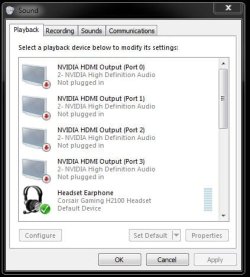
Speakers show as Not Plugged In

hmkmonroe

New member
Local time
8:50 AM
Messages
4
Have tried almost all solutions posted and still no sound from Logitech speakers plugged into Dell HD monitor (RealTek High Definition Audio) . Speakers work when plugged directly into pc jack and have always worked when plugged into monitor. Upgraded to Windows 10 and went back to Wondows 7 recently. Any solution will be appreciated. Have tried making sure all is enabled & not muted, updating driver, defaulting to basic audio driver and still no sound. Thank you.
 

My Computer My Computer

At a glance

windows 7 home premium 64 bitIntel(R) Core(TM) i7-4770 CPU @ 3.40GHz, 3401...12GBNVIDIA GeForce GT 635
Computer type
PC/Desktop
Computer Manufacturer/Model Number
dell
OS
windows 7 home premium 64 bit
CPU
Intel(R) Core(TM) i7-4770 CPU @ 3.40GHz, 3401 Mhz,
Motherboard
Dell XPS8700
Memory
12GB
Graphics Card(s)
NVIDIA GeForce GT 635
Hard Drives
1 TB
Antivirus
microsoft security essentials
Browser
Internet Explorer 11
How are you connecting audio to the monitor? Via HDMI? Via a separate audio cable from the PC (Green speaker jack) to the monitor?

Why are you using audio from the monitor rather than direct?
 

My Computer My Computer

At a glance

Windows 10 64 bitIntel i7 6700K16GB Corsair DominatorIntel CPU Graphics
Computer type
PC/Desktop
Computer Manufacturer/Model Number
My Own Build
OS
Windows 10 64 bit
CPU
Intel i7 6700K
Motherboard
ASUS ROG Maximus VIII Hero
Memory
16GB Corsair Dominator
Graphics Card(s)
Intel CPU Graphics
Sound Card
RealTek
Monitor(s) Displays
27" Dell S2719dgf
Screen Resolution
2560X1440
Hard Drives
1 TB Samsung 850 EVO SSD for Win 10 Pro
500GB Samsung 850 EVO SSD for Win 10 Insider
2 TB drive for backup
PSU
EVGA Supernova 750G2
Case
BeQuiet Silent Base 600
Cooling
Deepcool Captain 120EX
Keyboard
Microsoft Wireless 2000
Mouse
Microsoft wireless
Internet Speed
100 MB/sec (Cable)
Antivirus
Microsoft Defender and Malwarebytes
Browser
Edge/Firefox
Other Info
Cakewalk (Sonar) by BandLab and Studio One 4.1 Pro recording studio software. MOTU 896Mk3 Hybrid recording interface, Frontier Tranzport wireless control unit, Behringer X-Touch Control Surface.
Five USB connected optical drives for CD Audio production using Nero BurningROM
I agree, why aren`t you connecting your speakers directly to the PC ? Do you need an extension cable ?

But if Device Manager shows the audio output is ok, and you ran a mini plug audio cable with green ends from the green port on the PC to the audio input on the monitor, you should be getting sound.

Answer Jack`s questions to shed some light.

Also what does the sound icon down on the taskbar show, does it show a white speaker or a white speaker with a red line through it ?
 

Attachments

  • Capture.JPG
    Capture.JPG
    7.5 KB · Views: 29

My Computer My Computer

At a glance

Windows 10 Pro x64Intel Core i7 6700KGSkill TridentZ RGB 16GB 3600 16-16-16-36EVGA GTX 980 Ti SC x2
Computer type
PC/Desktop
Computer Manufacturer/Model Number
Skylake Special #666
OS
Windows 10 Pro x64
CPU
Intel Core i7 6700K
Motherboard
Asus Sabertooth Z170 Mark 1
Memory
GSkill TridentZ RGB 16GB 3600 16-16-16-36
Graphics Card(s)
EVGA GTX 980 Ti SC x2
Sound Card
Realtek High Definition
Monitor(s) Displays
AOC G2460PG
Screen Resolution
1920 x 1080 144Hz
Hard Drives
Samsung 860 Pro 256GB, Seagate Barracuda 4TB x2
PSU
EVGA 1000 P2, EVGA White Custom Braided Cables
Case
Corsair Vengeance C70 Gunmetal Black
Cooling
Corsair H100i v2, Corsair ML120 x2, Thermal Grizzly Kryonaut
Keyboard
Logitech G910 Orion Spectrum
Mouse
Logitech G700s
Internet Speed
Verizon Fios Quantum Gateway 75/75
Antivirus
Windows Defender, Malwarebytes Free 3.8.3
Browser
Chrome
Other Info
Corsair SP120 x4, LG Blu-ray Drive, Durabrand HT-395 100 Watt Dolby Digital Amp, Corsair H2100 Wireless 7.1 Headset
I am connecting the monitor to the pc by HDMI. Speakers are plugged into to speaker jack on monitor -- this is for convenience and has worked for years on this pc and previously on different pc's. Speakers do work if I connect directly to pc and yes, I would need an extension cord. I just do not understand why suddenly the monitor connection setup that has previously worked would stop working and not be fixable. From my searches it seems this is a problem many people have. Any help is appreciated.

Taskbar icon shows white speaker, no red line. When you right click on icon and continue to playback devices, speakers show as not plugged in. Everything is enabled and shows drivers are up to date. Nothing is muted.
 

My Computer My Computer

At a glance

windows 7 home premium 64 bitIntel(R) Core(TM) i7-4770 CPU @ 3.40GHz, 3401...12GBNVIDIA GeForce GT 635
Computer type
PC/Desktop
Computer Manufacturer/Model Number
dell
OS
windows 7 home premium 64 bit
CPU
Intel(R) Core(TM) i7-4770 CPU @ 3.40GHz, 3401 Mhz,
Motherboard
Dell XPS8700
Memory
12GB
Graphics Card(s)
NVIDIA GeForce GT 635
Hard Drives
1 TB
Antivirus
microsoft security essentials
Browser
Internet Explorer 11
That sounds like you have HDMI audio. If that is the case, HDMI should be set as the default audio playback device. The NVIDIA video card is supplying the sound, not your PC's sound card. If it worked and now does not, make sure HDMI audio is enabled. Possibly a new NVIDIA driver update caused the problem?
 

My Computer My Computer

At a glance

Windows 10 64 bitIntel i7 6700K16GB Corsair DominatorIntel CPU Graphics
Computer type
PC/Desktop
Computer Manufacturer/Model Number
My Own Build
OS
Windows 10 64 bit
CPU
Intel i7 6700K
Motherboard
ASUS ROG Maximus VIII Hero
Memory
16GB Corsair Dominator
Graphics Card(s)
Intel CPU Graphics
Sound Card
RealTek
Monitor(s) Displays
27" Dell S2719dgf
Screen Resolution
2560X1440
Hard Drives
1 TB Samsung 850 EVO SSD for Win 10 Pro
500GB Samsung 850 EVO SSD for Win 10 Insider
2 TB drive for backup
PSU
EVGA Supernova 750G2
Case
BeQuiet Silent Base 600
Cooling
Deepcool Captain 120EX
Keyboard
Microsoft Wireless 2000
Mouse
Microsoft wireless
Internet Speed
100 MB/sec (Cable)
Antivirus
Microsoft Defender and Malwarebytes
Browser
Edge/Firefox
Other Info
Cakewalk (Sonar) by BandLab and Studio One 4.1 Pro recording studio software. MOTU 896Mk3 Hybrid recording interface, Frontier Tranzport wireless control unit, Behringer X-Touch Control Surface.
Five USB connected optical drives for CD Audio production using Nero BurningROM

Attachments

  • Default Sound.JPG
    Default Sound.JPG
    36.8 KB · Views: 19
Last edited:

My Computer My Computer

At a glance

Windows 10 Pro x64Intel Core i7 6700KGSkill TridentZ RGB 16GB 3600 16-16-16-36EVGA GTX 980 Ti SC x2
Computer type
PC/Desktop
Computer Manufacturer/Model Number
Skylake Special #666
OS
Windows 10 Pro x64
CPU
Intel Core i7 6700K
Motherboard
Asus Sabertooth Z170 Mark 1
Memory
GSkill TridentZ RGB 16GB 3600 16-16-16-36
Graphics Card(s)
EVGA GTX 980 Ti SC x2
Sound Card
Realtek High Definition
Monitor(s) Displays
AOC G2460PG
Screen Resolution
1920 x 1080 144Hz
Hard Drives
Samsung 860 Pro 256GB, Seagate Barracuda 4TB x2
PSU
EVGA 1000 P2, EVGA White Custom Braided Cables
Case
Corsair Vengeance C70 Gunmetal Black
Cooling
Corsair H100i v2, Corsair ML120 x2, Thermal Grizzly Kryonaut
Keyboard
Logitech G910 Orion Spectrum
Mouse
Logitech G700s
Internet Speed
Verizon Fios Quantum Gateway 75/75
Antivirus
Windows Defender, Malwarebytes Free 3.8.3
Browser
Chrome
Other Info
Corsair SP120 x4, LG Blu-ray Drive, Durabrand HT-395 100 Watt Dolby Digital Amp, Corsair H2100 Wireless 7.1 Headset
While I appreciate your suggestions, what I do not understand is that the speakers were working and I have not changed the HDMI port being used or the default status. This would seem to indicate some type of software issue vs hardware, unless hardware just broke. I see sound levels changing on sound bar graph, but no sound coming from speaker when plugged into monitor. I have not yet had the opportunity to check the NVIDIA driver or the HDMI audio being enabled. Thanks.
 

My Computer My Computer

At a glance

windows 7 home premium 64 bitIntel(R) Core(TM) i7-4770 CPU @ 3.40GHz, 3401...12GBNVIDIA GeForce GT 635
Computer type
PC/Desktop
Computer Manufacturer/Model Number
dell
OS
windows 7 home premium 64 bit
CPU
Intel(R) Core(TM) i7-4770 CPU @ 3.40GHz, 3401 Mhz,
Motherboard
Dell XPS8700
Memory
12GB
Graphics Card(s)
NVIDIA GeForce GT 635
Hard Drives
1 TB
Antivirus
microsoft security essentials
Browser
Internet Explorer 11
The HDMI audio is generated in the Video card (sound chip). Verify that the HDMI is set as default audio playback device. If its set OK. Reseat the HDMI cable (unplug then plug back in) at both ends - the PC and monitor. Also check the interface audio cable . If you have a regular headset with a "TRS" plug, use that for testing and plug it into the audio out on the monitor and see if you have any audio. If you do, then the problem is in the speakers.
 

My Computer My Computer

At a glance

Windows 10 64 bitIntel i7 6700K16GB Corsair DominatorIntel CPU Graphics
Computer type
PC/Desktop
Computer Manufacturer/Model Number
My Own Build
OS
Windows 10 64 bit
CPU
Intel i7 6700K
Motherboard
ASUS ROG Maximus VIII Hero
Memory
16GB Corsair Dominator
Graphics Card(s)
Intel CPU Graphics
Sound Card
RealTek
Monitor(s) Displays
27" Dell S2719dgf
Screen Resolution
2560X1440
Hard Drives
1 TB Samsung 850 EVO SSD for Win 10 Pro
500GB Samsung 850 EVO SSD for Win 10 Insider
2 TB drive for backup
PSU
EVGA Supernova 750G2
Case
BeQuiet Silent Base 600
Cooling
Deepcool Captain 120EX
Keyboard
Microsoft Wireless 2000
Mouse
Microsoft wireless
Internet Speed
100 MB/sec (Cable)
Antivirus
Microsoft Defender and Malwarebytes
Browser
Edge/Firefox
Other Info
Cakewalk (Sonar) by BandLab and Studio One 4.1 Pro recording studio software. MOTU 896Mk3 Hybrid recording interface, Frontier Tranzport wireless control unit, Behringer X-Touch Control Surface.
Five USB connected optical drives for CD Audio production using Nero BurningROM
Re-installed NVIDIA driver and re-seated HDMI cable. Still no sound from speakers plugged into monitor jack. RealTek high definition audio is shown on several displays but is grayed out and thus not available to select -- this is where speakers are shown as not plugged in. This same situation happened once previously in past 2 years and I cannot remember solution. Speakers have worked fine for 2 years since and then suddenly no sound. Perhaps cause stems from an update issue. The obviously simple solution of a system restore is not available for me as I lost my restore point history when I upgraded to Windows 10 and subsequently downgraded back to windows 7. I will probably purchase an extension cord and plug speakers directly into pc, but I still just do not understand what has happened to cause no sound through usual setup using speaker jack on monitor. Thank you again for your involvement and suggested solutions.
 

My Computer My Computer

At a glance

windows 7 home premium 64 bitIntel(R) Core(TM) i7-4770 CPU @ 3.40GHz, 3401...12GBNVIDIA GeForce GT 635
Computer type
PC/Desktop
Computer Manufacturer/Model Number
dell
OS
windows 7 home premium 64 bit
CPU
Intel(R) Core(TM) i7-4770 CPU @ 3.40GHz, 3401 Mhz,
Motherboard
Dell XPS8700
Memory
12GB
Graphics Card(s)
NVIDIA GeForce GT 635
Hard Drives
1 TB
Antivirus
microsoft security essentials
Browser
Internet Explorer 11
Lets go back to beginning. If you are using HDMI to the monitor and getting audio from monitor and ONLY have HDMI cable attached then audio is being supplied by the NVIDIA video card. The Realtek is not being used and will show no speakers connected.

I don't have NVIDIA but if you have some type of NVIDIA control panel, there may be an option in that for audio?
 

My Computer My Computer

At a glance

Windows 10 64 bitIntel i7 6700K16GB Corsair DominatorIntel CPU Graphics
Computer type
PC/Desktop
Computer Manufacturer/Model Number
My Own Build
OS
Windows 10 64 bit
CPU
Intel i7 6700K
Motherboard
ASUS ROG Maximus VIII Hero
Memory
16GB Corsair Dominator
Graphics Card(s)
Intel CPU Graphics
Sound Card
RealTek
Monitor(s) Displays
27" Dell S2719dgf
Screen Resolution
2560X1440
Hard Drives
1 TB Samsung 850 EVO SSD for Win 10 Pro
500GB Samsung 850 EVO SSD for Win 10 Insider
2 TB drive for backup
PSU
EVGA Supernova 750G2
Case
BeQuiet Silent Base 600
Cooling
Deepcool Captain 120EX
Keyboard
Microsoft Wireless 2000
Mouse
Microsoft wireless
Internet Speed
100 MB/sec (Cable)
Antivirus
Microsoft Defender and Malwarebytes
Browser
Edge/Firefox
Other Info
Cakewalk (Sonar) by BandLab and Studio One 4.1 Pro recording studio software. MOTU 896Mk3 Hybrid recording interface, Frontier Tranzport wireless control unit, Behringer X-Touch Control Surface.
Five USB connected optical drives for CD Audio production using Nero BurningROM
Back
Top