Solved Specifying the “default web browser” doesn't respond!

Jamal NUMAN

New member
Member
VIP
Local time
9:30 AM
Messages
144
Specifying the “default web browser” doesn't respond!

Specifying the “default web browser” doesn't respond!

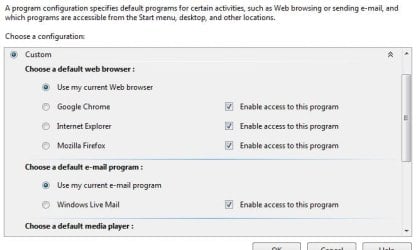
I got three web browsers in my machine, I wanted the “Firefox” to be the default browser (attached).

The issue that the choice is switched automatically to the “use my current web browser”

What might be the issue? How permanently the choice is specified to the “Firefox”?

Thank you

Best

Jamal
 

Attachments

  • Clip_75.jpg
    Clip_75.jpg
    78.2 KB · Views: 14

My Computer

OS
Windows 7 Ultimate x64
I don't know if this will help, Jamal, but it won't hurt. Try running a system file checker scan from an elevated command prompt (option two.) This will check for any damaged or corrupt system files that might be preventing you from changing your default browser. If problems are found, run the scan 3 times and reboot the computer after each scan.

http://www.sevenforums.com/tutorials/1538-sfc-scannow-command-system-file-checker.html

Now try changing the default browser by clicking the Start button. In the start menu search box type in default program. Click on Set your default programs (upper section under Control Panel.) After a few seconds you should see a "Set your default programs" screen. Click on Firefox and it's information should display on the right side of the screen. Click on Set this program as default and you should see a confirmation message that "This program has all its defaults". You can now close out the Control Panel. To test if Firefox is set as the default browser, right-click on this link www.sevenforums.com and select Open in New Window. You should see this Forum's home page in Firefox.
 
Last edited by a moderator:

My Computer

Computer type
Laptop
Computer Manufacturer/Model Number
Sony Vaio VPCEB47GM Laptop
OS
Win 7 Pro 64-bit
CPU
Intel i5 2.4 Ghz
Memory
8GB DDR3
Graphics Card(s)
Intel HD 3000
Sound Card
IDT High Definition
Monitor(s) Displays
15.6 WGXA Anti-Glare LED
Screen Resolution
1280x800
Hard Drives
640Gb 7200rpm
Antivirus
MSE
Browser
Opera (primary) with IE9 backup
Specifying the “default web browser” doesn't respond!

I got three web browsers in my machine, I wanted the “Firefox” to be the default browser (attached).

The issue that the choice is switched automatically to the “use my current web browser”

What might be the issue? How permanently the choice is specified to the “Firefox”?

Thank you

Best

Jamal

Do you have any toolbars installed? If so, try uninstalling them.

HTH
 

My Computer

Computer type
PC/Desktop
Computer Manufacturer/Model Number
Custom Built
OS
Windows 7 Professional x64
CPU
Intel i5 quad processor
Motherboard
DP67BG
Memory
16 GB
Graphics Card(s)
Radeon HD 5770
Sound Card
Realtek High Definition Audio
Monitor(s) Displays
Samsung SyncMaster
Screen Resolution
1920X1080
Hard Drives
WD 2TB (SATA Internal)
WD 1TB (USB External)
PSU
Corsair GS800
Case
Tower (Generic)
Cooling
3 Internal Fans
Keyboard
MS Wireless
Mouse
MS Optical Wired
Internet Speed
54 mbps
Antivirus
Emsisoft
Browser
IE-Version 9, Palemoon-Version 24.2.0
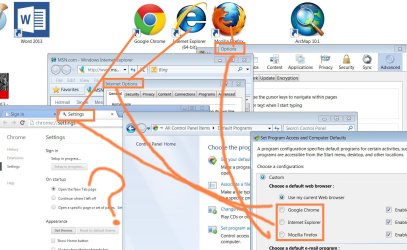
Set firefox as your default in firefox, tools>options>advanced tab>Click make firefox as default browser. Then set your default programs like this. These settings work for me for whatever browser I want as default. Set as defaut browser from within the browser.
4.JPG
 

My Computer

Computer Manufacturer/Model Number
Put together
OS
Win7 Pro-64 Bit
CPU
i7-2600-3.4GHz
Motherboard
ASRock Z68M
Memory
8 GIG DDR3
Graphics Card(s)
onboard
Sound Card
onboard
Hard Drives
Seagate 1TB 7200RPM
PSU
680 W
Case
black
Cooling
stock fans
Keyboard
Microsoft
Mouse
Microsoft optical
Thank you BrightBlessings for the answer.

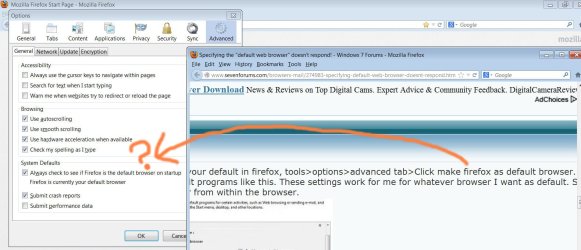
I couldn’t find this option on the Firefox. Please, have a look on the attached screenshot.

Best

Jamal
 

Attachments

  • hh.png
    hh.png
    57.3 KB · Views: 8

My Computer

OS
Windows 7 Ultimate x64
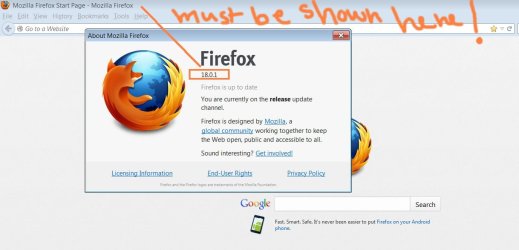
Just click on the Check Now tab and see what happens. What version of firefox are you using?
 

My Computer

Computer Manufacturer/Model Number
Put together
OS
Win7 Pro-64 Bit
CPU
i7-2600-3.4GHz
Motherboard
ASRock Z68M
Memory
8 GIG DDR3
Graphics Card(s)
onboard
Sound Card
onboard
Hard Drives
Seagate 1TB 7200RPM
PSU
680 W
Case
black
Cooling
stock fans
Keyboard
Microsoft
Mouse
Microsoft optical
Thank you for the prompt answer.

I got the most recent version of the Firefox. There is no “clear” option to set it as default (attached)!

Best

Jamal
 

Attachments

  • Clip_7.jpg
    Clip_7.jpg
    59.6 KB · Views: 3
  • Clip_9.jpg
    Clip_9.jpg
    125.6 KB · Views: 4

My Computer

OS
Windows 7 Ultimate x64
Thank you BrightBlessings for the answer.

I couldn’t find this option on the Firefox. Please, have a look on the attached screenshot.

Best

Jamal

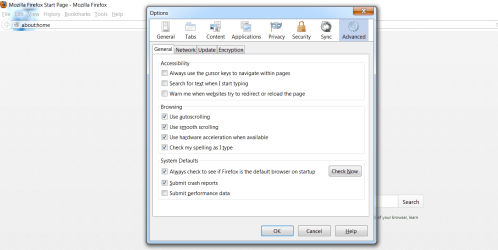
Click on the Check Now button next to Always check to see if firefox is the default browser on startup and you should be given an option to make it your default browser if it is not already so.

hh.png
 

My Computer

Computer Manufacturer/Model Number
Put together
OS
Win7 Pro-64 Bit
CPU
i7-2600-3.4GHz
Motherboard
ASRock Z68M
Memory
8 GIG DDR3
Graphics Card(s)
onboard
Sound Card
onboard
Hard Drives
Seagate 1TB 7200RPM
PSU
680 W
Case
black
Cooling
stock fans
Keyboard
Microsoft
Mouse
Microsoft optical
If your problem has been sorted, please mark this thread as solved. Have a nice day.
 

My Computer

Computer Manufacturer/Model Number
Put together
OS
Win7 Pro-64 Bit
CPU
i7-2600-3.4GHz
Motherboard
ASRock Z68M
Memory
8 GIG DDR3
Graphics Card(s)
onboard
Sound Card
onboard
Hard Drives
Seagate 1TB 7200RPM
PSU
680 W
Case
black
Cooling
stock fans
Keyboard
Microsoft
Mouse
Microsoft optical
Hi BrightBlessings,

The issue is still confusing.

I couldn’t find an option that CLEARLY says: “set this browser as default” neither in Internet Explorer” nor in “Firefox” or “Google chrome”.

What’s confusing also is whether this option is set on the level of the browser or from the operating system (windows)?

For example, as I have 3 web browsers, how to set one of them to be the default?


Best

Jamal
 

Attachments

  • Clip_10.jpg
    Clip_10.jpg
    142.7 KB · Views: 2

My Computer

OS
Windows 7 Ultimate x64
From Windows 7 Control Panel and Default Programs, which browser is listed, if any?
 

My Computer

OS
Windows 7 Home Premium x64
Back
Top