

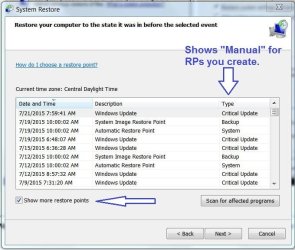
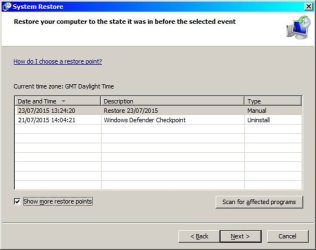
You show 2.75GB in use so there's something there. Post an image of your restore points. At the bottom left of the RP window, be sure to check "Show more restore points" or it will only list the last three. Any RPs you create will be listed as Manual under the Type column. DO NOT click Next from this screen. I just want to see the RPs.
Attachments
My Computer
At a glance
Windows 7 Pro-x64i7-2600 3.4GHz - 3.8GHz Turbo8Gb - 2x4GB, Muskin 991770 PC3-1333Integrated Intel HD 2000
- Computer type
- PC/Desktop
- Computer Manufacturer/Model Number
- Built 2/11/2011
- OS
- Windows 7 Pro-x64
- CPU
- i7-2600 3.4GHz - 3.8GHz Turbo
- Motherboard
- Intel DH67BL-B3
- Memory
- 8Gb - 2x4GB, Muskin 991770 PC3-1333
- Graphics Card(s)
- Integrated Intel HD 2000
- Sound Card
- Integrated Intel 10.1 HD, RealTek ALC892
- Monitor(s) Displays
- Asus LCD VH222H, Haier HL24XSL2a
- Screen Resolution
- 1920x1080, 1920x1080
- Hard Drives
- Crucial SSD C300-128Gb,
Western Digital WD5002AALX - 500Gb,
Western Digital WD7501AALS - 750Gb
- PSU
- Seasonic 650W 80+ Gold Modular
- Case
- Rosewill Defender
- Cooling
- Stock CPU, Four 120mm case fans, PCH fan added
- Keyboard
- Logitech EX100 Y-RBH94 Wireless
- Mouse
- Logitech EX100 M-RCE95 Wireless
- Internet Speed
- 3.0/1.5 Mbs
- Antivirus
- Microsoft Security Essentials
- Browser
- Microsoft Internet Explorer 11
- Other Info
- Antec Veris Premier-Multimedia IR Station,
Cyber Accoustics-3602 Speakers,
AFT XM-5U Card Reader,
Hauppauge TV-HVR-2250,
Sony LX300 USB Turntable

 Note the slider to the right of the window. I suspect you haven't had it turned on long enough to get the automatic RPs (


