- Local time
- 8:57 PM
- Messages
- 186
Hi guys.
I'v searched the forum and Googled this problem but nothing useful shows. I made a comment about this in the old http://www.sevenforums.com/tutorial...e10-spelling-correction-enable-disable-2.html but because its not IE10 I'm told to make a new thread in here.
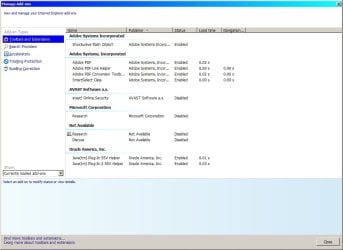
The spell checker on IE11 has always worked since I installed Windows 7 12 months ago. Over the past couple of weeks I've noticed its stopped working. Its always been enabled in Manage Add-ons. I've Googled and the closest think I've found is update the spell check dictionaries Download Spelling dictionaries for Internet Explorer 11 Release Preview from Official Microsoft Download Center
When I ran IE-Spelling-en.msu it checked and said KB2849696 is already installed.
I have FireFox as a backup and the spell check still works on there.
I've looked and search Programs and Features Installed Updates for KB2849696 and nothing shows. I search for KB297337 which is shown but it still said nothing found so that search is crap.
All updates have been installed as and when asked.
Anyone have any idea how I can get it working again?
I'v searched the forum and Googled this problem but nothing useful shows. I made a comment about this in the old http://www.sevenforums.com/tutorial...e10-spelling-correction-enable-disable-2.html but because its not IE10 I'm told to make a new thread in here.
The spell checker on IE11 has always worked since I installed Windows 7 12 months ago. Over the past couple of weeks I've noticed its stopped working. Its always been enabled in Manage Add-ons. I've Googled and the closest think I've found is update the spell check dictionaries Download Spelling dictionaries for Internet Explorer 11 Release Preview from Official Microsoft Download Center
When I ran IE-Spelling-en.msu it checked and said KB2849696 is already installed.
I have FireFox as a backup and the spell check still works on there.
I've looked and search Programs and Features Installed Updates for KB2849696 and nothing shows. I search for KB297337 which is shown but it still said nothing found so that search is crap.
All updates have been installed as and when asked.
Anyone have any idea how I can get it working again?
My Computer
- Computer type
- Laptop
- Computer Manufacturer/Model Number
- Samsung won't charge Now Dell Inspiron 17 3793
- OS
- Windows 7 Professional 32bit SP1, Windows 10 Home 64-bit at the moment
- CPU
- Intel Pentium B970 @ 2.30GHz, DELL DELL Intel 3793 Core i5 1
- Motherboard
- DELL 0C9WH2
- Memory
- 8GB
- Graphics Card(s)
- NVIDIA GeForce MX230 (Dell)
- Sound Card
- Realtek High Definition Audio
- Monitor(s) Displays
- 17.3" HD+ LED Display
- Screen Resolution
- 1920x1040
- Hard Drives
- 99GB (RAID SHIT SSD), Seagate 1TB SATA III DATA
Seagate ST1000LM048-2E7172 (SATA III)
- Mouse
- USB remote
- Antivirus
- Avast Free Antivirus 20.10.2442
- Browser
- Internet Explorer 11, FireFox
- Other Info
- DELL shit Its the worst laptop design ever made the laptop battery is inbuilt who the hell makes a laptop battery inbuilt DELL shit does, can't wait until the 1TB HDD is replaced and RAID shit is removed