Splitting the sound from HDMI

keredd

New member
Member
Local time
4:35 AM
Messages
37
I just bought a Viewsonic monitor with 1080 HD and although the video is excellent but the sound is awful. It appears as though the HDMI is taking ownership of the sound and transmitting it to the rinky dink speakers embedded in the monitor. I would like to use the regular desktop speakers I have always used that worked well but as long as the HDMI is plugged in they do not work. When I changed the connection to the monitor to VGA, the speakers work again but I lose the HD quality on the video. Is there anyway to use the old speakers for sound and HDMI for video. I surely hope there is or else I will feel as though I have lost my money on this monitor! :cry:

Thank you in advanced!
 

My Computer My Computer

Computer Manufacturer/Model Number
self built
OS
Windows 7 Ultimate x64
CPU
AMD|PH II X4 840 3.2G AM3 RT
Motherboard
ASUS - M4A88T-V EVO/USB3
Memory
2Gx2|GSK F3-10600CL8D-4GBHK R
Monitor(s) Displays
viewsonic
Hard Drives
C:/: SSD 32G|CORSAIR CSSD-V32GB2-BRKT R
D: SEAGATE 7K ST31000528AS OEM - OEM
PSU
CORSAIR|650W CMPSU-650TXV2 R
Case
CASE ANTEC|THREE HUNDRED BK RT
keredd, welcome to the Seven Forums.

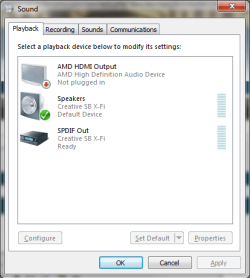
I guessing from your specs that you are using the onboard video, seeing as you didn't list a video card. If that is the case (or it is an AMD card), the onboard video has its own audio built in for audio over HDMI in addition to the regular onboard audio. When you open the Windows playback properties does it look something like this,

atihdmi.png

In your case it should show the same ATI HDMI audio as well as the Realtek onboard. If it isn't showing the Realtek then that would be why you can't select your speakers when the HDMI is connected, and you need to install the driver for it. You can find the latest Realtek driver here,

http://www.sevenforums.com/sound-audio/3756-latest-realtek-hd-audio-driver-version.html

Once installed then it is just a matter of setting it as the default playback device.
 

My Computer My Computer

Computer type
PC/Desktop
Computer Manufacturer/Model Number
Me
OS
Win 7 Ultimate x64
CPU
FX-8350 @ 4.6 GHz so far
Motherboard
Asus M5A97 EVO
Memory
ADATA XPG V1 Series Black 8GB DDR3 1600
Graphics Card(s)
Sapphire R9 270x Dual-X
Sound Card
Xonar DGX w/ Corsair Vengence 1300
Monitor(s) Displays
Acer S232HL Abid
Screen Resolution
1920x1080
Hard Drives
120 GB OCZ Vertex 3
500 GB Seagate 7200.12
PSU
Antec Earthwatts 650W Green
Case
Antec Three Hundred
Cooling
Cooler Master 212 EVO
Keyboard
Logitech G510
Mouse
Logitech G500s
Internet Speed
35000/3000
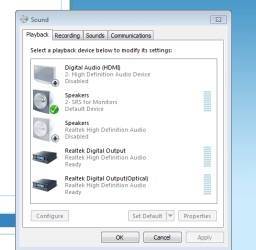
Thank you so much for you help! You pointed me in the right direction. I looked at the list of playback devices and the on board playback device was present and green as was the HDMI playback device but this had a green check mark by it. What I did to resolve the issue was "disable" the HDMI playback device and left the alternate driver device that came with the monitor as the default (check attached screenshot) sound device and "enabled" it. As soon as I did this, PRESTO, I got sound.

Thanks again! :D
 

Attachments

  • playbackdevices.PNG
    playbackdevices.PNG
    14.2 KB · Views: 4

My Computer My Computer

Computer Manufacturer/Model Number
self built
OS
Windows 7 Ultimate x64
CPU
AMD|PH II X4 840 3.2G AM3 RT
Motherboard
ASUS - M4A88T-V EVO/USB3
Memory
2Gx2|GSK F3-10600CL8D-4GBHK R
Monitor(s) Displays
viewsonic
Hard Drives
C:/: SSD 32G|CORSAIR CSSD-V32GB2-BRKT R
D: SEAGATE 7K ST31000528AS OEM - OEM
PSU
CORSAIR|650W CMPSU-650TXV2 R
Case
CASE ANTEC|THREE HUNDRED BK RT
Back
Top