Spontanous wakeup

bloodymeli

New member
Local time
11:42 PM
Messages
6
Hi All,

My laptop (windows 7, 64 bit, ultimate) continuously wakes up in the middle of night. I've disabled "Allow this device to wake up the computer" in the Wifi-card and Lan adapter but it continues.

I've no idea what makes my computer do so or how to stop it.
I have attached the Event Viewer log of my computer and two samples (23of6 and 24of6) which shows such wake ups.

Any help would be appreciated!
 

Attachments

My Computer My Computer

OS
Windows 7 64 bit Ultimate
Hello Bloodymeli, and welcome to Seven Forums.

The next time it wakes up, see if running the lastwake command from the tutorial below may be able to help ID what is waking the computer.

http://www.sevenforums.com/tutorials/122012-lastwake-command.html


In addition, you might also check the items in the tutorials below to see if they may be the cause as well.

How to Enable or Disable Windows Media Center Updates to Wake Up the Computer

How to See a List of Devices that are able to Wake Up the Computer

Hope this helps for now,
Shawn
 

My Computer My Computer

Computer type
PC/Desktop
Computer Manufacturer/Model Number
Self built custom
OS
64-bit Windows 11 Pro for Workstations
CPU
Intel i7-8700K OC'd to 5 GHz
Motherboard
ASUS ROG Maximus XI Formula Z390
Memory
64 GB (4x16GB) G.SKILL TridentZ RGB DDR4 3600 MHz
Graphics Card(s)
ASUS ROG-STRIX-GTX1080TI-O11G-GAMING
Sound Card
Integrated
Monitor(s) Displays
2 x Samsung Odyssey G7 27"
Screen Resolution
2560x1440
Hard Drives
1TB Samsung 990 PRO M.2,
4TB Samsung 990 PRO PRO M.2,
TerraMaster F8 SSD Plus NAS
PSU
Seasonic Prime Titanium 850W
Case
Thermaltake Core P3
Cooling
Corsair Hydro H115i
Keyboard
Logitech wireless K800
Mouse
Logitech MX Master 4
Internet Speed
2 Gb/s Download and 100 Mb/s Upload
Antivirus
Malwarebyte Anti-Malware Premium
Browser
Google Chrome
Other Info
Logitech Z625 speaker system,
Logitech BRIO 4K Pro webcam,
HP Color LaserJet Pro MFP M477fdn,
APC SMART-UPS RT 1000 XL - SURT1000XLI,
Galaxy S23 Plus phone
When you have a mystery wake-up, open a command line and type "powercfg lastwake" and that should tell you what's going on...
 

My Computer My Computer

Computer Manufacturer/Model Number
Compaq Presario SR5518F (desktop)
OS
Windows 7 Home Premium 64bit
CPU
Intel Pentium Dual Core E2180 @2GHz
Motherboard
MSI "Boston"
Memory
4 GB
Graphics Card(s)
NVIDIA GeForce 8500 GT
Sound Card
Integrated - Realtek High Definition Audio
Monitor(s) Displays
Acer
Hard Drives
Hitachi HDP725025GLA380 ATA Device
Optiarc DVD RW AD-7201S5 ATA Device
Internet Speed
5 Mbps
  • Like
Reactions: whs
Did I mention it also falls back to sleep autonomously?

Hi Sgage and Shawn,

Thanks for your tips. I can't use the last wake command, since a minute or so after my laptop wakes up spontaneously, it turn itself back to sleep autonomously. As for the other suggestions: I've disabled the media center updates and there are no devices that can wake up the computer (running the wake_armed line gives nothing).

However, the computer still wakes up in the middle of the night!

What should I do next?
 

My Computer My Computer

OS
Windows 7 64 bit Ultimate
Hi Sgage and Shawn,

Thanks for your tips. I can't use the last wake command, since a minute or so after my laptop wakes up spontaneously, it turn itself back to sleep autonomously. As for the other suggestions: I've disabled the media center updates and there are no devices that can wake up the computer (running the wake_armed line gives nothing).

However, the computer still wakes up in the middle of the night!

What should I do next?

You might want to take a look at your scheduled tasks to see if there's something there. Fire up Task Scheduler (it's in Administrative Tools) and see if there is a task that is configured to "wake computer".
 

My Computer My Computer

Computer Manufacturer/Model Number
Compaq Presario SR5518F (desktop)
OS
Windows 7 Home Premium 64bit
CPU
Intel Pentium Dual Core E2180 @2GHz
Motherboard
MSI "Boston"
Memory
4 GB
Graphics Card(s)
NVIDIA GeForce 8500 GT
Sound Card
Integrated - Realtek High Definition Audio
Monitor(s) Displays
Acer
Hard Drives
Hitachi HDP725025GLA380 ATA Device
Optiarc DVD RW AD-7201S5 ATA Device
Internet Speed
5 Mbps
Hi,

I have about a zillion and one tasks. How can I tell which one is the culpit? Can I do some kind of search? Are there any suspectable one? Can you please elaborate on how to do that?
 

My Computer My Computer

OS
Windows 7 64 bit Ultimate
Hi,

I have about a zillion and one tasks. How can I tell which one is the culpit? Can I do some kind of search? Are there any suspectable one? Can you please elaborate on how to do that?

In the morning, fire up Task Scheduler, and it will show you tasks that have run in the last 24 hours, and when they ran - that should narrow it down for you.
 

My Computer My Computer

Computer Manufacturer/Model Number
Compaq Presario SR5518F (desktop)
OS
Windows 7 Home Premium 64bit
CPU
Intel Pentium Dual Core E2180 @2GHz
Motherboard
MSI "Boston"
Memory
4 GB
Graphics Card(s)
NVIDIA GeForce 8500 GT
Sound Card
Integrated - Realtek High Definition Audio
Monitor(s) Displays
Acer
Hard Drives
Hitachi HDP725025GLA380 ATA Device
Optiarc DVD RW AD-7201S5 ATA Device
Internet Speed
5 Mbps
Are you confusing Task Manager and Task Scheduler? The Task Scheduler is what starts, say, an auto Virus scan or backup.

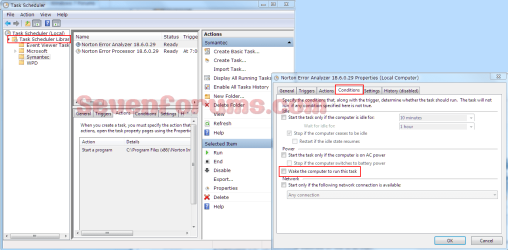
Type "sched" (no quotes) in the Start>Search and click on Task Scheduler. In the left pane expand Task Scheduler Libraries. Their will be a catagorized list below that, click each one and the tasks associated with it will be in the Center pane. Right click the task name (center pane), properties, and open the Conditions tab and see if any have the box "Wake the computer to run this task" checked.
Tasksched.PNG
 
Last edited:

My Computer My Computer

Computer type
PC/Desktop
Computer Manufacturer/Model Number
Home Built Desktop By DataTech
OS
Windows 7 Ultimate X64 SP1
CPU
Intel i5-2550K, Differing ~4.4-4.8GHz No built in GPU
Motherboard
ASUS P8Z68-V PRO/GEN3
Memory
16GB G.Skill Sniper 1866MHz @ 2133MHz 2x8GB
Graphics Card(s)
ASUS GTX650TIB-DC2OC-2GD5, (650TI Boost)
Sound Card
Onboard Realtek 5-1
Monitor(s) Displays
Samsung P2570HD
Screen Resolution
1920x1080
Hard Drives
Samsung 840 Pro 256GB SSD for OS, 500GB Seagate Constellation (Enterprise drive) for Data
PSU
Corsair HX650W
Case
Inwin Dragon Rider
Cooling
Hyper 212 EVO w/two Noctua fans, push-pull, @1300 RPM
Keyboard
E-Z Eyes, bright yellow keys with large characters
Mouse
steelseries SENSEI Laser Pro Gaming
Internet Speed
48-51Mbs Mbs down, 11 Mbs up Xfinity Cable
Antivirus
Norton Internet Security 2013
Browser
IE 10, Opera, Pale Moon if needed
Other Info
4 case fans, LG BluRay-RE, ASUS DVD-RW, Mr. Fusion power supply, 1.21 gigawatts.
Are you confusing Task Manager and Task Scheduler? The Task Scheduler is what starts, say, an auto Virus scan or backup.

It's possible he could be. He wants 'Task Scheduler', which is found in All Programs/Administrative Tools.
 

My Computer My Computer

Computer Manufacturer/Model Number
Compaq Presario SR5518F (desktop)
OS
Windows 7 Home Premium 64bit
CPU
Intel Pentium Dual Core E2180 @2GHz
Motherboard
MSI "Boston"
Memory
4 GB
Graphics Card(s)
NVIDIA GeForce 8500 GT
Sound Card
Integrated - Realtek High Definition Audio
Monitor(s) Displays
Acer
Hard Drives
Hitachi HDP725025GLA380 ATA Device
Optiarc DVD RW AD-7201S5 ATA Device
Internet Speed
5 Mbps
Back
Top