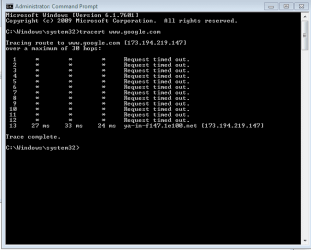
Sporadic Connection Issues, Tracert to Google Times out until 10+ Hops

flipleekim

New member
Local time
12:16 AM
Messages
4
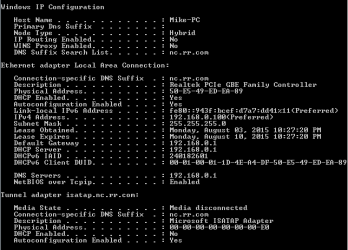
I am happy to elaborate on anything below. I've tried to lay out basic facts in something other than a wall of text.


Basic facts:
  • I live in an apartment complex. I had no issues for about 3 months until issues cropped up.
  • ISP has already sent a technician out to replace a "bad node" they detected.
  • I run a desktop which wires into a wireless router which feeds into my modem. Same issue is still around when I hardline directly into the modem. Impacts all devices on the network (including mac laptops, tablets, etc) so I'm not thinking it's a machine specific issue.
  • I own my own modem. I bought it off Amazon and did not do any set-up other than calling in to tell TWC what the number on the device is.
  • Symptoms (all sporadic): Complete loss of internet connection (need to unplug modem or wait ~5-10 minutes to get it back), extreme slowness (speedtest shows 0.5 mbps when I'm supposed to get 15) traceroute takes numerous hops to reach google.com).
Answers to questions from sticky:
  • 1. Is this a wired or wireless connection issue? Both (I have the issue even when hardwired directly into modem from desktop - my router usually mirrors hardwired output)
  • 2. Who is your Internet Service Provider (ISP)? Time Warner Cable
  • 3. What type of Broadband connection are you using? Cable (I think)
  • 4. What is the exact Make and Model of your Modem, Router or Modem/Router Combo? Arris Surfboard
  • 5. What is the Name of the Anti-Virus, Security or Firewall Software installed from the problematic computer? It happens across all computers using network.
Any thoughts on what the source of the problem is (e.g. a setting I have on my desktop that screws up the router when connected that way and the itself when hardlined, bad modem, bad service provider)?

Thanks in advance for your help. :)
 

Attachments

  • ipConfig.PNG
    ipConfig.PNG
    7.4 KB · Views: 5
  • tracert.PNG
    tracert.PNG
    7 KB · Views: 5

My Computer My Computer

At a glance

Windows 7 Home Premium 64 Bit
Computer type
PC/Desktop
OS
Windows 7 Home Premium 64 Bit
Yes, all devices having issues is either the modem/router or ISP. However, since you say this is happening when directly connected to the modem, I would say, factory reset it. The manual should say how.

Also is the modem in bridge mode or normal? Is the cable from modem connected to WAN port of router?
 

My Computer My Computer

At a glance

Windows 7 Ultimate x64 SP1AMD Phenom 2 1090T2x8GB Kingston HyperX Fury Black 1600Mhz Unga...MSI GTX 970 Gaming 4G
Computer type
PC/Desktop
Computer Manufacturer/Model Number
Custom Build
OS
Windows 7 Ultimate x64 SP1
CPU
AMD Phenom 2 1090T
Motherboard
Gigabyte GA-890FXA-UD5
Memory
2x8GB Kingston HyperX Fury Black 1600Mhz Unganged
Graphics Card(s)
MSI GTX 970 Gaming 4G
Sound Card
Realtek On-Board HD 7.1 Audio / Logitech G35
Monitor(s) Displays
3xAcer GD245HQ
Screen Resolution
1920x1080
Hard Drives
Samsung 850 Pro 512GB SSD - OS /
WD Caviar Black SATA 3 - 1 TBx2 - Dynamic RAID 0 /
WD Caviar Green SATA 2 - 640GBx2 - Dynamic RAID 0 /
WD Caviar Green SATA 2 - 640GB - Internal Backup /
Seagate Barracude SATA 3 - 3TB - External Backup/ Sync
PSU
HighPower 1000W
Case
Cooler Master HAF 932
Cooling
Noctua NH-D14
Keyboard
Logitech G19
Mouse
Logitech G500
Internet Speed
100/4 Mbit Cable (100GB quota)
Antivirus
ZoneAlarm Extreme Security / MBAM Pro / MBAE Free / SAS Free
Browser
IE 11 - Firefox - Chrome
Other Info
Logitech F710/ G27/ G940/ Z5500 // TrackIR 5 // Nvidia 3D Surround Vision
Back
Top