Sporadic graphic issues ; Samsung Series 5 Ultrabook w/Picture

PartyFerret

New member
Member
Local time
1:57 PM
Messages
28
Location
Darmstadt, Hessen Germany
Hello all,

This Samsung Series 5 Ultrabook has been returned to us for the 4th time because the customer consistently complains that the notebook apparently shows graphic issues, even though we have tested it with every testing tool we have and these issues could not be reproduced. The specs are:

Samsung Series 5 Ultrabook
NP530U4C-S02DE
Intel Core i5 2537M @ 1.40 GHz
4 GB RAM
Windows 7 Home Premium 64-Bit

The Notebook was sent back to us and was tested for almost 2 weeks and the problem could not be reproduced. The steps taken so far:

Graphic test with FurMark - 3 times for 8-10 hours
CPU test with OCCT - 3 times for 8-10 hours
RAM test with Memtest - 1 time for 7 passes
BIOS updated to the newest version
Intel burn-in test - 3 times
Daily normal use tests - 7 days
Graphic drivers - last 2 versions used and the customer says the problem still happened.

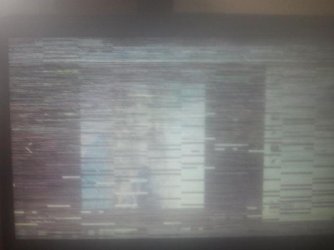
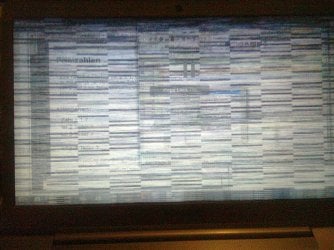
The Notebook runs completely stable when it is with us, but as soon as it returned to the customer for the second time, this problem appears its nasty little face. I have included a picture from the customer showing the graphic problems she has experienced. This problem we have not had at any time it has been with us for testing.

Maybe someone here can point me in the right direction, because we have all but expended our testing options.

*Pictures attached*
 

Attachments
  • Foto0136.jpg
    Foto0136.jpg
    340.7 KB · Views: 4
  • 2013-01-26 14 18 21.jpg
    2013-01-26 14 18 21.jpg
    19.6 KB · Views: 12

My Computer My Computer

At a glance

Windows 8 Professional 64-Bit
OS
Windows 8 Professional 64-Bit
Hi,

I can think of two possibilities:

Could this be an unstable power (wall socket) issue? Has the owner tried to run this laptop just from the battery, and maybe a different wall socket/outlet, to see if the issue still occurs?

How is the laptop used? Is it possible it is being used on a blanket/lap where the air vents are being blocked, causing the GFX card to overheat?

Regards,
Golden
 

My Computer My Computer

At a glance

Windows 10 Pro x64 ; Xubuntu x64Intel i7 860 @ 2.80 GHz O/C'ed to 4.0GHz16GB Corsair Vengance DDR3 @ 661 MHz Dual Cha...EVGA NVidia GTX 560 1024MB
Computer type
PC/Desktop
Computer Manufacturer/Model Number
Golden Mk. I.4
OS
Windows 10 Pro x64 ; Xubuntu x64
CPU
Intel i7 860 @ 2.80 GHz O/C'ed to 4.0GHz
Motherboard
Gigabyte P55A-UD3R Rev.1. Award BIOS F13
Memory
16GB Corsair Vengance DDR3 @ 661 MHz Dual Channel (9-9-9-24)
Graphics Card(s)
EVGA NVidia GTX 560 1024MB
Sound Card
Realtek Integrated
Monitor(s) Displays
Dual Samsung SyncMaster 2494HS
Screen Resolution
1920*1080 and 1920*1080
Hard Drives
1*Samsung 840 EVO 120GB SSD;
1*OCZ Vertex 2 60GB SSD;
2*Samsung F3 SpinPoint 1TB in RAID0;
1*Samsung F1 SpinPoint 1TB;
2*Western Digital 1TB External USB 3.0
1*Western Digital 500GB External USB 3.0
1*Seagate 500GB External USB 2.0
PSU
Thermaltake ToughPower QFan 750W
Case
Thermaltake Element S VK60001W2Z
Cooling
Corsair H60 Water Cooling, 2*230mm and 2*80mm case fans
Keyboard
Logitech G110
Mouse
Logitech MX518
Unstable wall socket is not possible because there are 4 other notebooks being run from this power strip and are working fine. GPU temps are normal, I checked these with GPU-Z and our GPU diagnostics tool. This problem appears to be a Samsung issue. I have now 3 notebooks with the same issue. The first two are Samsung Series 5 Ultrabooks and the other is a Samsung NP300E5C. These notebooks ALL have Nvidia GT 620 M and Intel HD 3000 graphics. I think there may be a pattern here.
 

My Computer My Computer

At a glance

Windows 8 Professional 64-Bit
OS
Windows 8 Professional 64-Bit
I think its too coincidental that the problems only occur when the client is running the laptop, yet wen you test it you can't replicate the issues. The problem must be at the client end.
 

My Computer My Computer

At a glance

Windows 10 Pro x64 ; Xubuntu x64Intel i7 860 @ 2.80 GHz O/C'ed to 4.0GHz16GB Corsair Vengance DDR3 @ 661 MHz Dual Cha...EVGA NVidia GTX 560 1024MB
Computer type
PC/Desktop
Computer Manufacturer/Model Number
Golden Mk. I.4
OS
Windows 10 Pro x64 ; Xubuntu x64
CPU
Intel i7 860 @ 2.80 GHz O/C'ed to 4.0GHz
Motherboard
Gigabyte P55A-UD3R Rev.1. Award BIOS F13
Memory
16GB Corsair Vengance DDR3 @ 661 MHz Dual Channel (9-9-9-24)
Graphics Card(s)
EVGA NVidia GTX 560 1024MB
Sound Card
Realtek Integrated
Monitor(s) Displays
Dual Samsung SyncMaster 2494HS
Screen Resolution
1920*1080 and 1920*1080
Hard Drives
1*Samsung 840 EVO 120GB SSD;
1*OCZ Vertex 2 60GB SSD;
2*Samsung F3 SpinPoint 1TB in RAID0;
1*Samsung F1 SpinPoint 1TB;
2*Western Digital 1TB External USB 3.0
1*Western Digital 500GB External USB 3.0
1*Seagate 500GB External USB 2.0
PSU
Thermaltake ToughPower QFan 750W
Case
Thermaltake Element S VK60001W2Z
Cooling
Corsair H60 Water Cooling, 2*230mm and 2*80mm case fans
Keyboard
Logitech G110
Mouse
Logitech MX518
It does seem that way, but unfortunately our customers are professional business people and never want to hear that. I have sent our Samsung representative an E-mail regarding these graphic issues. If no service bulletins regarding this are put out by Samsung, the customer must live with it because it will be on their end.
 

My Computer My Computer

At a glance

Windows 8 Professional 64-Bit
OS
Windows 8 Professional 64-Bit
I have never seen overheating in these aluminum Ultrabooks. They stay pretty cool and have two small quiet fans that run only when needed. Perhaps this issue has to do with the NVidia and Intel HD 3000 butting heads. Difficult to say until I hear from Samsung.
 

My Computer My Computer

At a glance

Windows 8 Professional 64-Bit
OS
Windows 8 Professional 64-Bit
Extra info

My girlfriend has a Samsung Series 5 ultra book presenting the exact same graphic glitch, we come to realize that has to do with the manipulation of the equipment. 95% of the time the glitch appears when she grabs the laptop from the sides (it happened a few times to me too while using her laptop). It is not a hard grab, even when she lifted it grabbing it from both sides the glitch appears.

She have the equipment for a year or so and keep happening once a week or so.

I don't know the internal configuration of the equipment but It seems that the graphic card is on either side of the keyboard and the pressure (or movement) triggers the glitch.
 

My Computer My Computer

At a glance

OSx
Computer type
PC/Desktop
OS
OSx
Samsung series 5 ultra display problems

have had this np530u3c-e03hk laptop for 2 years now and it has always had display issues. Same at about 1x/week. Always while viewing web video. It freezes a sec, then blanks screen and then display comes back saying display driver has stopped working. Bought it in hong kong while travelling so couldnt really return it and thats the only prob with this thing other than 8gb ram not being enough for windows sometimes (why they sell with ANY windows computer with under 8gb?? bs ). The upper left corner of the keyboard is always hot when it happens, dont know if this is where the gpu is or from input power plug circuit. fans always run in normal mode, sitting on a desk. always hear fans cranking away in high when this failure happens. laptop isnt restarted or turned off but 1x/month probably.

been waiting 2yrs now for samsung to update drivers, etc. guess not. :( samsung software always sucks anyway. the recovery solution 5 backup software has never worked either, just fails partway through. samsung link software to samsung gs5 phone- fail. suck. actually... i cant get any device to link to this notebook, via wifi, bt, anything. recall network cable not working for internet either the few times i tried in the past (plugs in at hot keyboard area). cant even simply remove junk oem software like norton from their update reminders. computers, phones, anything. soo they just makehardware... ships and refrigerators and everything else in korea.
 

My Computer My Computer

At a glance

Windows 7 Home Premiumi7-3517u8gbhd4000
Computer type
Laptop
Computer Manufacturer/Model Number
samsung series 5 ultra np530u3c-e03hk
OS
Windows 7 Home Premium
CPU
i7-3517u
Memory
8gb
Graphics Card(s)
hd4000
Hard Drives
m4-ct256 ssd
Epic fail from Samsung. In november of 2014 the laptop finally broke down. We left it on the process of shutting-down in the night and next morning the laptop was hot as hell, at point of making it untouchable. We disconnect it from the power outlet, tried to start it after cooled down but nothing happened.

We took it over to the tech service and the motherboard was toasted, no further explanation. 18 months of usage for a thousand dollars laptopt does not worth it. We managed to salvage the HDD and the RAM but everything else is lost.

2 days later my GF opted for a Macbook Pro, a couple of hundreds dollars more but no issue so far.
 

My Computer My Computer

At a glance

OSx
Computer type
PC/Desktop
OS
OSx
Back
Top