SSD and my AppData Folder plus more

bianson

New member
Local time
12:25 PM
Messages
6
I had my Windows 7 PC setup with Windows installed on what was then my C Drive. I installed a SSD as my Master and configured Windows 7 to save to Libraries on my old C drive, now called D.

Problem #1

My SSD is 120 GB but currently has only 12 GB free. I install most of my programs to D rather than the SSD but in the interest of speed, some were installed to the SSD. Current SSD Usage:

MOSCache - 594 MB
PerfLogs - 0
Program Files - 2.94 GB
Program Files (x86) - 8 GB
ProgramData - 6.64 GB
Users - 34.4 GB
Windows - 22.5 GB

I believe the only one I can really make changes to and the one with the most usage is Users. AppData is 28 GB and continues to grow.

Can I move this to another drive? Is that advisable because I have read differing opinions? Any other thoughts on reducing it's size? I don't really want to buy an even larger SSD as I think the root problem still exists and AppData will continue to grow.


Problem #2

When I added the SSD, I did an clean install of Windows 7 onto the SSD and kept my old copy of Windows 7 on my old C drive, now D. Since my 2 TB D drive is currently at 220 GB free, deleting my old version of my Windows 7 frees up additional space. Should I be safe in doing that?


Problem #3

My PC periodically, after being on for several hours, turns itself off and BIOS is reset to boot to the D Drive instead of the SSD C Drive. I have to turn it off, access BIOS and tell it the primary boot drive is the SSD. Why would this be happening?


Problem #4

Firefox downloads to a download folder on the SSD, How can I have it download to the Downloads folder on my D Drive?


So there you have my burning questions of the day. I would appreciate any help you can provide.

Bob
 

My Computer

OS
Windows 7 64 bit
#2 - You have a lot of room on the 2TB drive, so wait until you have the SSD setup the way you want with everything moved off it before deleting the old install.

#4 - Click on Firefox top left then Options / Options. Change the folder pointed to under Downloads or do as I do and select Always ask me where to save files.

#3 - What make SSD did you buy? Have you done any searching for problems with it? Some SSDs are not very stable from what I've been reading. I just ordered a Kingston SSDNow V200 128 GB SATA III which had pretty good reviews. Should get it Tuesday the 21st.
 

My Computer

Computer type
PC/Desktop
Computer Manufacturer/Model Number
Lenovo IdeaCenter 450
OS
Windows 10 Pro X64
CPU
Intel Quad Core i7-4770 @ 3.4Ghz
Memory
16.0GB PC3-12800 DDR3 SDRAM 1600 MHz
Graphics Card(s)
Intel Integrated HD Graphics
Sound Card
Realtek HD Audio
Monitor(s) Displays
HP 22" LCD
Screen Resolution
1680 x 1050
Hard Drives
250GB Samsung EVO SATA-3 SSD
2TB Seagate ST2000DM001 SATA-2
1.5TB Seagate ST3150041AS SATA
Keyboard
Dell USB
Mouse
Lenovo USB
Internet Speed
Cable via Road Runner 3MB Upload, 30MB Download
Antivirus
Windows Defender, MBAM Pro, MBAE
Browser
Seamonkey
Other Info
UEFI/GPT
PLDS DVD-RW DH16AERSH
Can you post a snip of your expanded Disk Management so we can see how your PC is setup. Thanks,
 

My Computer

Computer type
PC/Desktop
Computer Manufacturer/Model Number
Custom Build
OS
Windows 7 Home Premium 32-Bit - Build 7600 SP1
CPU
Intel Core i3-2120 3.30Ghz
Motherboard
Asus P8Z68-V LX Intel Z68 Socket H2 ATX
Memory
Kingston 4 GB DDR3 1333 mhz
Graphics Card(s)
AMD Radeon HD6670
Sound Card
Sound Blaster Audigy SE 24-Bit
Monitor(s) Displays
Asus VE228
Screen Resolution
1440 X 900
Hard Drives
OCZ Vertex 3 120 GB Sata 3 SSD ==
Kingston SH103/S3 120 G Hyper X 120 GB SSD ==
Western Digital 500 GB Caviar Green 7200 RPM ==
PSU
Corsair CX600M == 600 Watt
Case
NZXT Apollo - Silver with Clear Side Panel
Cooling
Three 120 mm Fans
Keyboard
Microsoft Natural 4000
Mouse
Microsoft Custom Optical 3000
Internet Speed
AT&T Fiber Optic Wireless Network
Antivirus
Microsoft Security Essentials
Browser
Chrome
Other Info
120 mm Blue LED Fan -- Three Blue LED Lazer Light Sticks
I bought a Corsair Force 3 SSD ATA. Delighted with the speed but then anything is good...until it fails!!

Ztrucker...220 GB's isn't a lot of room considering it's my scratch disk for Photoshop as well. My plan is to buy another 2 TB drive and use it as my scratch disk and leave my current D drive for straight storage.
 

Attachments

  • Disk Management Screen Shot.jpg
    Disk Management Screen Shot.jpg
    331.6 KB · Views: 23

My Computer

OS
Windows 7 64 bit
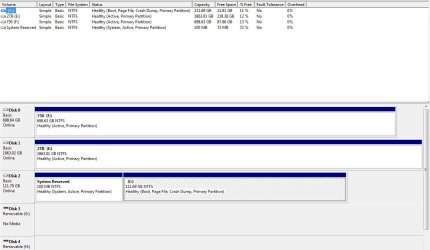
Better Screen Shot?
 

Attachments

  • Disk Management Screen Shot.jpg
    Disk Management Screen Shot.jpg
    79 KB · Views: 26

My Computer

OS
Windows 7 64 bit
You don't want to delete anything until you get the SSD booting as you like. You have drive E: and F: as active. Only your System Reserved should be marked as active. You can use this tutorial to mark them inactive.
http://www.sevenforums.com/tutorials/197157-partition-mark-inactive.html ==
I don't see your D: drive in the Disk Management. Where is it showing? == When you installed Windows on the SSD, were all of the other drives unplugged from the Motherboard?
 

My Computer

Computer type
PC/Desktop
Computer Manufacturer/Model Number
Custom Build
OS
Windows 7 Home Premium 32-Bit - Build 7600 SP1
CPU
Intel Core i3-2120 3.30Ghz
Motherboard
Asus P8Z68-V LX Intel Z68 Socket H2 ATX
Memory
Kingston 4 GB DDR3 1333 mhz
Graphics Card(s)
AMD Radeon HD6670
Sound Card
Sound Blaster Audigy SE 24-Bit
Monitor(s) Displays
Asus VE228
Screen Resolution
1440 X 900
Hard Drives
OCZ Vertex 3 120 GB Sata 3 SSD ==
Kingston SH103/S3 120 G Hyper X 120 GB SSD ==
Western Digital 500 GB Caviar Green 7200 RPM ==
PSU
Corsair CX600M == 600 Watt
Case
NZXT Apollo - Silver with Clear Side Panel
Cooling
Three 120 mm Fans
Keyboard
Microsoft Natural 4000
Mouse
Microsoft Custom Optical 3000
Internet Speed
AT&T Fiber Optic Wireless Network
Antivirus
Microsoft Security Essentials
Browser
Chrome
Other Info
120 mm Blue LED Fan -- Three Blue LED Lazer Light Sticks
I screwed up bigmck, I keep referring to D and it should be E. I have no D.

No...I am pretty sure I did NOT have my other drives unplugged from the m/b when I installed Windows 7 to the SSD.
What's the rational for making all drives except System Reserved changed to inactive? Why would they all be showing as active now?
 

My Computer

OS
Windows 7 64 bit
I screwed up bigmck, I keep referring to D and it should be E. I have no D.

No...I am pretty sure I did NOT have my other drives unplugged from the m/b when I installed Windows 7 to the SSD.
What's the rational for making all drives except System Reserved changed to inactive? Why would they all be showing as active now?

The E: would have been showing active because that is what you were booting from before. I don't know why F: is active. The only drive that should be active is the one that you are booting from. In this case the System Reserved of your C: drive is what should be active. == Since you did not have your other drives unplugged from the MB, it is possible some info from Windows got installed to E: and that is where you are booting from instead of C:. I suggest you go through the tutortial I posted above and make all drives inactive except for the System Reserved. == I just installed Windows on a SSD a month or so ago. I unplugged all drives from the MB except the SSD. I then had to use the tutorial I listed above to make my old Windows inactive. I was not having any problems, but it is just a good idea to get things straight. In your case there is a problem and you really need to make them inactive to help get things straight.
 

My Computer

Computer type
PC/Desktop
Computer Manufacturer/Model Number
Custom Build
OS
Windows 7 Home Premium 32-Bit - Build 7600 SP1
CPU
Intel Core i3-2120 3.30Ghz
Motherboard
Asus P8Z68-V LX Intel Z68 Socket H2 ATX
Memory
Kingston 4 GB DDR3 1333 mhz
Graphics Card(s)
AMD Radeon HD6670
Sound Card
Sound Blaster Audigy SE 24-Bit
Monitor(s) Displays
Asus VE228
Screen Resolution
1440 X 900
Hard Drives
OCZ Vertex 3 120 GB Sata 3 SSD ==
Kingston SH103/S3 120 G Hyper X 120 GB SSD ==
Western Digital 500 GB Caviar Green 7200 RPM ==
PSU
Corsair CX600M == 600 Watt
Case
NZXT Apollo - Silver with Clear Side Panel
Cooling
Three 120 mm Fans
Keyboard
Microsoft Natural 4000
Mouse
Microsoft Custom Optical 3000
Internet Speed
AT&T Fiber Optic Wireless Network
Antivirus
Microsoft Security Essentials
Browser
Chrome
Other Info
120 mm Blue LED Fan -- Three Blue LED Lazer Light Sticks
Back
Top