Solved SSD drive: What should look like drive space allocation

arjfca

New member
Member
VIP
Local time
3:40 AM
Messages
363
Hello

This morning MY win 64 PC failed to load up. A message saying that I need to load up the Win 64 disk installation.


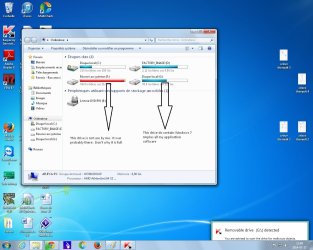
I removed my SSD drive and installed it using an USB adapter to another PC. When looking at the disk allocation, I see that drive F: is nearly full while drive G: where all my files do reside still have spaces available.

Here drive G: is my drive C: when install on my PC and Win 7 64 is under this drive

I do not remember to have installed a second drive on my SSD, maybe it was installed automatically with the installation software.

This F drive do appear in red in My Computer and a warning message is displayed by Windows mentioning that the drive is full

Is there a way to increase space allowance for a SSD drive without risking to loose data?
Is the fact that this drive is full may cause a Windows problem?

Any information appreciate

Martin
 

My Computer My Computer

At a glance

windows 7 Pro x64Intel I5 34508 GB DDR3 dual chanelAsus Radeon 4870 Nevedi Gforce GTX 500Ti
Computer Manufacturer/Model Number
Home made
OS
windows 7 Pro x64
CPU
Intel I5 3450
Motherboard
Gefabye B75M-D3H
Memory
8 GB DDR3 dual chanel
Graphics Card(s)
Asus Radeon 4870 Nevedi Gforce GTX 500Ti
Sound Card
None
Monitor(s) Displays
4 L206W, Synckmaster, Acer X203W, X223W
Screen Resolution
1680 X 1050
Hard Drives
SSD 120G from Intel

640 GB
PSU
Cooler Master 600W
Case
Antec
Cooling
Regular fan
Keyboard
Microsoft Multimedia Bilingual
Mouse
Microsoft Optical 3000
It would be helpful if you would attach a screen shot of Disk Management with SSD connected with the USB adapter.
 

My Computer My Computer

At a glance

Windows 10 Pro x64, Windows 8.1 Pro x64, Wind...INTEL i9-7920X LGA 206664 GB (4 X 16 GB) G-Skill V Series DDR4 3200 ...EVGA GTX 1060 SC 3 GB
Computer type
PC/Desktop
Computer Manufacturer/Model Number
Custom Built
OS
Windows 10 Pro x64, Windows 8.1 Pro x64, Windows 7 Ultimate x64 SP1,
CPU
INTEL i9-7920X LGA 2066
Motherboard
Gigabyte X299-WU8 F3
Memory
64 GB (4 X 16 GB) G-Skill V Series DDR4 3200 Quad Channel
Graphics Card(s)
EVGA GTX 1060 SC 3 GB
Sound Card
Realtek Onboard ALC1220
Monitor(s) Displays
2 x Samsung S27E310
Screen Resolution
1920x1080
Hard Drives
Samsung 2 x 970 EVO Plus 500 GB NVMe
1 x 6TB WD 6003FZBX SATA
1 x 6TB WD 60EFRX SATA
12 x 3TB WD 30EFRX SATA
PSU
Seasonic X-1050
Case
Thermaltake Armor+
Cooling
Corsair H80i V2 Liquid AOI Cooler
Keyboard
Logitech G510s
Mouse
Logitech MX Master 2S
Internet Speed
200 Mb/s
Antivirus
ESET NOD32 13.1
Browser
EDGE (Dev, Canary, Beta), Chrome
Other Info
ASUS RT-AC68U router
Malwarebytes 4.0.4
Has requested, here id a snap picture of My Computer window when the drive containing the faulty WIN 7 is installed using an external usb adapter

Thanks for any help

martin
 

Attachments

  • SSD drive.jpg
    SSD drive.jpg
    119.3 KB · Views: 14

My Computer My Computer

At a glance

windows 7 Pro x64Intel I5 34508 GB DDR3 dual chanelAsus Radeon 4870 Nevedi Gforce GTX 500Ti
Computer Manufacturer/Model Number
Home made
OS
windows 7 Pro x64
CPU
Intel I5 3450
Motherboard
Gefabye B75M-D3H
Memory
8 GB DDR3 dual chanel
Graphics Card(s)
Asus Radeon 4870 Nevedi Gforce GTX 500Ti
Sound Card
None
Monitor(s) Displays
4 L206W, Synckmaster, Acer X203W, X223W
Screen Resolution
1680 X 1050
Hard Drives
SSD 120G from Intel

640 GB
PSU
Cooler Master 600W
Case
Antec
Cooling
Regular fan
Keyboard
Microsoft Multimedia Bilingual
Mouse
Microsoft Optical 3000
That F partition on the same drive is a useless partition Windows creates when installing (for use with Bitlocker). It just places all boot files there, while the entire system, user files and programs lie in the rest, the G partition here. That's why it's so small and almost full, and is never shown on Windows.

It's normal and almost all times should not cause any trouble. Search for "system reserved partition" for more info about it, both this forum and Google contains lots of tips about it. Don't worry about it, just care about your own files on G. Windows will most likely recreate it when you reinstall it.
 

My Computer My Computer

At a glance

Windows 7 Ultimate x64Intel Core i7-740QM8 GB DDR3NVIDIA GeForce 330GT
Computer type
Laptop
Computer Manufacturer/Model Number
Toshiba Sattelite A665-S6092
OS
Windows 7 Ultimate x64
CPU
Intel Core i7-740QM
Memory
8 GB DDR3
Graphics Card(s)
NVIDIA GeForce 330GT
Screen Resolution
1366x768
Hard Drives
Samsung 840 SSD 500GB
1TB USB3 external HD
Cooling
Coolermaster Notepal U3 notebook cooling pad
Internet Speed
3mbps ASDL
Antivirus
ClamWin 0.98.7
Browser
Opera 12.17 x86 (main), Firefox 38 (sec), IE11 (last resort)
That F partition on the same drive is a useless partition Windows creates when installing (for use with Bitlocker). It just places all boot files there, while the entire system, user files and programs lie in the rest, the G partition here. That's why it's so small and almost full, and is never shown on Windows.

It's normal and almost all times should not cause any trouble. Search for "system reserved partition" for more info about it, both this forum and Google contains lots of tips about it. Don't worry about it, just care about your own files on G. Windows will most likely recreate it when you reinstall it.

Thank you Alejandro85

I will look somewhere else for what could had cause the problem

Martin
 

My Computer My Computer

At a glance

windows 7 Pro x64Intel I5 34508 GB DDR3 dual chanelAsus Radeon 4870 Nevedi Gforce GTX 500Ti
Computer Manufacturer/Model Number
Home made
OS
windows 7 Pro x64
CPU
Intel I5 3450
Motherboard
Gefabye B75M-D3H
Memory
8 GB DDR3 dual chanel
Graphics Card(s)
Asus Radeon 4870 Nevedi Gforce GTX 500Ti
Sound Card
None
Monitor(s) Displays
4 L206W, Synckmaster, Acer X203W, X223W
Screen Resolution
1680 X 1050
Hard Drives
SSD 120G from Intel

640 GB
PSU
Cooler Master 600W
Case
Antec
Cooling
Regular fan
Keyboard
Microsoft Multimedia Bilingual
Mouse
Microsoft Optical 3000

My Computer My Computer

At a glance

Windows 10 Pro x64, Windows 8.1 Pro x64, Wind...INTEL i9-7920X LGA 206664 GB (4 X 16 GB) G-Skill V Series DDR4 3200 ...EVGA GTX 1060 SC 3 GB
Computer type
PC/Desktop
Computer Manufacturer/Model Number
Custom Built
OS
Windows 10 Pro x64, Windows 8.1 Pro x64, Windows 7 Ultimate x64 SP1,
CPU
INTEL i9-7920X LGA 2066
Motherboard
Gigabyte X299-WU8 F3
Memory
64 GB (4 X 16 GB) G-Skill V Series DDR4 3200 Quad Channel
Graphics Card(s)
EVGA GTX 1060 SC 3 GB
Sound Card
Realtek Onboard ALC1220
Monitor(s) Displays
2 x Samsung S27E310
Screen Resolution
1920x1080
Hard Drives
Samsung 2 x 970 EVO Plus 500 GB NVMe
1 x 6TB WD 6003FZBX SATA
1 x 6TB WD 60EFRX SATA
12 x 3TB WD 30EFRX SATA
PSU
Seasonic X-1050
Case
Thermaltake Armor+
Cooling
Corsair H80i V2 Liquid AOI Cooler
Keyboard
Logitech G510s
Mouse
Logitech MX Master 2S
Internet Speed
200 Mb/s
Antivirus
ESET NOD32 13.1
Browser
EDGE (Dev, Canary, Beta), Chrome
Other Info
ASUS RT-AC68U router
Malwarebytes 4.0.4
Back
Top